
Travel connectivity guide
eSIM for Guatemala: mobile internet guide
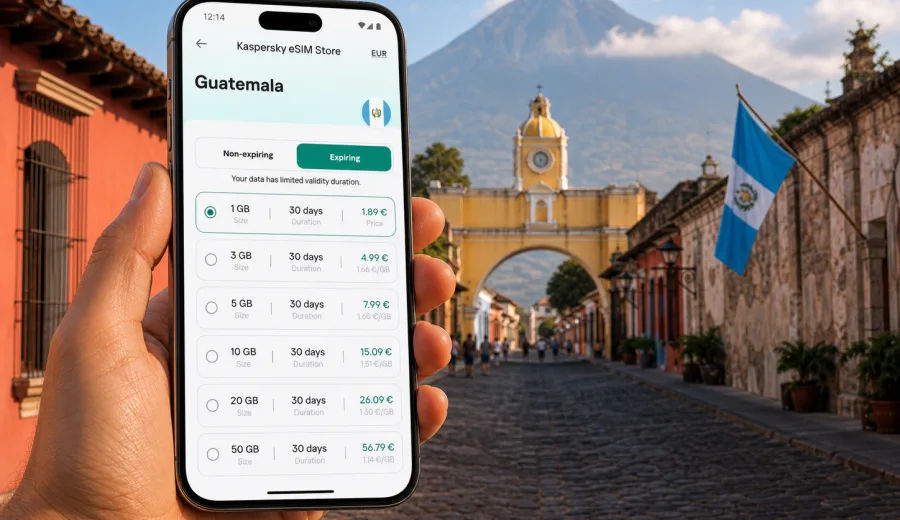
eSIM for Guatemala: mobile connection and internet for your trip
Planning mobile internet before a trip to Guatemala is a practical step, especially if you will rely on maps, hotel confirmations, ride arrangements, translation, banking alerts and messengers from the first day. An eSIM can help you prepare a data plan for Guatemala without looking for a physical SIM card after arrival or changing the SIM already in your phone.
Guatemala is often a multi-stop destination. You may land near Guatemala City, continue to Antigua, travel to Lake Atitlan, visit Tikal from Flores, or move between highland towns, coastal areas and business meetings. In each scenario, mobile data supports everyday decisions: finding a transfer, checking an address, confirming tickets, messaging a guide, or joining a work call when hotel Wi-Fi is not enough.
Kaspersky eSIM Store is an app and website where you can quickly choose, arrange and activate an eSIM with a suitable data plan for mobile internet during an international trip. It helps you review plan conditions such as data volume, validity period, destination and price before you start using the plan.
Why eSIM is useful for mobile internet in Guatemala
An eSIM is a digital SIM profile installed on a compatible phone or tablet. For travel, the main advantage is simple: you can prepare mobile data for the destination digitally and keep your physical SIM slot free. This is useful in Guatemala because the first online tasks often appear before you have time to compare local options in person.
Typical first-day tasks include:
- opening maps for the airport transfer or hotel route;
- messaging your driver, host, guide, colleagues or family;
- checking flight, shuttle, hotel or tour confirmations;
- using translation tools in transport, restaurants and shops;
- receiving banking notifications and one-time codes;
- checking weather before volcano, lake or jungle routes;
- sharing your location with someone you trust.
An eSIM does not automatically replace every communication service. Many travel eSIM data plans are designed for mobile internet, not for a local phone number, standard voice calls or SMS. If calls and messages are not included in the selected plan conditions, you can use internet-based apps while the eSIM handles mobile data.
Where mobile data helps during a Guatemala trip
Guatemala combines large-city logistics, colonial towns, highland roads, lakeside villages, archaeological routes and nature trips. Even if you use Wi-Fi in hotels or cafes, mobile data is useful when you are moving between places or need to solve a small problem quickly.
| Situation in Guatemala | Why mobile data helps | What to check in the plan |
|---|---|---|
| Arrival near Guatemala City | Maps, transfer details, hotel address, messaging | Validity period and activation timing |
| Antigua stay | Navigation, restaurant bookings, translation, transport | Enough data for daily maps and messages |
| Lake Atitlan route | Boat schedules, accommodation details, local contacts | Duration and offline backups |
| Flores and Tikal trip | Tickets, guide contact, maps, weather updates | Data volume and plan validity |
| Business travel | Email, calendar, documents, calls over internet apps | Larger package and hotspot rules if needed |
Connection quality can vary by location, building structure, terrain, device settings and local network conditions. Urban and frequently visited areas may feel different from mountain roads, remote villages or jungle routes. It is sensible to keep critical details offline even when you prepare an eSIM for the trip.
eSIM, roaming and local SIM cards: how to compare
There is no single best option for every traveler. International roaming may be convenient because it uses your usual operator, but prices and included data depend on your home plan. A local physical SIM can be useful for long stays or local calling needs, but it may require an offline purchase, a compatible unlocked phone and time after arrival. An eSIM is useful when you want to prepare a data plan before or during the trip without handling a plastic SIM card.
| Option | Strong point | Possible limitation |
|---|---|---|
| Travel eSIM | Digital setup, clear data package, no physical SIM swap | Requires an eSIM-compatible, unlocked device |
| Home-operator roaming | Uses your existing SIM and number | Pricing and limits may be less predictable |
| Local physical SIM | Can suit longer stays and local calling needs | Requires finding, buying and installing a SIM |
| Public Wi-Fi | Useful in hotels, offices and some cafes | Not available everywhere and less convenient on the move |
For many trips, a mixed setup works well. You can keep your main SIM for important calls or SMS, use eSIM for mobile data in Guatemala, and connect to trusted Wi-Fi for heavy downloads. This reduces dependence on a single connection source while keeping your phone settings manageable.
How much data you may need
The right data volume depends on what you do online, not only on how many days you stay. A traveler who mostly checks messages and maps needs less than someone who uploads photos, joins video calls or uses a laptop through hotspot.
Approximate planning guide:
| Usage style | Common tasks | Planning note |
|---|---|---|
| Light | Messaging, maps, email previews, booking checks | A smaller package may be enough if hotel Wi-Fi is reliable |
| Standard | Maps, browsing, social apps, occasional photo sharing | A medium package gives more comfort for daily movement |
| Work-focused | Email, cloud files, calls over internet apps, hotspot | Check data volume, validity and tethering conditions |
| Media-heavy | Streaming, large uploads, backups, frequent video | Use Wi-Fi for heavy tasks where possible |
You can make a travel plan last longer by downloading offline maps before departure, pausing cloud photo backups on mobile data, disabling automatic app updates, and limiting auto-downloads in messaging apps. These small settings matter on routes where you may not want to spend data on background tasks.
What to check before you buy an eSIM for Guatemala
Compatibility is the first checkpoint. Not every phone or tablet supports eSIM, and some devices are locked by an operator. Before choosing a plan, check your device and confirm that it can install and use an eSIM for mobile data.
Review these details before arranging a plan:
- destination: the plan should include Guatemala or a suitable regional option;
- validity: the number of days should cover your real travel dates;
- data volume: choose enough for maps, messaging, work and transfers;
- activation rules: check when the validity period starts;
- top-up options: useful if your route changes or data use increases;
- device rules: some eSIM profiles cannot be moved after activation;
- roaming data setting: some devices require data roaming to be enabled for the eSIM profile.
This check helps avoid common problems: buying a plan for the wrong destination, installing it on an incompatible device, starting validity earlier than intended, or discovering too late that the phone is locked to one operator.
Choosing a plan for Guatemala in Kaspersky eSIM Store
Once you know your route and travel dates, plan selection becomes easier. In Kaspersky eSIM Store, you can review available options for the destination and compare key conditions before arranging the plan. For Guatemala, focus on practical questions: how long you will stay, how much mobile internet you expect to use, and whether you need data mainly for navigation and messaging or for heavier work tasks.
If you are preparing now, you can choose an eSIM plan for your trip to Guatemala and check the current options for the destination. Put the plan next to your itinerary: arrival day, transfer days, hotel stays, meetings, guided tours, remote-work sessions and return travel. This helps you avoid both underestimating data needs and paying for a package that is larger than your realistic use.
For a short city-and-Antigua visit, a compact plan may be enough if you mostly need maps, messengers and booking details. For a Lake Atitlan, Flores or Tikal route, think about validity period as well as data volume. For business travel, a medium or larger package can be more comfortable because email, attachments, calls over internet apps and navigation can quickly increase usage. If your route includes several countries in Central America, review whether a regional plan is more suitable than a single-country plan.
Step-by-step setup before departure
The best time to prepare an eSIM is before you leave, while you still have stable internet and time to check settings. Installation can also be completed after arrival if needed, but doing the main steps early gives you more control.
1. Confirm that your phone or tablet supports eSIM and is not locked to one operator.
2. Choose Guatemala as the destination and review available data plans.
3. Compare data volume, validity period, price and activation conditions.
4. Arrange the selected plan through the site or app.
5. Install the eSIM by following the on-screen steps or using the QR code from your confirmation.
6. Name the new mobile plan clearly, for example "Guatemala data".
7. Keep your primary SIM active for calls or important messages if you need it.
8. On arrival, select the eSIM for mobile data and check whether data roaming must be enabled for that profile.
For detailed device-specific steps, use the Android installation guide or the iOS installation guide. Exact menu names can vary by phone model and operating-system version, so follow the instructions shown on your device during setup.
Practical scenarios for Guatemala
| Scenario | Practical mobile-data need | Planning tip |
|---|---|---|
| First transfer | Driver messages, hotel address, shuttle pickup point | Install the eSIM before travel and switch data lines after arrival |
| Antigua and highlands | Walking routes, restaurant bookings, activity confirmations | Save meeting points offline for early departures |
| Lake Atitlan | Boat notes, host messages, village transfers | Choose validity that covers the full lake route |
| Flores and Tikal | Tickets, guide contact, maps, weather | Download essential details before remote sections |
| Business travel | Email, documents, calendar changes, internet calls | Check hotspot rules and choose enough data for work peaks |
Settings that help avoid surprises
A few phone settings can make travel data easier to manage:
- set the eSIM as the mobile data line only when you are ready to use it;
- keep your home SIM active for calls or SMS only if needed;
- turn off mobile-data backups for photo and cloud apps;
- disable automatic app updates over mobile data;
- monitor data use in phone settings and in the plan interface where available;
- keep the QR code or installation email until setup is complete;
- do not delete the eSIM profile unless you are sure you no longer need it.
If mobile data does not start right away, check the active data line, roaming-data setting for the eSIM, airplane mode, APN instructions if provided, and local signal. If the issue continues, contact support with your device model, destination, plan details and a short description of what you see on screen.
Quick checklist for Guatemala mobile internet
Use this checklist before you travel:
- Your device supports eSIM.
- The device is not locked to one operator.
- The plan includes Guatemala or the regional route you need.
- The validity period matches your trip dates.
- You understand when the plan starts consuming validity.
- You have enough data for maps, messaging, work and transfers.
- You saved installation instructions and can access them offline if needed.
- You know which SIM is used for mobile data and which one is used for calls.
- Heavy downloads, backups and streaming are limited on mobile data.
The goal is to remove avoidable uncertainty before you are in an airport, shuttle, hotel lobby, meeting room or boat dock trying to fix connection settings under time pressure.
FAQ about eSIM and internet in Guatemala
Does an eSIM give me a local phone number in Guatemala?
Usually, travel eSIM data plans are focused on mobile internet. They may not include a local phone number, standard voice calls or SMS unless the plan conditions say otherwise.
Can I install the eSIM before I arrive?
In many cases, yes. Installing before departure is convenient because you can complete setup with a stable connection. Check the activation rules of your selected plan so you understand when the validity period starts.
Should I remove my regular SIM card?
No, not usually. One advantage of eSIM is that you can keep your regular SIM in the phone and use the eSIM for mobile data. Exact options depend on the device and SIM settings.
Will eSIM have the same connection quality everywhere in Guatemala?
Connection quality depends on local networks, location, device bands, buildings, terrain and the selected plan. Keep important information offline for critical travel moments.
Choose mobile internet for Guatemala before you travel
A good travel connection plan should be ready before you need it. For Guatemala, that means checking device compatibility, choosing a data volume and validity period that match your itinerary, and keeping your phone settings clear.
Kaspersky eSIM Store helps you choose, arrange and activate an eSIM with a data plan for mobile internet in an international trip. Before departure, review destination options and prepare an eSIM plan for Guatemala so maps, messages, bookings and work tools are easier to access when your trip begins.