
Travel connectivity guide
Guayaquil eSIM: Mobile Internet for Your Trip
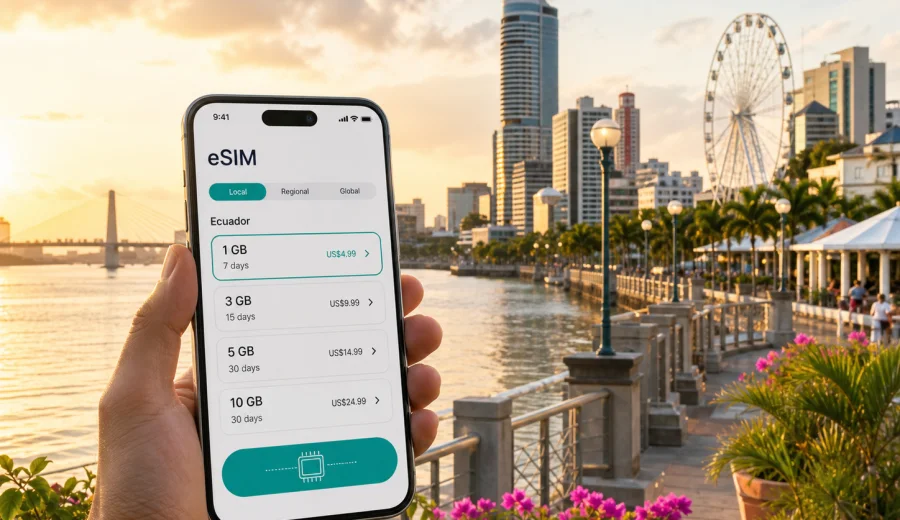
Guayaquil eSIM: mobile connection and internet for your trip
Guayaquil is often the first or last stop in an Ecuador itinerary: a flight into Jose Joaquin de Olmedo International Airport, a night near the Malecon, a meeting in the business district, or a transfer toward the Pacific coast and the Galapagos route. In each of these situations, mobile internet is not a small detail. You may need maps before you understand the street layout, ride-hailing after a late arrival, hotel messages while your room is being prepared, or a stable data connection for check-in documents and work calls.
An eSIM can make that first day simpler because it lets you prepare mobile data without looking for a physical SIM card after landing. For Guayaquil, the useful question is not only "Will I have internet in Ecuador?" It is "Will I be online at the moments when the city is moving around me: airport pickup, taxis, riverside walks, hotel check-in, meetings, restaurants, and onward travel?"
This guide focuses on Guayaquil city scenarios: arrival, transport, navigation, hotel stays, business travel, stopovers, and trips from the city. It also explains how to choose an eSIM plan for Ecuador, what to check before purchase, and how to use mobile data sensibly during your stay.
Why mobile internet matters in Guayaquil
Guayaquil is a practical travel hub as much as a destination. The airport is close to the city, the bus terminal is important for regional movement, and many travelers use the city as a base before continuing to beaches, Cuenca, Quito, or the Galapagos. That means your phone often becomes your main travel tool.
You may need mobile data in Guayaquil for:
- mapping the route from the airport to your hotel;
- messaging a driver, host, colleague, or tour contact;
- checking hotel booking details and digital confirmations;
- using ride-hailing apps or comparing transport options;
- translating short messages or menus;
- checking opening hours and route changes;
- working from a hotel, cafe, office, or event venue;
- managing boarding passes and onward travel reservations.
Public Wi-Fi can help in hotels, restaurants, malls, and airport areas, but it is not a complete travel plan. It may require registration, work only inside a building, slow down at busy times, or be unavailable exactly when you are outside looking for transport. A prepared eSIM gives you a separate mobile data option for the parts of the trip that happen between Wi-Fi networks.
Arrival at Jose Joaquin de Olmedo International Airport
For many visitors, Guayaquil starts at Jose Joaquin de Olmedo International Airport. The airport is close to the city center compared with many large international hubs, but the first 30 minutes still matter. You may be collecting luggage, confirming a pickup point, checking a hotel address, or deciding whether to take an official taxi or app-based ride.
With an eSIM installed before departure, you can usually switch to the travel data line after landing and wait for the device to register on a local network. Connection time can vary by device, profile, and local network conditions, so it is better to treat it as a setup process rather than an instant guarantee.
A useful airport checklist:
- Install the eSIM profile while you still have reliable Wi-Fi.
- Keep your primary SIM active if you need banking messages or calls.
- Set the eSIM as the line for mobile data when you are ready to use it.
- Turn on data roaming for the eSIM if the plan instructions require it.
- Open maps before leaving the terminal so your route is loaded.
- Save your hotel address in Spanish and English for drivers.
If your flight lands late, mobile data becomes especially useful. You can message reception, follow the route on a map, check that the car is going toward the right district, and keep family or colleagues updated without waiting to find Wi-Fi.
Moving around the city
Guayaquil is spread across different urban zones, from the Malecon and Las Penas to Samborondon, Urdesa, Kennedy, the airport area, and business or residential districts farther from the waterfront. Travel times can change with traffic, weather, and the time of day. A working data connection helps you make small decisions quickly instead of relying on screenshots taken hours earlier.
Typical movement scenarios include:
| Situation | Why mobile data helps |
|---|---|
| Airport to hotel | Confirm the address, track the route, message your hotel, and follow traffic conditions. |
| Malecon and Las Penas | Navigate on foot, check restaurant details, and call a ride when you leave. |
| Business meetings | Share arrival times, open calendar details, and use maps between venues. |
| Bus terminal trips | Check tickets, platforms, transfer times, and onward route information. |
| Hotel changes | Contact the next property and compare transport options before moving luggage. |
Guayaquil is not a city where you want every transport decision to depend on a weak lobby connection. Even a modest data package can be enough for maps, messaging, email, ride apps, and travel documents if you manage video, cloud backups, and large app updates separately on trusted Wi-Fi.
City areas where an eSIM is especially useful
The Malecon 2000 riverfront is one of Guayaquil's easiest areas for walking, taking photos, finding cafes, and meeting other travelers. Mobile internet helps with live maps, ride pickup points, and quick searches when you move between the riverfront, Las Penas, and Cerro Santa Ana.
In the airport and northern hotel zones, eSIM data is useful for transfers, early flights, and short stays. If you are in Guayaquil for one night before continuing to another part of Ecuador, the goal is efficiency: fewer stops, fewer queues, and fewer small uncertainties.
In Samborondon and business districts, mobile data matters for calendar changes, file access, messaging, and video calls. If you are traveling for work, you may spend more time moving between hotels, offices, restaurants, and event spaces than sightseeing. A prepared eSIM can keep routine business tasks from becoming dependent on venue Wi-Fi.
In Urdesa, Kennedy, and residential areas, data is helpful because trips are more point-to-point. You may be visiting a restaurant, a meeting address, or a local contact rather than following a simple tourist route. Live navigation and messaging can save time.
Choosing an eSIM plan for Guayaquil
For a city trip, choose a plan by matching data volume and validity to your real behavior. A short stopover needs a different setup from a two-week trip with remote work and weekend travel. Look at three things first: destination, data allowance, and duration.
Use this simple planning table:
| Trip style | Typical data needs | What to prioritize |
|---|---|---|
| Overnight stopover | Low to moderate | Maps, transport, hotel messages, boarding passes. |
| Weekend in Guayaquil | Moderate | Navigation, restaurants, photos, messaging, light browsing. |
| Business trip | Moderate to high | Email, calls through apps, documents, backup connection for meetings. |
| Guayaquil plus coast | Moderate to high | Longer validity, enough data for movement between cities. |
| Ecuador route from Guayaquil | High if you work or stream | Country coverage, data allowance, and plan duration. |
Before choosing, check whether your trip is only Guayaquil or whether it continues elsewhere in Ecuador. For a city article, the relevant plan page is still the country page, because mobile data plans are usually organized by country or region rather than by neighborhood. When you are ready to compare available options, you can choose an eSIM plan for your trip to Guayaquil and review the data volume, duration, destination, and price before checkout.
This is also the right moment to think about your main data habits. Maps and messaging are usually light. Video, tethering, cloud photo backups, app updates, and long video calls can consume data quickly. If you expect to work from your laptop using your phone as a hotspot, choose more data than you would for sightseeing alone, and check whether tethering is allowed under the selected plan terms.
What to check before you pay
The most important check is device compatibility. eSIM works only on compatible smartphones, tablets, and some other connected devices. Support can differ by model, region of sale, and carrier lock status, so do not rely only on the model name. Before purchase, check your device and make sure it is not locked to a mobile operator.
Also review the plan details carefully:
- Destination: the plan should cover Ecuador if your focus is Guayaquil.
- Validity: the number of days should match your travel dates.
- Data volume: leave room for transport, maps, messaging, and unexpected changes.
- Activation rules: check when the validity period starts.
- Top-up options: see whether adding more data is possible for the selected plan.
- Calls and SMS: assume the plan is for mobile internet unless the plan terms say otherwise.
An eSIM is not a replacement for every mobile service. It is mainly a convenient way to use mobile data during a trip. If you need a standard phone number for voice calls or SMS, keep your primary SIM available or use internet-based calling and messaging apps where appropriate.
How to install and activate your eSIM
The easiest setup is usually before travel, while you have a stable Wi-Fi connection and enough time to follow each step calmly. After you choose a plan, the eSIM profile appears in your account or app flow, and you can install it on a compatible device.
General setup steps:
1. Check that your phone supports eSIM and is not carrier locked.
2. Choose Ecuador as the destination and select a suitable data plan.
3. Install the eSIM profile using the instructions provided after checkout.
4. Keep your primary SIM for calls or verification messages if you need it.
5. Set the eSIM as the mobile data line when you are ready to use it.
6. Enable data roaming for the eSIM if the instructions or plan settings require it.
7. Wait a few minutes after arrival if the device needs time to register on a local network.
For detailed device guidance, use the Android installation instructions or the iOS installation instructions. Follow the steps for your operating system, and avoid deleting the eSIM profile unless you are sure you no longer need it; some profiles cannot be transferred after activation.
Practical data scenarios in Guayaquil
For a short stopover, your eSIM mainly supports decisions. You might land in the evening, get to a hotel near the airport, sleep, and continue the next morning. The useful apps are maps, ride-hailing, airline apps, messenger, email, and hotel booking tools. A small data plan may be enough if you avoid video and large downloads.
For a leisure stay, your data use becomes more varied. You may walk the Malecon, visit Las Penas, look for restaurants, send photos, check opening hours, and return to your hotel after dark. Mobile internet helps you stay flexible without planning every route in advance.
For a business trip, reliability and control matter more than sightseeing. You may need to join a call from the hotel lobby, download an updated presentation, message a local contact, or change meeting locations. Use hotel or office Wi-Fi for large files when possible, and keep mobile data as your fallback for movement and urgent tasks.
For an Ecuador route starting in Guayaquil, think beyond the city. If you continue to Cuenca, the coast, Quito, or a Galapagos flight connection, choose a plan with enough validity for the full route. Do not buy only for the first day if you will need data throughout the country.
Data-saving habits that work well in the city
You do not need to make your phone unusable to save data. A few settings can stretch a plan noticeably during a Guayaquil trip.
Before departure:
- Download offline map areas for Guayaquil and your next destination.
- Save hotel addresses, booking codes, and flight details offline.
- Turn off automatic app updates on mobile data.
- Pause cloud photo and video backup until you are on trusted Wi-Fi.
- Download playlists, podcasts, and documents before the trip.
During the trip:
- Use mobile data for navigation, messaging, bookings, and urgent searches.
- Use hotel Wi-Fi for large uploads, streaming, and system updates.
- Close apps that refresh in the background if you are on a small plan.
- Check your device data usage once a day on longer stays.
- Keep screenshots of addresses and QR codes in case coverage is temporarily weak.
These habits are especially useful when you move between the airport, central areas, malls, hotels, and regional transport. You can keep the eSIM for moments when mobility matters and use Wi-Fi for heavier tasks.
eSIM compared with other options in Guayaquil
There is no single best option for every traveler. The right choice depends on your trip length, device, data habits, and tolerance for setup steps.
| Option | Strengths | Limits |
|---|---|---|
| eSIM for Ecuador | Can be prepared before arrival, no physical SIM swap, useful for airport and city movement. | Requires compatible, unlocked device and careful plan selection. |
| Home roaming | Keeps your familiar SIM and number active. | Costs and data limits depend on your home operator. |
| Local physical SIM | Can suit longer stays if you want a local mobile setup. | Requires finding a sales point and handling setup after arrival. |
| Public Wi-Fi | Useful in hotels, cafes, offices, and airport areas. | Not always available while moving and may require extra sign-in steps. |
For many visitors, the practical setup is a mix: keep the home SIM for calls or verification, use an eSIM for travel mobile data, and use trusted Wi-Fi for heavy tasks. That gives you flexibility without making every online action depend on one connection method.
Common mistakes to avoid
The first mistake is waiting until you are tired at the airport to start reading setup instructions. Install the eSIM profile earlier if the plan allows it, and leave activation settings for the right moment according to the plan rules.
The second mistake is choosing data based only on the number of travel days. A three-day business trip can use more data than a week of light sightseeing if you attend video calls or tether a laptop. Estimate by activity, not only by calendar.
The third mistake is deleting the eSIM profile after a temporary issue. If the phone takes time to register, check settings first: mobile data line, data roaming for the eSIM, airplane mode toggle, and device restart. Deleting the profile may make recovery harder depending on the plan conditions.
The fourth mistake is assuming that eSIM includes a phone number. Unless the selected plan clearly states otherwise, treat it as mobile data. Use internet-based messaging and calls, and keep your primary SIM available if you expect SMS verification.
Quick answers for Guayaquil travelers
Can I use an eSIM as soon as I land in Guayaquil?
You can usually prepare the eSIM before arrival and switch mobile data to that line after landing. Connection can take a few minutes and depends on your device, settings, and local network registration.
Is eSIM useful for a one-night stopover?
Yes, it can be useful if you need maps, transport, booking details, and messaging between the airport, hotel, and next flight. For a very short stay, choose a plan that matches light usage.
Will an eSIM replace my regular phone number?
No, not unless the plan terms clearly include voice or SMS. In this context, eSIM is mainly for mobile internet. Keep your primary SIM active if you need calls or verification messages.
Should I install the eSIM before flying to Ecuador?
Installing before departure is often more comfortable because you can use stable Wi-Fi and follow instructions without airport pressure. Check the plan rules so you know when validity starts.
Can I use the same eSIM outside Guayaquil?
If the selected plan covers Ecuador, it is intended for the destination shown in the plan terms, not only one city district. Check coverage destination, validity, and plan conditions before relying on it for a wider route.
Final preparation before your Guayaquil trip
Before you leave, make your phone travel-ready: confirm eSIM compatibility, choose a plan for Ecuador, install the profile on Wi-Fi, save key addresses offline, and decide which SIM will handle mobile data. This is a small preparation step, but it can make the first hour in Guayaquil calmer, especially if you arrive late, travel for work, or continue to another Ecuador destination soon after.
Kaspersky eSIM Store is an app and website where you can quickly choose, arrange, and activate an eSIM with a suitable mobile internet plan for an international trip. For Guayaquil, use it to compare the available Ecuador options, check the data allowance and validity period, and prepare your phone before the city starts asking for maps, messages, bookings, and transport decisions.
Choose a plan that matches your route, device, and data habits, then prepare an eSIM plan for your Guayaquil trip before departure or when you have reliable Wi-Fi after arrival.