
Travel connectivity guide
Gudauri eSIM for Mobile Internet in Georgia
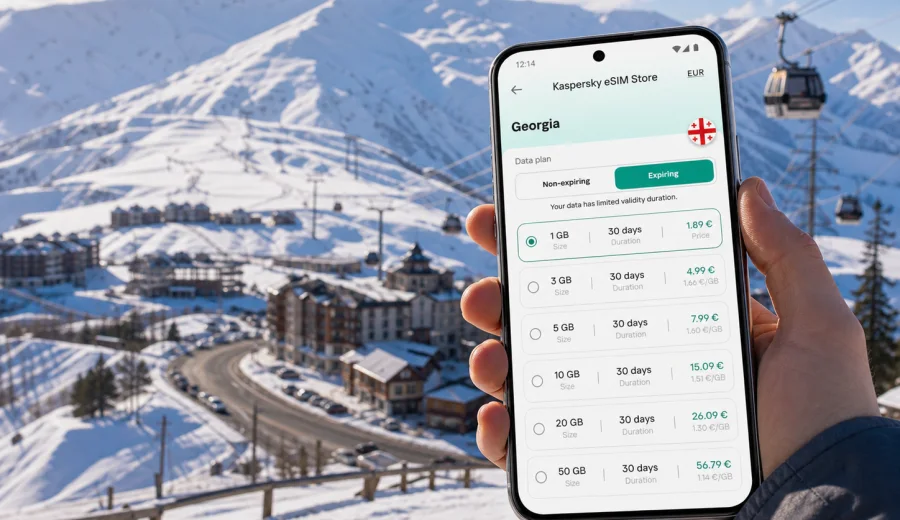
Gudauri eSIM: mobile connection and internet for a mountain trip to Georgia
Gudauri is not the kind of destination where you want to solve mobile internet problems after you arrive. The resort sits high in the Greater Caucasus, and most travel plans depend on real-time details: transfer timing from Tbilisi or Kutaisi, road conditions on the Georgian Military Highway, hotel check-in messages, ski lift updates, map navigation, taxi contacts, card payments, and calls through messengers. An eSIM can make the first hours easier because you can prepare mobile data before the trip and avoid looking for a physical SIM card when your luggage, skis, or winter clothing are already taking your attention.
For Gudauri, the key point is simple: choose a data plan for Georgia, install it on a compatible phone, and keep your main SIM for calls or banking messages if you need it. Kaspersky eSIM Store is an app and website where you can quickly choose, arrange, and activate an eSIM with a suitable data plan for mobile internet during an international trip. It is useful when your priority is not a local phone number, but practical online access for maps, rides, bookings, weather, messaging, and travel coordination.
Why mobile internet matters in Gudauri
Gudauri is a mountain resort rather than a large city. That changes how you use mobile data. You may spend part of the day in a hotel, restaurant, ski rental shop, gondola station, viewpoint, or on the road between resort areas. Wi-Fi may be available in some places, but it is not something to rely on for every practical task.
Mobile internet is especially useful in Gudauri when you need to:
- message your driver before a transfer from Tbilisi, Kutaisi, or Stepantsminda;
- follow your route along the Georgian Military Highway;
- check weather, wind, and visibility before going up the lifts;
- use maps to find hotels, ski rentals, restaurants, ATMs, and meeting points;
- confirm booking details with apartments or guesthouses;
- share live location with family or colleagues;
- use translation tools in shops, restaurants, or transport discussions;
- join a video call or send files during a remote-work stay;
- keep tickets, insurance documents, and payment confirmations accessible.
The resort layout also makes navigation more practical with data. Gudauri has several hotel and apartment clusters rather than one dense downtown grid. If you are staying near New Gudauri, a roadside hotel, a chalet area, or a quieter slope-side property, your route to lifts, rental shops, supermarkets, and restaurants may not be obvious on the first day. A working data connection helps you move without asking for directions every few minutes.
Arrival scenarios: when eSIM helps first
Most visitors reach Gudauri by road. The drive from Tbilisi is common, and travelers may also arrive from Kutaisi, Stepantsminda, Kazbegi routes, or a wider Georgia itinerary. In winter, travel timing can depend on traffic, weather, police controls, and mountain road conditions. Even if your driver knows the route, you still need a reliable way to coordinate.
| Travel moment | Why data helps | Practical use |
|---|---|---|
| Airport arrival | You may need to message a transfer driver or hotel | Messenger calls, live location, booking confirmation |
| Road to Gudauri | Mountain roads can affect timing | Maps, traffic view, arrival updates |
| First hotel check-in | Apartment hosts may use messenger instructions | Door codes, map pins, payment details |
| First ski day | Weather and lift plans may change quickly | Forecasts, route planning, group chats |
| Evening plans | Restaurants and taxis can be spread out | Maps, reviews, reservations, ride coordination |
If you install an eSIM before departure, you can usually switch to the travel data line after landing or shortly before you need it, depending on the plan conditions. This is more convenient than searching for a SIM desk when your transfer is waiting or when you arrive late in the evening.
Gudauri is local, but your route is regional
A city article about Gudauri still needs the Georgia context because the eSIM plan should match the country you are visiting. For a trip focused on Gudauri, you usually need a Georgia data plan rather than a separate city product. This matters if your route includes Tbilisi, Mtskheta, Ananuri, Kazbegi, Gori, Borjomi, Batumi, or Kutaisi before or after the ski resort.
Think of your mobile data needs by route:
- Gudauri only: a short ski weekend, hotel stay, maps, messaging, weather, and payments.
- Tbilisi plus Gudauri: airport arrival, city nights, road transfer, restaurant searches, and resort navigation.
- Gudauri plus Kazbegi: mountain roads, viewpoints, changing weather, and communication with drivers.
- Georgia road trip: several regions, longer validity, more map use, and more photo/video sharing.
- Business plus ski break: work calls, documents, hotspot use where allowed by the plan, and evening logistics.
This is why it is better to choose by country, duration, traffic volume, and route rather than by the resort name alone.
How much data to plan for Gudauri
Data use in Gudauri can be light or heavy depending on your habits. Maps, messaging, and booking pages usually use modest traffic. Video calls, cloud backups, streaming, and frequent social video uploads use much more.
Use this simple planning guide:
| Trip type | Typical data use | What to watch |
|---|---|---|
| 2-3 day ski weekend | Low to medium | Maps, messenger calls, weather, taxi messages |
| 4-7 day holiday | Medium | Daily navigation, photos, group chats, restaurant search |
| Remote-work stay | Medium to high | Calls, documents, hotspot use, cloud sync |
| Family or group trip | Medium to high | Multiple coordination chats, maps, shared photos |
| Road trip around Georgia | High | Navigation, research, uploads, long travel days |
Before you choose a plan, check whether your hotel has reliable Wi-Fi and whether you expect to work from the room. Even good hotel Wi-Fi may not be enough for all moments of the trip, but it can reduce the amount of mobile data you need. If you plan to upload ski videos, stream entertainment, or use your phone as a hotspot, choose a larger data allowance and verify that tethering is allowed in the selected plan conditions.
Choosing an eSIM plan for Gudauri
The right plan is the one that matches how long you will be in Georgia and how you will move. A short trip with a private transfer and hotel Wi-Fi needs less data than a week with day trips, ski school coordination, restaurant searches, and video calls. A family trip may also require each traveler to have their own connection, especially if people ski at different speeds or separate during the day.
Before buying, review four details:
1. Destination: the plan should cover Georgia for a Gudauri trip.
2. Validity: the active period should match the full stay, including arrival and departure days.
3. Data allowance: choose enough traffic for maps, messaging, weather, booking pages, and any work tasks.
4. Plan conditions: check when validity starts, whether top-ups are available, and whether hotspot use is included.
After you know your route and approximate data needs, you can prepare an eSIM data plan for a trip to Gudauri in Georgia through Kaspersky eSIM Store. The page is for Georgia because Gudauri belongs to the Georgian travel destination; use it to compare available options for the country and choose a plan that fits your stay.
Installing eSIM before the trip or after arrival
It is usually easier to install the eSIM while you still have stable Wi-Fi at home or at the hotel before a travel day. You can then activate or select the eSIM data line when the plan conditions say it is appropriate. The exact steps depend on your phone model and operating system, so follow the instructions shown after purchase.
A practical setup sequence looks like this:
1. Check that your phone supports eSIM and is not locked to another mobile operator.
2. Choose a Georgia data plan that fits your Gudauri route.
3. Complete the order and open the eSIM details in your account, email, or app.
4. Install the eSIM by following the on-screen steps or using the QR code where applicable.
5. Name the line clearly, for example "Georgia eSIM", so you do not confuse it with your main SIM.
6. Set mobile data to the eSIM line when you are ready to use travel data.
7. Keep your primary number active for calls or SMS if you still need banking codes or regular voice service.
For detailed setup, use the Android installation guide or the iOS installation guide. If activation takes a few minutes, wait and avoid repeatedly deleting and reinstalling the eSIM profile unless the instructions or support team tell you to do so.
Check compatibility before you buy
Not every phone supports eSIM, and some devices may be carrier-locked. This check is especially important before a mountain trip because solving device setup problems on the road is inconvenient. Before choosing a plan, check your device and confirm that eSIM is available on your exact model and region variant.
Also check these points:
- your phone has the latest practical software update installed;
- you know where SIM or mobile network settings are located;
- you have Wi-Fi available during installation;
- your main SIM can remain active if you need regular calls or SMS;
- you understand whether the eSIM includes data only or other services, according to the plan details.
For many travel eSIM plans, ordinary phone calls and SMS are not included unless the selected plan explicitly says otherwise. You can still use internet-based calls and messages through apps while mobile data is active.
Gudauri travel situations where data saves time
Gudauri trips often involve small decisions throughout the day. None of them feel dramatic, but together they create a strong case for preparing mobile data in advance.
Transfer changes. Your flight may land early, immigration may take longer than expected, or a driver may park at a different pickup point. A messenger call and live location can solve this faster than searching for Wi-Fi.
Ski logistics. You may need to coordinate with ski school, rental shops, friends on another slope, or a family member returning to the hotel. Data helps keep plans moving when people are not all in one place.
Weather decisions. Mountain weather can shift. Checking forecast, wind, visibility, and lift status before leaving the hotel can prevent wasted time.
Restaurant and evening movement. Gudauri evenings are quieter than large city nights, but you still may need maps, opening hours, booking messages, or a taxi contact.
Work between ski days. If you travel with a laptop, an eSIM can support practical tasks on your phone and, where the plan allows, hotspot use. For important calls, still test hotel Wi-Fi and keep a backup plan.
Hotels, workdays, and short stopovers
Gudauri accommodation ranges from large hotels to apartments and private chalets. Apartments may use digital check-in messages, map pins, or key instructions, so save the address, host contact, and booking confirmation offline before the road transfer. Install the eSIM before the travel day if possible, keep a power bank available, and check whether your hotel Wi-Fi is suitable for work calls.
For business trips, retreats, or remote-work ski breaks, treat mobile data as a backup for practical tasks: messages, calendars, document approvals, maps, and urgent calls. Keep large uploads for hotel Wi-Fi when possible. If you plan to use your phone as a hotspot, check the selected plan conditions before relying on tethering.
Short stopovers also benefit from prepared data. If Gudauri is one night on the way to Kazbegi or part of a winter road trip, prioritize driver coordination, maps for viewpoints and food stops, weather checks, and messaging with the next accommodation. The road segment may use more data than the hotel stay itself.
Mobile internet does not replace offline preparation. Save important documents, keep your hotel location in maps, and make sure the eSIM data line is selected before you leave the hotel for a long ski day or transfer.
eSIM versus roaming and local SIM in Gudauri
There is no universal best choice for every traveler. Standard roaming may be convenient if your home operator offers a suitable package. A local physical SIM may work for longer stays if you are comfortable buying and setting it up in person. eSIM is useful when you want to prepare data in advance and avoid changing a plastic SIM card.
| Option | Strength | Possible drawback |
|---|---|---|
| Travel eSIM | Prepare before arrival, no physical SIM swap, clear data plan terms | Requires compatible unlocked device |
| Home roaming | Keeps your usual SIM active and can be simple | Price and limits depend on your operator |
| Local physical SIM | Can suit long stays or local calling needs | Requires purchase point, setup time, and physical SIM handling |
| Public Wi-Fi | Useful in hotels and cafes | Not available everywhere and may be inconvenient on the move |
For many Gudauri visitors, eSIM works best as a prepared data layer: maps, messaging, bookings, weather, and app-based calls. Your main SIM can remain available for your home number if your phone supports dual SIM settings.
Common mistakes to avoid
The most common eSIM mistakes are easy to prevent:
- buying a plan for the wrong destination or region;
- forgetting to check whether the phone supports eSIM;
- installing the eSIM only after leaving stable Wi-Fi;
- deleting the eSIM profile too quickly during setup;
- using video streaming or cloud backup without tracking data use;
- assuming the plan includes a regular phone number;
- forgetting that mountain travel can require data before you reach the hotel;
- letting the phone battery run low on a transfer day.
Treat the eSIM as part of your travel preparation, like insurance documents, ski clothing, and hotel confirmation. A few minutes of setup before departure can make the first day in Gudauri much smoother.
FAQ: eSIM for Gudauri
Do I need a separate eSIM for Gudauri?
Usually you need a plan for Georgia, not a separate city plan. Gudauri is the city focus of your trip, but the mobile data destination should match the country.
Can I install eSIM before flying to Georgia?
In many cases, yes. Install while you have stable Wi-Fi, then follow the plan instructions on when to activate or start using it. Conditions can vary by selected plan.
Will eSIM give me a local phone number?
Many travel eSIM plans are data-focused and do not include ordinary voice calls or SMS unless the plan states otherwise. Use internet-based calls and messages when data is active.
Is eSIM useful if my hotel has Wi-Fi?
Yes, because many important tasks happen away from the hotel: transfer coordination, maps, ski logistics, weather checks, payments, and messaging during the day.
Can I use eSIM for a hotspot?
Only rely on hotspot use if the selected plan allows it. Check plan conditions before you plan remote work around tethering.
What should I do if eSIM does not connect immediately?
Check that mobile data is assigned to the eSIM line, data roaming for that line is enabled if required by the instructions, and the phone has signal. If the issue remains, contact support and avoid deleting the eSIM profile unless instructed.
Prepare mobile internet before your Gudauri trip
Gudauri is easier when your phone is ready before the mountain road begins. With an eSIM, you can plan mobile data for maps, transfers, hotel messages, ski days, weather checks, and communication with your travel group without looking for a physical SIM card after arrival.
If your device supports eSIM and your route is focused on Georgia, use Kaspersky eSIM Store to choose a data plan for your Gudauri trip. Review the destination, data allowance, validity period, and plan conditions, then install the eSIM before departure or while you have stable Wi-Fi. That gives you a practical mobile internet setup for the resort, the transfer, and any short trips around Georgia.