
Travel connectivity guide
Guernsey eSIM: mobile connection and internet
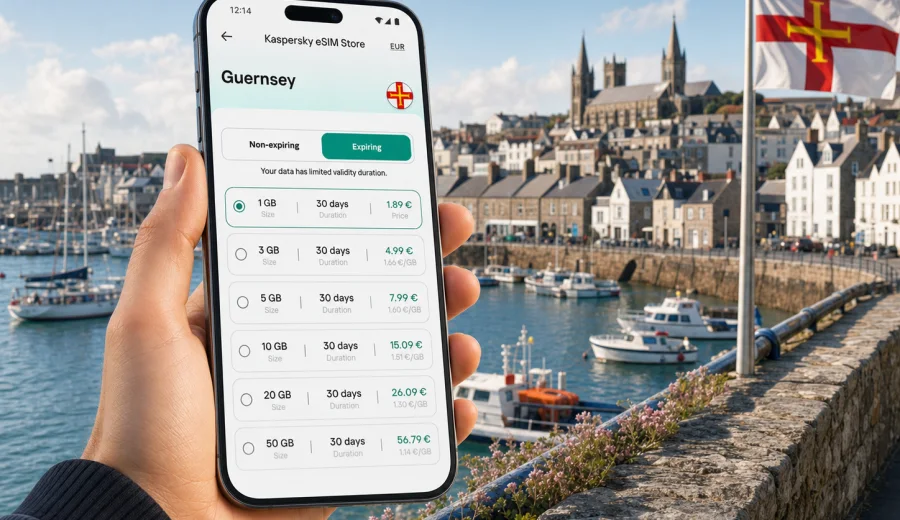
eSIM, mobile connection and internet in Guernsey: a practical guide for your trip
Guernsey is compact, scenic and easy to explore, but a good mobile connection still matters. You may need mobile internet as soon as you land at Guernsey Airport, when you take a bus into Saint Peter Port, when you check ferry updates, or when you follow walking routes along the cliffs. An eSIM can make that part of the trip simpler because you do not need to look for a physical SIM card after arrival.
This guide explains how to plan mobile internet for Guernsey, when an eSIM is useful, what to check before choosing a data plan, and how to avoid common travel connectivity mistakes. It is written for visitors who want practical control: enough data for maps, messages and bookings, clear validity conditions, and a setup process that can be completed on a compatible phone.
Why mobile internet matters in Guernsey
Guernsey is small, but travel tasks quickly become digital. You may use your phone for hotel check-in, two-factor authentication, restaurant bookings, taxi coordination, ferry schedules, cycling routes, tide information, weather alerts and payments. Public Wi-Fi can help in hotels or cafes, but it is not a full replacement for mobile data when you are moving around the island.
Typical situations where mobile internet is useful:
- arriving by air and checking transport from Guernsey Airport;
- walking through Saint Peter Port and using maps for lanes and steps;
- visiting coastal viewpoints such as the south coast cliffs;
- checking ferry details for nearby Channel Islands routes;
- sharing trip updates with family or colleagues;
- using messaging apps instead of regular calls;
- confirming bookings when you are away from your accommodation;
- navigating between beaches, museums, gardens and restaurants.
An eSIM is especially convenient if your phone supports it and you want to prepare before departure. You can keep your regular SIM in place for your home number and use the eSIM for mobile data in Guernsey, subject to the conditions of the selected plan and your device settings.
What an eSIM does for a Guernsey trip
An eSIM is a digital SIM profile installed on a compatible smartphone or tablet. For travel, it is commonly used for mobile data. Instead of inserting a plastic SIM card, you install an eSIM profile and choose it for data when you need internet abroad.
For Guernsey, an eSIM can help with three practical goals:
1. Prepare mobile internet before the trip, so you are not dependent on finding a local shop immediately after arrival.
2. Choose a data amount and validity period that fits the length of your stay.
3. Keep your main number available on your physical SIM or another eSIM while using a separate travel data plan.
Travel eSIM plans usually focus on data. They may not include a local phone number, voice calls or SMS unless that is stated in the plan terms. For calls and messages, many travelers use internet-based apps over mobile data. Before you rely on this setup, check whether your bank, airline, employer or accommodation still sends verification codes by SMS to your main number.
Guernsey travel scenarios and data needs
Your ideal data amount depends less on Guernsey's size and more on how you use your phone. A short weekend with maps and messaging needs much less data than a working trip with video calls and file sharing.
| Trip style | Typical data use | Practical planning tip |
|---|---|---|
| Weekend break | Light maps, messaging, bookings | A smaller data allowance may be enough if your hotel Wi-Fi is reliable. |
| Family holiday | Maps, photos, messaging, attraction searches | Choose more data if several people rely on one phone for planning. |
| Remote work stop | Email, cloud files, calls, hotspot | Check hotspot support and allow extra data for video meetings. |
| Ferry and island hopping | Tickets, schedules, maps, messaging | Consider validity length, not only data size. |
| Outdoor itinerary | Navigation, weather, tide checks | Download offline maps as a backup before long walks. |
For most visitors, the biggest data drains are video streaming, cloud photo backup, app updates and video calls. Maps, messaging and web searches are usually moderate, especially if you download key routes in advance. If you plan to use your phone as a hotspot for a laptop, choose a plan with enough data and confirm that tethering is allowed by the plan and device settings.
Before you choose a plan, check your device
Not every smartphone supports eSIM, and not every eSIM-capable phone is ready to use a travel eSIM. Some devices are locked to a carrier, some models differ by region, and some older phones do not support digital SIM profiles at all.
Before buying a plan, check your device. Also confirm these points in your phone settings:
- the device supports eSIM installation;
- the phone is not locked to a mobile operator;
- you have a stable internet connection for the initial eSIM installation;
- you know which SIM is used for mobile data and which is used for calls;
- data roaming can be enabled for the travel eSIM if the plan instructions require it;
- you have not deleted an eSIM profile that you still need, because reinstallation rules can vary.
This step is worth doing before you travel. Troubleshooting compatibility at the airport is more stressful than checking it at home while you still have time to choose another option.
eSIM, roaming and Wi-Fi: what to compare
There is no single best connection method for every visitor. A good decision depends on price, convenience, data use, length of stay and how much control you want before departure.
| Option | Useful when | Possible limitation |
|---|---|---|
| Travel eSIM | You want to prepare data before arrival and avoid a physical SIM swap. | Requires a compatible, unlocked device and correct setup. |
| Home operator roaming | You want to keep everything under your existing mobile account. | Costs and data limits can vary significantly by operator. |
| Public Wi-Fi | You mainly need internet at hotels, cafes or transport hubs. | Not always available when walking, driving or checking live updates. |
| Physical local SIM | You prefer an in-store setup or your phone does not support eSIM. | Requires finding a seller and may mean swapping SIM cards. |
For many Guernsey trips, eSIM works best as a travel data layer. It does not have to replace every other connection option. You can still use hotel Wi-Fi for heavy downloads and keep your regular SIM active for calls or SMS if your home operator conditions allow it.
How to estimate data for Guernsey
A practical way to choose a plan is to list the tasks you expect to do away from Wi-Fi. Do not only think about the number of days. A three-day trip with frequent video calls can use more data than a week of maps and messaging.
Use this quick estimate:
- maps, route searches and transport checks: low to moderate data use;
- messaging with photos: moderate data use;
- social media browsing: moderate to high data use;
- cloud photo backup: high data use;
- video calls: high data use;
- streaming music or video: high data use;
- laptop hotspot use: high and less predictable data use.
If you want a simple planning rule, choose a data allowance that covers your essential tasks first: navigation, messaging, booking management and emergency searches. Then add extra data for comfort, such as social media, remote work or hotspot use.
Choosing an eSIM plan before your trip
Once you know your travel dates, device compatibility and approximate data needs, compare available plan conditions carefully. In Kaspersky eSIM Store, you can choose a direction and review plan details such as data amount, validity period and price before arranging the eSIM. For Guernsey, where a dedicated Guernsey entry is not listed in the provided English plan links, you can review the relevant regional options and prepare an eSIM plan for travel in Europe if that route fits your itinerary and the displayed plan conditions.
Read the plan screen before payment. Pay attention to:
- destination or region included in the plan;
- data amount;
- validity period;
- when validity starts;
- whether the plan is expiring or non-expiring;
- price and currency;
- instructions for installation and activation;
- whether hotspot use is supported;
- refund and usage conditions.
Kaspersky eSIM Store should be treated as an app and site that helps you choose, arrange and activate an eSIM with a suitable mobile data plan for a trip abroad. The mobile service conditions depend on the selected plan, the device and the networks available at the destination.
When to install and when to activate
Installation and activation are related, but they are not always the same moment. Installation adds the eSIM profile to your device. Activation starts or prepares the plan for use according to its terms. The exact timing can depend on the selected plan, so read the instructions shown during setup.
A calm approach is:
1. Check eSIM compatibility before purchase.
2. Choose the relevant destination or regional plan.
3. Install the eSIM while you have stable Wi-Fi.
4. Keep your primary SIM active if you need calls or SMS.
5. On arrival, select the eSIM for mobile data.
6. Enable data roaming for the eSIM if the instructions require it.
7. Test maps and messaging before leaving the airport, port or hotel.
If you need device-specific help, use the Android eSIM installation guide or the iOS eSIM installation guide. Keep those instructions available before you travel, especially if this is your first eSIM setup.
Practical setup checklist
Use this checklist before departure:
- Confirm that your phone supports eSIM and is unlocked.
- Save your booking details offline.
- Install the eSIM while connected to stable Wi-Fi.
- Label the eSIM clearly, for example "Travel data".
- Decide which SIM handles mobile data.
- Turn off mobile data switching if you want to avoid accidental roaming on your main SIM.
- Check whether your primary number must stay active for SMS codes.
- Download offline maps for Guernsey.
- Disable automatic app updates over mobile data.
- Review the plan validity period and data amount.
How to reduce data use during the trip
Small settings can keep data available for maps, tickets, bookings and urgent searches:
1. Download offline maps before departure.
2. Turn off cloud photo backup on mobile data.
3. Disable automatic app updates over mobile data.
4. Use lower video quality for calls when possible.
5. Keep streaming for Wi-Fi.
6. Close apps that refresh constantly in the background.
7. Monitor remaining data in your phone settings and account area.
Common mistakes to avoid
The most common eSIM problems are usually preventable. Avoid these mistakes:
- buying a plan before confirming eSIM support;
- assuming a travel eSIM includes a local phone number;
- deleting the eSIM profile after installation;
- leaving your home SIM selected for mobile data by mistake;
- forgetting to enable roaming for the travel eSIM when required;
- using video streaming and cloud backup without checking remaining data;
- waiting until you are offline to open setup instructions;
- choosing a validity period that is shorter than your trip.
If something does not work immediately, check the basics first: selected data SIM, roaming setting, airplane mode, phone restart, APN instructions if provided, and plan activation status. If you need your regular number for SMS codes or calls, keep your main SIM active and check your home operator's roaming terms.
FAQ
Can I use an eSIM for mobile internet in Guernsey?
Yes, if your device supports eSIM, is not carrier-locked, and the selected plan conditions fit your destination or regional route.
Does an eSIM replace my normal SIM card?
Not necessarily. Many travelers keep their usual SIM for their home number and use the eSIM for travel data.
Do I need Wi-Fi to install an eSIM?
You need an internet connection for installation. Stable Wi-Fi is usually the easiest option.
Should I activate the eSIM before I arrive?
Follow the selected plan instructions. Validity can depend on installation, activation or first network connection.
Will I get a Guernsey phone number?
Travel eSIM data plans generally focus on mobile internet and may not include a phone number, voice calls or SMS unless the plan says so.
What if my phone says there is no service?
Check the selected data SIM, roaming setting, airplane mode, activation status and any APN instructions.
Final preparation before you travel
Guernsey is an easy place to enjoy when your phone is ready for the basics: maps, messages, bookings, transport updates and quick searches. An eSIM can reduce arrival-day friction because you can prepare mobile data before you need it, keep your usual number on your main SIM, and manage the travel plan from your phone.
Before you leave, confirm compatibility, review plan conditions and install the eSIM while you still have stable internet. Then use mobile data intentionally during the trip: keep essential services online, save heavy downloads for Wi-Fi, and monitor your remaining allowance.
If you want to prepare mobile internet before your Guernsey trip, you can review available eSIM plan options for Europe in Kaspersky eSIM Store and choose the plan whose destination, data amount and validity period match your route.