
Travel connectivity guide
Guilin eSIM: mobile internet for travel
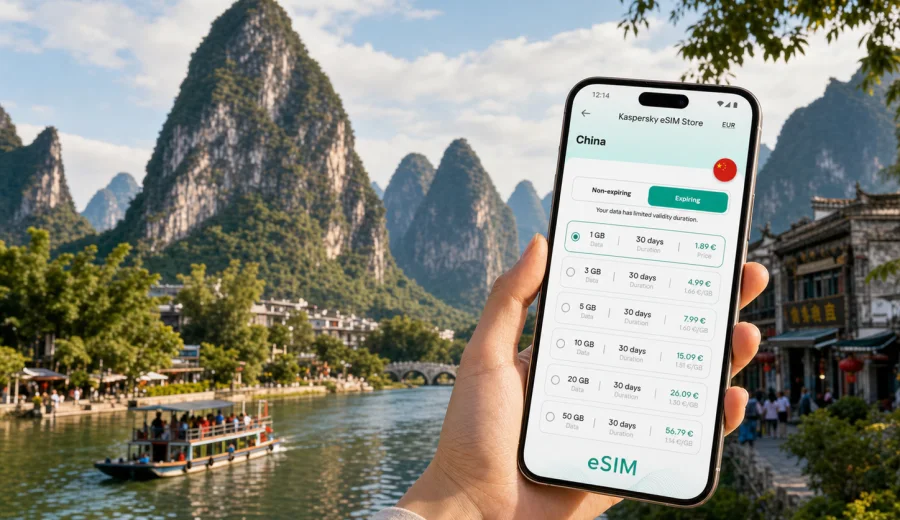
Guilin eSIM: mobile connection and internet for a China trip
Guilin is one of the easiest places in China to photograph and one of the least convenient places to visit offline. The airport is outside the city, the railway stations serve different routes, hotel names may appear in several transliterations, and many of the best day trips move between river piers, village roads, karst viewpoints, and small-town guesthouses. A reliable mobile connection is not just useful for posting views of the Li River. It helps you find the right exit at Guilin North Railway Station, check a ride-hailing pickup point, translate a restaurant menu, follow a walking route near the Two Rivers and Four Lakes area, and stay in contact with your hotel when plans change.
An eSIM can make the first hours in Guilin simpler because you do not need to look for a physical SIM counter before using mobile internet. With Kaspersky eSIM Store, you can use the app or website to choose a suitable eSIM tariff for mobile internet in China, check the data amount and validity period, install the eSIM on a compatible device, and activate it for the trip. The practical advantage is preparation: you can set up the connection before leaving home, then use data for maps, messages, bookings, and local navigation when you arrive.
Why mobile internet matters specifically in Guilin
Guilin is compact in the center, but the travel pattern is spread out. A typical itinerary can include the airport, a central hotel, the Li River cruise pier, Yangshuo, Longji Rice Terraces, Elephant Trunk Hill, Reed Flute Cave, Guilin West Railway Station, and smaller scenic stops. These places are not all within one walkable district, and the most scenic parts often sit outside the dense urban core.
For many visitors, mobile internet in Guilin supports five daily tasks:
- checking routes from Guilin Liangjiang International Airport to the hotel;
- translating addresses for taxi, ride-hailing, and hotel staff;
- confirming train times and station names before leaving for the platform;
- using maps around river piers, caves, lake paths, and viewpoints;
- keeping messaging apps available for travel partners, guides, and accommodation.
Public Wi-Fi can help in hotels, cafes, and some transport hubs, but it is not a dependable travel plan. You may need data before check-in, between stations, at a viewpoint, or while waiting for a transfer. eSIM is most useful in these gaps: the moments when you need one clear answer and do not want to search for a hotspot.
Arrival in Guilin: when an eSIM helps first
Guilin Liangjiang International Airport is around 25 to 30 kilometers from the city center, depending on your destination. After landing, many travelers need to message the hotel, check the airport bus route, compare taxi options, or confirm whether the driver is going to the correct district. If your eSIM is already installed, you can switch on mobile data after arrival and handle these steps before leaving the terminal.
The same applies if you arrive by train. Guilin has several stations used by different routes. Guilin Railway Station is closer to the city center, while Guilin North and Guilin West can be more relevant for high-speed rail journeys. A wrong station assumption can cost time, especially if you have a same-day transfer to Yangshuo or Longji. Mobile internet helps you verify the station, route, platform notices, and onward transport before you commit to a taxi or bus.
Short arrivals benefit even more. If you have one night in Guilin before a cruise or a train, there is little room for trial and error. A working data connection lets you move from arrival to hotel to dinner without depending on printed confirmations or hotel Wi-Fi.
Where travelers use data in Guilin
Guilin travel is not only a city-center experience. The best use of mobile data changes by area:
| Area or route | Why internet is useful | Practical data need |
|---|---|---|
| Airport to city | Check transport, message hotel, confirm pickup points | Maps, messaging, translation |
| Zhengyang Pedestrian Street and lakes | Walking navigation and restaurant search | Maps, reviews, payments support |
| Elephant Trunk Hill | Ticket timing, meeting points, photos backup | Maps and cloud sync if enabled |
| Reed Flute Cave | Route planning from the center, return transport | Navigation and messaging |
| Li River cruise | Pier details, guide messages, weather checks | Messaging and light browsing |
| Yangshuo | Scooter routes, hotel contact, countryside navigation | Maps, translation, ride coordination |
| Longji Rice Terraces | Mountain village routes and driver coordination | Messaging and offline map backup |
This is why choosing only by price can be misleading. A short city stop may need a modest package. A longer itinerary with Yangshuo, Longji, video calls, remote work, or frequent photo backup needs more data and a longer validity period.
Choosing a data amount for Guilin
The right eSIM tariff depends on how you travel. Guilin is scenic, so travelers often use more data than expected for maps, photos, short videos, and messaging with guides or hotels. At the same time, you can reduce usage by downloading offline maps, keeping video uploads for hotel Wi-Fi, and disabling automatic cloud backup on mobile data.
Use this simple estimate:
- 1 to 3 GB can suit a short stopover, light maps, chat, and basic searches;
- 5 GB is more comfortable for a three- or four-day city visit with regular navigation;
- 10 GB can suit Guilin plus Yangshuo if you use maps, translation, and social apps often;
- 20 GB or more is better for longer China trips, remote work, tethering, or frequent media uploads.
Before choosing, think about your highest-data day, not only the total trip length. A Li River cruise day may involve navigation to the pier, messaging, weather checks, photo sharing, and route planning in Yangshuo. A workday from a hotel may require video meetings and file access. Those two days have very different data profiles.
City center, hotels, and local movement
Many hotels in Guilin cluster around the central lakes, railway station area, and main commercial streets. Staying centrally reduces transport friction, but it does not remove the need for mobile data. Hotel Wi-Fi usually starts after check-in. Your most connected moments may happen before that: when you are locating the entrance, asking for early check-in, or finding the correct branch of a hotel chain.
For local movement, internet is useful because English-language signs and map names may not always match the name in your booking confirmation. Keep your hotel name, Chinese address, and phone number saved offline. Then use mobile data to open maps, send the address, or translate a message when needed.
If you plan evening walks around the lakes, keep enough battery and data for the return trip. Guilin's scenic center is pleasant to explore on foot, but you may still need a route back through smaller streets, especially after dinner or rain.
Trips from Guilin: Yangshuo and Longji
Guilin is often the gateway rather than the final destination. Yangshuo is popular for the Li River landscape, countryside cycling, bamboo raft areas, cafes, and guesthouses. Longji Rice Terraces are farther away and involve mountain roads, villages, and viewpoints. In both cases, mobile internet becomes a coordination tool.
For Yangshuo, data helps with:
- confirming the correct pier or bus station;
- coordinating pickup with a hotel or driver;
- using translation for scooter rental or route questions;
- checking the weather before cycling or rafting;
- navigating between West Street, riverside paths, and countryside roads.
For Longji, it is wise to prepare more carefully. Download offline map areas before leaving Guilin, save accommodation details, and keep your driver's contact information available. Mobile coverage and speed can vary by exact route, terrain, and local network conditions, so do not rely on live data alone for every mountain turn. eSIM is useful, but good preparation is still part of the travel plan.
Preparing your phone before the trip
Before you choose an eSIM tariff, confirm that your device supports eSIM and is not locked to a carrier in a way that prevents adding a travel eSIM. You can use the compatibility check here: Check your device. This step matters because eSIM support differs by model, purchase region, and device configuration.
Then prepare your phone for Guilin:
1. Update your operating system while you are still on stable Wi-Fi.
2. Save your passport name, hotel address, and booking references offline.
3. Download offline map areas for Guilin, Yangshuo, and any terrace villages you plan to visit.
4. Install the eSIM before departure if your tariff instructions allow it.
5. Keep your primary SIM active for banking or two-factor messages if needed.
6. Turn off automatic photo and video backup on mobile data unless your package is large.
7. Pack a power bank for long scenic days away from the hotel.
If Guilin is part of a wider China itinerary, choose the tariff for the country route, not only the first city. For example, a traveler landing in Shanghai, taking high-speed rail to Guilin, and leaving from Guangzhou should consider the full China travel period and data use. Around the middle of planning, it is a good moment to review mobile internet options for China and match the data amount to your actual route.
How to install and activate an eSIM
The general process is straightforward, but it is worth doing carefully. In Kaspersky eSIM Store, you choose the destination and suitable tariff, review the data amount and validity period, and follow the installation steps for your device. The exact screens differ between Android and iOS, so use the relevant guide when you install: Android installation guide or iOS installation guide.
For many travelers, the cleanest sequence is:
1. Install the eSIM while connected to stable Wi-Fi before the trip.
2. Keep it turned off for mobile data until you are ready to use it, unless the tariff instructions say otherwise.
3. After arrival in China, select the eSIM for mobile data.
4. Enable data roaming for the eSIM if the device or tariff instructions require it.
5. Check that your primary SIM is not using paid roaming data in the background.
6. Open a map or browser page to confirm that mobile internet is working.
Avoid deleting the eSIM profile after installation unless you are sure you no longer need it. Some eSIM profiles cannot be moved or reinstalled freely after activation. If you are unsure, check the tariff details and support information before making changes.
Business trips and remote work in Guilin
Guilin is not only a leisure destination. It also receives business travelers attending regional meetings, education events, supplier visits, research trips, and tourism-industry appointments. For work travel, the value of eSIM is predictability: you can prepare a data option before arrival and reduce dependence on hotel Wi-Fi quality.
Business travelers should plan for:
- messaging and calendar access during airport or railway transfers;
- maps to meeting locations with similar English names;
- translation for addresses, receipts, and quick service questions;
- email and document access between appointments;
- a backup data option if hotel Wi-Fi is slow during peak hours.
If you need video calls, check your data allowance carefully. A short call can be manageable, but repeated meetings may use data quickly. When possible, reserve mobile data for travel-critical tasks and use secure hotel or office Wi-Fi for heavier sessions.
Stopovers and short stays
A one-day or two-day Guilin stopover usually has a tight rhythm: arrive, reach the hotel, visit the lakes or Elephant Trunk Hill, eat nearby, sleep, and leave early for a cruise or train. In this scenario, eSIM is less about heavy data and more about avoiding small delays.
For a short stay, prepare:
- hotel address in Chinese and English;
- screenshots of train or flight details;
- offline map of the central lakes and your hotel area;
- eSIM installed before arrival;
- enough data for maps, chat, translation, and ride coordination.
Do not wait until the first transfer to solve connectivity. If your train arrives late or your flight lands after dark, you will want mobile internet ready before you start looking for transport.
Practical data-saving tips in Guilin
Guilin can encourage high data use because the landscape is visual. Photos, videos, cloud sync, and social apps can consume a package faster than navigation. You can stay more controlled with a few settings:
- download offline maps for Guilin and Yangshuo before arrival;
- disable automatic app updates on mobile data;
- set photo backup to Wi-Fi only;
- send compressed photos in messaging apps when possible;
- close navigation after reaching the destination;
- avoid streaming video on mobile data unless your tariff is sized for it;
- check data usage daily in your phone settings.
If you travel as a group, do not assume one person's hotspot should support everyone all day. Tethering can drain battery and data quickly, and availability depends on the selected tariff and device settings. Each traveler who needs independent navigation or messaging should have a reliable plan.
Quick checklist for a connected Guilin trip
Use this checklist before leaving for China:
- Device supports eSIM and is ready to add a profile.
- eSIM tariff validity covers the full stay in China.
- Data amount matches your route: Guilin only, Guilin plus Yangshuo, or a wider China itinerary.
- Installation guide is saved or opened before departure.
- Hotel address and key bookings are available offline.
- Offline maps are downloaded for Guilin and side trips.
- Primary SIM data roaming is controlled to avoid unwanted charges.
- Power bank is packed for long sightseeing days.
This preparation is especially useful if you land late, travel with children, meet a driver, or need to reach a guesthouse outside the city center. Connectivity does not replace planning, but it makes the plan easier to adjust.
Common questions about eSIM and internet in Guilin
Is eSIM useful if my hotel has Wi-Fi?
Yes. Hotel Wi-Fi helps once you are inside the hotel, but it does not cover airport arrival, station transfers, walking routes, taxi coordination, scenic areas, or day trips. eSIM is mainly useful between fixed Wi-Fi points.
Does an eSIM include a local phone number?
Usually, travel eSIM tariffs for mobile internet focus on data. Standard phone calls and SMS are not included unless the specific tariff states otherwise. You can use internet-based messaging and calling apps over mobile data.
Should I activate the eSIM before flying to China?
Install it before departure if possible, but read the tariff instructions before activation. Some tariffs start validity when installed, while others start when first connected to a supported network. The safest approach is to install on Wi-Fi and activate according to the instructions for your selected tariff.
How much data do I need for Guilin and Yangshuo?
Light travelers may manage with a smaller package, but Guilin plus Yangshuo often justifies more data because of navigation, translation, ride coordination, photo sharing, and weather checks. Choose a package that covers your busiest day, not only the average day.
Can I rely only on public Wi-Fi?
You can use public Wi-Fi where available, but it is not a complete connectivity plan. You may need internet outdoors, in transit, at a pier, or before hotel check-in. Mobile data gives you a more flexible backup for those moments.
Final preparation before you go
Guilin rewards flexible movement. One day may be a calm lake walk in the city center; the next may involve an early transfer to a river pier, a countryside route in Yangshuo, or a mountain road toward Longji. In each case, mobile internet supports the practical side of the trip: maps, translation, hotel messages, transport details, weather checks, and quick changes of plan.
Before departure, check device compatibility, decide how much data your itinerary realistically needs, and install the eSIM while you still have stable Wi-Fi. Kaspersky eSIM Store can help you choose, set up, and activate a suitable eSIM tariff for mobile internet in China through the app or website. When your route is clear, choose an eSIM tariff for your trip to Guilin and keep your first day in the city focused on the journey, not on finding a connection.