
Travel connectivity guide
Guyana eSIM: Mobile Internet for Travel
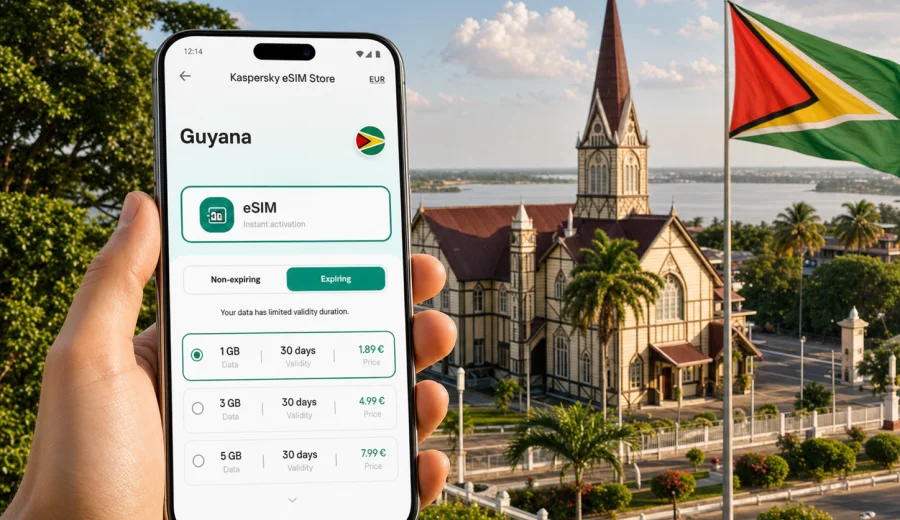
eSIM in Guyana: mobile connection and internet for your trip
Guyana is a country where mobile internet matters from the first day of travel. You may need maps in Georgetown, a ride from Cheddi Jagan International Airport, hotel messages on arrival, banking confirmation codes, weather updates before a river trip, or a working chat app while moving between towns. An eSIM can make that preparation simpler because you can arrange mobile data before you leave, keep your physical SIM in the phone, and activate a data plan on a compatible device when the trip begins.
This guide explains how to plan mobile connection and internet for Guyana with eSIM, what to check before purchase, how much data different travel styles may need, and how to avoid common mistakes. It is written for travelers who want practical steps rather than telecom jargon.
Why mobile internet in Guyana needs planning
Guyana combines a compact coastal travel corridor with large interior regions, river routes, rainforest lodges, and long distances between services. Even if most of your trip is in Georgetown, connectivity is still part of basic travel preparation.
Typical online tasks in Guyana include:
- using maps and ride coordination after arrival;
- confirming hotel details and tour pickup times;
- messaging guides, hosts, colleagues, or family;
- checking domestic flight or boat transfer updates;
- translating addresses, menus, and local information;
- using banking apps or payment confirmations;
- sharing photos without relying only on hotel Wi-Fi.
Public Wi-Fi can be useful in hotels, cafes, and airports, but it is not a full travel plan. It may require a password, work only in one building, slow down at busy times, or be unavailable when you are moving. Roaming from your home operator can also be convenient, but the daily fees and data limits may not suit every trip. eSIM gives you another option: a separate mobile data profile for travel, installed digitally on a compatible phone.
What an eSIM does for a trip to Guyana
An eSIM is a digital SIM profile built into many modern smartphones and some tablets. Instead of inserting a plastic SIM card, you install a mobile data profile by following instructions on the device. For Guyana, this means you can prepare a travel data plan without visiting a store after landing.
With an eSIM, you can usually keep your regular SIM active for calls, SMS, and banking codes while using the eSIM for mobile data. The exact setup depends on your device, your home operator, and the selected eSIM plan, so it is important to review the plan conditions before you pay.
Kaspersky eSIM Store is an app and website where you can choose a destination, review available data plan conditions, arrange the selected eSIM plan, and activate it on a compatible device. The service is designed for mobile internet in international travel, not for replacing a local mobile subscription in the destination country.
Quick answer
For most visitors, an eSIM for Guyana is useful when you want mobile data ready before arrival, do not want to search for a physical SIM card, and prefer to manage the plan from your phone. Before buying, check that your device supports eSIM, confirm that it is not locked to another operator, choose a data allowance that fits your itinerary, and read when the plan validity period starts.
Where travelers usually need data in Guyana
The need for mobile internet changes by route. A business traveler in Georgetown may use data mainly for email, maps, and messaging. A nature traveler going toward Kaieteur Falls, the Rupununi, or river lodges may need data for coordination before and after remote segments, but should not assume continuous service in every interior location.
| Travel situation | Why data helps | Practical note |
|---|---|---|
| Arrival at Cheddi Jagan International Airport | Messaging, transport, hotel confirmation | Install eSIM before departure so setup is not your first task after landing. |
| Georgetown stay | Maps, restaurants, meetings, local transport | A moderate data plan is usually enough if hotel Wi-Fi is reliable. |
| Coastal towns and day trips | Navigation and coordination | Download offline maps before leaving the city. |
| Nature lodges and interior travel | Tour updates, emergency contacts, weather checks | Coverage can vary; ask your lodge or guide what to expect. |
| Work trip | Email, files, video calls | Choose more data and keep Wi-Fi for heavy uploads or long calls. |
The key point is simple: eSIM helps with preparation and day-to-day mobile internet, but coverage and speed depend on local network conditions, device support, location, terrain, and the selected plan. No travel data option should be treated as guaranteed in every place.
eSIM, roaming, local SIM, and Wi-Fi: how they compare
There is no single best option for every traveler. The right choice depends on how long you stay, how much data you need, and how much time you want to spend arranging connectivity.
| Option | Good for | Trade-offs |
|---|---|---|
| eSIM travel data plan | Travelers who want to prepare before arrival and avoid changing plastic SIM cards | Requires an eSIM-compatible, unlocked device; usually focused on mobile data. |
| Home operator roaming | Short trips where convenience matters more than cost control | Daily fees and data limits can be high or unclear depending on your operator. |
| Local physical SIM | Longer stays or travelers who specifically need a local number | Requires local purchase, registration rules may apply, and setup can take time. |
| Public Wi-Fi | Hotel work sessions, large downloads, backup connectivity | Not available everywhere and not ideal as your only connection while moving. |
For many trips, the most practical setup is a mix: eSIM for mobile data while moving, hotel Wi-Fi for large downloads, and your home SIM left active if you need calls or SMS from your regular number.
How much data you may need
Your data use depends on habits, app settings, and trip length. The examples below are planning ranges, not promises. Video, cloud backup, social media auto-play, and map downloads can change usage quickly.
| Traveler profile | Typical use | Possible plan size |
|---|---|---|
| Light user | Messaging, maps, email, occasional browsing | 1-3 GB for a short trip |
| Standard tourist | Maps, messaging, tickets, social media, some photo sharing | 3-5 GB for several days |
| Active traveler | Frequent navigation, photo uploads, calls over messengers, research | 5-10 GB |
| Remote worker | Email, documents, tethering, video meetings | 10 GB or more, plus Wi-Fi for heavy work |
To keep data under control:
- turn off automatic cloud photo and video backups on mobile data;
- download offline maps for Georgetown and your route before departure;
- disable auto-play video in social apps;
- use Wi-Fi for system updates and large files;
- check your data balance during the trip;
- keep messenger calls shorter when mobile signal is weak.
Device compatibility comes first
Before choosing a plan, confirm that your phone or tablet can use eSIM. Some devices support eSIM only in certain regional versions. Some phones are locked to a specific operator, which can block use with another mobile profile.
Before paying for a travel eSIM, check your device and make sure:
- the model supports eSIM;
- the device is not locked to your home operator;
- the operating system is updated enough to install an eSIM profile;
- you have a stable internet connection for installation;
- you understand how to switch mobile data between SIM profiles.
If you travel with two phones, install the eSIM on the device you will actually carry and use for maps, messages, and travel apps. eSIM profiles often cannot simply be moved to another device after activation; conditions depend on the selected profile and plan.
When to arrange eSIM for Guyana
The most comfortable time to arrange eSIM is before the trip, while you still have stable Wi-Fi and enough time to read the plan details. You can check the destination, data allowance, validity period, and installation steps without airport pressure.
Do not leave every step until arrival if your flight lands late, you are meeting a driver, or you need to message someone immediately. At the same time, read the plan terms carefully: some plans begin validity when installed, while others begin when first connected to the supported network. The safest approach is to install and activate according to the instructions for the specific plan.
You can use Kaspersky eSIM Store to choose an eSIM plan for a trip to Guyana after you know your dates, route, and approximate data needs. Review the available options, choose a data amount and duration that match the itinerary, and keep the setup details available before departure.
A practical setup checklist
Use this checklist before you fly:
- Confirm that your destination is Guyana, not French Guiana; they are different destinations.
- Check eSIM compatibility and operator unlock status.
- Choose a plan duration that covers arrival day and departure day.
- Estimate data needs based on maps, messaging, work, and media use.
- Save hotel addresses, tour contacts, and emergency numbers offline.
- Download offline maps for Georgetown and any route outside the city.
- Keep your regular SIM active if you need SMS codes or calls.
- Make sure you know which SIM profile will handle mobile data.
- Read whether data roaming must be enabled for the eSIM profile.
- Keep installation instructions available in case you need to repeat a step.
This preparation is especially useful if your itinerary includes early transfers, river travel, interior flights, or remote lodges where troubleshooting is harder.
How to install and activate an eSIM
Installation varies slightly by phone model and operating system, but the basic flow is similar: choose the plan, add the eSIM profile to the device, select it for mobile data, and activate it according to the plan instructions. If your device asks whether to enable data roaming for the eSIM profile, follow the instructions for the selected plan.
For detailed setup steps, use the Android eSIM installation guide or the iOS eSIM installation guide. It is better to read the guide before travel, because installation requires an internet connection and a few quiet minutes.
A simple installation sequence:
1. Connect your phone to stable Wi-Fi.
2. Open the eSIM setup instructions for your device.
3. Add the eSIM profile using the provided method.
4. Label the profile clearly, for example Travel eSIM or Guyana data.
5. Set mobile data to the eSIM profile when you want to use it.
6. Keep your primary SIM for calls or SMS if needed.
7. Test that mobile data works when the plan is ready for use.
Avoid deleting the eSIM profile unless you are sure you no longer need it. Reinstallation rules depend on the plan and profile conditions.
Data planning for common Guyana itineraries
Short Georgetown visit
If you stay in Georgetown for a few days, your data use will likely come from maps, messaging, restaurant searches, email, and transport coordination. A smaller plan may be enough if your hotel Wi-Fi is reliable and you do not upload many videos.
Recommended habits:
- save your hotel and meeting locations offline;
- keep mobile data for navigation and messages;
- use Wi-Fi for photo backups;
- check data use each evening.
Business trip
Business travelers often underestimate background data. Email attachments, calendar sync, cloud documents, and messenger calls can use more data than casual browsing. If you may need tethering for a laptop, choose a larger allowance and check whether hotspot use is allowed under the selected plan conditions.
Practical approach:
- use mobile data for urgent email and messaging;
- use secure, trusted Wi-Fi for heavy files where possible;
- turn off unnecessary background sync;
- keep a backup contact method for meetings and drivers.
Nature and adventure route
Guyana is known for rainforest, waterfalls, savannah, rivers, and wildlife travel. These routes are a major reason to plan connectivity carefully. eSIM can help before and after remote segments, but interior coverage can be limited or variable. Ask tour operators and lodges about realistic connectivity on your exact route.
Before remote travel:
- share your itinerary with family or colleagues;
- download maps and key documents;
- save lodge contacts offline;
- keep power banks charged;
- do not rely on mobile data as the only safety tool.
Multi-country South America or Caribbean route
Some travelers combine Guyana with nearby countries or broader regional travel. If your route crosses borders, check whether a country-specific plan is enough or whether a regional option fits better. The correct choice depends on supported destinations, data amount, validity, and where you will spend most days.
What to check in plan details
Before arranging a travel eSIM plan, read the plan card carefully. The most important fields are not just price and data size.
Check these items:
- destination coverage: Guyana should be included;
- data allowance: enough for your expected use;
- validity period: covers the full trip;
- activation timing: when the validity period starts;
- hotspot support: important for laptop or tablet use;
- top-up options: useful if plans can be extended or replenished;
- support information: helpful if setup questions appear;
- device requirements: eSIM support and unlocked status.
If two plans look similar, choose the one that fits your real behavior. A traveler who only uses maps and messages has different needs from someone who sends videos, works from a laptop, or spends long days away from hotel Wi-Fi.
Common mistakes to avoid
The most frequent eSIM issues are not complicated; they usually come from rushed setup or assumptions.
Avoid these mistakes:
- buying a plan before checking eSIM compatibility;
- confusing Guyana with French Guiana in the destination list;
- choosing a plan that expires before the departure day;
- leaving installation until you are standing outside the airport;
- forgetting to select the eSIM profile for mobile data;
- leaving cloud backups active on mobile data;
- assuming voice calls and SMS are included;
- deleting the eSIM profile during troubleshooting;
- expecting the same signal quality in remote rainforest areas as in the capital.
If something does not work immediately, slow down and check the basics: profile installed, mobile data assigned to the eSIM, roaming setting configured as instructed, plan activated, and location within supported coverage.
FAQ about eSIM and mobile internet in Guyana
Is eSIM enough for a trip to Guyana?
For many travelers, eSIM is enough for mobile data tasks such as maps, messaging, email, and travel apps. It is not a guarantee of service in every remote location, and it usually does not replace a regular phone number for voice calls or SMS.
Can I keep my usual SIM card?
In many dual-SIM phones, yes. You can keep your regular SIM for calls or SMS and use the eSIM profile for mobile data. The exact options depend on your device and operator settings.
Should I install the eSIM before or after arrival?
Install it when you have stable Wi-Fi and time to follow the steps carefully. Activation timing depends on the selected plan, so read the instructions before deciding when to complete the final activation step.
Will eSIM work in the interior of Guyana?
Coverage can vary by location, terrain, local network conditions, and plan support. For remote lodges, river routes, and rainforest areas, ask your tour provider what connectivity is realistic and keep offline backups.
Does an eSIM plan include calls and SMS?
Travel eSIM plans are usually focused on mobile data. If calls or SMS are included, that should be stated in the plan conditions. For calls and messages, many travelers use internet-based apps.
What happens if I run out of data?
Options depend on the selected plan. Some plans may support top-up or additional purchase; others may require a new plan. Check this before travel if you expect heavy data use.
Final preparation before you leave
Good mobile internet preparation for Guyana is mostly about timing and clarity. Check your device, choose the right destination, select a realistic data allowance, install the eSIM when you have stable Wi-Fi, and keep offline copies of important travel details. Use mobile data for movement and urgent tasks, and save heavy downloads for trusted Wi-Fi.
If you want to prepare mobile internet before departure, open Kaspersky eSIM Store and select an eSIM plan for Guyana that matches your travel dates, data needs, and device compatibility. A few minutes of setup before the trip can make arrival, transfers, and everyday travel communication much easier.