Travel connectivity guide
Gyor eSIM: Mobile Internet for Your City Trip
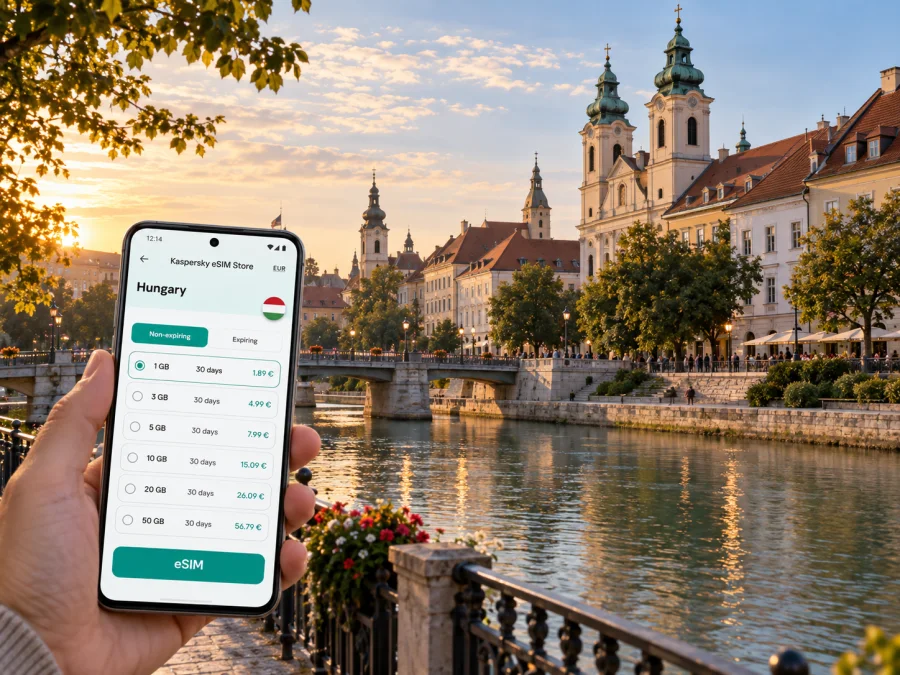
Gyor eSIM: mobile connection and internet for exploring the city
Gyor (written Győr in Hungarian) is a compact city in north-western Hungary where the Rába meets the Mosoni-Danube. Its historic center, riverside paths, railway station and modern business areas all fit into a trip that may last only a day or stretch into a longer stay. A dependable mobile internet connection helps with the practical details: checking a train platform, finding a hotel entrance, following a walking route through the old town or messaging a colleague after arrival.
An eSIM can make that first hour easier. Instead of looking for a physical SIM card, you can prepare a compatible phone for mobile data before you travel. For Gyor, the useful question is not simply how much data to buy, but how you expect to move around: walking through the center, commuting to a meeting, taking regional trains, or using the city as a base for day trips.
What mobile internet helps with in Gyor
Gyor is manageable on foot around its central sights, but a visitor’s day rarely stays in one place. You might arrive by train, check in near the center, cross the river for a riverside walk, and then travel to a workplace or a nearby town. Maps and transport information help connect those separate parts of the day.
With mobile data available, you can use your preferred map to locate a street or hotel, check opening details before setting out, translate a short notice, and contact accommodation if your arrival time changes. It also helps when plans shift: a delayed connection, a change of meeting room or an unexpected stop can be handled without searching for public Wi-Fi.
A mobile connection is most useful when it supports a real task. Download tickets, reservations and important addresses before leaving, then use data for live directions and last-minute changes. This keeps the phone useful without making every step depend on a constant connection.
Arriving and finding your way from the station
Gyor’s railway station is a major arrival point for visitors coming from other Hungarian cities or travelling along the Vienna–Budapest corridor. The central area is close enough to explore on foot, although the best route depends on your hotel, luggage and the weather. Before setting off, check the exact accommodation entrance rather than relying only on the property name: similarly named streets or buildings can be confusing after a long journey.
At the station, take a moment to orient yourself. Confirm the street exit and destination on your map, and save the hotel address for offline access. If you are travelling with a large suitcase, have mobility needs, or arrive late, compare a walk with local bus or taxi options instead of assuming the shortest route is the most convenient. Timetables and stop locations can change, so check current information close to departure.
Many city-center visits begin around Baross Gábor Street and the nearby squares. From there, the old town opens into a network of pedestrian-friendly streets and smaller lanes. Navigation is less about covering a long distance than choosing the right turn: a map can prevent a detour when a church tower or courtyard looks close but sits behind a block of buildings.
Moving between the old town, riverbanks and everyday Gyor
The appeal of central Gyor is its close mix of historic streets and water. The city is associated with the Rába, Rábca and Mosoni-Danube rivers, and riverbanks offer a different sense of direction from the compact lanes inland. Radó Island and the surrounding paths are good examples of why a map is helpful: a short walk can move from a busy central street to a quieter waterside setting, and a bridge or riverside path may shape the most direct route.
The historic core is suited to unhurried walking. Use a map to connect landmarks into a loop rather than repeatedly returning to the same square. A practical route might start around the station and Baross Street, continue toward Széchenyi Square, then head toward the cathedral and Bishop’s Castle area before crossing toward the river. Leave room for a pause: cafés, shaded squares and the water can make a short route take longer than expected.
| Area or landmark | Useful approach |
|---|---|
| Baross Gábor Street | Use it as a central orientation line between the station side and the historic core. |
| Széchenyi Square | Check nearby lanes and entrances before navigating to a specific café, museum or meeting point. |
| Cathedral and Bishop’s Castle quarter | Expect historic buildings and compact streets; keep the destination pin open for the final turns. |
| Radó Island and river paths | Follow a riverside walk as a separate leg, and confirm bridge crossings on the map. |
| Hotel or business district beyond the center | Check the complete door-to-door route, including the final walk from a stop. |
Do not assume that every short journey should be made by bus. In the center, walking may be simpler, while a bus can make sense for a destination farther from the core, heavy rain or a tight schedule. Gyor has a local bus network; use current route and ticket information for the specific stop and time you need. Mobile data can help you compare options, but keep the route or ticket information accessible if your battery is low.
If you plan to cycle, walk near the river or explore after dark, use the map as a guide rather than a substitute for local awareness. Follow signed public paths, check conditions, and allow extra time where a route crosses a bridge or follows a less familiar street.
Choosing a data plan for a city stay
The right amount of data depends on your habits and itinerary. A visitor who mainly checks maps and sends messages will use a different amount from someone who joins video calls, uploads large files or streams entertainment over mobile data. Hotel Wi-Fi may cover some evening use, but it should be treated as a convenience rather than the only way to get online while moving around.
Kaspersky eSIM Store is an app and website where you can choose, purchase and activate an eSIM with a suitable plan for mobile data on an international trip. Check the destination, data allowance, validity period and other terms before you decide. To prepare for your visit, compare eSIM plan options for Hungary and choose according to your expected use in Gyor and elsewhere on your route.
Staying oriented on a short stopover
On a short stop, choose one compact route through the historic center and nearby river paths, then set a clear return time for the station or your next appointment. Save the onward departure point and hotel address as map pins, and keep ticket details available offline. If you have luggage, confirm storage arrangements before building them into your plan.
Gyor for business trips and longer stays
Business visitors often need a more reliable routine than a sightseeing itinerary. Meeting locations may be outside the historic center, while accommodation, the station and restaurants are spread across different parts of town. Save full addresses in advance, including building names or entrance details, and ask a host to clarify which gate or reception to use if the site is part of a larger complex.
A data connection can support calendar updates, navigation, email and messaging between appointments. Before departure, download documents needed for the meeting and confirm which applications require sign-in. If you expect frequent video calls, plan for a stable Wi-Fi connection at your hotel or workplace where available; mobile data performance can vary with location, indoor conditions, network availability and your plan.
Day trips from Gyor: keep the route connected
Gyor’s position makes it a useful base for exploring other places in north-western Hungary, and rail or road journeys can form part of a wider itinerary. Some visitors also travel onward toward Budapest or Vienna. These are separate destinations with their own schedules, so confirm the current departure, arrival station and ticket conditions for each leg rather than relying on a remembered timetable.
A city eSIM plan is useful only if its coverage and terms fit the complete route. If your itinerary crosses a national border, verify that the plan includes every country you will visit. Do this before purchase, and check whether the eSIM needs a setting change when you move between locations. Keep boarding or ticket information available offline in case you have no signal at a platform or in a station building.
Set up your eSIM before you need directions
A calm setup at home or in your hotel is easier than troubleshooting while carrying luggage. First make sure your phone supports eSIM and is not restricted by a carrier lock. Device support can differ by model and market, so check whether your device is compatible before you choose a plan. Keep your usual SIM active if you still need its number for calls or verification messages, and review which line is selected for mobile data.
Kaspersky eSIM Store helps you choose, purchase and activate an eSIM plan for an international trip. Follow the plan details and your device’s prompts. If you need step-by-step help, use the Android eSIM installation instructions or the iOS eSIM installation instructions.
A general preparation sequence is:
- Check device compatibility and confirm that the phone is unlocked for the eSIM you intend to use.
- Choose a plan for Hungary or for all countries on your itinerary; review its data, validity and activation conditions.
- Install the eSIM using the provided instructions and a reliable internet connection.
- Label the new line clearly, for example “Travel data,” so it is easy to identify in settings.
- Follow the plan’s instructions about when to enable the eSIM and data roaming. Settings differ between devices and plans.
- Test the setup when convenient, then save support and account details where you can find them.
Do not delete an installed eSIM profile as a troubleshooting shortcut unless the plan instructions or support team tell you to do so. Some profiles cannot simply be reinstalled after removal. If the connection does not work after arrival, check that the eSIM line is enabled, the correct line is selected for data, and the plan is active; then follow the plan-specific troubleshooting steps.
Common questions about mobile internet in Gyor
Can I explore Gyor without mobile data?
Yes. You can walk around the central area with a paper map or information saved in advance. Mobile data is useful for live directions, changing plans, checking current transport details and contacting accommodation, but it is not required for every part of a visit.
Is an eSIM a replacement for my usual phone number?
Usually it is best thought of as a mobile-data option for travel. An eSIM plan does not include an ordinary phone number, calls or SMS unless the specific terms say otherwise. You can keep your home SIM available for calls or verification and use internet-based messaging over data.
Should I install the eSIM before leaving home?
Often, installing before departure makes it easier to follow the setup steps while you have time and internet access. Activation timing varies by plan, so read its instructions carefully. If the validity starts at installation or activation, take that into account when deciding when to switch it on.
Will the same plan work for a trip to Vienna or Budapest?
Do not assume so. Check the destination list and terms for the selected plan, especially if you cross into another country. Coverage, supported locations and data conditions depend on the plan and its underlying network arrangements.
How much data should I choose for a weekend?
There is no single amount that suits everyone. Navigation and messaging use less than frequent video meetings or streaming. Estimate your usage by activity, account for the validity period, and use your phone’s data controls to monitor consumption during the trip.
What if a map route changes while I am walking?
Pause somewhere safe before checking the phone, then confirm your destination and the next turn. If data is unavailable, use a saved map or screenshot and ask accommodation or a local information point for help. Keep the station or hotel address saved so you can retrace the route.
A simple plan for a smoother Gyor visit
Before the trip, save your accommodation and key addresses, review your onward transport and decide whether your phone will need data for work, navigation or both. Choose a plan that matches the full route and the amount of time you will be away. Install the eSIM with the device instructions nearby, and keep essential directions available offline.
Once in Gyor, use the phone to connect the station, hotel, historic center, riverbanks and any out-of-center appointments into a practical itinerary. Walk the compact center when it suits your plans, check current local transport details for longer journeys, and leave a little flexibility for a stop along the water or an unexpected change.
When you are ready to prepare, choose an eSIM plan for your trip to Hungary through Kaspersky eSIM Store. Review the plan terms, install the eSIM on a compatible device and follow its activation instructions before setting out to explore Gyor.


