Travel connectivity guide
Ha'ateiho eSIM: Mobile Internet in Tonga
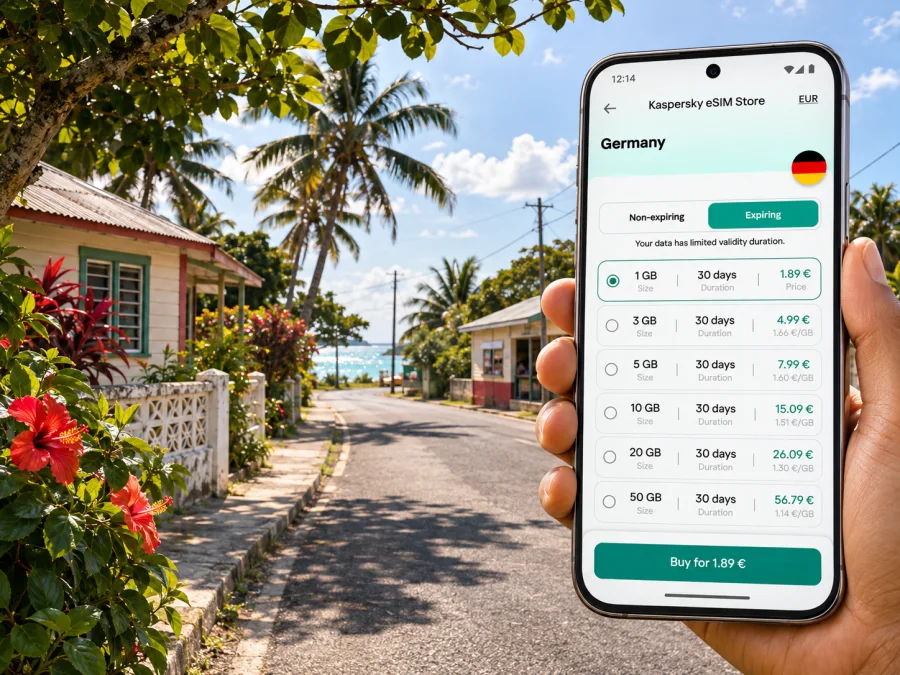
Ha'ateiho eSIM: Mobile Connection and Internet for Your Visit
Ha'ateiho is a village on Tongatapu, Tonga’s main island, not an independent city. Nuku'alofa is the capital and a separate urban center. Mobile data can help coordinate an airport pickup, find accommodation, check routes, and keep plans accessible away from Wi-Fi.
This guide focuses on mobile internet around Ha'ateiho. Coverage depends on your handset, chosen plan, local network, and exact location. A travel eSIM should not be assumed to provide a local number, voice calls, or SMS unless its terms say so.
Where Ha'ateiho fits into a Tongatapu trip
Ha'ateiho is identified as part of the Tongatapu 7 constituency in central Tongatapu. It is not the capital or an airport district. When searching for directions, compare the village pin with your accommodation or meeting point; a broad search for “Tonga” or “Nuku'alofa” may point elsewhere.
International arrivals land at Fua'amotu International Airport on Tongatapu. Ha'ateiho is on the same island, but the route depends on your address and transport. Arrange a pickup with your host if needed, and save the driver’s contact and address offline; a map pin does not replace a confirmed plan.
Nuku'alofa is the island’s main urban hub, with shops, services, the harbor, and markets. A stay in Ha'ateiho may instead center on a local visit or a base for exploring Tongatapu. If you are visiting the village from Nuku'alofa for part of a day, arrange your return before setting out.
A quick orientation
| Trip question | Practical answer |
|---|---|
| Is Ha'ateiho the capital? | No. Nuku'alofa is Tonga’s capital; Ha'ateiho is a village on Tongatapu. |
| Which island is it on? | Tongatapu, Tonga’s main island. |
| Where do international arrivals land? | Fua'amotu International Airport, on Tongatapu. Confirm transport onward. |
| Is local eSIM availability confirmed? | Not in the official information reviewed here. Check the offer and network terms. |
The table is a planning aid, not a coverage promise. Signal can change by location; check the plan terms and phone reception.
Mobile internet for arriving and finding your stay
Prepare essential arrival details before departure so you are not depending on a new connection to retrieve them:
- Save the accommodation name, full address, phone number, and map pin in a note available offline.
- Download an offline map for Tongatapu and mark Fua'amotu, your stay, Nuku'alofa, and any pre-arranged meeting point.
- Keep the pickup instructions and booking confirmation available without a data connection.
- Tell your host your arrival time and flight details; ask how to reconnect if plans change.
- Keep your home SIM accessible if you need it for bank verification or calls, and check your home operator’s roaming settings and charges.
Offline maps are a fallback. If a pin ends before your accommodation, ask the host for a landmark or final directions while connected. Download maps over Wi-Fi and carry a charger for long outings.
Choosing the right kind of connection
Compare roaming, a travel eSIM, and a local SIM by the actual conditions for your dates. Availability, price, registration, and supported networks can change.
| Option | Useful when | Check before you rely on it |
|---|---|---|
| Home-SIM roaming | Keep your usual number active. | Data price, destination inclusion, partner network, roaming settings. |
| Travel eSIM | Add a separate data profile to a compatible phone. | Tonga coverage, allowance, validity, tethering, calls and SMS. |
| Local physical SIM | Consider local service or a fallback. | Availability, registration, top-ups, phone lock status. |
| Wi-Fi | Use at accommodation or a venue. | Access terms and connection quality. |
Tonga Communications Corporation (TCC) and Digicel (Tonga) Limited are associated with Tonga’s mobile market. TCC publishes data offers for its SIM customers and lists an airport counter at Fua'amotu. This does not establish which network a travel eSIM uses or reception at a Ha'ateiho address.
Official public information reviewed here does not confirm a tourist eSIM from a Tongan operator or the local partner for every travel eSIM. Verify network, technology, voice service, and coverage on the offer itself. If Tonga support is unclear, keep confirmed roaming or a local physical SIM as a backup; do not assume a nearby destination’s eSIM will work.
Match allowance and validity to your expected use, and check that every island on your route is covered.
When you are ready to compare current options, you can review eSIM plans for a trip to Tonga. Check the destination coverage and full terms shown for the specific plan before choosing it. Kaspersky eSIM Store is an app and website where you can select, arrange, and activate an eSIM plan for mobile data during an international trip; it is not a local mobile operator and does not determine signal availability in Ha'ateiho.
Planning data use around Ha'ateiho
Estimate data from your habits, and decide which activities can wait for Wi-Fi:
| Activity | A lower-data approach |
|---|---|
| Maps and route checks | Download a map beforehand; use live data for changes and searches. |
| Messaging | Disable automatic video and large-file downloads. |
| Photos and large files | Back up over Wi-Fi; disable automatic downloads. |
| Calls and translation | Prefer Wi-Fi for video and download offline resources. |
Actual use varies with video quality, background sync, and app settings. Turn off automatic updates over mobile data and check your remaining allowance in the plan account or device settings when available.
For work, download key documents, allow for variable connectivity, and test the accommodation’s connection before relying on video calls. Use a hotspot only if the plan and device permit tethering.
Device and plan checks before purchase
An eSIM is a digital mobile profile. Support depends on the phone variant, software, purchase market, and carrier lock; devices in one model family may differ. Check whether your device supports eSIM and confirm it is unlocked.
Before paying, confirm all of the following on the specific plan page:
- Tonga is explicitly listed as a supported destination.
- Coverage and any named local network suit your itinerary.
- The data allowance and validity period fit your stay.
- Confirm when validity begins; purchase, installation, and first connection may differ.
- The plan provides data only unless voice calls or SMS are explicitly included.
- The plan’s rules for hotspot use, top-ups, refunds, and reinstallation are acceptable to you.
- Your phone has enough battery and a stable internet connection for installation.
If the offer does not identify a local partner or activation timing, ask support before purchase; do not infer support from a nearby country. If Tonga availability is unclear, use confirmed roaming or investigate a local SIM after arrival. A physical SIM is an option for an incompatible or locked phone.
Install and activate before you need directions
Install over stable Wi-Fi and read the plan’s activation instructions first. Profiles differ on whether validity begins at purchase, installation, or first connection. Avoid deleting a profile as a troubleshooting shortcut.
- Confirm compatibility, unlock status, Tonga coverage, and plan conditions.
- Add the profile over Wi-Fi using the supplied QR code or manual details.
- Label it clearly and select it for mobile data when ready.
- Enable data roaming for that profile only if the plan requires it.
- After arrival, allow network registration and test a webpage before navigating.
Follow the relevant Android eSIM setup instructions or iOS eSIM setup instructions. Menu names vary. Keep your QR code and one-time installation code private.
If it does not connect, check that the profile is enabled, mobile data uses the correct line, and roaming is set as instructed. Briefly toggle airplane mode, restart, and compare the network selection with the plan directions. Contact support over Wi-Fi; do not delete a profile unless advised, as it may not reinstall.
Moving between Ha'ateiho, Nuku'alofa, and the island
For a day combining Ha'ateiho and Nuku'alofa, save both destinations and agree on the return pickup in advance. Messaging can help coordinate, but does not guarantee a vehicle or ride service is available.
The Ha'amonga 'a Maui trilithon, 'Anahulu Caves, and Mapu 'a Vaea blowholes are separate Tongatapu excursions, not Ha'ateiho attractions. Confirm access and transport, then save the route offline.
Before an outing, confirm transport, save directions and contacts offline, charge your phone, and share your plan if travelling independently. For a short stopover, prioritize pickup, accommodation, and onward travel.
Accommodation, work, and local etiquette
Ask whether Wi-Fi reaches your room and can support work calls; a listing alone does not guarantee stable video. Ha'ateiho is a lived-in village: ask before photographing people, homes, or events. Tonga Tourism notes Sunday church life across Tongatapu, so check local expectations and arrange errands ahead if visiting on Sunday. For work, download files and test connectivity at the actual location.
Common connection problems and sensible fixes
| What you notice | What to try |
|---|---|
| eSIM appears installed but there is no data | Confirm the plan is active, select it for mobile data, and check the plan’s roaming instructions. |
| The phone shows a network but apps do not load | Verify data allowance and validity; refresh the connection and confirm the required APN only if the provider specifies one. |
| Service works outdoors but not indoors | Move nearer a window or use accommodation Wi-Fi; indoor reception can differ from outdoor reception. |
| Data is being used faster than expected | Pause cloud backups, app updates, and auto-play; review hotspot connections. |
| Navigation cannot find the address | Check the saved pin, ask the host for a landmark or local spelling, and compare the route with offline notes. |
| The eSIM setup screen asks for a code again | Use the order instructions or support; do not repeatedly delete or reinstall the profile. |
Signal varies by location, buildings, network load, and plan access. Reconnecting cannot create coverage where a plan has none; keep another way to contact your host or driver.
Frequently asked questions
Is Ha'ateiho a city?
It is a village on Tongatapu. Nuku'alofa is Tonga’s capital and main urban center.
Will a travel eSIM definitely work in Ha'ateiho?
Not from the place name alone. Verify Tonga, the local network if identified, and coverage terms; reception varies by location, handset, and network conditions.
Can I use a travel data eSIM for normal calls and SMS?
Only if the plan expressly includes them. A data-only eSIM supports app-based calls and messages but does not automatically provide a local number or standard voice and SMS.
What if my phone does not support eSIM?
Use confirmed home-SIM roaming or check local physical SIM availability and registration requirements after arrival.
Do I need data all the time?
No. Download maps over Wi-Fi and use data for route changes and coordination. Check the allowance if you expect frequent media or work use.
A simple preparation checklist
Before leaving home:
- Save your Ha'ateiho accommodation address, host contact, and map pin offline.
- Confirm how you will travel from Fua'amotu and how the driver will recognize your destination.
- Check eSIM device compatibility, carrier lock status, destination coverage, plan validity, and data allowance.
- Check home-SIM roaming charges if leaving it active for calls or verification.
- Install over Wi-Fi if permitted and label the profile clearly.
- Download a Tongatapu map, booking confirmations, and essential translation resources.
- Carry a charger and backup payment method.
On arrival:
- Confirm your pickup and address before leaving the airport.
- Select the correct data line and test the connection while you can still ask for help.
- Keep offline directions available and check your balance before a longer outing.
Ha'ateiho is a village destination, so a smooth visit depends on practical preparation more than on a promise of uninterrupted coverage. Save the details you may need offline, verify the exact network and terms of any plan, and arrange transport with your host. When an eSIM is suitable for your unlocked, compatible device, Kaspersky eSIM Store lets you choose, arrange, and activate a travel data plan through its app or website. Choose an eSIM plan for your Tonga trip after reviewing the current destination coverage and plan conditions, and keep roaming or a local SIM in mind if the offer does not fit your itinerary.


