
Travel connectivity guide
Halifax eSIM for Mobile Internet in Canada
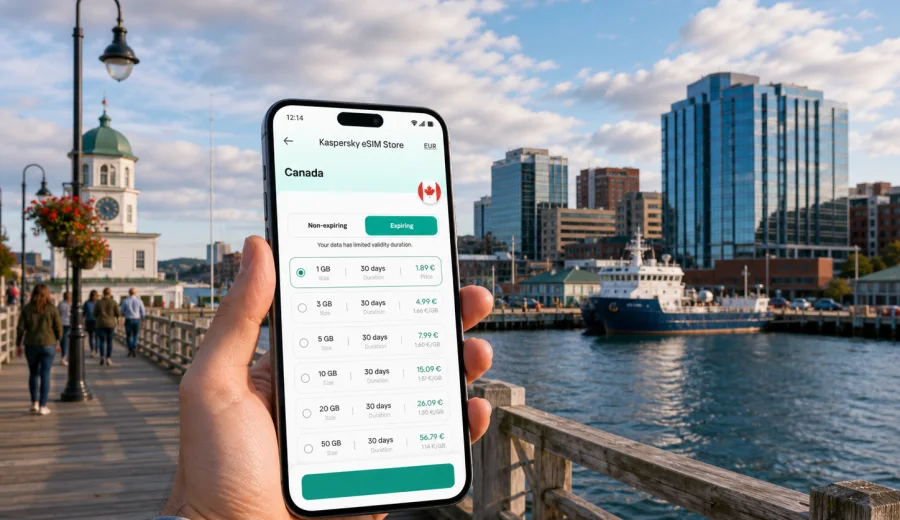
Halifax eSIM: mobile connection and internet for a smooth city trip
Halifax is a compact harbour city, but a trip here still depends on reliable mobile internet. You may need maps from Halifax Stanfield International Airport to downtown, ferry schedules between Halifax and Dartmouth, restaurant bookings, hotel check-in details, or weather updates before a coastal drive. An eSIM helps you prepare that connection before you start moving.
For travellers, Halifax has two useful qualities: the centre is easy to explore on foot, and many of the best experiences sit just outside the central grid. The waterfront, Citadel Hill, Spring Garden Road, the North End, Dartmouth, Peggy's Cove routes, and longer Nova Scotia road trips all create moments when internet access becomes practical rather than optional.
An eSIM is a digital SIM profile installed on a compatible phone or tablet. In the context of Kaspersky eSIM Store, it is used for mobile internet during international travel. You choose a destination and a suitable data plan, install the eSIM on your device, and activate it according to the plan conditions. It is not a full replacement for a local mobile subscription: voice calls and SMS are usually not included unless the selected plan says otherwise, so messengers and calling apps over data remain the practical choice.
Why Halifax travellers benefit from an eSIM
Halifax rewards flexible plans. The same day can include an airport transfer, a walk along the boardwalk, a ferry ride to Dartmouth, a museum visit, dinner near Barrington Street, and a late check of tomorrow's weather before a coastal route. Public Wi-Fi can help in some hotels, cafés, and terminals, but it is not a dependable travel plan for navigation, transport, payments, and urgent messages.
Mobile internet is especially useful when you need to:
- open a map as soon as you leave Halifax Stanfield International Airport;
- confirm the address of a hotel in downtown Halifax, the South End, or Dartmouth;
- check ferry or bus timing while moving between neighbourhoods;
- use ride-hailing, taxi apps, parking apps, or car rental tools;
- compare walking routes around the waterfront, Citadel Hill, and Spring Garden Road;
- share your location with colleagues or family during a business trip;
- check weather, fog, wind, or road conditions before leaving the city.
The key advantage is preparation. If your phone supports eSIM, you can set up a travel data plan before departure or soon after arrival. That is helpful in Halifax because the airport is outside the city centre, and travellers often want to go directly to a hotel, meeting, campus, cruise terminal, or rental car desk.
Arrival at Halifax Stanfield International Airport
Most international visitors arrive through Halifax Stanfield International Airport, located north of the city. The drive to central Halifax can take roughly 30 to 45 minutes depending on traffic, weather, and your final address. If your mobile internet is ready, the transfer is simpler: you can message your accommodation, follow the route, check pickup details, or track a shuttle without relying on airport Wi-Fi.
Useful arrival tasks include:
| Arrival moment | Why mobile internet helps |
|---|---|
| Leaving the terminal | Open maps, ride apps, bus information, or car rental details. |
| First ride into Halifax | Follow the route and estimate arrival time for check-in. |
| Late arrival | Find food options, convenience stores, and the safest route to your hotel. |
| Weather shift | Review rain, wind, fog, or winter conditions before leaving the airport. |
If you plan to activate the eSIM only after landing, check the instructions before your flight so you know where the QR code or installation flow is stored. Conditions vary by plan, so read the activation details before you travel.
Moving around Halifax with mobile data
Central Halifax is walkable, but it is built around hills, harbour edges, university areas, historic streets, and ferry links. A route that looks short on a map may include a steep climb from the waterfront to Citadel Hill or a weather change that makes a taxi more attractive.
Common local movement scenarios:
- Waterfront to downtown: maps help you move between the boardwalk, restaurants, offices, museums, and hotels without losing time on side streets.
- Citadel Hill and the Public Gardens: mobile data helps with walking directions, opening hours saved in your itinerary, and photo backup if you use cloud sync.
- Halifax to Dartmouth: ferry timing, terminal locations, and waterfront routes are easier to manage online.
- South End and universities: visitors attending events or campus meetings can confirm building entrances and transit options.
- North End cafés and breweries: map search and reservations are useful because small venues can sit on quieter streets.
- Suburban meetings or family visits: mobile data helps with ride coordination and unfamiliar addresses outside the central tourist zone.
Hotels, apartments, and business trips
Hotel Wi-Fi is useful once you are inside the building, but it does not cover the travel moments between the airport, lobby, meeting room, restaurant, ferry terminal, and event venue. A Halifax eSIM plan is most valuable in those gaps. It keeps your phone ready for practical tasks while the city is still unfamiliar.
For business travellers, mobile internet supports calendar updates during the airport transfer, messaging before meetings on Barrington Street or near the waterfront, authentication apps, map links to office entrances, expense uploads, and laptop hotspot use when the selected plan allows tethering. A short email session uses far less data than a long video meeting, so choose a plan with more allowance if you expect to work from a laptop every day.
Choosing a data plan for Halifax
The right data amount depends on how you travel. Halifax can be light on data if you mostly use hotel Wi-Fi and save offline maps, but it can become data-heavy if you stream, upload photos, use video calls, or drive through Nova Scotia with navigation running for hours.
| Traveller profile | Typical data needs | Practical plan logic |
|---|---|---|
| Short stopover or one-night stay | Low | Enough for maps, messaging, flight updates, and ride coordination. |
| Weekend city break | Low to medium | Useful for navigation, restaurant search, photos, and ferry planning. |
| Business trip | Medium to high | Add allowance for email, calls over data, file sharing, and hotspot use if permitted. |
| Family visit | Medium | Messaging, maps, shared plans, and occasional media use across several days. |
| Nova Scotia road trip from Halifax | High | Navigation, weather checks, accommodation messages, and route changes outside the city. |
When comparing options, look at four details before payment: data volume, validity period, destination coverage, and activation rule. The best plan for a three-day conference may not be the same as the best plan for a two-week route from Halifax to the South Shore, Cape Breton, or the Bay of Fundy area.
If Halifax is the main stop in your Canada itinerary, you can choose an eSIM plan for your Halifax trip through Kaspersky eSIM Store and match the data allowance to your expected travel pattern. The product helps you select a suitable prepaid data plan, install the eSIM on a compatible device, and manage the plan through the site or app.
City districts where data is especially useful
Halifax does not require a complicated travel strategy, but each area creates different connectivity needs. Downtown and the waterfront are the main visitor zones, so mobile data helps with walking routes, menus, reservations, payment confirmations, and ferry access. Spring Garden Road and the South End are useful for shopping, university visits, cafés, and meetings, where exact entrances matter. In the North End, map search and transit timing are helpful because restaurants and local venues can sit on quieter streets. Dartmouth is close by ferry, but you still need timing and orientation for the terminal and return trip.
Halifax stopovers and cruise visits
Halifax can be a short stop as well as a full destination. Cruise passengers, conference visitors, and travellers connecting through the airport often have only a few hours to make decisions, so a ready eSIM plan helps you use that time well.
For a short Halifax visit, prepare:
1. Save your arrival point and hotel address.
2. Download an offline map as a backup.
3. Install the eSIM before departure if your plan supports advance installation.
4. Keep the activation instructions available offline.
5. Check which SIM should handle mobile data.
A short visit is not the time to troubleshoot device compatibility. Do that before the trip.
Device compatibility and installation
Before choosing a plan, confirm that your phone or tablet supports eSIM and is not restricted by a carrier lock. Many recent premium and mid-range devices support eSIM, but support differs by model, region, and firmware. You can check your device before buying a plan so you do not discover a limitation at the airport.
The installation process usually follows this pattern:
1. Select Canada as the destination and choose a plan with the data volume and validity period you need.
2. Complete the order in Kaspersky eSIM Store.
3. Install the eSIM profile using the provided instructions.
4. Set the eSIM as the mobile data line when you are ready to use it.
5. Enable data roaming for the eSIM if the plan instructions require it.
For setup details, use the official instructions for Android or instructions for iOS. Read the steps before departure if you expect to arrive late, travel with children, or go directly from the airport to a meeting.
Practical data-saving tips in Halifax
Mobile internet is easier to manage when you decide which tasks need cellular data and which can wait for hotel Wi-Fi. Use mobile data for maps, ferry timing, ride coordination, urgent messages, authentication apps, payment confirmations, weather checks, restaurants, pharmacies, parking, and meeting addresses. Wait for Wi-Fi when possible for app updates, long non-urgent video calls, high-resolution photo backup, streaming, and large work files.
You can also reduce usage by saving offline maps, preloading hotel addresses, turning off automatic cloud backup on mobile data, and limiting social media autoplay.
Trips from Halifax: when a larger plan makes sense
Many visitors use Halifax as a base for Nova Scotia. That changes the data calculation. A city weekend may need only a modest plan, while a road trip can use more data because navigation, weather checks, accommodation messages, and route searches happen throughout the day.
Common trips from Halifax include Peggy's Cove, Lunenburg and the South Shore, the Annapolis Valley, Bay of Fundy routes, Cape Breton journeys, and family visits outside the urban area. For these trips, check destination coverage and plan validity carefully. A plan should match the number of travel days, the amount of navigation you expect, and whether you will use the phone as a hotspot.
Quick checklist before you fly to Halifax
Use this checklist a day or two before departure:
- Confirm that your device supports eSIM and is not carrier-locked.
- Choose a Canada plan with enough data for city use and any trips from Halifax.
- Install the eSIM while you still have a stable connection, if the plan allows it.
- Save the activation instructions offline.
- Download an offline map of Halifax as backup.
- Save your hotel, meeting venue, airport transfer, and ferry terminal addresses.
- Check whether data roaming should be enabled for the eSIM.
- Decide which SIM handles mobile data and which handles calls or SMS.
- Turn off automatic updates and large cloud backups on mobile data.
This preparation is especially useful for late arrivals, winter trips, business schedules, family travel, and cruise calls where every hour in the city matters.
FAQ: Halifax eSIM and mobile internet
Is an eSIM useful for Halifax if my hotel has Wi-Fi?
Yes. Airport transfers, ferry timing, walking routes, restaurant searches, ride apps, and weather checks all happen away from hotel Wi-Fi.
Can I use an eSIM for calls and SMS in Halifax?
Most travel eSIM plans are designed for mobile internet. They usually do not include a regular phone number, voice calls, or SMS unless the selected plan states otherwise.
How much data do I need for a weekend in Halifax?
Light users may need only a modest allowance for maps, messages, ferry timing, and restaurant searches. Add more data for video calls, media uploads, or day trips.
Is public Wi-Fi enough for a Halifax trip?
Public Wi-Fi can help, but it is not available at every street, ferry terminal, taxi pickup point, or coastal stop. A prepared eSIM gives you more control over navigation and communication.
Final advice for Halifax travellers
A Halifax eSIM is not just about staying online for convenience. It supports the practical rhythm of the trip: airport arrival, hotel check-in, waterfront walks, Dartmouth ferry timing, business meetings, restaurant plans, weather checks, and road trips from the city. The best approach is to choose a plan that fits the whole itinerary, not only the first day downtown.
Before you travel, check device compatibility, choose a data volume that matches your route, read the activation rules, and install the eSIM while you have time to review the steps. With Kaspersky eSIM Store, you can prepare a Canada eSIM plan for your Halifax trip and keep mobile internet ready for the moments when Wi-Fi is not enough.