
Travel connectivity guide
Hamilton eSIM: mobile internet in Bermuda
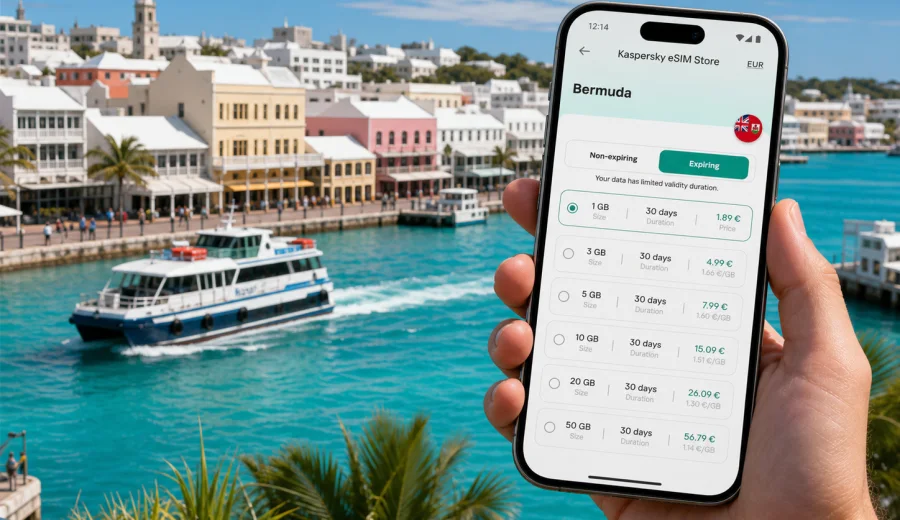
Hamilton eSIM guide: mobile connection and internet for a Bermuda trip
Hamilton is compact, polished and easy to underestimate. Many visitors first see it as the place for a hotel check-in, a meeting, a ferry connection or a quick walk along Front Street before heading to beaches and historic parishes. In practice, the city often becomes the control point for a Bermuda trip: you arrive from L.F. Wade International Airport, arrange transport, confirm restaurant reservations, check ferry timing, navigate one-way streets, answer work messages and plan short trips across the island.
That is why mobile internet matters in Hamilton from the first hour. The city is small enough to explore on foot, but the wider Bermuda itinerary usually depends on maps, messaging, booking confirmations and live updates. A travel eSIM can help you prepare mobile data before departure, keep your main SIM in place and reduce the need to rely on hotel Wi-Fi or public networks when you need directions, ride coordination or a quick call through a messenger.
This guide focuses on Hamilton, Bermuda: arrivals, city movement, business trips, hotels, ferry connections, short stopovers and day trips from the capital. It also explains how to choose an eSIM tariff for the trip, what to check before buying and how to use mobile data in a practical way without turning your phone setup into a last-minute task.
Why Hamilton is a mobile-first city for travelers
Hamilton is the capital of Bermuda and the island's main business center. It sits on Hamilton Harbour, with pastel buildings, shops, offices, restaurants and ferry links concentrated around a walkable downtown. For travelers, the city usually combines several roles at once:
- arrival base after the airport transfer;
- business district for meetings and corporate travel;
- ferry hub for routes across Hamilton Harbour and beyond;
- dining and shopping area around Front Street, Reid Street and Queen Street;
- starting point for beaches, golf, railway trail walks and parish trips;
- practical stop for errands, banking, pharmacies and hotel coordination.
This mix creates frequent small online tasks. You may need to message a hotel before check-in, open a map while walking from the ferry terminal, compare transport options, check opening hours, find a restaurant entrance on a side street or send documents before a meeting. Offline maps help, but they do not replace live search, messaging, cloud access and booking apps.
Hamilton also rewards flexible planning. Weather can change the order of a harbor walk, a beach visit or an outdoor lunch. Ferry and bus choices may depend on timing. If you are using a rented scooter or electric minicar outside the city, you may need data for routes, parking locations and return instructions. A prepared eSIM gives you a separate data line for these tasks while your usual number can stay active for calls or banking confirmations if your device supports dual SIM behavior.
Arrival in Bermuda: where data becomes useful
Most international travelers arrive at L.F. Wade International Airport, which is outside Hamilton in the eastern part of Bermuda. The transfer into Hamilton is not complicated, but it is exactly the moment when mobile internet is useful: you may need to confirm a taxi, message a host, check the address of a hotel on the harbor side or share your expected arrival time with colleagues.
Common arrival tasks include:
1. Opening the hotel address before leaving the airport.
2. Messaging a driver, host or colleague.
3. Checking whether your room, meeting venue or luggage storage is ready.
4. Saving the route from the hotel to Front Street or the ferry terminal.
5. Downloading documents, boarding passes and reservation details.
6. Checking the weather before deciding whether to walk or take a taxi.
If you install an eSIM before travel, you can avoid searching for a local mobile option immediately after landing. Activation details depend on the selected tariff, so it is worth reading the conditions in advance, especially the validity period and when data usage begins. Some travelers prefer to install the eSIM at home on a stable Wi-Fi connection and activate data after arrival; others complete the setup at the hotel. The important point is to avoid doing the whole process in a hurry at the curb or hotel desk.
Hamilton neighborhoods and city movement
Hamilton is easy to walk, but your phone still works as a planning tool. Front Street follows the waterfront and is the best-known visitor axis. Reid Street and Church Street run behind it, with shops, offices, restaurants and services. The ferry terminal, City Hall area, Queen Street and surrounding lanes can be handled on foot, but short distances still become confusing if you are matching a meeting address, a restaurant name and a hotel entrance.
For visitors staying just outside the downtown core, mobile data helps with:
- checking whether a walk is comfortable in heat, rain or after dark;
- deciding between taxi, bus, ferry or hotel transport;
- navigating back from a restaurant after evening plans;
- sharing a live location with travel companions;
- coordinating pickup points where streets are narrow or one-way;
- using translation or currency tools for quick decisions.
Hamilton is not a city where you need constant heavy data usage to manage the day. It is a city where small, timely connections prevent small travel problems from growing. A few map refreshes, several messages and one booking update may be enough to save a late arrival, a missed ferry or a confused meeting handoff.
Mobile data scenarios in Hamilton
Different trips create different data needs. A long weekend in Hamilton is not the same as a business trip with video meetings, and a cruise stop is not the same as a week in a hotel. Use the table below as a practical way to think about eSIM data before choosing a tariff.
| Travel scenario in Hamilton | Typical online tasks | Data approach |
|---|---|---|
| Short stopover or cruise visit | Maps, messaging, restaurant search, photos to upload later | Small data package may be enough if you avoid streaming |
| Business trip | Email, calendar, documents, ride coordination, hotspot backup | Choose more data and check whether tethering is allowed in the tariff |
| Hotel-based vacation | Maps, chats, booking apps, occasional calls through messengers | Moderate data works well when hotel Wi-Fi handles heavy use |
| Island exploration from Hamilton | Navigation, ferry and bus planning, beach searches, weather checks | Choose enough data for full-day movement away from Wi-Fi |
The most common mistake is not choosing too little data for one map session. It is forgetting all the background uses: app updates, cloud photo sync, automatic video downloads, social media autoplay and navigation rerouting. Before you travel, adjust phone settings so the eSIM data package is used for travel essentials first.
Preparing your phone before you land
The simplest setup is done before departure, when your phone is on a reliable Wi-Fi network and you are not dealing with luggage or airport timing. Before choosing a tariff, check your device and make sure it supports eSIM. Also check that it is not locked to one mobile operator, because a locked device may not accept an additional eSIM profile.
A practical pre-trip checklist:
- confirm that your phone supports eSIM;
- update the operating system if you have been postponing updates;
- keep your main SIM active if you need SMS or calls from your regular number;
- decide which line should handle mobile data after arrival;
- save your hotel address and key booking details offline;
- turn off automatic cloud sync, app updates and video autoplay on mobile data;
- keep installation details available in email or the Kaspersky eSIM Store account;
- install the eSIM on Wi-Fi when possible and read the tariff activation rules.
Kaspersky eSIM Store is an app and website where you can choose, arrange and activate an eSIM with a suitable mobile internet tariff for an international trip. It is useful when you want to prepare data access before arriving in Bermuda and avoid making connectivity decisions only after you reach Hamilton.
Choosing an eSIM tariff for Hamilton and Bermuda
For a city trip, do not choose only by the largest number on the screen. Look at four practical details: destination coverage, data volume, validity period and tariff conditions. Hamilton is your city focus, but the eSIM should match Bermuda as the country destination because you will likely move between the airport, the capital, beaches, ferry stops and other parishes.
When comparing options, ask yourself:
- How many days will I be in Bermuda?
- Will I stay mostly in Hamilton or take day trips around the island?
- Do I need data for work documents or only maps and messaging?
- Will hotel Wi-Fi handle video calls and large downloads?
- Do I need hotspot use for a laptop, and is it allowed by the chosen tariff?
- Does the validity period cover arrival day and departure day?
If your trip is built around Hamilton meetings, restaurants and short local movement, a moderate data package can be enough. If you plan to use maps all day, upload photos, work from cafes or use your phone as a backup connection for a laptop, choose more data. The safer approach is to match the tariff to your real behavior, not to an ideal version of the trip where Wi-Fi is always available.
For Bermuda, you can prepare an eSIM tariff for your Hamilton trip before departure, then use the selected tariff according to its conditions after installation and activation. Review the data allowance, validity period and any notes about activation timing before you rely on it for arrival tasks.
Business trips, hotels and Wi-Fi gaps
Hamilton is Bermuda's main business center, so many visits are short, scheduled and less forgiving than a relaxed beach vacation. You may arrive with a meeting calendar, a hotel booking, a dinner reservation and a return flight already fixed. In that situation, mobile data is not about browsing; it is about keeping the day coordinated.
Business travelers often use mobile internet in Hamilton for:
- checking calendar changes while moving between hotel and office;
- opening cloud documents before a presentation;
- finding the correct entrance for an office on a side street;
- confirming dinner plans near Front Street;
- sharing a location with colleagues;
- using a laptop hotspot as a backup if the tariff allows it.
Hotel and office Wi-Fi can still handle large downloads, long calls and heavy work sessions. The eSIM is the practical layer between fixed Wi-Fi points: airport transfer, taxi coordination, walks to dinner, ferry movement and urgent messages when you are away from the lobby. This split keeps data use under control while still giving you a reliable way to handle travel tasks.
Getting around Hamilton with a connected phone
Visitors to Bermuda cannot treat local transport exactly like a large mainland city. Hamilton is walkable, but island movement may involve taxis, buses, ferries, rented scooters, electric minicars or organized transfers. Mobile data helps you decide which option fits the moment.
For downtown Hamilton, walking is often the most efficient option. You can move between the ferry terminal, harborfront restaurants, shops and offices without complex transport. Data helps with micro-navigation: whether to take a parallel street, where the entrance is, which side of the block the restaurant occupies and how long the walk will feel in the current weather.
For trips beyond the city, your phone becomes more important. Ferry connections across the harbor, bus routes to beaches, taxi coordination and scooter navigation all benefit from live data. Bermuda roads can be narrow and unfamiliar to visitors, and the island drives on the left, so it is better to prepare routes before starting and avoid adjusting navigation while moving.
Useful transport habits:
1. Save the hotel location as a favorite in your map app.
2. Check the route while you are still on Wi-Fi, then keep mobile data available for updates.
3. Share meeting or pickup points as map pins, not only street names.
4. Carry a power bank if you will be outside Hamilton most of the day.
5. Keep your main number reachable if local contacts might call you.
Installing and activating your eSIM
The exact setup flow can vary by device and tariff, but the general process is straightforward: choose the destination and tariff, complete the purchase flow, install the eSIM profile on a compatible device and select it for mobile data when you are ready to use it. If you prefer step-by-step device guidance, use the installation guide for Android or the installation guide for iOS.
Before activation, read the tariff details carefully. Check whether the validity period starts at installation, at first network connection or at another defined moment. This matters for Bermuda because some travelers install the eSIM before departure, while others prefer to activate after landing or at the hotel.
A careful setup sequence:
1. Arrange the selected tariff while connected to stable Wi-Fi.
2. Install the eSIM profile before the trip if the tariff conditions allow it.
3. Name the line clearly, for example "Bermuda travel data".
4. Keep your main SIM available for calls or SMS if needed.
5. After arrival, select the eSIM line for mobile data.
6. Enable data roaming for the eSIM if the instructions or device settings require it.
7. Test maps and messaging before leaving the airport or hotel.
An eSIM usually supports mobile data. It does not automatically give you a local phone number, voice calls or SMS unless the selected tariff explicitly includes those services. For ordinary travel communication, many visitors use internet-based calling and messaging apps over the data connection.
Day trips from Hamilton
Hamilton is central enough to support several short trips. You might cross the harbor, visit beaches, follow parts of the Railway Trail, head toward St. George's, explore Dockyard or move between restaurants, galleries and waterfront points. Even when the distance is short, data use can increase because you are away from hotel Wi-Fi for longer.
For island days, prepare in layers:
- download the general Bermuda map area offline;
- keep mobile data for live rerouting and current searches;
- save hotel and ferry terminal locations;
- screenshot important booking confirmations;
- check weather before committing to a beach or outdoor route;
- keep a charger or power bank in your bag.
If Hamilton is only one part of a wider Bermuda stay, choose a tariff that covers the full country destination and full trip length, not just the hours you expect to spend downtown. A city article can focus on Hamilton, but the practical data decision should include the airport transfer, beaches, harbor crossings and departure day.
Quick answers for Hamilton travelers
Do I need an eSIM if my hotel in Hamilton has Wi-Fi?
Hotel Wi-Fi is useful, but it does not cover airport transfers, walks, ferries, taxis, restaurants or day trips. An eSIM gives you mobile data between fixed Wi-Fi points.
Should I activate the eSIM before flying to Bermuda?
Install and activation timing depends on the selected tariff. Many travelers prefer to install on Wi-Fi before departure, then turn on the eSIM for mobile data after arrival if the tariff conditions support that approach.
Can I keep my usual phone number active?
On many dual SIM devices, you can keep your main SIM available for calls or SMS and use the eSIM for mobile data. Check your device settings and any roaming costs from your regular mobile operator.
Is an eSIM enough for calls in Hamilton?
Most travel eSIM use is focused on mobile data. If the tariff does not include voice or SMS, use internet-based calling and messaging apps over the data connection.
How much data should I choose for Hamilton?
For maps, messaging and booking apps, a smaller or moderate package may be enough. For business work, hotspot use, frequent uploads or full-day island movement, choose more data and check the tariff conditions.
Final checklist before your Hamilton trip
Before you leave, make your phone setup as calm as the rest of your itinerary should be:
- choose a Bermuda tariff that fits the full trip, not only downtown Hamilton;
- confirm that your device supports eSIM and is not locked;
- install the eSIM on a stable Wi-Fi connection when possible;
- save the hotel, airport and ferry terminal locations;
- keep your main SIM active if you need calls or bank messages;
- set background data, cloud backup and app updates to Wi-Fi only;
- test maps and messaging after activation;
- keep installation instructions and support access available.
Hamilton is easy to enjoy when the practical details are handled early. With mobile data ready, you can move from the airport to the harbor, from a meeting to dinner, from the ferry terminal to a beach plan and from a hotel lobby to a last-minute route change with less friction.
To prepare before departure, use Kaspersky eSIM Store to choose an eSIM tariff for your Bermuda trip and review the conditions that match your Hamilton itinerary.