
Travel connectivity guide
Hanga Roa eSIM: Internet for Rapa Nui Travel
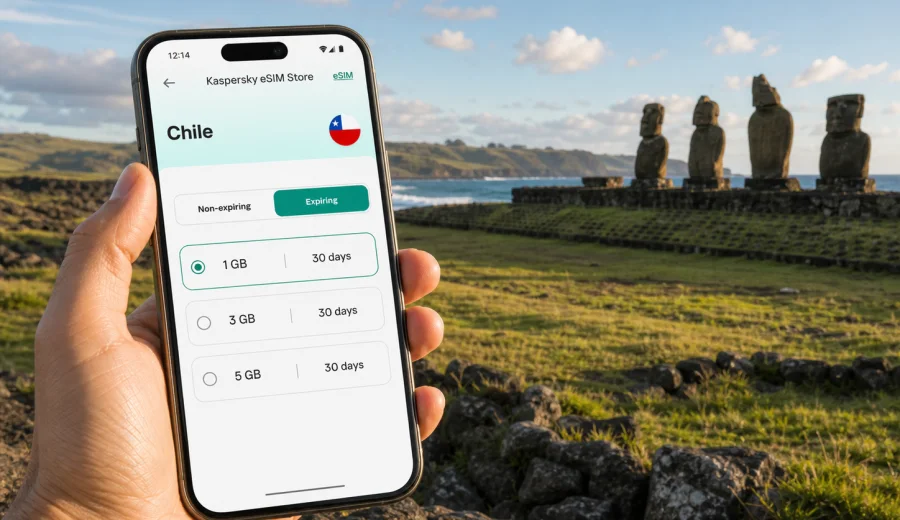
Hanga Roa eSIM: mobile connection and internet for your trip to Rapa Nui
Hanga Roa is the practical base for almost every trip to Rapa Nui, also known as Easter Island. It is where most hotels, guesthouses, restaurants, rental offices, tour desks, pharmacies and everyday services are located. It is also where your mobile internet plan starts to matter: you may need maps at the airport, messages from your host, online booking confirmations, taxi coordination, digital tickets, weather checks and quick research before driving out to archaeological sites.
An eSIM can make this part of the trip simpler. Instead of looking for a physical SIM card after a long flight, you can prepare a digital SIM profile before departure, choose a data package for Chile and use mobile internet on a compatible phone when the plan is active. For Hanga Roa, that preparation is useful because the city is compact, but the island experience often depends on moving between the airport, town streets, coastal paths, national park sites and beaches.
This guide focuses on mobile connection and internet in Hanga Roa itself: arrival, local movement, navigation, hotel stays, day trips from town, business travel and practical eSIM preparation.
Why mobile internet matters in Hanga Roa
Hanga Roa does not feel like a big urban destination. You are not dealing with a metro system, several airport terminals or dozens of business districts. The challenge is different: the town is the service center of a remote island, and many travel decisions happen on the move.
You may need internet for:
- messaging your accommodation after landing at Mataveri International Airport;
- checking a map before walking from the waterfront to a restaurant or guesthouse;
- confirming meeting points for guided tours to Rano Raraku, Ahu Tongariki or Orongo;
- using translation tools in shops, rental offices and tour desks;
- comparing weather and wind conditions before choosing a beach or coastal walk;
- opening booking confirmations when reception asks for details;
- coordinating a rental car, taxi or transfer;
- using messaging apps for calls when your travel eSIM plan is data-only.
The city is small enough to explore on foot in central areas, but your itinerary will often stretch beyond town. A mobile data connection is useful not because Hanga Roa is hard to understand, but because the day can change quickly: a restaurant is closed, a tour time shifts, a driver sends a new meeting point, or you decide to visit Tahai at sunset.
Arrival at Mataveri International Airport
Mataveri International Airport is very close to Hanga Roa. For many travelers, the first online task happens almost immediately after landing: contacting a host, checking whether a transfer is waiting, opening a map, or confirming where to collect a rental vehicle.
Before your flight, save these items offline:
- hotel or guesthouse name and address;
- host phone number or messaging contact;
- booking reference;
- arrival transfer instructions;
- a screenshot of your first-day itinerary;
- passport and travel insurance details in a secure offline location;
- the eSIM installation instructions for your device.
Even if you plan to use mobile internet after arrival, keeping key information offline gives you a fallback. Airports, hotels and restaurants may have Wi-Fi, but you should not build the first hour of the trip around finding a usable public network.
If your phone supports eSIM, you can prepare the profile before the journey and activate the data plan according to the tariff conditions. Before buying, check your device and make sure it is not locked to one mobile operator. This matters more on a remote island than in a large city, because replacing a connectivity plan at short notice can take time.
Where you will use data around town
Most visitors spend a lot of time between the waterfront, the main streets, restaurants, accommodation areas and nearby archaeological sites. The distances are manageable, but the usefulness of internet changes by scenario.
| Hanga Roa moment | Why mobile data helps | Practical tip |
|---|---|---|
| Airport arrival | Transfer messages, map checks, accommodation contact | Install the eSIM before the flight if the tariff allows it, then activate data when appropriate |
| First walk in town | Navigation, restaurant searches, opening saved places | Download an offline map and use data for updates |
| Waterfront and Tahai | Sunset timing, photo backup, meeting points | Avoid heavy uploads if your data package is small |
| Rental car pickup | Documents, route planning, messaging the office | Save the rental agreement and emergency contact offline |
| Guided tours | Schedule changes, pickup details, translation | Keep the guide contact pinned in your messenger |
| Hotel evenings | Email, calls through apps, planning the next day | Use trusted hotel Wi-Fi for large updates when available |
The key is to separate essential data from nice-to-have data. Maps, messages and confirmations are essential. Long video uploads, cloud backups and streaming can wait until you have a stable Wi-Fi connection or a larger data package.
Hanga Roa by district and travel routine
Hanga Roa is not usually described through formal business districts, but travelers experience it through practical zones.
The central town area is where you will find many restaurants, small shops, rental offices and services. You may use data here for opening menus, confirming reservations, checking walking routes and contacting a host. Because you will move between short stops, a ready mobile connection is more convenient than repeatedly asking for Wi-Fi passwords.
The waterfront is a common place for walks, meals and sunset plans. You may want mobile internet for route checks, weather updates, photo messages and navigation back to your accommodation after dark. If you are using a data-only eSIM plan, calls through messaging apps can cover many routine needs.
The airport side of town matters on arrival and departure days. Your phone should already have the essentials: boarding details, accommodation contact, transfer instructions and enough data for last-minute changes.
The accommodation areas around town vary from hotels and guesthouses to cabins and family-run stays. Before booking, it is worth checking whether the property offers reliable Wi-Fi if you need video calls, large file transfers or remote work. Mobile data is excellent for independence during the day, but accommodation Wi-Fi can still be useful for heavier tasks.
Transport, navigation and day trips from Hanga Roa
Hanga Roa is the starting point for most island movement. Depending on your travel style, you may walk, use taxis, join guided tours, rent a car, rent a bike or arrange transfers through your accommodation. Public transport is not the main planning tool for most visitors, so internet helps with coordination rather than timetable reading.
For navigation, download an offline map before departure. Then use mobile data for live details: updated opening information, meeting points, messages from guides and route checks when plans change. This mixed approach protects your data allowance and gives you a backup if the signal is weaker outside town.
Common movement scenarios include:
- walking from your accommodation to the waterfront, restaurants and shops;
- taking a short transfer from the airport to your hotel;
- joining a guided trip to archaeological sites outside town;
- driving to Rano Raraku, Ahu Tongariki or Anakena;
- visiting Orongo and Rano Kau from Hanga Roa;
- returning to town for dinner, supplies and next-day planning.
When you drive outside Hanga Roa, save routes before leaving the accommodation. Keep your phone charged and consider a power bank if you rely on it for maps and photos. Mobile internet is helpful, but a remote-island itinerary should not depend on constant high-speed data in every location.
How to plan your eSIM data for Hanga Roa
The right amount of mobile data depends on how you travel. A short stay with mostly maps and messages needs much less data than a remote-work trip with video calls and frequent uploads. Think about the tasks you need mobile data to handle when you are away from trusted Wi-Fi.
For a light traveler, mobile internet may be used mainly for maps, chats, ride or transfer coordination, booking confirmations and quick searches. For this style, a smaller data package can be enough if you avoid video streaming and automatic cloud backups.
For a photographer or active social media user, Hanga Roa can create data pressure quickly. Sunset photos, moai-site videos, beach clips and cloud backups can use a lot of traffic. You can still use eSIM efficiently by saving large uploads for Wi-Fi and keeping mobile data for messaging, navigation and urgent sharing.
For a business traveler or remote worker, the priority is reliability planning. Check accommodation Wi-Fi before booking, keep a mobile data package ready for messages and backup access, and avoid scheduling critical video calls while moving between sites. Mobile data is useful as a flexible travel layer, not as a promise that every outdoor location will support heavy work.
When you are ready to prepare mobile internet for the trip, you can choose an eSIM plan for Chile in Kaspersky eSIM Store and compare available data volume, validity period and destination conditions before you travel to Hanga Roa.
Installing an eSIM before the trip
The smoothest approach is to install the eSIM profile while you still have reliable home internet. Then you can activate the plan according to the instructions and tariff conditions. The exact flow depends on your phone model and operating system.
General steps:
1. Check that your phone supports eSIM and is not operator-locked.
2. Choose Chile as the destination and select a data package that matches your trip length.
3. Complete the order in the app or on the website.
4. Install the eSIM profile using the provided QR code or in-app flow.
5. Label the eSIM clearly, for example "Chile data" or "Travel eSIM".
6. Keep your main SIM active for calls or SMS if you need it.
7. Turn on mobile data for the travel eSIM when you are ready to use the plan.
For device-specific setup, use the Android installation guide or the iOS installation guide. Follow the instructions for your device rather than copying settings from another phone, because menu names and eSIM behavior can differ by model.
Safety, costs and common mistakes
An eSIM helps you prepare mobile internet, but it does not remove the need to manage settings carefully. The most common mistakes are simple and avoidable.
| Mistake | Why it causes trouble | Better approach |
|---|---|---|
| Installing the eSIM at the last minute | You may be tired, offline or in a hurry | Install before departure over a stable connection |
| Forgetting device compatibility | Not every phone supports eSIM | Check support and operator lock status before buying |
| Leaving roaming on for the wrong line | Your home SIM may create roaming costs | Set mobile data to the travel eSIM and review default SIM settings |
| Using mobile data for automatic backups | Photos and videos can consume data quickly | Save large uploads for trusted Wi-Fi |
| Depending only on live maps | Coverage and battery can vary outside town | Download offline maps and carry a power bank |
Also remember that many travel eSIM tariffs are data-only. They may not include a local phone number, standard voice calls or SMS unless the tariff conditions say so. For calls and messages, plan to use internet-based apps. If your bank or airline requires SMS to your regular number, keep your primary SIM available according to your phone's dual-SIM settings.
Quick checklist before flying to Hanga Roa
Use this checklist the day before departure:
- Confirm your accommodation address and transfer instructions.
- Save your host or hotel contact offline.
- Download offline maps for Hanga Roa and Rapa Nui.
- Check your phone's eSIM compatibility and lock status.
- Install the eSIM profile while you have stable Wi-Fi.
- Read the activation conditions for the selected tariff.
- Label the travel eSIM clearly in phone settings.
- Turn off automatic mobile-data backups if your package is limited.
- Pack a power bank and charging cable.
- Save Android or iOS eSIM setup instructions for offline reference.
For arrival day:
- keep airplane mode on until you are ready to configure mobile data;
- select the travel eSIM for mobile data when appropriate;
- make sure data roaming is enabled for the eSIM if the instructions require it;
- confirm that your primary SIM is not accidentally using roaming data;
- message your accommodation or driver once the connection is ready.
Choose mobile internet for Hanga Roa before you travel
Hanga Roa rewards preparation. The town is relaxed, but the trip often depends on timely messages, maps, transfer details, tour coordination and flexible day planning. A prepared eSIM can help you arrive with mobile internet ready for the practical parts of the journey, while offline maps and saved documents give you a backup.
Before your flight to Rapa Nui, review your phone compatibility, choose a data package that matches your stay and install the eSIM while you have stable Wi-Fi. In Kaspersky eSIM Store, you can prepare an eSIM plan for Chile and keep your Hanga Roa trip focused on the island rather than on finding connectivity after landing.