
Travel connectivity guide
Hangzhou eSIM: Mobile Internet for Your Trip
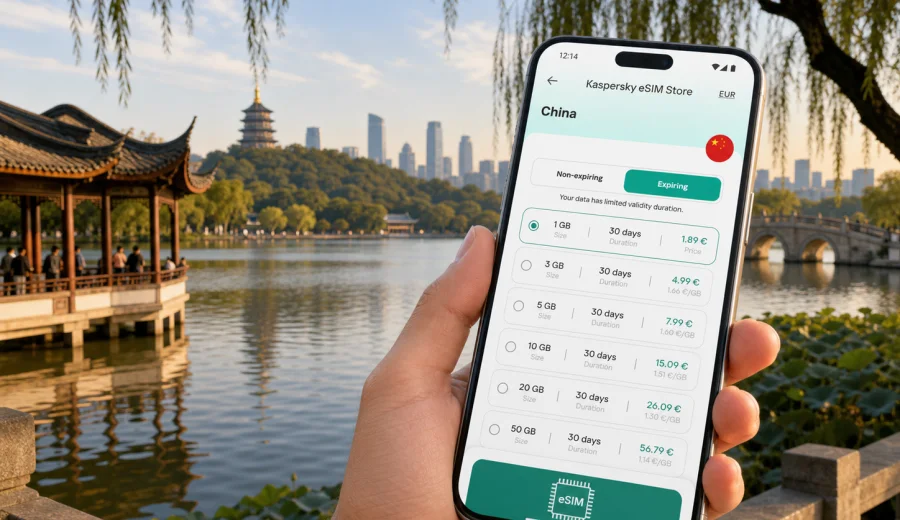
Hangzhou eSIM: mobile connection and internet for your city trip
Hangzhou is a city where a good travel day often depends on being online at the right moment. You may land at Hangzhou Xiaoshan International Airport, go straight to a hotel near West Lake, cross the river for meetings in Binjiang, or continue by train from Hangzhou East Railway Station. In each case, mobile internet helps you open maps, confirm bookings, message your hotel, translate addresses, and adjust plans without looking for a physical SIM card shop after arrival.
An eSIM can be useful if your phone supports it and you want mobile data prepared before you reach China. Instead of changing a plastic SIM card, you install a digital SIM profile, select it for mobile data, and use the chosen data plan during the trip. Kaspersky eSIM Store is an app and website where you can choose, arrange, and activate an eSIM with a suitable data plan for travel abroad. Plan conditions vary, so always check destination, data volume, validity period, activation rules, and device compatibility before purchase.
This guide is about Hangzhou specifically: airport arrival, districts, transport, hotels, business travel, stopovers, and short trips from the city. China provides the country context and the correct plan destination, but the practical focus stays on using eSIM mobile connection and internet in Hangzhou.
Why mobile internet matters in Hangzhou
Hangzhou is easy to enjoy when your phone is ready from the first hour. The city combines lakeside sightseeing, business districts, technology parks, railway hubs, and scenic areas spread around West Lake, the Qiantang River, Xixi Wetland, and tea village routes. Mobile data is useful because you rarely need only one app. A normal day can involve maps, ride details, hotel messages, restaurant reservations, tickets, weather checks, translation, and work chats.
Typical Hangzhou moments where mobile internet helps:
- after landing, when you need the route from the airport to the hotel;
- near West Lake, where walking paths, piers, temples, and cafes are easier to manage with live maps;
- at large stations, where the right exit and pickup point matter;
- in Binjiang or Qianjiang New City, where business meetings may be far from tourist areas;
- on day trips to Longjing tea areas, Xixi Wetland, or nearby rail destinations;
- when you need to contact a hotel, driver, colleague, or travel companion quickly.
Hotel and cafe Wi-Fi can still be useful, especially for large downloads. It is less convenient when you are outside, moving between districts, or trying to solve a transport problem. A travel eSIM helps reduce dependence on public Wi-Fi for routine city tasks.
Arrival at Hangzhou Xiaoshan International Airport
The airport stage is where many connectivity problems appear. You may need to message your accommodation, check whether metro or road transfer is better, compare travel time, or show the address to a driver. If your eSIM is installed before departure, you can usually switch the data line after landing and follow the selected plan instructions.
Prepare these items before the flight while you still have a stable connection:
- hotel name and address, ideally in both English and Chinese;
- booking confirmation and check-in details saved offline;
- route options from the airport to your district;
- contact details for your hotel or host;
- eSIM setup instructions and QR code access if needed;
- enough battery, or a power bank for the first transfer.
Some eSIM plans start validity when installed, while others start after first connection to a supported network. Read the activation conditions before you travel so you do not use part of the validity period too early.
Where eSIM helps most in the city
| Area or travel zone | Common reason to go there | How mobile data helps |
|---|---|---|
| West Lake and Hubin | Sightseeing, hotels, restaurants, lakeside walks | Maps, walking routes, bookings, messaging |
| Wulin and city center | Shopping, offices, metro transfers | Navigation, meeting updates, local search |
| Qianjiang New City | Business, conferences, riverfront hotels | Ride routes, calendar changes, work messages |
| Binjiang | Technology offices, business travel, river crossings | Taxi pickup points, maps, mobile email |
| Xixi Wetland | Nature walks, family trips, resort stays | Tickets, return transport, route changes |
| Longjing tea areas | Scenic visits and tea culture | Smaller-road navigation and pickup points |
| Hangzhou East Railway Station | High-speed rail and regional transfers | Train updates, station exits, onward routes |
The practical lesson is to choose a data plan around your real movement pattern. A quiet weekend near West Lake may need less data than a business week with rides across several districts, mobile email, maps, and hotspot use.
How much data to plan
Data use depends on your phone settings and travel habits. Treat the numbers on a plan as a budget to manage, not as something that should be spent quickly. Maps, messaging, email, ticket apps, and light browsing are usually manageable. Video streaming, app updates, cloud photo backup, and large work files can consume data fast.
| Trip style | Likely mobile internet use | Planning note |
|---|---|---|
| One-day stopover | Maps, messaging, ride details, quick searches | Save documents offline and keep data for live tasks |
| Weekend near West Lake | Navigation, restaurants, weather, shared photos | Turn off mobile cloud backup if you want to save traffic |
| Business trip | Email, maps, calendar changes, occasional files | Check whether hotspot use is allowed by the plan |
| Family trip | Maps, translation, tickets, group coordination | Decide who carries the main data phone |
| Regional route | Hangzhou plus other Chinese cities | Confirm that the plan covers the full route |
Before departure, update apps on Wi-Fi, download offline maps if you use them, and set photo backup to Wi-Fi only. Then mobile data can support the parts of the trip where live connection matters most.
Choosing an eSIM data plan for Hangzhou
Start with the destination. Hangzhou is in China, so a city article should point to a China data plan rather than a separate city plan. If your itinerary continues outside China, compare whether a regional or broader option fits better, but do not assume one plan covers every destination. Coverage, validity, and included data are plan-specific.
Before choosing, check:
- destination: China, or a wider route if your itinerary requires it;
- data volume: enough for maps, messaging, email, tickets, and travel apps;
- validity period: long enough for arrival and departure days;
- activation moment: installation or first supported network connection;
- hotspot rules: important for laptops or shared family use;
- support and refund conditions: useful if compatibility is uncertain.
If Hangzhou is your main destination and you want to prepare mobile internet before departure, you can choose a data plan for your trip to Hangzhou in China through Kaspersky eSIM Store. Review the plan details carefully, because the right option depends on your device, route, data habits, and length of stay.
Device compatibility: check before purchase
Your device must support eSIM, and it should not be locked in a way that prevents using another mobile data profile. Support can vary by model, region, and operator configuration, so check the exact device rather than the product family name.
Use this checklist:
- confirm that your exact phone or tablet model supports eSIM;
- check that the device is not operator-locked;
- make sure you can receive installation details by email or account access;
- keep a stable internet connection for installation;
- avoid deleting an installed eSIM profile unless you know it can be reinstalled;
- decide whether your primary SIM should remain active for calls or messages.
You can also check your device before choosing a plan. This is worth doing even if you have used eSIM before, because regional device variants may differ.
How to install and activate eSIM
The best time to install eSIM is usually before the trip, while you have reliable Wi-Fi. Activation timing depends on the selected plan, so follow the plan instructions. In general, the flow is: choose a destination and data plan, complete the order, install the eSIM profile, then select it for mobile data when you are ready to use it.
For device-specific steps, use the official installation pages: Android installation guide and iOS installation guide. Keep the instructions saved before travel if you expect to install the eSIM after landing.
A simple setup sequence:
1. Check eSIM support and lock status.
2. Choose the plan for China or your wider route.
3. Install the eSIM profile using the provided method.
4. Label the line clearly, for example Travel data.
5. Keep your primary SIM active if you need it for calls.
6. On arrival, select the eSIM for mobile data.
7. Enable data roaming for the eSIM if the plan instructions require it.
8. Test maps and messaging before leaving the airport or hotel.
Do not leave setup until you are in a taxi queue with low battery and no Wi-Fi. A few minutes of preparation can prevent the most common arrival problems.
Practical Hangzhou scenarios
One-day stopover
With only several hours in Hangzhou, your phone becomes the trip manager. Keep the itinerary conservative: West Lake, Hubin, and central dining areas are easier to manage than distant scenic spots. Use mobile data for live maps, ride details, and messages, not for heavy downloads.
West Lake weekend
A weekend near West Lake can include walking paths, boat piers, temples, gardens, cafes, and evening views. Save must-see places offline, then use mobile internet for decisions that change during the day: route timing, restaurant availability, pickup points, and return transport.
Business or family trip
Business travel may involve Qianjiang New City, Binjiang, conference hotels, or office parks. Family travel adds coordination around tickets, hotel messages, and meeting points. In both cases, choose enough data for maps and communication, check hotspot rules before relying on a laptop or shared device, and store essential details offline.
Moving around Hangzhou with mobile data
Hangzhou visitors often combine metro, taxis, walking, airport transfer, and high-speed rail. Mobile data helps with station exits, pickup points, route changes, and messages when weather, traffic, or meeting times shift. Save your hotel location after arrival, keep the address in Chinese if available, screenshot key routes when battery is low, and carry a power bank on long sightseeing days. At Hangzhou East Railway Station, allow extra time and use mobile internet for onward navigation.
Common mistakes to avoid
- Buying a plan before checking eSIM support on the exact device.
- Deleting an eSIM profile without reading whether reinstall is possible.
- Choosing too little data for a work trip with hotspot use.
- Assuming a data-only eSIM includes voice calls or SMS.
- Forgetting that validity period rules vary by plan.
- Leaving cloud photo backup active on mobile data.
- Waiting until arrival with no Wi-Fi, low battery, and no saved instructions.
- Choosing a country plan when the real itinerary crosses into other destinations.
Most eSIM problems are preparation problems. Check compatibility, read the plan conditions, and install while you still have stable internet.
FAQ: eSIM for Hangzhou
Can I use eSIM only for mobile internet in Hangzhou?
Yes. Many travel eSIM plans are designed mainly for mobile data. They may not include a regular phone number, voice calls, or SMS unless this is stated in the plan conditions.
Should I install eSIM before flying to Hangzhou?
In many cases, yes. Install while you have reliable Wi-Fi, but check whether validity starts at installation or first supported network connection.
Is eSIM useful if my hotel has Wi-Fi?
Yes. Hotel Wi-Fi helps inside the hotel. Mobile data is useful at the airport, around West Lake, in business districts, at stations, and during day trips.
Can I keep my usual SIM active?
On many compatible phones, you can keep your primary SIM for calls or messages and use the travel eSIM for mobile data. Exact behavior depends on your device and settings.
Is one eSIM enough for a laptop?
An eSIM is installed on one compatible device. If you want to connect a laptop, you may need hotspot sharing from the phone, and the selected plan must allow it.
What if I visit Shanghai or another Chinese city after Hangzhou?
Choose based on the listed destinations. A China plan may suit a route that stays within China. Wider regional travel may require a different option.
Choose eSIM mobile internet for your Hangzhou trip
Hangzhou is easier to navigate when your mobile connection is ready before the first transfer. With an eSIM-compatible device, you can prepare a data plan for China, keep your physical SIM in place, and use mobile internet for maps, messaging, hotel details, transport, and work tasks throughout the city.
Kaspersky eSIM Store helps you choose, arrange, and activate an eSIM with a suitable data plan for travel abroad through the app or website. Before purchase, check compatibility, read the plan conditions, and decide how much data you need for your Hangzhou itinerary. When you are ready, choose an eSIM data plan for your trip to Hangzhou and set it up before you travel.