Travel connectivity guide
Hanoi eSIM: Mobile Internet and Travel Tips
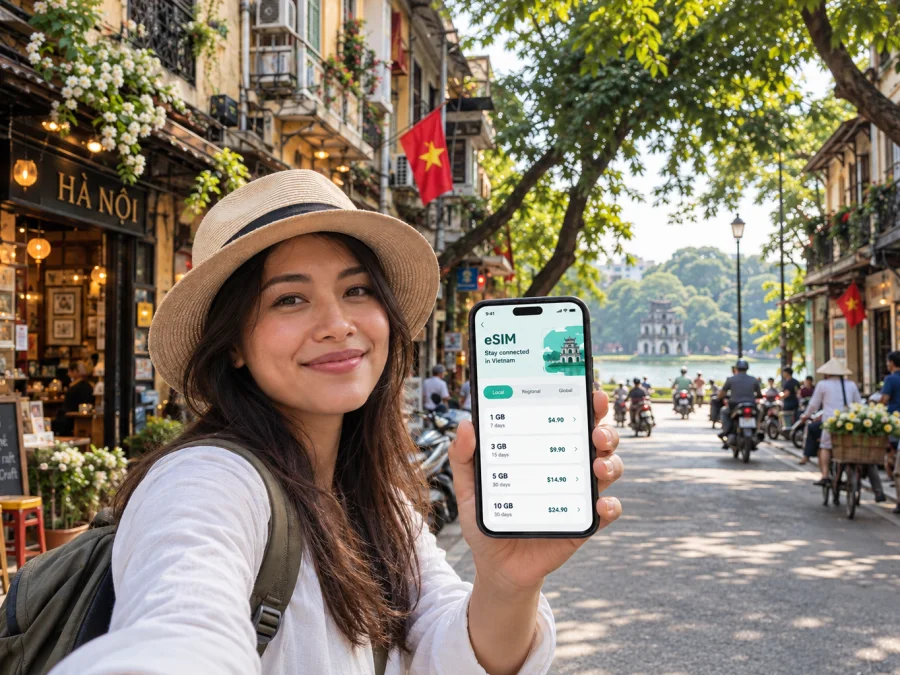
Hanoi eSIM: mobile connection and internet for your city trip
Hanoi is easiest to explore when you can check a map, message your host and adjust a route while you are on the move. An eSIM can make mobile data part of your arrival plan, so you do not have to begin the trip by searching for a shop or relying on hotel Wi-Fi. The city rewards slow wandering, but its busy streets, changing plans and spread-out districts make a dependable way to get online useful from the first day.
This guide focuses on using mobile internet in Hanoi: what to prepare before landing at Noi Bai International Airport, how to orient yourself around Hoan Kiem Lake, what to consider when choosing where to stay, and how to plan days that cross the city. It also explains what an eSIM can and cannot do, and how to keep maps, ride details and work messages accessible without letting your phone become the whole trip.
Plan for the first hour after landing
Noi Bai International Airport is outside the central neighborhoods, so the first trip into Hanoi involves a transfer rather than a short walk from the terminal. Before you board, save your accommodation name and address in a format you can show a driver or host. A map pin is useful too, but keep a written address available in case your battery is low or the screen is hard to read in a crowded pickup area.
If you arrive on an international flight, you will use Terminal 2; domestic flights use Terminal 1. Check your flight details and follow the signs after you land. The airport publishes current information about transport options and terminal services, so confirm the available choices on the day rather than relying on an old screenshot or a fixed fare quoted in a guide. For a connecting flight, leave enough time to follow airport instructions between terminals and to complete any required formalities.
A phone with mobile data can help you compare a route, contact your hotel and share your arrival details. It is still sensible to download an offline map of central Hanoi before leaving home. Offline access is a backup for navigation, not a replacement for live traffic, updated pickup points or messages from your accommodation.
Arrival checklist
- Keep your hotel or apartment address in a note that opens without a data connection.
- Save the map location and the name of the neighborhood, not only the property name.
- Check whether your airport transfer is arranged and where you are expected to meet.
- Charge your phone before the flight and carry a power bank if you use navigation heavily.
- Decide which SIM profile will handle mobile data before you leave the terminal.
- Keep your home number available for calls or verification messages if you need it.
The first goal is simple: reach your accommodation with the address, pickup details and a working way to contact someone. Once checked in, you can make a calmer plan for exploring the city.
Getting oriented around central Hanoi
Hoan Kiem Lake is a helpful point of reference for many first-time visitors. The Old Quarter lies to its north, while streets around the lake and farther south connect with the French Quarter and the area around the Hanoi Opera House. Ba Dinh, with major civic and cultural sites, is farther west. West Lake, or Ho Tay, is a larger waterside area northwest of the center. These names are useful when you compare hotels, directions and daily routes.
Hanoi is not a city where every journey is best understood as a straight line. A destination may look nearby on a map, while a busy crossing, one-way street or local traffic pattern changes the practical route. Use a map to check the destination and walking approach, then look up from the screen before crossing. For short distances in the Old Quarter, walking can be more predictable than getting in and out of a vehicle, especially when you are visiting several small streets or cafés.
| Area | What it can mean for a visitor | A useful phone task |
|---|---|---|
| Old Quarter | Dense streets, shops, food stops and small hotels near the historic center | Save your lodging pin and check the exact lane or entrance |
| Hoan Kiem Lake | A clear meeting point and a natural place to begin a central walk | Share a precise meeting point instead of saying only “by the lake” |
| French Quarter | Wider streets and notable civic, cultural and hotel addresses south and southeast of the lake | Compare walking time with a vehicle route before setting out |
| Ba Dinh | A district for planned visits to major landmarks and institutions | Check opening arrangements and entry details before travelling |
| West Lake | A broad lakeside area with a different pace from the central lanes | Group nearby stops together to avoid repeated cross-city trips |
This is a practical orientation, not a promise that all streets or venues fit neatly inside one district label. Hanoi’s boundaries and everyday place names do not always match the categories used by booking sites. Confirm the location of an individual hotel, meeting room or entrance before you commit to a route.
Moving through the city
Hanoi combines walking, public transport, taxis and app-based rides. Which option makes sense depends on distance, weather, luggage, timing and how comfortable you feel navigating the streets. A phone connection helps with route planning and communication, but it does not remove the need to confirm the vehicle, destination and pickup point.
The city’s metro has passenger service on the Cat Linh–Ha Dong line and the elevated Nhon–Cau Giay section of the Nhon–Hanoi Station Line 3 project. The full project and the operating segment are not the same, so check current service details, station access and operating arrangements before building a time-sensitive itinerary around a train. A metro ride may be convenient for a journey near its stations; for destinations beyond them, you may still need to walk or use another form of transport.
For taxis or ride-hailing, verify the car and driver details shown in your booking before getting in. Set the destination in the app or show the address, and make sure the pickup location is the one you intended. At a crowded hotel entrance or market, move to a clear, safe place and communicate where you are standing. Do not assume that a pin on the opposite side of a major street is an easy pickup point.
Hotels, workdays and short stopovers
A hotel choice affects more than the evening walk home. If you have an early departure from Noi Bai, ask the property how to arrange a ride and when you should leave; if your plans center on the Old Quarter, confirm the exact lane and vehicle access. Keep the accommodation address, check-in instructions and host contact in an offline note. For a hotel farther from the lake, pin the nearest recognizable entrance or meeting point so a driver does not have to guess which side of a large building you mean.
For a business visit, save each meeting address and the name of the building or reception desk. Mobile data can help with calendar changes and route updates, but leave time to find the correct entrance and check in. If you need to work between appointments, choose a place where you can sit safely and hear a call; do not plan a video meeting around an unpredictable ride across town.
A short stopover needs a conservative plan. Count the airport transfer both ways, the time needed to return for your flight and a buffer for traffic. Choose one central area rather than trying to cross Hanoi several times. Keep your onward boarding information and return pickup details accessible offline, and confirm the day’s airport and transport arrangements before leaving the terminal.
Prepare mobile data for Hanoi
An eSIM is a digital SIM profile that can be installed on a compatible, unlocked device. For a trip to Hanoi, a travel eSIM can be used for mobile data under the terms of its selected plan. It may be convenient if you prefer to prepare before departure and avoid handling a physical SIM immediately after landing. Availability, data allowance, validity and supported networks depend on the plan, so review its details for Vietnam before choosing.
Kaspersky eSIM Store is an app and website where travelers can choose, order and activate an eSIM with a suitable plan for mobile internet during an overseas trip. The service is not a mobile network operator. Your experience in Hanoi depends on the selected plan, the partner network it uses, local coverage and your device settings. No eSIM should be treated as a guarantee of uninterrupted service in every building or street.
Think about your likely use before selecting a plan. Maps, messaging and web searches usually consume less data than frequent video streaming, cloud backups or uploading large files. If you work remotely, count video meetings and file transfers as part of your expected use, and consider connecting to trusted Wi-Fi for large downloads. Check the plan’s validity period as well as its data amount; an allowance that looks sufficient may not suit a longer stay or intensive work schedule.
You can review eSIM plan options for Vietnam and compare the stated allowance and validity with your itinerary. The right choice depends on how long you will stay, how often you expect to use mobile data and whether you have reliable Wi-Fi where you are staying.
Before you choose
- Confirm the destination. Make sure the plan applies to Vietnam and read any regional conditions shown with it.
- Estimate your use. Include navigation, messaging, browsing, work calls and media uploads.
- Check validity. Match the plan period to your dates and expected activation timing.
- Review your device. Confirm eSIM support and that the phone is not carrier-locked. Check whether your device supports eSIM.
- Keep your main number in mind. Decide whether you need it active for calls or account verification, and review how your phone handles two SIM profiles.
- Save the setup details. Keep installation instructions and any QR code or activation information accessible before travel.
Device support can vary by model, region and carrier lock status. Check the exact device rather than relying only on a product family name. If you are unsure, confirm with the manufacturer or your current carrier before purchase. Avoid deleting an installed profile unless you understand the plan’s reinstallation rules; some eSIM profiles cannot simply be downloaded again.
Install and use the eSIM thoughtfully
Install the profile when you have a stable internet connection and enough time to follow the instructions. Depending on your device, setup can use a QR code or a manual activation flow. The exact menu names vary between phone models and operating system versions. Follow the steps supplied for your eSIM and device: Android installation instructions or iOS installation instructions.
A practical sequence is:
- Check that your phone supports eSIM and is unlocked.
- Connect to Wi-Fi and open the eSIM setup instructions.
- Add the eSIM profile using the method provided for your plan.
- Label the new profile so you can recognize it while travelling.
- Choose which SIM should handle mobile data and keep your home number settings as intended.
- Follow the plan’s activation guidance, including whether data roaming must be enabled for that profile.
- Wait for the device to register; activation or network selection may take a few minutes.
- Test a simple webpage or message before you rely on the connection for a pickup or appointment.
If you install the profile before departure, do not assume that installation and the start of plan validity are always the same event. Check the plan terms to understand when the validity period begins. If you would rather wait until Hanoi, keep the setup information available offline and use trusted Wi-Fi for installation. Choose the approach that matches the plan instructions and your comfort with phone settings.
When you arrive, select the travel eSIM for mobile data if that is how you intend to use it. Keep the primary line configured for calls or SMS only if needed, and review roaming settings carefully to avoid unexpected charges from your home carrier. The eSIM plan is generally intended for data unless the plan details explicitly say otherwise; it may not include a local phone number, standard voice calls or SMS. Internet messaging and voice apps can work over data, subject to the app and network conditions.
If data does not work, check that the correct profile is enabled, the travel eSIM is selected for mobile data and the plan has become active. Review the instructions for any required data roaming setting. Restarting the phone or toggling airplane mode can sometimes refresh registration, but follow your plan’s support guidance if the issue continues. A downloaded map and saved address help you stay oriented while you troubleshoot.
Frequently asked questions
Is an eSIM useful as soon as I arrive in Hanoi?
It can be, if the profile is installed and the plan is active according to its terms. Mobile data can help you contact your accommodation and check a route from Noi Bai. Save your address and transfer details in advance as a backup.
Will one eSIM work throughout every part of Vietnam?
Coverage depends on the selected plan, its partner network, local conditions and your device. Check the plan details for the places on your itinerary, especially if you will leave Hanoi for a more remote area.
Can I keep my usual phone number?
Often you can keep a home SIM profile active while using an eSIM for data, if your device supports dual SIM use. Settings vary. Check which line handles data, calls and messages, and ask your home carrier about roaming charges for your main number.
Does a travel eSIM include ordinary calls and text messages?
Usually it is intended for mobile data unless the specific plan states otherwise. It may not provide a local number or standard calls and SMS. You can use internet-based messaging apps over data when their service is available.
Should I install the eSIM before flying?
You may install it before departure if the plan instructions allow it and you have a stable connection. Check when validity starts. If you prefer to install it after landing, keep the QR code or activation details accessible offline and use Wi-Fi.
What should I do if the map position seems wrong?
Stop somewhere safe, check the street name and compare the route with the saved destination. In dense blocks, the map dot can be imprecise. Ask your host for a nearby landmark or show the written address rather than walking while focused on the screen.
How much data should I choose for a Hanoi visit?
There is no single amount for every traveler. Estimate the length of your stay and how often you will use maps, messaging, video, hotspot sharing or remote-work tools. Review the allowance and validity together, and use trusted Wi-Fi for large downloads where practical.
Leave room for the city
A phone connection is most helpful when it removes small planning frictions: finding a hotel entrance, checking a pickup, sharing a meeting point or changing a route. Prepare the details you may need offline, keep an eye on battery use and pause navigation before crossing busy streets. Then let Hanoi set the pace, whether your day centers on the Old Quarter, the lake, a meeting in Ba Dinh or a slower walk beside West Lake.
Before departure, review the plan conditions, confirm device compatibility and follow the installation steps for your phone. In Kaspersky eSIM Store, you can choose an eSIM plan for your trip to Vietnam and prepare mobile data for your time in Hanoi.


