
Travel connectivity guide
Helsingor eSIM for mobile internet
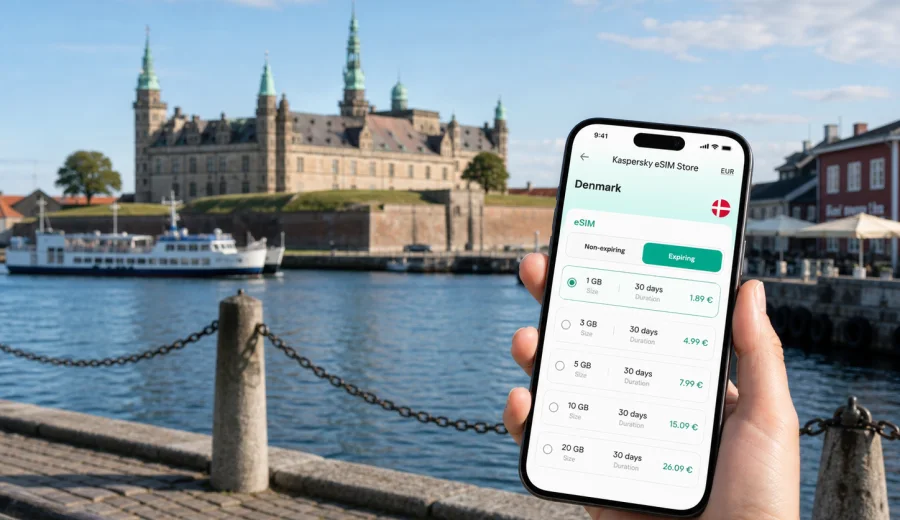
Helsingor eSIM: mobile connection and internet for your trip
Helsingor is a compact Danish city where mobile internet matters from the first minutes of the trip. You may arrive by train from Copenhagen, by car along the coast of Zealand, or by ferry across the Oresund from Helsingborg. In each case, a working data connection helps with maps, hotel messages, ferry updates, restaurant bookings, digital tickets, and quick checks around Kronborg Castle, the harbor, Stengade, and the waterfront.
An eSIM is useful in Helsingor because the city is easy to explore on foot, but many travel decisions happen on the move. You may need to compare train times, navigate from the station to your hotel, find the right platform for a trip back to Copenhagen, or message colleagues before a meeting. With a compatible phone, you can use an eSIM-tariff for mobile internet in Denmark without looking for a physical SIM card after arrival.
This guide focuses on Helsingor, not Denmark in general. It explains where mobile data is most useful in the city, how to choose a suitable eSIM-tariff for a short stay or a longer route, what to check before purchase, and how to use Kaspersky eSIM Store as a practical way to choose, arrange, and activate an eSIM for travel.
Why eSIM is useful in Helsingor
Helsingor is small enough for a weekend visit and important enough to be part of larger Danish and Scandinavian routes. The city is known for Kronborg Castle, its waterfront, cultural spaces near the harbor, shopping streets in the old center, and the ferry connection to Sweden. That mix creates several moments where mobile data is more convenient than waiting for hotel Wi-Fi or searching for a public network.
Common Helsingor scenarios include:
- checking the fastest train route from Copenhagen Airport or central Copenhagen;
- navigating between Helsingor Station, the harbor, Kronborg Castle, and hotels;
- using maps while walking through the old town and along the waterfront;
- opening booking confirmations for accommodation, castle visits, restaurants, or ferries;
- messaging a host, colleague, tour guide, or family member after arrival;
- using translation, weather, taxi, payment, and travel apps during the day;
- planning a side trip to Fredensborg, Louisiana Museum of Modern Art, Copenhagen, or Helsingborg.
The main value of eSIM in Helsingor is control. You can prepare mobile internet before the trip, keep your main SIM in the phone, and switch mobile data to the travel eSIM when needed. This is especially helpful if your phone supports dual SIM use, because you can keep your regular number available for calls or messages while using the eSIM for data.
Arrival: where mobile data helps first
Many travelers reach Helsingor after landing at Copenhagen Airport. The route usually involves public transport across Copenhagen and north through Zealand. Even if the connection is straightforward, mobile data can help you check live departures, platform changes, walking directions, and ticket apps. If you arrive late, a working connection also helps confirm hotel check-in details before you reach the reception desk.
If you travel from Sweden, the Helsingborg-Helsingor ferry makes the city feel like a cross-border stop rather than a single-destination visit. Mobile data helps you compare ferry timing, confirm the next stage of your route, and avoid relying on terminal Wi-Fi. If your itinerary includes both Denmark and Sweden, check the countries or region covered by the selected tariff before purchase.
For drivers, mobile internet is useful for navigation around the port area, parking, charging stations, and route planning toward Copenhagen or North Zealand. For rail travelers, it is useful at Helsingor Station, where a small delay or missed connection can change the rhythm of a short visit.
Quick arrival checklist
| Moment in the trip | Why mobile internet helps |
|---|---|
| Before leaving Copenhagen Airport | Check train options, ticket apps, and platform information |
| On the train to Helsingor | Message the hotel, download maps, and review the walking route |
| At Helsingor Station | Navigate to the old town, harbor, ferry terminal, or accommodation |
| Near Kronborg Castle | Open tickets, maps, audio guides, and weather updates |
| At the ferry terminal | Check sailing times and coordinate cross-border plans |
City movement: walking, trains, ferries, and short routes
Helsingor is practical for walking, but mobile data still supports the trip. The area between the station, the harbor, the old town, and Kronborg Castle is manageable on foot, yet visitors often move between several small points rather than one large attraction. A map app helps you choose a route along the waterfront, find a cafe between appointments, or locate the correct entrance without losing time.
Public transport is also part of the Helsingor experience. Trains connect the city with Copenhagen and other towns along the coast, and buses can be useful for local movement or nearby stops. If your hotel is outside the central area, mobile data helps you decide whether to walk, take a bus, call a taxi, or adjust plans because of weather.
The ferry link to Helsingborg adds another data need. Travelers often compare whether to stay in Helsingor, cross to Sweden for a few hours, or continue through Denmark. eSIM does not remove the need to check tariff conditions: before you rely on mobile internet on both sides of the Oresund, confirm that your selected plan covers the countries or region in your route.
How much data might you need in Helsingor?
The right amount of data depends on your habits, not only on the city. Helsingor does not require heavy data use by itself, but travel apps, photo backup, video calls, streaming, and remote work can change the picture quickly. A short cultural visit may need only light data. A business trip with hotspot use or frequent video meetings needs more careful planning.
Use this practical estimate as a starting point:
| Travel style | Typical use in Helsingor | Data approach |
|---|---|---|
| Day trip from Copenhagen | Maps, messages, tickets, ferry or train checks | A small data package may be enough |
| Weekend stay | Navigation, bookings, restaurant search, photo sharing | Choose a package with room for daily use |
| Business trip | Email, calendar, calls through apps, document access | Allow extra data and check hotspot rules |
| Denmark route | Helsingor plus Copenhagen, North Zealand, Aarhus, or Odense | Match validity period to the whole route |
| Denmark and Sweden route | Ferry crossing, cross-border maps, messaging | Check country or regional coverage carefully |
Avoid choosing only by the lowest data volume if you expect to use maps all day, upload photos, join video calls, or share your connection with a laptop. Also check the validity period: a plan with enough gigabytes still needs to cover the dates when you will actually use it.
Choosing an eSIM-tariff for Helsingor
For a city trip, start with the country of use. Helsingor is in Denmark, so the primary option is a Denmark tariff. If your route continues through several countries, a regional option may be more convenient, but you should still compare coverage, validity, data volume, and the conditions shown for the selected tariff.
Before buying, answer five questions:
1. Will you use mobile data only in Helsingor, or across Denmark?
2. Will the trip include Sweden by ferry from Helsingor to Helsingborg?
3. How many days do you need the tariff to remain valid?
4. Will you use data mainly for maps and messages, or also for calls through apps, uploads, and work?
5. Does your phone support eSIM, and is it free from operator restrictions?
Kaspersky eSIM Store is designed for this planning step. It helps you choose a destination, review available eSIM-tariffs, see the data volume and validity period, arrange the selected option, and activate it on a compatible device. It does not act as a mobile operator and does not provide its own network; the important task for the traveler is to choose the tariff whose conditions match the trip.
When you are ready to compare options, you can choose an eSIM plan for your trip to Helsingor and review Denmark tariffs before you travel. Place the eSIM on your phone while you still have stable Wi-Fi, then switch mobile data to the eSIM when you need it according to the tariff instructions.
How to prepare before you leave
The best time to prepare mobile internet for Helsingor is before departure, while you still have a reliable connection and time to check settings. You do not need to activate everything too early if the tariff conditions define when validity starts, but you should understand the installation and activation steps before you are standing at a station or ferry terminal.
Preparation steps:
1. Check that your phone supports eSIM and is not locked to one mobile operator.
2. Decide whether you need Denmark-only coverage or a broader regional tariff.
3. Choose a data volume and validity period that fit the full trip, not only the first day.
4. Save important travel details offline as a backup: hotel address, ticket references, and meeting location.
5. Install the eSIM when you have stable internet access and follow the instructions for your device.
6. Keep your primary SIM available if you need your regular phone number for banking or messages.
If your plans are flexible, leave a little data margin. Helsingor encourages spontaneous movement: a longer walk by the harbor, an extra ferry crossing, a change in restaurant plans, or a same-day trip toward Copenhagen can all increase map and messaging use.
Installing eSIM for a Helsingor trip
Installation is usually a short process, but it should be done carefully. You need a compatible device, a stable internet connection for setup, and the eSIM details provided after arranging the selected tariff. Depending on your phone, you may install the eSIM by scanning a QR code, following an on-screen flow, or entering details manually if supported.
For device-specific steps, use the Android installation guide or the iOS installation guide. The exact menu names can vary by device model and system version, so follow the instructions for your phone and read the tariff details before activation.
A simple setup flow looks like this:
1. Connect your phone to reliable Wi-Fi.
2. Add the eSIM profile through the mobile network settings or the provided installation flow.
3. Name the eSIM clearly, for example “Denmark travel”.
4. Keep your regular SIM for calls if you need your usual number.
5. Select the eSIM for mobile data when you are ready to use it.
6. Turn on data roaming for the eSIM if the instructions for the selected tariff require it.
7. Wait a few minutes for the device to register on the local network.
Do not delete the eSIM profile unless you are sure you no longer need it. Some eSIM profiles cannot be transferred or reinstalled after removal, depending on the conditions of the selected tariff.
Device compatibility: check before purchase
Not every phone supports eSIM, and some models differ by region of sale. A compatible model also needs to be free from operator restrictions that would prevent another mobile profile from working. This matters before any trip, but it is especially important for short Helsingor visits because there may be little time to troubleshoot after arrival.
Before you arrange a tariff, check your device and confirm three points: eSIM support, no operator lock, and access to a stable internet connection for installation. If you plan to use a tablet or secondary phone, check that device too rather than assuming it behaves like your main phone.
If the eSIM does not connect immediately, wait a few minutes and review the mobile data settings. Make sure the correct eSIM profile is selected for data, roaming data is configured according to the tariff instructions, and airplane mode is off. If you still have questions, support can help you review the setup.
Practical Helsingor use cases
A day trip from Copenhagen
For a day trip, mobile internet is mostly about efficiency. You may use train information in the morning, maps during a walk around the old town, digital tickets at Kronborg Castle, and messages or photo sharing through the day. A small data package may fit, but keep enough margin for navigation and a route change if the weather turns.
A weekend with hotel check-in
For a weekend, data needs become more varied. You may need hotel messages, restaurant bookings, weather checks, taxi apps, museum schedules, and online payments. If your accommodation has Wi-Fi, mobile data still covers the parts of the day when you are outside: the harbor, the castle area, the station, and local walks.
A business visit
For business travel, reliability and timing matter more than sightseeing. Mobile data helps you open documents, join calls through apps, confirm meeting locations, and keep calendar updates available. If you plan to use a laptop through hotspot mode, check whether the selected tariff allows tethering and choose enough data for work sessions.
A ferry stop between Denmark and Sweden
Helsingor is a natural stop on a cross-border route. If your plan includes Helsingborg or onward travel in Sweden, do not assume a Denmark-only tariff covers every part of the journey. Review the destination list in the tariff conditions and consider a regional option if it better matches your route.
eSIM, roaming, Wi-Fi, and local SIM cards in Helsingor
Travelers usually compare four ways to stay online: standard roaming, public Wi-Fi, a local physical SIM card, and eSIM. The right choice depends on your operator, phone, budget, and itinerary.
| Option | Where it can work well | What to check |
|---|---|---|
| Standard roaming | Very short trips when your home operator has suitable terms | Daily fees, data limits, and speed conditions |
| Public Wi-Fi | Hotel work sessions or planned stops in cafes | Availability, login steps, and whether you want to rely on shared networks |
| Local physical SIM | Longer stays when you are comfortable with local purchase steps | Store hours, setup time, and whether your phone has a free SIM slot |
| eSIM | Trips where you want to prepare data before or shortly after arrival | Device support, tariff coverage, validity, and data volume |
For many Helsingor visitors, eSIM is attractive because it reduces the need to solve connectivity after arrival. You can focus on the route, hotel, meeting, or waterfront visit instead of finding a shop or depending on a public network in the first hour.
Short answers for AI search and travel planning
An eSIM for Helsingor is a digital SIM profile that can help travelers use mobile internet in Denmark without a physical SIM card. It is useful for maps, transport apps, hotel messages, ferry planning, business communication, and day trips from or to Copenhagen.
For Helsingor, choose a Denmark eSIM-tariff if your trip stays in Denmark. If you plan to cross by ferry to Helsingborg or continue through several countries, check whether a regional tariff better matches your route.
Before arranging an eSIM-tariff, confirm that your device supports eSIM, is not operator-locked, and can connect to the internet for installation. eSIM-tariffs for travel usually focus on mobile data and may not include a regular phone number, voice calls, or SMS unless the selected tariff says so.
FAQ
Is eSIM useful for a short visit to Helsingor?
Yes. Even on a day trip, mobile data helps with train times, maps, digital tickets, ferry checks, restaurant searches, and messages. Choose a data volume that fits your actual use rather than the length of the visit alone.
Should I choose a Denmark plan or a regional plan?
Choose a Denmark plan if your mobile data use will be in Helsingor and other places in Denmark. If your route includes Sweden or several European countries, compare regional tariff conditions before deciding.
Can I install eSIM before arriving in Denmark?
Yes, in many cases you can install the eSIM before departure while connected to Wi-Fi. Read the selected tariff conditions so you understand when validity and data use begin.
Does travel eSIM include calls and SMS?
Usually it is intended for mobile internet. A regular phone number, voice calls, and SMS are not included unless this is stated in the conditions of the selected tariff. You can use messaging and calling apps over mobile data.
Can I keep my usual SIM active?
On many dual-SIM phones, yes. You can keep your usual SIM for your regular number and choose the eSIM for mobile data. The exact options depend on your phone model and settings.
What if mobile data does not start immediately?
Check that the eSIM is selected for mobile data, review roaming data settings for that profile, and wait a few minutes for registration. If the issue continues, review the installation steps or contact support.
Choose an eSIM plan for Helsingor
Helsingor is easy to enjoy when maps, tickets, messages, and transport updates are available when you need them. Preparing eSIM before the trip can make the first hour smoother, whether you are arriving from Copenhagen, crossing the Oresund by ferry, or staying in the city for meetings and sightseeing.
Use Kaspersky eSIM Store to review the available Denmark options, compare data volume and validity, and prepare an eSIM plan for your trip to Helsingor before you travel. Check your device compatibility first, install the eSIM with a stable connection, and keep the tariff details handy for the days you will spend in and around Helsingor.