
Travel connectivity guide
Helsinki eSIM: mobile internet guide
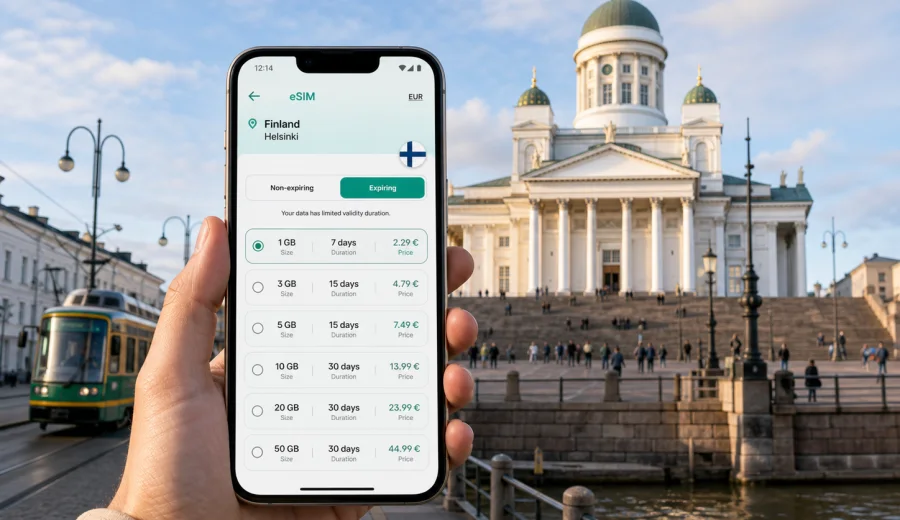
Helsinki eSIM guide: mobile connection and internet for your trip
Helsinki is easier to enjoy when your phone is ready before you step out of the airport. The center is compact, transport is well organized, and many trips depend on maps, ticket apps, hotel messages, ferry timetables, and online payments. An eSIM can make that first hour smoother because you can prepare mobile internet for Finland without looking for a physical SIM card after landing.
This guide focuses on practical city situations: arriving at Helsinki Airport, moving between districts, using trains and trams, checking routes to hotels, working from cafes or meeting spaces, taking a ferry, and planning short trips from Helsinki. It also explains how to choose an eSIM tariff and what to check before purchase.
Why mobile internet matters in Helsinki
A route in Helsinki may combine a train, a tram, a short walk, and a ferry. Weather can change the best walking plan. A hotel check-in code, business calendar update, restaurant reservation, or museum ticket may arrive while you are already moving through the city.
Mobile internet is especially useful in Helsinki for:
- checking the route from Helsinki Airport to the city center;
- using digital public transport tickets and route planners;
- comparing tram, metro, bus, ferry, taxi, and walking options;
- finding the correct hotel entrance in areas with inner courtyards;
- opening booking confirmations and QR codes;
- staying reachable during business meetings or event days;
- using translation, maps, and messaging without relying on public Wi-Fi;
- planning day trips to Suomenlinna, Espoo, Porvoo, Tampere, or Tallinn.
Helsinki has a calm pace, but many services are digital-first. If your phone is offline, a simple transfer or late arrival can become slower than it needs to be.
Arrival at Helsinki Airport
Most international visitors arrive through Helsinki Airport in Vantaa. The airport is connected with the city by train, buses, taxis, ride-hailing services, and rental cars. The train is usually a straightforward choice for reaching central Helsinki, but you still need to check the right direction, ticket zone, platform updates, and the best onward connection to your accommodation.
Typical arrival tasks where mobile internet helps:
| Moment | What you may need online for |
|---|---|
| Before passport control | Messages from a hotel, colleague, driver, or host |
| Baggage claim | Train schedules, delay updates, meeting-point details |
| Airport exit | Ticket purchase, taxi app, navigation to the station |
| First ride | Live route tracking and transfer planning |
| Arrival in the center | Walking directions to hotel, office, apartment, or event venue |
If you install your eSIM before the trip, you can often activate mobile data after landing and start using maps and messages without looking for a shop. Activation details depend on the selected tariff, the phone, and the local network.
Getting around Helsinki with a connected phone
Helsinki's transport network is practical for visitors because many important areas are linked by trams, metro, trains, buses, and ferries. The central station area is a major hub. Kamppi connects shopping, buses, metro, and walking routes. Trams are useful around the center, Katajanokka, Eira, Kallio, Pasila, Töölö, and harbor areas.
A connected phone makes it easier to:
1. Check whether walking, tram, or metro is fastest.
2. Find the right stop when several lines use nearby platforms.
3. Follow live changes during snow, rain, events, or construction.
4. Confirm the zone and validity of a ticket.
5. Share your location with a travel companion.
6. Keep a taxi or ride-hailing route visible.
For short city breaks, a small data package may be enough if you mostly use maps, messaging, and ticket apps. For business travel, video calls, hotspot use, and cloud work can increase data use quickly. Compare tariffs by data volume and validity period, not just by headline price.
Helsinki districts where eSIM is useful
Helsinki is not a huge city, but its neighborhoods have different travel patterns. The same eSIM can support many small tasks as you move between them.
| Area | Common travel scenario | Why mobile internet helps |
|---|---|---|
| City Center and Kluuvi | Central station, shopping, museums, meetings | Fast route checks, calendar updates, QR tickets |
| Kamppi and Ruoholahti | Hotels, buses, metro, offices | Transfers, ride booking, messages after check-in |
| Katajanokka | Harbor, hotels, ferries, architecture walks | Ferry timing, walking routes, weather checks |
| Kallio | Cafes, restaurants, nightlife, local streets | Navigation between smaller venues and tram stops |
| Pasila | Events, offices, train connections | Live timetable updates and meeting coordination |
| Töölö | Parks, cultural venues, waterfront walks | Maps, tickets, restaurant bookings |
| Eira and Ullanlinna | Design streets, coastal walks, apartments | Precise walking directions and shared locations |
Even in a compact city, map searches, ticket screens, photo uploads, and messenger calls can add up, especially if you travel in a group or manage work at the same time.
Choosing an eSIM tariff for Helsinki
For a Helsinki trip, the correct destination is Finland. A city article does not require a separate city-specific tariff page; you should choose an eSIM tariff that covers Finland and matches the length and style of your trip.
Think about four questions:
- How many days will you stay in Helsinki?
- Will you also visit another Finnish city or a nearby country?
- Will you use the phone only for maps and messages, or also for hotspot and work?
- Do you need the tariff ready before departure, or will you choose it after arrival?
For light use, maps, messaging, transport apps, email, and web searches are usually the main data needs. For heavier use, include video calls, laptop tethering, photo backup, social media uploads, and streaming. If you are traveling for business, choose a validity period that covers your arrival and departure days, not only the meeting days.
When you are ready to compare options, Kaspersky eSIM Store helps you choose an eSIM tariff for a trip to Helsinki and Finland by destination, data volume, duration, and price before you install it on a compatible device.
How to prepare before departure
The best time to set up your phone is usually before the day of travel. You can review tariff terms calmly, check your device, and avoid doing everything while standing in the arrivals hall.
Preparation checklist:
- Check that your device supports eSIM.
- Make sure your phone is not locked to one mobile operator.
- Confirm that the tariff covers Finland and fits your dates.
- Check when the validity period starts according to the tariff terms.
- Keep your primary SIM active if you need bank messages or calls.
- Save hotel, meeting, and transport details for offline access.
- Install the eSIM while you still have stable Wi-Fi.
- Know which SIM profile should use mobile data after landing.
Kaspersky eSIM Store is an app and website where you can choose, arrange, install, and activate an eSIM with a suitable tariff for mobile internet in a foreign trip. It is not a mobile operator and does not own the local network. Network behavior depends on the selected tariff, the device, and local conditions.
Installing and activating eSIM
The exact steps vary by phone model, but the logic is simple: choose a tariff, install the eSIM profile, select the correct mobile data line, and activate it according to the instructions. If you install before travel, keep your existing SIM for calls or SMS if you need it, and use the eSIM profile for mobile data when you arrive in Finland.
Use the official setup guidance if you need step-by-step help: see the Android eSIM installation instructions or the iOS eSIM installation instructions.
Before you switch data lines, check these settings:
| Setting | What to verify |
|---|---|
| Mobile data line | The eSIM profile is selected for data when you want to use it |
| Data roaming | Some eSIM tariffs may require data roaming to be enabled for the eSIM profile |
| Default calls | Your regular SIM can remain selected if you need your usual number |
| Low data mode | Useful if you want to reduce background traffic |
| Hotspot | Availability can depend on the tariff and device settings |
Do not delete an eSIM profile unless you are sure you no longer need it. Some profiles cannot be transferred or reinstalled after activation.
Data use scenarios in Helsinki
Your best tariff depends less on the city name and more on what you do while you are there.
| Trip type | Likely data pattern | Practical recommendation |
|---|---|---|
| Weekend city break | Maps, chats, restaurant searches, tickets | Choose a short validity period and enough data for navigation |
| Family holiday | Shared routes, photos, bookings, messaging | Add a buffer because several people may rely on one phone |
| Business trip | Email, calendar, taxis, video calls, hotspot | Choose more data and keep charger access in mind |
| Event visit | Venue maps, tickets, social media, group chats | Save tickets offline and keep mobile data for live updates |
| Stopover | Airport transfer, city walk, ferry or train check | A smaller package may be enough if usage is focused |
| Remote work day | Laptop tethering, files, calls, cloud apps | Pick a larger package and avoid unnecessary background sync |
If you plan to work from Helsinki, test the eSIM connection before the first important call. Keep hotel or office Wi-Fi as a backup for long video meetings.
Hotels, apartments, and check-in codes
Many Helsinki stays involve digital check-in messages, door codes, app-based access, or late-arrival instructions. This is common in apartments, boutique hotels, and serviced accommodation. If you arrive in the evening, mobile internet can be the difference between opening a message at the door and searching for Wi-Fi nearby.
Before leaving the airport or station:
- download the check-in instructions;
- save the address in your maps app;
- confirm whether the entrance is on a main street or courtyard;
- check public transport options for your arrival time;
- keep the host or hotel chat available;
- take a screenshot of important codes in case the signal is weak indoors.
Courtyards, side doors, and winter darkness can slow you down. A connected phone helps keep arrival practical.
Business trips and meetings
Helsinki is a frequent destination for conferences, technology meetings, public-sector visits, university events, and design or startup travel. Business days often move between the airport, Pasila, the city center, Ruoholahti, Otaniemi in Espoo, hotels, and dinner locations.
For business travel, mobile internet supports:
- calendar changes while you are in transit;
- taxi and train route checks;
- quick document access;
- messenger calls with colleagues;
- authentication prompts for work accounts;
- hotspot use when Wi-Fi is unstable or unavailable;
- translation of short messages or venue instructions.
If your employer requires a secure workflow, follow your company policy for devices, cloud services, and public networks. eSIM helps you use mobile data instead of depending only on public Wi-Fi, but it does not replace corporate security tools.
Ferries, harbors, and island routes
Helsinki's waterfront is part of the city experience. Travelers often visit Suomenlinna, walk around the Market Square area, use harbor terminals, or take ferries for regional and international routes. Mobile data is useful because schedules, platforms, gates, and walking routes can change during the day.
For Suomenlinna, keep enough battery and data for ferry times, maps, museum details, and weather checks. On windy or cold days, live information helps you adjust the route. If you use your phone for photos and maps all day, consider lowering background sync.
Stopovers in Helsinki
Helsinki can work well for a short stopover because the airport rail connection makes a city visit realistic for some travelers. If you have enough time between flights, mobile internet helps you check luggage options, train timing, route duration, weather, and the safest return time to the airport.
A stopover plan should be conservative:
1. Check the real time available after immigration, baggage, and security needs.
2. Choose one compact area, such as the central station, Senate Square, Market Square, or a cafe district.
3. Save your airport return route before leaving the terminal.
4. Keep mobile data available for live transport updates.
5. Leave more buffer in winter or during busy travel periods.
For a stopover, you may not need a large data package. What matters is reliable access to navigation, transport, and airline messages.
Trips from Helsinki to other places
If Helsinki is the start of a longer route, choose your eSIM tariff around the whole trip, not only the first night. From Helsinki, visitors commonly continue to Espoo, Porvoo, Tampere, Turku, Lapland routes, or ferries toward Tallinn and Stockholm. A Finland tariff can be suitable for trips inside Finland, while cross-border travel may require a regional or different country option depending on your itinerary and the available tariff conditions.
Before buying, compare:
- country coverage;
- data volume;
- validity period;
- whether the tariff matches every destination on your route;
- when validity starts;
- refill or top-up options;
- whether hotspot use is allowed by the tariff and device.
If you are unsure whether to choose a country or regional option, base the decision on where you will spend the most time.
Quick data-saving tips
Helsinki is a very connected city, but it is still useful to manage mobile data carefully, especially on short tariffs.
- Download offline maps for central Helsinki before travel.
- Disable automatic photo and video backup on mobile data.
- Update apps over Wi-Fi before departure.
- Save PDF tickets and confirmations offline.
- Use low data mode during long city walks.
- Avoid streaming video on mobile data unless your package is large enough.
- Check data balance after the first day to adjust usage.
- Keep one messaging app ready for travel contacts.
These settings keep your eSIM data package focused on the tasks that matter while you are moving.
Common mistakes to avoid
The most common eSIM problems are not specific to Helsinki. They usually come from setup timing, device compatibility, or tariff mismatch.
Avoid these mistakes:
- buying a tariff before checking whether your phone supports eSIM;
- choosing a validity period that ends before your departure day;
- installing the eSIM but leaving mobile data on the wrong SIM profile;
- deleting the eSIM profile after activation;
- assuming voice calls and SMS are included when the tariff is for mobile internet;
- waiting until landing to read setup instructions for the first time;
- using hotspot for a laptop without checking data needs;
- relying only on airport or cafe Wi-Fi for time-sensitive messages.
An eSIM for travel is most useful when it is prepared like any other trip essential.
FAQ about eSIM in Helsinki
Do I need a Helsinki-specific eSIM?
No. For a city trip to Helsinki, choose a tariff that covers Finland. Helsinki is the city context, but the tariff destination should match the country or region shown in the tariff details.
Can I keep my regular SIM active?
Yes, in many dual-SIM phones you can keep your regular SIM for calls or SMS and use the eSIM for mobile data. Check your phone settings carefully so roaming charges do not come from the wrong SIM.
Will eSIM include a Finnish phone number?
Travel eSIM tariffs are usually focused on mobile internet. Ordinary voice calls and SMS are not included unless the terms of a specific tariff say otherwise. You can use internet-based messaging and calling apps through mobile data.
Should I install eSIM before flying to Helsinki?
Installing before departure is often more convenient because you can use stable Wi-Fi and read the instructions without pressure. Activation and validity timing depend on the tariff conditions, so check the details before you travel.
Is public Wi-Fi enough in Helsinki?
Public and hotel Wi-Fi can be useful, but it may not help while you are walking, taking transport, entering an apartment, or waiting at a harbor. eSIM helps reduce dependence on public Wi-Fi for everyday travel tasks.
What if my phone does not support eSIM?
Use the device compatibility check before purchase. If your phone does not support eSIM or is locked by an operator, you may need another mobile internet option for the trip.
Final preparation for your Helsinki trip
Before you leave, decide how much mobile data you realistically need for maps, transport, messages, bookings, and work. Check device compatibility, read the tariff conditions, install the eSIM while you have stable Wi-Fi, and keep your regular SIM settings clear if you need your usual number for calls or verification messages.
For a Helsinki city break, business visit, stopover, or longer route through Finland, Kaspersky eSIM Store helps you prepare an eSIM tariff for mobile internet in Finland so your phone is ready for navigation, transport, hotel access, and everyday travel communication.