
Travel connectivity guide
Herat eSIM: Mobile Internet for Your Trip
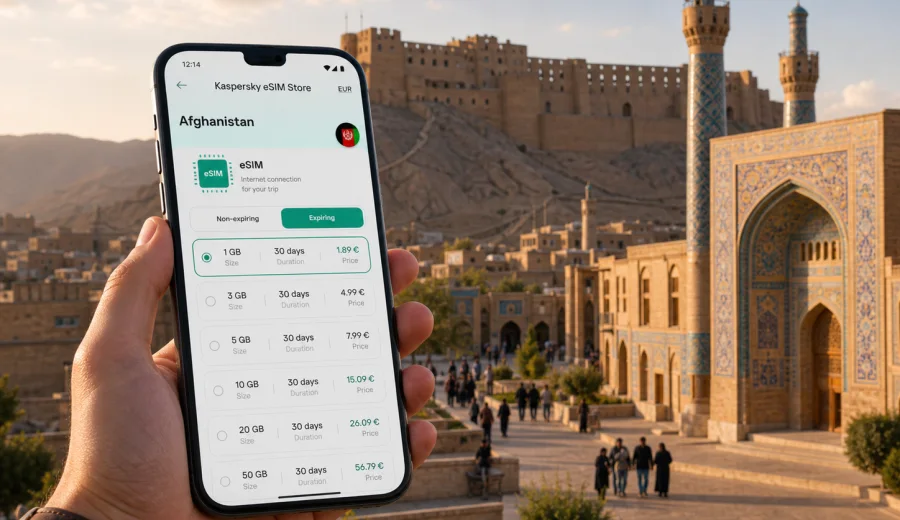
Herat eSIM: mobile connection and internet for a practical city trip
Herat is one of Afghanistan's most atmospheric cities: a place of old citadel walls, blue-tile architecture, busy bazaars, business visits, family routes, and long drives across western Afghanistan. For a traveler, the city can feel compact on a map and very spread out in practice. Hotels, offices, the airport road, historical sites, restaurants, and onward transport points are often easier to manage when your phone is ready for navigation, messaging, translation, and ride coordination from the first day.
That is why eSIM planning matters for Herat. Mobile internet is not only about posting photos from a landmark. It helps you confirm a pickup, share your location with a host, check a hotel address in Dari or English, save a route before leaving the lobby, and keep work messages moving during a short stay. A good setup is especially useful if you arrive after a long international route, have a tight business schedule, or plan to continue from Herat to another part of Afghanistan.
This guide focuses on the practical side of mobile connection and internet in Herat: arrival, local movement, city districts, hotels, business trips, stopovers, day planning, and eSIM preparation before you travel.
Why Herat is a city where mobile internet needs planning
Herat is a regional hub, not a simple resort destination. Visitors may come for business meetings, aid and project work, family visits, cultural travel, transit, or onward road journeys. Your phone may need to handle several tasks in the same day:
- confirming airport pickup details;
- messaging a local contact when plans change;
- saving addresses for a hotel, office, restaurant, or guesthouse;
- using maps in areas where street names may be written differently;
- checking travel time before crossing the city;
- translating short messages or signs;
- coordinating with a driver for trips outside the central area;
- using banking, email, and document apps when Wi-Fi is not reliable.
Public Wi-Fi can be useful in hotels and offices, but it should not be your only plan. Speeds, login rules, power availability, and access restrictions can vary by venue. A prepared eSIM gives you a separate mobile data option on a compatible device, so you can start each day with more control.
Arrival in Herat: what to prepare before landing
If Herat is your first stop in Afghanistan, the first hour after arrival can be the most important part of your connectivity plan. You may need to find your driver, confirm a meeting point, contact a hotel, or update someone waiting for you. If Herat is a later stop after Kabul, Mazar-i-Sharif, or another city, you may still want mobile data ready before the next transfer.
Before departure, prepare this short checklist:
| Task | Why it matters in Herat |
|---|---|
| Save hotel and office addresses offline | Some addresses may be easier to show than to pronounce. |
| Save key contacts in more than one app | Messaging availability can depend on each person's habits. |
| Download maps for the city area | Helpful if mobile signal changes during movement. |
| Keep your passport and booking details accessible offline | Useful at hotel check-in and transport points. |
| Prepare an eSIM before travel | Reduces the need to search for a mobile option immediately after arrival. |
If your device supports eSIM, you can install the eSIM profile before the trip and activate it according to the instructions for the selected tariff. The exact timing and settings can depend on the tariff, so read the conditions before you travel.
Local movement: how data helps around the city
Herat travel often depends on local knowledge. A driver, host, colleague, or hotel desk may guide you, but your phone still plays a role. Mobile data helps you compare your route with the destination, send a location pin, check whether a meeting has moved, or explain where you are if a pickup point is busy.
Useful data scenarios in Herat include:
- sending your live location to a driver before leaving a hotel;
- checking the distance between the Herat Citadel area and a meeting venue;
- translating a short message when a contact writes in Dari or another language;
- looking up a restaurant or office entrance before the car arrives;
- saving screenshots of key routes when leaving the central area;
- checking flight or transport updates without relying on hotel Wi-Fi.
For most city visits, your phone does not need constant heavy streaming. It needs dependable access for maps, messages, email, documents, and light web use. That difference matters when you choose a data allowance.
City focus: Herat locations where a ready phone helps
Herat's historic core, commercial streets, hotels, airport routes, and residential areas can create different phone-use patterns. In the old city and around heritage sites, you may use maps, translation, and camera backup. Around hotels and offices, you may use email, video-free messaging, and documents. During airport transfers or drives outside the center, you may rely more on saved maps and direct messaging.
Around the Herat Citadel and old city
The Herat Citadel area is a natural orientation point for many visitors. If you are taking photos, meeting a guide, or moving between historic streets and a nearby restaurant, mobile data helps you keep the route visible and share your position. It is also useful for checking whether a pickup location is on the main road or down a smaller side street.
Around hotels and guesthouses
Hotel Wi-Fi can be enough for calls from your room, but it may not cover the lobby, entrance, parking area, or nearby streets. An eSIM is useful when you need to message a driver from outside, open a map after leaving the building, or check a document during a meeting day.
Business visits and project work
Business travelers in Herat often need a predictable routine: hotel, meeting, site visit, lunch, another meeting, then evening reporting. Mobile data helps you stay available without asking each venue for Wi-Fi. It also gives you a fallback if a meeting moves or a contact sends a last-minute file.
Short stopovers
If Herat is only a short stop, mobile data is still important because there is less time to solve connectivity problems locally. A prepared eSIM can make a one-night stay easier: confirm arrival, get to the hotel, check the next day's plan, and move on.
How much data might you need in Herat?
The right data amount depends on your habits, trip length, and whether your hotel or office Wi-Fi is reliable. The table below is a practical way to estimate usage without treating every traveler the same.
| Travel style in Herat | Typical mobile data use | What to consider |
|---|---|---|
| 1-2 day stopover | Low to moderate | Maps, messaging, pickup coordination, flight checks. |
| 3-5 day city stay | Moderate | Daily navigation, messaging, email, light browsing. |
| Business trip | Moderate to high | Documents, cloud apps, calendar changes, calls through internet apps. |
| Photo-heavy cultural visit | Moderate to high | Backups and uploads can use data quickly. Use Wi-Fi for large files. |
| Multi-city Afghanistan route | Higher | More travel days, more map use, more coordination between transfers. |
If you mainly use maps and messaging, a smaller package may be enough for a short visit. If you use cloud documents, video meetings, social apps, or hotspot mode for a laptop, choose more data and check whether tethering is allowed in the selected tariff conditions.
Choosing an eSIM setup for a Herat trip
An eSIM is a digital SIM profile that can provide mobile data on a compatible phone or tablet. It is especially useful when you want to prepare before travel instead of dealing with a physical SIM card after arrival. For Herat, the key is to choose a tariff for Afghanistan, not a city-specific product, because mobile data availability is arranged at country or regional level.
When comparing options, look at:
- destination coverage shown for the tariff;
- data allowance in GB;
- validity period;
- price and currency;
- activation rules;
- whether top-up is available;
- whether hotspot use is allowed;
- support information and setup instructions.
For a city article, the practical decision is still country-based: choose Afghanistan as the destination, then plan the data amount around your Herat schedule. You can review eSIM options for Afghanistan before your Herat trip and select a tariff that matches the length and style of your stay.
Kaspersky eSIM Store is an app and website where you can quickly choose, arrange, and activate an eSIM with a suitable mobile data tariff for an international trip. It helps you prepare mobile internet for travel, but the selected tariff conditions, coverage, activation timing, and data allowance should always be checked before purchase.
Compatibility check before you buy
Before choosing any eSIM tariff, confirm that your phone or tablet supports eSIM and is not locked in a way that prevents adding another mobile profile. This step is easy to miss, especially if you use a company phone or a device bought through a mobile contract.
Use this quick check:
- your device model supports eSIM;
- the device is not restricted to one mobile network;
- your operating system is up to date enough for eSIM setup;
- you can access Wi-Fi during installation if required;
- you understand which SIM will be used for mobile data during the trip.
If you are unsure, check your device before you choose a tariff. A few minutes of checking can prevent a much bigger problem after arrival in Herat.
Installing and activating eSIM for Herat
The setup flow usually has two stages: installation of the eSIM profile and activation for use. Depending on the tariff, you may be able to install before departure and activate closer to the trip or after arrival. Read the conditions carefully so the validity period starts when you expect it to start.
A practical sequence:
1. Check that your device supports eSIM.
2. Choose Afghanistan as the destination for your Herat trip.
3. Select a data amount and validity period.
4. Keep access to stable Wi-Fi while installing the eSIM profile.
5. Follow the setup steps for your device.
6. Set the eSIM as the mobile data line when you are ready to use it.
7. Keep your primary SIM available for calls or SMS if you still need it.
For detailed setup steps, use the Android setup guide or the iOS setup guide. The exact menu names can vary by device model and operating system version.
Herat trip scenarios and data planning
The first-time visitor
You arrive, meet a driver, check in, visit the old city, and keep in touch with a host. Your priority is messaging, maps, translation, and hotel coordination. Choose enough data for daily navigation and keep larger uploads for Wi-Fi.
The business traveler
You may move between a hotel, office, project site, and airport road. Your phone needs to handle calendar changes, contact updates, PDFs, email, and occasional internet calls. Choose a tariff with enough data for work apps and check whether hotspot use is allowed if you plan to connect a laptop.
The cultural traveler
You may spend time around the citadel, mosque architecture, markets, and traditional streets. Photos and map searches can add up, but cloud backup is the largest data risk. Set photo backup to Wi-Fi only if your data allowance is limited.
The onward traveler
If Herat is one stop in a larger Afghanistan route, plan for the full country stay, not only the city days. You may need mobile data during transfers, at hotels, and while coordinating across time zones. A longer validity period can be more convenient than several short fixes.
Settings that make mobile data easier to control
Small phone settings can protect your data allowance:
- turn off automatic cloud photo backup on mobile data;
- restrict app updates to Wi-Fi;
- download offline maps before long drives;
- disable autoplay video in social apps;
- keep messaging apps active but limit background refresh for heavy apps;
- monitor data use in your phone settings each day;
- use hotel or office Wi-Fi for large files when it is available and trusted.
If your phone allows more than one SIM line, label them clearly. For example, keep your home SIM for calls and messages, and set the eSIM as the mobile data line during the trip. Before important calls, check which line is handling data.
Mobile internet and safety-minded travel habits
Herat travel can involve changing plans, guarded entrances, scheduled pickups, and local advice. Mobile data supports good travel habits, but it should be paired with offline preparation. Save addresses, contact names, hotel details, and meeting points before leaving a reliable connection. Share your route with a trusted person when appropriate, and avoid depending on a single app for every detail.
Practical habits:
- take screenshots of addresses in English and local script if you have them;
- keep your hotel name and phone number offline;
- agree on pickup points before moving;
- carry a power bank for long days;
- keep a paper or offline backup of the most important contacts;
- check data balance before a long transfer.
The goal is not to be online every second. The goal is to avoid being stuck without a usable connection at the moments when coordination matters.
FAQ: eSIM, mobile connection, and internet in Herat
Is a Herat eSIM different from an Afghanistan eSIM?
For travel planning, you usually choose a tariff for Afghanistan rather than a separate Herat product. The city matters for your usage pattern, while the destination selection is country-based.
Can I use eSIM for regular phone calls and SMS in Herat?
Many travel eSIM tariffs are designed for mobile data. They may not include a regular phone number, voice calls, or SMS unless this is clearly stated in the conditions. You can often use internet-based messaging and calling apps through mobile data.
Should I install eSIM before I travel or after I arrive?
Installation before travel can be convenient because you can use stable Wi-Fi and avoid setup pressure on arrival. Activation rules differ by tariff, so check when validity begins and follow the instructions for your selected option.
Is hotel Wi-Fi enough for Herat?
Hotel Wi-Fi can be useful, especially for large files, but it does not help when you are outside the building, in a car, waiting for a pickup, or moving between meetings. Mobile data gives you a separate option for those moments.
What if my phone has a physical SIM already?
Many compatible phones can keep a physical SIM and an eSIM profile at the same time. You can often use your primary SIM for calls or SMS and the eSIM for mobile data, depending on device settings and tariff rules.
Final preparation before your Herat trip
Before departure, make your phone travel-ready: update key apps, save offline maps, check device compatibility, prepare contact details, and choose a data allowance that matches your Herat schedule. If your trip includes business meetings, long transfers, or onward travel in Afghanistan, give yourself more data than a simple sightseeing stopover would require.
Kaspersky eSIM Store helps you choose, arrange, and activate an eSIM with a suitable mobile data tariff for an international trip. For Herat, select Afghanistan as the destination and check the tariff conditions before purchase. You can prepare an eSIM tariff for your trip to Herat before you travel, so mobile internet is part of your plan rather than a problem to solve after arrival.