Travel connectivity guide
Herceg Novi eSIM: Mobile Internet Guide
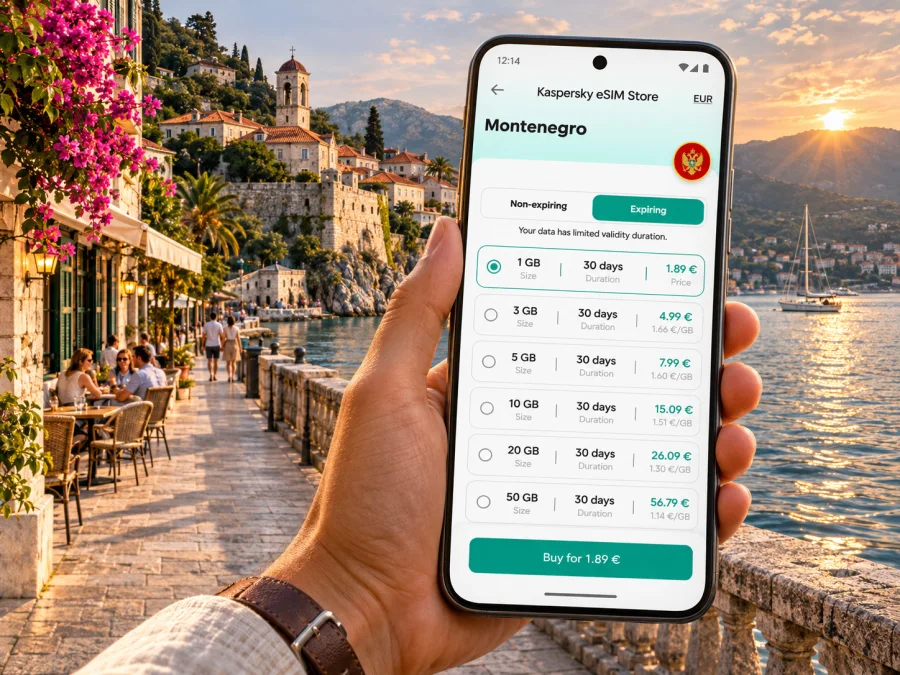
Herceg Novi eSIM: mobile connection and internet for your trip
Herceg Novi rewards visitors who move slowly. The old town rises above the Bay of Kotor, stairways connect streets at different levels, and the coastal promenade leads west towards Igalo and east towards Meljine. A map, accommodation messages, transport details and opening information can all be useful in the same afternoon. Preparing mobile internet before arrival makes it easier to handle those practical details while leaving more attention for the town itself.
An eSIM is a digital mobile profile installed on a compatible, unlocked device. A travel data plan can provide mobile internet through a local partner network, subject to the plan’s coverage, validity, data allowance and other terms. It is not automatically a replacement for your home number: voice calls and SMS are not included unless the specific offer says so. For many visitors, the simplest arrangement is to keep a home SIM available for calls or verification messages and select the travel eSIM for mobile data.
This guide focuses on using data around Herceg Novi and along its immediate coastal corridor in the Republic of Montenegro. It covers arrival, walking, local planning, day trips and the checks that make an eSIM more predictable. Network availability can vary between streets, buildings, hillsides and the waterfront, so no plan should be treated as a guarantee of identical service at every point.
What mobile internet helps with in Herceg Novi
Herceg Novi’s old town, seafront and residential slopes sit at different elevations. Live maps help you compare routes, find an address and identify stairways, but a short-looking route may be steep. Mobile data is useful for checking accommodation messages, transport details, translations and weather while you move through town.
Download essential information for offline use as well. A dead battery, a temporary service interruption or a weak indoor signal can happen anywhere. Keep your accommodation address, reservation details, travel documents and a basic town map accessible without a connection. Mobile data is a useful layer of preparation, not a substitute for those simple backups.
First orientation: the waterfront and the hillside
Herceg Novi stretches along the entrance to the Bay of Kotor. Its waterfront and promenade are useful reference points, while the old town and central squares sit above the sea. Walking between levels can involve many steps and steep streets. The local tourism organisation describes a six-kilometre promenade and a broad network of mapped trails; those figures help explain why route planning matters, but your exact walk will depend on the starting point and chosen section.
Think of the area in connected parts rather than as one compact center:
| Area | What a visitor may use it for | Mobile-data planning |
|---|---|---|
| Old Town and central squares | Historic lanes, fortifications, cafés and civic landmarks | Save the pin for your destination; stone lanes and level changes can make a direct-looking route confusing. |
| Škver and the seafront | Waterfront access, boats and the promenade | Check meeting points carefully; a place name may refer to a nearby pier, road or entrance. |
| Topla | A residential link between central Herceg Novi and Igalo | Compare the route with the terrain before walking with luggage or in the heat. |
| Igalo | A western part of the town associated with the coast and the Simo Milošević Institute | Confirm the exact address and side of the main road before setting out. |
| Meljine | The eastern end of the urban coastal corridor | Keep the destination pin and return route available if you plan to walk along the shore. |
| Kumbor, Đenovići and Baošići | Settlements farther along the Riviera | Check the day’s transport and return options before leaving the central area. |
These names are useful for orientation, not a promise of coverage or a substitute for a current map. Accommodation listings may describe the same general location with different neighbourhood names. Ask your host to send a map pin as well as a written address, then save both before you arrive.
Arriving in Herceg Novi
Tivat Airport is a common air gateway for this part of the coast. The Airports of Montenegro website lists Herceg Novi as about 23 kilometres and 50 minutes from Tivat Airport; treat that as a general reference rather than a guaranteed journey time. Road conditions, traffic, border procedures on some routes, season and your final address can change the transfer. Check your flight, transport arrangements and arrival time close to travel.
Podgorica Airport is another possible entry point, but it is farther from Herceg Novi. Compare the whole journey, not only the flight fare: ground transport, arrival hour, luggage, and whether you have a connection to the coast all matter. If you land late, arrange the onward transfer before boarding and keep the driver’s contact details, destination pin and booking confirmation saved offline.
On arrival, use your data connection to confirm the pickup location and share an update if plans change. Do not assume that an airport transfer will wait at a particular exit unless the provider has confirmed it. If you are using a taxi or pre-booked car, agree the destination and fare arrangements directly with the service before departure. When using a map, compare the route with the actual road signs, especially where the road follows the coast or climbs away from the waterfront.
If you arrive by road from another part of Montenegro or a neighbouring country, traffic on the coastal route can make a short distance take longer than expected. A ferry crossing may be relevant on some itineraries around the bay, but schedules and operating conditions can change. Verify the crossing and onward journey on the day, and keep a second route in mind if a connection is important.
Choosing a plan for the shape of your trip
Start with the itinerary and your normal phone habits. A weekend in one apartment usually has different data needs from a longer stay with frequent navigation, video calls and day trips. Estimate what you will do on mobile data, then compare the current plan details for destination, allowance, validity and price. Do not infer that a plan covers every nearby country simply because the itinerary stays on the Adriatic coast; check each country or region included in the actual offer.
A practical estimate can be made without guessing at a universal daily number:
- List the activities that will use mobile data: maps, messaging, browsing, calls through apps, photo uploads or video.
- Mark which tasks can use hotel or café Wi-Fi, while remembering that public Wi-Fi is not always available or suitable.
- Consider whether you will upload large files or stream video away from Wi-Fi. Those activities can use much more data than checking a map or sending a text message.
- Choose an allowance and validity period that cover the full trip, including arrival and departure days.
- Read the plan’s start conditions and any limits before purchase. Do not assume that installation, activation and the start of validity occur at the same moment.
Kaspersky eSIM Store is an app and website where travellers can choose, purchase and activate an eSIM with a suitable plan for mobile internet abroad. To review current options for this destination, browse plans for the Republic of Montenegro. The plan page and its terms determine the current allowance, validity, supported destination and other conditions; availability and details can change.
Match the plan to the travel pattern
| Travel pattern | What to consider before selecting data |
|---|---|
| Short city break | Allow for map use, messaging, arrival coordination and a small buffer for changes. |
| Beach-focused stay | Check whether your accommodation has reliable Wi-Fi for heavier use; keep mobile data for directions, bookings and time away from the property. |
| Remote work | Confirm that the plan’s allowance and terms suit your work. Test the connection before relying on it for a call, and identify Wi-Fi backup. |
| Road trip from Herceg Novi | Verify that the plan covers every country on your route, not just Montenegro, and consider where you may need offline maps. |
| Longer visit | Compare validity with the full stay and understand the plan’s top-up or renewal rules, if offered. |
No data estimate works for every traveller. Navigation and text messages are usually lighter tasks than uploading a photo library or joining repeated video meetings. If you are unsure, review the plan details and your device’s data-usage screen during the trip; you can then adjust app settings or use Wi-Fi for large transfers.
Device, plan and phone checks before purchase
Compatibility depends on the exact device version, software, carrier lock status and country or region where the device was sold. A product name alone may not settle the question: regional variants can differ, and some phones are locked to a home operator. Before paying, confirm eSIM support for your exact device and make sure it is unlocked. Check whether your device is compatible.
Use this checklist before travel:
- [ ] Confirm that your exact phone model and regional variant support eSIM.
- [ ] Ask your home operator whether the phone is carrier-unlocked if you are not sure.
- [ ] Check that the operating system is up to date and that you can access the email or account containing the eSIM details.
- [ ] Compare the plan’s country or regional coverage with the whole itinerary.
- [ ] Read the data allowance, validity period, activation requirements, roaming instructions and any fair-use conditions.
- [ ] Keep access to a reliable internet connection for installation if the setup flow requires it.
- [ ] Save the eSIM instructions, booking details and support information before departure.
- [ ] Decide which line will handle calls and SMS and which line will handle mobile data.
If compatibility is uncertain, resolve it before purchase rather than relying on the destination airport to troubleshoot the phone. Avoid deleting an installed eSIM profile while diagnosing a problem unless the plan’s instructions or support team tells you to do so; a profile may not be reusable after removal.
Install before departure, activate with care
Follow the purchase instructions for the plan you selected. In general, you need a compatible, unlocked device and an internet connection during setup. The exact menus differ by phone and operating-system version, so use the current guide for your device: installation instructions for Android and installation instructions for iOS.
A careful setup sequence looks like this:
- Read the plan instructions. Check whether the profile can be installed before travel and when its validity begins.
- Connect to Wi-Fi. Keep the phone online while you add the eSIM, if the instructions require an internet connection.
- Add the profile. Use the provided installation method and follow the on-screen prompts. Do not share a QR code or activation details publicly.
- Label the lines. Give the travel profile a clear name such as “Montenegro data” so it is easy to identify beside your home line.
- Set the data line. Choose the travel eSIM for mobile data when appropriate, while retaining your home line for calls or messages if you need it.
- Wait for setup to finish. Registration can take a few minutes. Follow the plan’s directions on when to turn the line on and whether data roaming must be enabled for that eSIM.
- Check the result. Confirm that the phone shows the intended line for data and that the plan is active according to its terms.
If you prefer to install after landing, keep the setup details somewhere you can reach without relying on the travel eSIM. If you install in advance but want to use the plan later, leave it configured as directed and do not enable the data line or roaming until the plan instructions say it is time. Activation rules vary, so use the specific plan’s wording rather than a general rule from another trip.
Getting around: maps, steps and coastal routes
A map is most helpful when it reflects the terrain. Before setting off from the Old Town, check the elevation and whether the route uses stairs. In warm weather or with luggage, a route along the waterfront may be more comfortable even if it takes longer. If your accommodation is above the coast, identify the nearest practical road entrance instead of relying only on a pin dropped in the middle of a block.
For a day centred on the promenade, save the start and end points and the address of your accommodation. The Herceg Novi Tourist Organization describes the promenade as six kilometres long. You can use that as a planning cue, but check the section you intend to walk and allow time for stops, heat, uneven pavement or a change of plan. Keep water and a charged phone with you; the route itself is more enjoyable when you are not navigating under pressure.
Local transport and taxi services can be useful for longer coastal distances or steep climbs. Routes and timetables may change with the season, so verify the current departure point and time before leaving. Search results can show businesses with similar names; confirm the exact pickup place with the operator or accommodation host. If your phone signal is intermittent, a screenshot of the route and written destination can make the handoff easier.
Driving gives flexibility for the wider Riviera, but the central streets are not always the easiest place to park. The local tourism site describes marked parking zones and seasonal arrangements in Herceg Novi and Igalo. Check signs and payment instructions on site because zones, hours and rules can vary by season. If a parking payment depends on a local mobile operator or SMS, confirm that it works with your number and plan before relying on it; a data-only eSIM does not automatically provide ordinary SMS service.
Use cases on a typical day
On arrival, mobile data can help with a transfer message and check-in pin. In the historic center, use a saved map for stairways and level changes. Along the promenade, keep your accommodation pin and return details handy. For work or an excursion, check plan terms, data allowance and destination coverage in advance; save tickets and maps before you leave Wi-Fi.
If mobile data does not connect
Work through the basics before changing several settings at once:
- Check that the eSIM profile is enabled and selected for mobile data.
- Confirm that the plan is within its validity period and has remaining data, using the account or plan information available to you.
- Check the provider’s installation instructions for the correct network-selection and roaming settings.
- Turn airplane mode on briefly and then off, or restart the device if the instructions allow it.
- Move to a different location and try again; indoor walls, terrain and local network conditions can affect reception.
- If service still fails, contact the plan’s support channel with your device model, location, time and a short description of what you tried.
Keep the home SIM available if you need a conventional call or SMS, and connect to trusted Wi-Fi when possible to reach support. Do not remove the eSIM profile as a first troubleshooting step. If a booking or transport connection is time-sensitive, use the phone number or offline contact details you saved before travel.
Frequently asked questions
Is Herceg Novi in the Republic of Montenegro?
Yes. Herceg Novi is a coastal city in Montenegro, at the entrance to the Bay of Kotor. The country name in plan details may appear as Montenegro; check the destination shown on the specific offer.
Will a Montenegro eSIM work everywhere in Herceg Novi?
No plan should be assumed to work everywhere. Availability depends on the underlying network, the exact location, buildings and terrain, the device and the plan terms. Check current plan information and keep offline maps or Wi-Fi as a backup.
Can I use a travel eSIM for ordinary calls and SMS?
Usually a data-focused travel eSIM does not include a regular phone number, voice calls or SMS unless the offer specifically says otherwise. Internet calling and messaging apps can work over data, subject to their own requirements. Keep your home line enabled if you need its number, and check roaming charges with your home operator.
Before you leave
Save your address and transfer details, check the route from your arrival point, and download a map of Herceg Novi. Confirm compatibility, unlock status, destination, allowance, validity and activation terms. Install the profile as instructed and keep essential information available offline. Check current local information for transport, parking and opening times because conditions can change.
Herceg Novi is best explored at a pace that leaves room for detours: a turn up a stairway, a longer stretch beside the water or a spontaneous stop in the old town. A prepared connection can make those choices easier without making the phone the centre of the visit.
Prepare your eSIM for Herceg Novi
When your device is ready and you have checked the plan terms against your dates and itinerary, use Kaspersky eSIM Store to choose, purchase and activate a suitable eSIM for mobile internet abroad. Review current options for the Republic of Montenegro and confirm the coverage, allowance, validity and activation details shown for the plan you select. Install it using the instructions for your device, keep offline essentials available, and enjoy your time in Herceg Novi.


