
Travel connectivity guide
Herning eSIM Guide for Mobile Internet
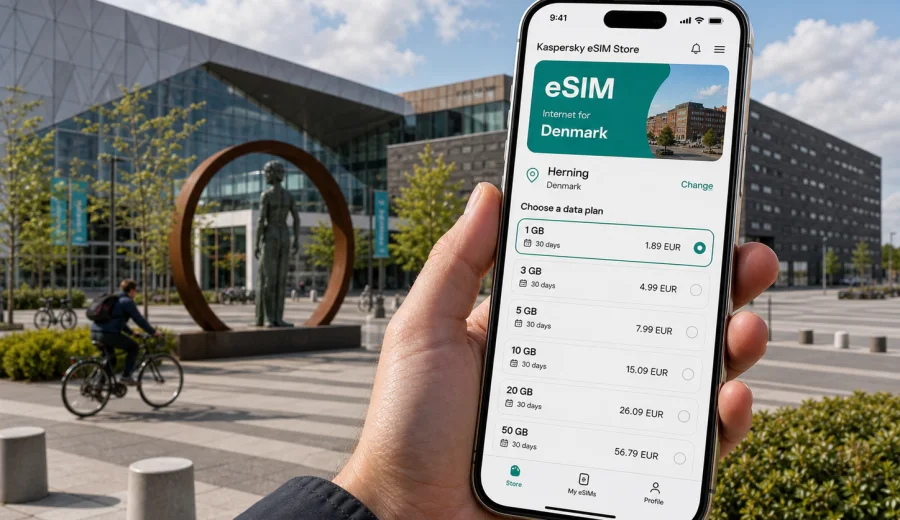
Herning eSIM guide: mobile connection and internet for a smooth city trip
Herning is a practical travel base in central Jutland: easy to reach, compact enough to navigate without stress, and busy enough to make reliable mobile internet useful from the moment you arrive. Many visitors come for exhibitions at MCH Messecenter Herning, concerts or sports events at Jyske Bank Boxen, football at MCH Arena, business meetings, design and art around Birk, or onward travel across Denmark. In all of those scenarios, an eSIM can make the trip simpler because you can prepare mobile data before you start moving through the city.
This guide explains how to use eSIM for Herning in a city-focused way: arrival, transport, hotels, event venues, local districts, business travel, stopovers, and day trips. It also shows how to estimate the right data allowance and what to check before you choose a plan.
Why mobile internet matters in Herning
Herning is not a huge city, but the moments when you need internet are often time-sensitive. You may need to find the right platform at Herning Station, check a bus connection, open a hotel confirmation, message colleagues before a trade fair, or navigate from the city center to an event venue after dark. Public Wi-Fi can help in some places, but it is not something to rely on for every transfer, street corner, or taxi pickup.
For many trips, the most useful travel setup is simple:
- keep your usual SIM active for important calls or banking messages;
- use an eSIM for mobile data in Denmark;
- download key documents before departure;
- keep maps, transport apps, email, and messengers available while moving;
- check device compatibility before buying any eSIM plan.
An eSIM is especially convenient if Herning is one stop in a wider Denmark itinerary. You can arrive through Billund, Aarhus, Aalborg, Copenhagen, or another city, then continue to Herning by train, bus, or car without searching for a physical SIM card on the way.
Arrival scenarios: getting online before you reach the city
Herning is commonly reached by train, regional bus, rental car, or rides from nearby airports. The city itself does not need a complicated arrival plan, but your connection should be ready before the first navigation decision.
| Arrival route | Why mobile data helps | Practical eSIM use |
|---|---|---|
| Billund Airport to Herning | Checking transfers, pickup points, hotel routes, and delays | Activate data before leaving the terminal or when you start the ground transfer |
| Aarhus or Copenhagen by train | Tracking train changes, platforms, and tickets | Keep maps and transport apps online during connections |
| Rental car in Jutland | Navigation, parking, hotel check-in, and event venues | Use mobile data for live maps and traffic updates |
| Business transfer or shuttle | Messaging colleagues and confirming meeting times | Keep email and chat available without depending on venue Wi-Fi |
If you install the eSIM before departure, you can usually avoid doing setup while tired, in a queue, or between connections. The exact activation moment depends on the selected plan, so read the plan conditions before your trip and check when validity starts.
Moving around Herning with eSIM
Herning is manageable, but its travel pattern is spread between several useful zones. The city center, Herning Station, hotels, event venues, MCH Messecenter Herning, Jyske Bank Boxen, MCH Arena, and the Birk cultural area are not always in one short walking loop. Mobile internet helps because you can adjust routes instead of memorizing them.
Typical city uses include:
- walking navigation between the station, restaurants, shops, and hotels;
- checking bus routes to exhibition and event areas;
- finding the correct entrance for a venue or conference hall;
- coordinating with colleagues during busy fairs;
- using translation, messaging, and payment apps;
- ordering a taxi or checking pickup points;
- checking opening hours saved in your itinerary.
For a short visit, this may sound basic. In practice, these are the small tasks that make a city trip run smoothly. Herning is often visited for a specific appointment, not just open-ended sightseeing, so a missed message or wrong route can cost more than a few minutes.
City zones where data is useful
The best eSIM plan for Herning depends on what kind of trip you are taking. A visitor who stays near the station for one night needs less data than someone attending a three-day exhibition, sharing files, and using maps across central Jutland.
Herning city center
The center is useful for hotels, restaurants, shopping, and train access. Mobile internet helps with walking routes, reservations, ride pickup points, and checking whether a meeting place is closer to the station or a hotel. If you arrive late, online maps can also help you avoid wandering with luggage.
MCH Messecenter Herning and event venues
Herning is a strong event city. During major exhibitions, concerts, sports events, and conferences, venue Wi-Fi may be crowded or require registration. Mobile data gives you a separate connection for tickets, QR codes, messages, calendar updates, and directions to the correct hall or entrance.
Birk and cultural stops
The Birk area and Herning's art and design locations are easier to enjoy when you can check routes, opening times saved in your notes, and nearby transport. If you are combining culture with business, an eSIM lets you switch between navigation and work messages without looking for a cafe connection.
Hotels and business parks
Hotel Wi-Fi is useful, but it is not always the best option for check-in, messaging outside the building, or a quick map search when leaving for a meeting. Mobile data also helps if you need a backup connection for travel documents, boarding passes, or a video call in a quiet corner.
How much data do you need for Herning?
Most Herning trips do not require a very large data package unless you plan to work heavily from mobile data. The main question is whether your eSIM is for travel essentials only or for regular work use.
| Trip type | Typical length | Suggested data approach |
|---|---|---|
| Event evening or stopover | 1 day | A small plan may cover maps, messages, tickets, and hotel tasks |
| Weekend in Herning | 2-3 days | Choose enough data for navigation, browsing, transport, and photo sharing |
| Trade fair or conference | 3-5 days | Allow extra data for email, document previews, venue messaging, and hotspot use if permitted |
| Denmark route with Herning included | 5-10 days | Pick a plan that covers the wider country itinerary, not only Herning |
| Remote-work style trip | 1 week or more | Choose a larger package and check hotspot rules in the plan conditions |
As a practical rule, maps, messaging, email, web search, tickets, and transport checks use moderate data. Video calls, cloud backups, social video, streaming, and laptop tethering use data much faster. Before choosing a package, decide which of those activities you will actually do on mobile data.
Choosing an eSIM plan for a Herning trip
For Herning, choose an eSIM plan by country first, because the city belongs to Denmark and the mobile data plan must match the destination. Then compare the data amount, validity period, price, and whether the plan fits your route. If your trip includes Aarhus, Billund, Copenhagen, Aalborg, or other Danish cities, treat the plan as mobile internet for Denmark rather than only a Herning tool.
This is the right point to prepare the connection: you can choose an eSIM plan for travel to Herning and Denmark in Kaspersky eSIM Store, then install it on a compatible device before departure or when you are ready to activate the plan according to its conditions.
When comparing options, check these details:
- destination coverage shown in the plan;
- data allowance;
- validity period;
- whether the plan is expiring or non-expiring, if this choice is available;
- whether hotspot use is allowed under the selected plan;
- activation rules and when the validity period starts;
- refund and support conditions;
- whether your device supports eSIM and is not locked to one carrier.
Do not choose only by the smallest package or the lowest price. A plan that is too small can become inconvenient during a busy event day, while a plan that is much larger than your real use may be unnecessary for a short stopover.
Practical scenarios in Herning
You are coming for an exhibition
Install the eSIM before you travel, keep the QR code or installation flow accessible, and activate mobile data when the plan conditions make sense for your arrival. Save your hotel, venue address, hall number, and calendar appointments. At the venue, use mobile data for messages, tickets, meeting changes, and navigation between halls. If you need to share files, use Wi-Fi when available and keep eSIM data for time-critical tasks.
You are attending a concert or sports event
Mobile data is useful before and after the event, when many people are moving at the same time. Keep your ticket loaded, share your location with friends if needed, and check transport options before leaving the venue. If the network is busy around the event area, wait a few minutes and keep essential information saved offline as a backup.
You are visiting Herning for business
For business travel, the most important use is continuity. You need email, chat, maps, calendar updates, and document access while moving between the station, hotel, meeting rooms, and venue areas. An eSIM can be a backup to hotel or conference Wi-Fi and can also support secure, routine work tasks when public networks are inconvenient.
You are using Herning as a base
Herning works well as a base for central Jutland. You may visit nearby towns, continue toward Silkeborg, Aarhus, Billund, or the west coast, or combine business with a free day. In that case, choose the plan for Denmark and check that the validity period covers your full route, including arrival and departure days.
Checklist before you buy an eSIM
Before you choose a plan, spend two minutes on compatibility and trip details. This is more useful than fixing setup problems after arrival.
- Check whether your device supports eSIM.
- Make sure your phone is not locked to a single mobile carrier.
- Confirm that Denmark is the correct destination for your Herning trip.
- Estimate data use based on maps, messaging, email, streaming, and work tasks.
- Check plan validity and activation rules.
- Decide whether you need hotspot use and verify the plan conditions.
- Keep your primary SIM available if you need calls or SMS from your usual number.
- Save hotel, venue, ticket, and transport details offline as a fallback.
An eSIM plan for mobile data usually does not include a regular local phone number, voice calls, or SMS unless the selected plan clearly says otherwise. For calls and messages, you can use internet-based apps over mobile data.
How to install and activate your eSIM
The exact setup flow depends on your device and the plan, but the travel logic is usually the same: choose the destination, select a plan, complete the purchase, install the eSIM profile, and enable mobile data for that eSIM when you are ready to use it. If you want a device-specific walkthrough, use the Android eSIM installation guide or the iOS eSIM installation guide.
A practical setup sequence for Herning looks like this:
1. Choose Denmark as the destination for your Herning trip.
2. Select a data package and validity period that match your stay.
3. Install the eSIM while you still have a stable connection.
4. Keep your primary SIM active if you need your usual number.
5. On arrival, select the eSIM for mobile data.
6. Turn on data roaming for the eSIM if the plan instructions require it.
7. Test maps and messaging before leaving the airport, station, or hotel.
Avoid deleting the eSIM profile after installation unless the instructions say it is safe to do so. In many cases, an activated eSIM cannot simply be moved to another phone.
Common mistakes to avoid
The most common eSIM problems are preventable. They usually come from buying the wrong destination, installing too late, overlooking device compatibility, or choosing a plan that does not match the real trip.
Avoid these mistakes:
- choosing a country plan that does not match Denmark;
- waiting until you are already in a busy venue to install the eSIM;
- forgetting to check whether your phone supports eSIM;
- assuming that mobile data includes a local phone number;
- using video streaming on a small package;
- deleting the eSIM profile after activation;
- ignoring the plan validity period;
- relying only on public Wi-Fi for tickets and transport.
If you are traveling with colleagues or family, each person should check their own device and data needs. One traveler may use only maps and messages, while another may need email, uploads, and hotspot access.
FAQ: eSIM for Herning
Is there a special eSIM just for Herning?
Usually you choose a plan for Denmark, because Herning is the city destination inside the country. This also helps if your route includes Billund, Aarhus, Copenhagen, or other Danish stops.
Can I install the eSIM before I leave home?
In many cases, yes. Installing before departure is often easier because you can use a stable connection and avoid setup pressure on arrival. Check the selected plan's activation and validity rules before you install or activate it.
Will eSIM replace my usual phone number?
Not necessarily. Travel eSIM plans for mobile data usually do not include a standard phone number, calls, or SMS unless the plan conditions say so. You can keep your primary SIM for your usual number and use the eSIM for data.
Is eSIM useful if my hotel has Wi-Fi?
Yes, because the most important travel moments happen outside the hotel: station transfers, venue entrances, taxis, walking routes, restaurants, and meeting changes. Hotel Wi-Fi is useful, but it does not cover the whole city.
What should I do before a concert or exhibition?
Load your ticket, save the venue address, check your route, and make sure mobile data works before the crowd gets heavy. Keep essential information offline as well.
Can I use eSIM for trips from Herning?
Yes, if the selected plan covers Denmark and remains valid for your travel dates. That makes it useful for nearby towns, airport transfers, and wider Jutland routes.
Final preparation for Herning
Herning rewards a practical travel setup. You do not need a complicated connectivity plan, but you do need mobile internet at the moments when transport, venues, hotels, and messages intersect. Check your device, choose Denmark as the destination, select a data package that fits your actual itinerary, and install the eSIM while you have time to do it calmly.
Before your trip, you can prepare an eSIM plan for Herning through the Denmark page in Kaspersky eSIM Store. It gives you a straightforward way to choose, arrange, and activate an eSIM with a suitable mobile data plan for your visit, while keeping the focus on the city tasks that matter: arrival, navigation, meetings, venues, and onward travel.