
Travel connectivity guide
eSIM Honduras: mobile connection and internet
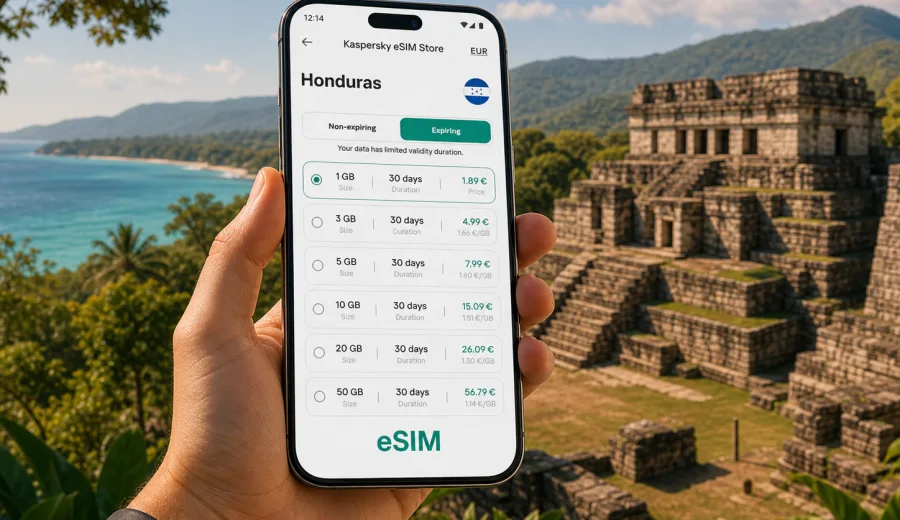
eSIM in Honduras: mobile connection and internet for your trip
Honduras is a country where mobile internet quickly becomes part of the trip plan. You may need maps in Tegucigalpa, a ride-hailing app after landing in San Pedro Sula, weather updates before visiting the Bay Islands, or messaging while moving between Copan Ruinas, La Ceiba and the Caribbean coast. A physical SIM card can work, but it usually means looking for a shop, comparing local offers on arrival, and dealing with registration or language details when you would rather start your route.
An eSIM is a practical alternative for many travelers because it lets you prepare mobile data before the trip and install a digital SIM profile on a compatible phone. For Honduras, the main advantage is control: you can choose a data package, see the validity period, install the eSIM over Wi-Fi, and keep your regular SIM in place for calls or banking messages if your device supports dual SIM use.
This guide explains how to think about mobile connection and internet in Honduras, when an eSIM is useful, how much data to plan, what to check before buying, and how Kaspersky eSIM Store can help you choose, set up and activate an eSIM tariff for travel.
Why mobile internet matters in Honduras
Honduras travel often combines very different settings in one itinerary. A visitor may spend one day in a large city, the next on a long road transfer, and the following days near beaches, reefs or archaeological sites. In each case, internet access solves a different problem.
Common mobile data tasks include:
- checking airport pickup details and hotel addresses;
- using maps for walking, driving or intercity transfers;
- confirming ferry times to Roatan or other islands;
- messaging guides, hosts and travel companions;
- translating menus, signs and short conversations;
- checking weather before boat trips or mountain routes;
- using mobile banking or payment confirmations;
- uploading photos when Wi-Fi is slow or unavailable.
Public Wi-Fi can be useful in hotels, cafes and airports, but it is not a complete travel plan. It may be slow, unavailable outside main tourist areas, or inconvenient when you need a quick decision on the road. Roaming from your home operator can also be simple, but the price and data limits depend on your existing plan. An eSIM gives you one more option: a prepared mobile data plan for the country you are visiting.
What an eSIM does for a Honduras trip
An eSIM is a digital SIM profile installed on a compatible smartphone or tablet. Instead of inserting a plastic SIM card, you add the eSIM profile through your device settings, usually by scanning a QR code or following installation steps. After activation, the eSIM can provide mobile data under the conditions of the selected tariff.
For a trip to Honduras, this can be especially useful if you want to:
- avoid searching for a local SIM card immediately after arrival;
- compare data volume and validity before you travel;
- keep your primary SIM card active for calls or SMS from home;
- separate travel mobile data from your regular number;
- choose a prepaid data package for a specific stay length.
An eSIM for travel is usually focused on mobile internet. It does not normally include a local phone number, traditional voice calls or SMS unless the selected tariff explicitly says so. For calls and messages, many travelers use internet-based apps once mobile data is active.
Where travelers use data most in Honduras
The right data plan depends less on the country name and more on your route. Honduras has business travel, family visits, diving trips, archaeological travel and nature itineraries, so the same 7-day stay can produce very different data use.
| Travel scenario | Typical places | Mobile internet use | Planning tip |
|---|---|---|---|
| Short city stay | Tegucigalpa, San Pedro Sula | Maps, rides, hotel coordination, email | A small or medium data package may be enough if hotel Wi-Fi is reliable. |
| Caribbean coast trip | La Ceiba, Tela, Roatan transfers | Ferries, weather, messaging, photos | Choose more data if you expect to use maps and uploads away from Wi-Fi. |
| Diving or island holiday | Roatan, Utila | Messaging, bookings, navigation, media sharing | Check validity carefully if the trip includes several island days. |
| Culture and history route | Copan Ruinas and nearby towns | Maps, tickets, translation, guide contact | Download offline maps, then use mobile data for live updates. |
| Work trip | Meetings, transfers, remote check-ins | Email, documents, video calls, hotspot use | Choose a larger package and check whether tethering is allowed by the tariff. |
Coverage, speed and availability can vary by location, local network conditions, device settings and the chosen tariff. It is better to plan with a little margin than to assume that every route, hotel and road segment will behave the same way.
Before you buy: check your device
Not every phone supports eSIM, and some devices are locked to a carrier. Before choosing a tariff, confirm that your model supports eSIM and that it can use another mobile plan while you travel. You can start with the device compatibility window: check your device.
Also check these points:
- your phone is not carrier-locked;
- your operating system is up to date enough for eSIM installation;
- you have stable Wi-Fi for the installation step;
- you know which SIM will be used for mobile data after arrival;
- you understand whether your regular SIM should stay active for calls or SMS;
- you have saved the eSIM installation details somewhere accessible.
If you rely on SMS codes from your bank, airline or work tools, keep your primary SIM available for those messages if your plan and device allow it. The travel eSIM can handle mobile data while your regular number remains available for essential messages.
How much data to choose for Honduras
There is no single correct data volume for every traveler. A careful estimate is usually better than choosing the smallest option and hoping it lasts.
Use these practical ranges:
- Light use: messaging, occasional maps, email checks and basic browsing. This can suit a short stay or a traveler who mostly uses hotel Wi-Fi.
- Moderate use: daily maps, messaging, web searches, social media, translation and some photo uploads. This is common for sightseeing and independent travel.
- Heavy use: frequent media uploads, video calls, streaming, cloud backups or hotspot use for a laptop. This needs a larger package and more attention to tariff conditions.
To reduce data use, download offline maps before departure, disable automatic cloud backups on mobile data, turn off auto-play video in social apps, and update apps only over Wi-Fi. These small settings can make a limited data package last longer.
A practical data estimate
The table below gives a planning view. It is not a promise of exact consumption, because apps and settings differ, but it helps you compare likely usage.
| Activity | Approximate data impact | Travel advice |
|---|---|---|
| Text messaging | Low | Usually safe for any package. |
| Map navigation | Low to medium | Download offline maps to reduce repeated loading. |
| Web browsing | Medium | Image-heavy pages use more data. |
| Social media photos | Medium to high | Upload over Wi-Fi if the package is small. |
| Video calls | High | Use only when necessary on limited data. |
| Streaming video | Very high | Avoid on mobile data unless you chose a large package. |
| Laptop hotspot | Variable, often high | Check tariff rules and monitor usage closely. |
For many travelers, the best choice is not the biggest possible package, but a plan that matches the number of days, route style and expected app use. Validity matters as much as gigabytes: a 30-day plan can be more comfortable for a flexible itinerary than a very short plan with the same data volume.
When to install and activate your eSIM
Installation and activation are not always the same moment. Installation adds the eSIM profile to your device. Activation starts the tariff or prepares it for use according to the conditions of the selected plan. Read the tariff details before you travel so you know when validity begins.
A reliable sequence looks like this:
1. Check that your device supports eSIM and is not locked.
2. Choose Honduras as your destination.
3. Select a data package by volume and validity period.
4. Complete the order and keep the installation details.
5. Install the eSIM while you have stable Wi-Fi.
6. Before departure or after landing, set the eSIM as the line for mobile data when appropriate.
7. Turn on data roaming for the eSIM if the instructions or your device require it.
8. Test mobile data with a simple page or messaging app.
For installation help, follow the relevant guide for your device: Android installation instructions or iOS installation instructions. The exact names of settings can vary by phone model and operating system version, so it is useful to keep the instructions open during setup.
Choosing an eSIM plan for Honduras
At this point in planning, you already know the key variables: route, stay length, device compatibility, and likely data use. You can then use Kaspersky eSIM Store to choose an eSIM tariff for your trip to Honduras and compare available options by destination, data volume, validity and price before you travel.
Kaspersky eSIM Store is an app and website where you can quickly choose, arrange and activate an eSIM with a suitable mobile data tariff for an international trip. It helps you prepare the mobile internet part of the journey in a more organized way: select the destination, review the terms, install the eSIM on a compatible device and manage the plan from the site or app.
When comparing options, look at:
- data volume in GB;
- validity period and when it starts;
- destination coverage stated in the tariff;
- price and currency;
- whether top-up is available;
- whether hotspot use is permitted;
- installation and activation instructions;
- support options if setup does not go as expected.
Do not choose only by price. A plan that is too small can become inconvenient during a route with long transfers, while a plan that is too large may be unnecessary for a short hotel-based trip. The right tariff is the one that matches your actual travel behavior.
eSIM, roaming and local SIM: what to compare
Travelers usually choose between three mobile internet options: home roaming, a local physical SIM card, or a travel eSIM. Each can be reasonable depending on the trip.
| Option | Strengths | Trade-offs |
|---|---|---|
| Home roaming | Uses your existing number and may need no setup | Price, speed limits and data volume depend on your home operator. |
| Local physical SIM | Can be useful for longer stays or local calls | Requires finding a shop, checking documents, and changing or adding a SIM card. |
| Travel eSIM | Can be prepared before arrival and keeps your physical SIM slot free | Requires eSIM-compatible device and careful activation settings. |
An eSIM is especially convenient when you want mobile data quickly and do not need a local voice number. A local SIM may still make sense for long stays, local calling needs or situations where a traveler wants an in-person mobile shop. Roaming can be easiest for very short trips if your home plan has clear and acceptable terms.
Honduras route planning: data by region
Honduras is not one single travel pattern. Your data use may change as you move.
In Tegucigalpa and San Pedro Sula, mobile internet is often about logistics: airport transfers, hotel addresses, meeting coordination, maps and messaging. If you are traveling for work, email and document access can increase consumption.
On the north coast, including La Ceiba and Tela, you may use data for transport updates, ferry planning, weather checks and communication with hotels or tour operators. Weather information is especially useful before boat trips.
On the Bay Islands, such as Roatan and Utila, travelers often use mobile data for reservations, diving schedules, messaging and photo sharing. If your hotel Wi-Fi is inconsistent, you may rely on the eSIM more than expected.
Around Copan Ruinas, mobile data helps with navigation, translation, guide coordination and route planning between towns. Download key maps in advance, then use mobile data for updates and messages.
For road trips, do not assume that every segment will have the same connection quality. Save addresses, booking confirmations and maps offline before long transfers.
Checklist before departure
Use this checklist a few days before your flight, not while standing in an arrivals hall:
- Confirm that your phone supports eSIM.
- Check whether the device is carrier-locked.
- Decide how many days the data plan must cover.
- Estimate whether you are a light, moderate or heavy data user.
- Download offline maps for main destinations.
- Save hotel addresses and transfer details offline.
- Turn off mobile data backups for photos and videos.
- Install the eSIM while connected to stable Wi-Fi.
- Keep your primary SIM available if you need SMS codes.
- Read the activation rules before turning the eSIM on.
This preparation reduces the chance of using airport Wi-Fi under pressure, choosing a plan in a hurry, or losing access to essential messages from your regular number.
Common setup mistakes
Most eSIM problems are caused by small settings rather than the idea of eSIM itself. Watch for these issues:
- installing the eSIM on a device that does not support it;
- trying to transfer an activated eSIM to another phone when the tariff does not allow it;
- leaving mobile data assigned to the wrong SIM line;
- forgetting to enable data roaming for the eSIM when required;
- activating the plan too early if validity starts immediately;
- deleting the eSIM profile before the trip is over;
- assuming that the data plan includes voice calls or SMS.
If mobile data does not work after arrival, first check the selected mobile data line, data roaming setting for the eSIM, APN details if provided, and whether the plan is active. Restarting the device can also help after settings are changed.
Quick recommendations for different travelers
If you are visiting Honduras for a weekend, choose a plan with enough data for maps, messaging and travel confirmations. Keep streaming and large uploads for Wi-Fi.
If you are combining cities, coast and islands, choose a plan with a validity period that covers the entire route. A little extra data can be useful for ferry updates, weather checks and messaging.
If you are working while traveling, choose more data than a casual traveler and check hotspot rules. Video meetings can consume a package quickly.
If you are traveling with family, decide whether every person needs their own eSIM or whether one person will handle navigation and bookings. Do not rely on a single phone for every essential document.
If you are an active photographer or content creator, disable automatic uploads on mobile data and choose a plan that accounts for previews, social posting and cloud sync.
FAQ about eSIM and internet in Honduras
Can I use an eSIM in Honduras instead of a physical SIM card?
Yes, if your device supports eSIM, is not locked, and the selected tariff covers Honduras. The eSIM can provide mobile data for travel under the conditions of the plan you choose.
Does an eSIM include a Honduran phone number?
Travel eSIM tariffs are usually designed for mobile internet. They normally do not include a local phone number, voice calls or SMS unless those features are clearly included in the tariff details.
Should I install the eSIM before flying?
It is often convenient to install it before departure while you have reliable Wi-Fi. Check the activation rules first, because validity may start at a specific moment depending on the tariff.
Can I keep my regular SIM active?
On many dual SIM devices, yes. You can often keep your primary SIM for calls or SMS and use the eSIM for mobile data. The exact behavior depends on the device and your home operator.
What if I run out of data?
Check whether top-up is available for the selected tariff. If not, you may need to choose another suitable plan. Monitor usage during the trip, especially if you use video, hotspot or cloud backups.
Is eSIM better than roaming?
It depends on your home roaming terms, route and data needs. An eSIM can be a more transparent or convenient option for many trips because you select a prepaid data package in advance, but you should compare the exact terms.
Will mobile internet work the same everywhere in Honduras?
No mobile option can guarantee identical performance in every location. Connection quality can depend on local coverage, terrain, network load, device support and the selected tariff.
Final preparation for your Honduras trip
Mobile connection and internet are easier to manage when you decide before arrival how you will get online. Check your phone, estimate your data needs, install the eSIM over Wi-Fi, and keep offline copies of the essentials. That way, your first task in Honduras can be getting to your hotel, meeting your guide or starting the route, not searching for a SIM card counter.
Before you travel, use Kaspersky eSIM Store to choose an eSIM tariff for Honduras that fits your stay length, route and expected data use. It is a practical way to prepare mobile internet for the trip on a compatible device and keep the setup steps clear from the start.