
Travel connectivity guide
eSIM for Hong Kong: mobile internet guide
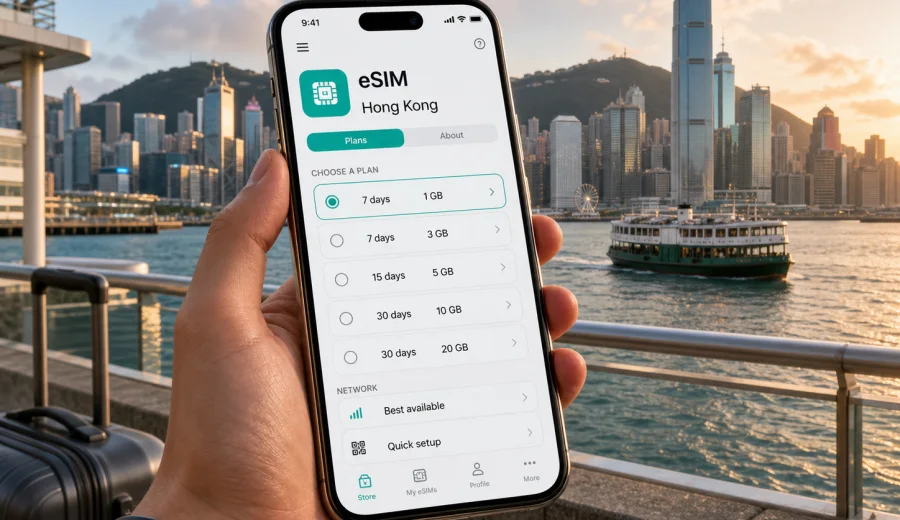
eSIM for Hong Kong: mobile connection and internet for your trip
Hong Kong is a compact destination, but a trip here can be surprisingly demanding on mobile data. You may land at Hong Kong International Airport, take the Airport Express, use maps to move between Central and Kowloon, confirm hotel details in a messenger, scan restaurant menus, pay for transport, translate signs, check ferry schedules, and coordinate meetings across a dense urban route. A stable mobile connection and internet access help you handle these everyday tasks without searching for a physical SIM card after arrival.
An eSIM is a digital SIM profile that can be installed on a compatible smartphone or tablet. For travel, it is useful because you can prepare mobile internet before your flight or shortly after landing, keep your primary SIM in the device, and use a separate data plan for the destination. Kaspersky eSIM Store is an app and website where you can choose, set up, and activate an eSIM with a suitable plan for mobile internet during an international trip.
This guide explains how to use eSIM in Hong Kong, how to choose a plan, what to check before payment, and how to avoid common setup mistakes. It is written for country travel scenarios: short city breaks, business trips, longer stays, family travel, and routes that include several districts or nearby destinations.
Why mobile internet matters in Hong Kong
Hong Kong is easy to navigate when you are online. The city has efficient public transport, dense shopping areas, ferry routes, hillside roads, business districts, and many services that work best when your phone has data. Even if your hotel has Wi-Fi, the most important travel moments often happen away from it.
Typical mobile internet use in Hong Kong includes:
- navigation from the airport to the hotel;
- checking MTR routes, bus stops, ferry piers, and walking directions;
- messaging family, colleagues, drivers, hosts, and tour contacts;
- using maps in Central, Tsim Sha Tsui, Mong Kok, Wan Chai, Causeway Bay, and Lantau;
- confirming restaurant reservations, tickets, and check-in details;
- translating short notices, menus, and service messages;
- using ride-hailing, payment, airline, and banking apps;
- sharing photos and backing up travel documents when needed.
Public Wi-Fi can be useful in airports, hotels, malls, and cafes, but it should not be your only plan. You may need internet while moving between places, waiting outdoors, entering a building, or dealing with a delayed flight. eSIM helps reduce dependence on public Wi-Fi and gives you a more predictable way to manage travel data.
What eSIM gives you during a Hong Kong trip
For most travelers, eSIM is a practical data solution rather than a replacement for every mobile service. It usually gives mobile internet through a selected data plan. It does not normally include a local phone number, standard voice calls, or SMS unless this is clearly stated in the conditions of a specific plan. For calls and messages, many travelers use internet-based apps.
The main advantage is control. Before you start using data, you can review the destination, data allowance, validity period, and price of the selected plan. This makes it easier to match the plan to your trip instead of relying only on default roaming or buying a physical SIM card in a shop after landing.
Quick summary
| Travel need | How eSIM can help |
|---|---|
| Arrival at the airport | Prepare data for maps, transport, hotel messages, and flight updates. |
| Business travel | Keep work apps and messengers available between meetings. |
| Family trip | Share navigation, tickets, and booking details while moving around. |
| Short stopover | Use data without spending time looking for a physical SIM card counter. |
| Longer stay | Choose a plan with enough data and validity for your expected usage. |
The exact experience depends on your device, the selected plan, local network conditions, and how you configure mobile data on your phone. That is why the best preparation is simple: check compatibility, choose a plan that matches your real route, install eSIM carefully, and test the settings before you need the connection urgently.
When eSIM is especially useful in Hong Kong
Hong Kong trips often involve fast transitions: airport to city, city to outlying islands, business district to restaurant, hotel to exhibition venue, or Kowloon to Hong Kong Island. In these moments, mobile internet is not just for entertainment. It helps you avoid small delays that can become stressful when you are tired, carrying luggage, or travelling with children.
eSIM is especially useful if:
- you want mobile data ready before leaving the airport;
- your current roaming option is unclear or too limited for the trip;
- you prefer not to look for a physical SIM card after arrival;
- you need internet mainly for maps, messages, bookings, and work apps;
- your phone supports eSIM and can keep your regular SIM active;
- you plan to visit several districts and do not want to depend on Wi-Fi.
It is also useful for travelers who arrive late, have a short layover, or go straight to a meeting. Instead of making mobile internet the first errand of the trip, you can make it part of your pre-travel checklist.
How much data you may need
Data use depends on your habits, but you can estimate it before choosing a plan. The goal is not to pick the biggest allowance automatically. A better approach is to think about the length of the trip, the apps you use, whether your hotel has reliable Wi-Fi, and how often you stream or upload media while away from Wi-Fi.
| Trip style | Typical data profile | What to consider |
|---|---|---|
| 1-3 day stopover | Light maps, messaging, transport, tickets | A smaller plan may be enough if you avoid video streaming. |
| 4-7 day city trip | Daily navigation, photos, social apps, bookings | Choose a balance of data and validity, with some reserve. |
| Business trip | Email, calls in apps, documents, maps, calendar | Allow extra data for video calls and file transfers. |
| Family travel | Shared planning, maps, entertainment, cloud photo backup | Consider how many people and devices will rely on mobile data. |
| Longer stay | Work, navigation, apps, regular uploads | Check validity carefully and consider whether top-up is available. |
Video streaming, cloud backups, app updates, and hotspot use can consume data quickly. If you want to keep usage predictable, download offline maps, save hotel information, update apps before departure, and pause automatic media backups until you are on trusted Wi-Fi.
How to choose an eSIM plan for Hong Kong
Before choosing a plan, write down the real shape of your trip. Hong Kong may look small on a map, but travel patterns differ: a conference in Wan Chai, a shopping weekend in Tsim Sha Tsui, a family visit to Lantau, a ferry trip, or a cross-border itinerary each creates a different data profile.
Use this checklist:
- Destination: confirm that the plan is for Hong Kong or for a region that includes Hong Kong.
- Duration: match validity to your arrival and departure dates.
- Data allowance: estimate maps, messengers, work apps, browsing, and media.
- Activation rules: check when the validity period starts and what actions trigger usage.
- Device support: confirm that your phone or tablet supports eSIM.
- SIM lock: make sure the device is not locked to another carrier.
- Hotspot needs: check whether you plan to share data with a laptop or another device.
- Support route: know where to find help if setup does not go as expected.
If you are ready to compare options, you can use Kaspersky eSIM Store to choose an eSIM plan for your Hong Kong trip and review the available data allowances and validity periods before you travel.
Hong Kong travel scenarios and practical data tips
For airport arrival, install the eSIM before departure if the plan instructions allow it, then switch mobile data to the eSIM profile after landing. For business travel, leave extra data for calls in apps, email, documents, and maps between meetings. For family trips, download entertainment and offline maps before the flight so shared hotspot use does not consume the plan too quickly. For short stopovers, focus on a plan with the right validity rather than the largest data size.
What to check before buying or activating eSIM
The most important technical check is device compatibility. Not every phone supports eSIM, and some models differ by region of sale. A device may also be locked to a carrier, which can prevent another mobile profile from being used. Before you choose a plan, check your device and confirm that eSIM is available in your phone settings.
Check these points before payment:
1. Your device supports eSIM and is not carrier-locked.
2. The operating system is updated enough to manage eSIM profiles correctly.
3. You have internet access for installation if the eSIM is not already installed.
4. The selected plan covers Hong Kong or the region you need.
5. The data allowance matches your expected use.
6. The validity period matches your arrival and departure dates.
7. You understand when plan validity or data usage begins.
8. You know whether data roaming must be enabled for the eSIM profile.
9. You understand that standard calls and SMS may not be included.
10. You have saved important travel details offline in case setup takes longer than expected.
This checklist is especially important if you are setting up eSIM for a work phone, a device bought in another region, or a phone that previously used only one physical SIM card.
How to install and activate eSIM for Hong Kong
Installation usually takes only a few steps, but you should do it calmly and with a stable internet connection. After choosing a plan, the eSIM details may appear in your profile or be provided by QR code, depending on the flow. Follow the instructions shown for your device and avoid deleting the eSIM profile unless support advises you to do so.
General setup sequence:
1. Check that your phone supports eSIM and is not locked by a carrier.
2. Choose a plan for Hong Kong or a suitable regional option.
3. Install the eSIM profile using the on-screen instructions or QR code.
4. Name the profile clearly, for example “Hong Kong data”.
5. Keep your primary SIM for calls if you still need your usual number.
6. Set the eSIM profile as the line for mobile data.
7. After arrival, wait a few minutes for the phone to register on a local network.
8. If the instructions require it, enable data roaming for the eSIM profile only.
For detailed device steps, use the Android installation guide or the iOS installation guide. The exact names of settings can vary by device model, operating system version, and language.
eSIM, roaming, local SIM, and public Wi-Fi compared
There is no single best option for every traveler. The right choice depends on your device, trip length, data use, budget, and tolerance for setup steps.
| Option | Strengths | Limits |
|---|---|---|
| eSIM for travel | Can be prepared before the trip, no physical card, clear data and validity conditions. | Requires a compatible unlocked device and careful setup. |
| Default roaming | Uses your current mobile number and familiar operator account. | Conditions and prices vary; data limits may be lower than expected. |
| Local physical SIM | Can be useful for longer stays or local voice needs. | Requires finding a point of sale and replacing or adding a physical SIM. |
| Public Wi-Fi | Useful in hotels, airports, cafes, and offices. | Not always available when moving; quality and security practices vary. |
Many travelers combine options: eSIM for everyday mobile data, hotel Wi-Fi for larger downloads, and the primary SIM kept active for important messages from the home number. The key is to decide this before the trip, not when you are already trying to find transport after landing.
Common mistakes to avoid
The most common eSIM problems are small setup mismatches: buying before checking device support, forgetting to assign mobile data to the eSIM profile, leaving data on the home SIM, choosing the wrong destination, or deleting the eSIM profile during troubleshooting. Prepare while you have time, save travel details offline, and test settings calmly after installation.
FAQ
Can I use eSIM in Hong Kong for mobile internet?
Yes, if your device supports eSIM, is not carrier-locked, and you choose a plan that covers Hong Kong. Kaspersky eSIM Store helps you choose, set up, and activate an eSIM with a suitable plan for mobile internet during your trip.
Does eSIM include a Hong Kong phone number?
Usually no. Travel eSIM plans are commonly designed for mobile data. Standard voice calls, SMS, and a local phone number are not included unless the conditions of the selected plan clearly say otherwise. You can use internet-based calling and messaging apps over mobile data.
Should I install eSIM before leaving or after arrival?
If the plan instructions allow it, installing before departure can reduce stress. You still need to check when validity begins and when data usage starts. If you install after arrival, make sure you have Wi-Fi or another internet connection for setup.
Do I need to enable data roaming?
Some eSIM profiles require data roaming to be enabled on the eSIM line. This does not mean you should enable roaming for your home SIM. Follow the setup instructions and make sure mobile data is assigned to the eSIM profile you intend to use.
Can I keep my regular SIM active?
In many modern phones, yes. You can keep your usual SIM for calls or messages and use eSIM for mobile data. The exact behavior depends on your device model, SIM configuration, and carrier settings.
Is eSIM better than buying a physical SIM in Hong Kong?
It depends on your trip. eSIM can be more convenient if you want to prepare mobile internet before arrival and avoid looking for a SIM card shop. A physical SIM may still suit some longer stays or specific local voice needs. Compare the conditions and choose what fits your travel plan.
What if my eSIM does not connect immediately?
Give the phone a few minutes, confirm that mobile data is assigned to the eSIM profile, check whether data roaming is required for that profile, and restart the device if needed. If the problem continues, use the support route provided in the app or website.
Choose an eSIM plan for your Hong Kong trip
Hong Kong is easiest to enjoy when your phone is ready for maps, transport, messages, bookings, and everyday travel tasks. With Kaspersky eSIM Store, you can choose, set up, and activate an eSIM with a suitable plan for mobile internet before or during your trip.
Review the available options and choose an eSIM plan for Hong Kong that fits your route, data needs, and travel dates.