Travel connectivity guide
Honor Magic V2 128GB eSIM: Compatibility & Setup
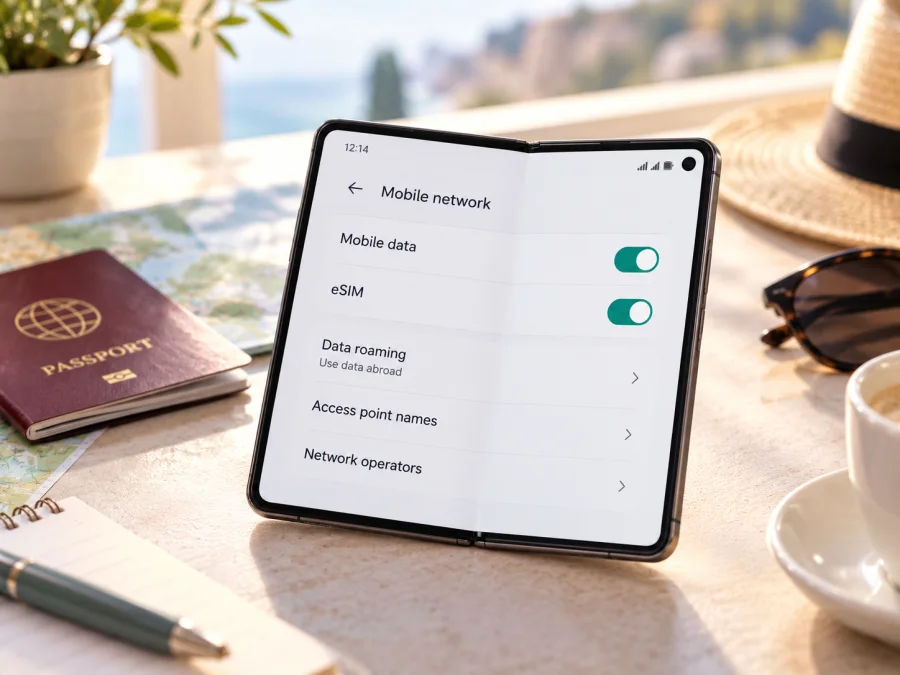
Honor Magic V2 128GB eSIM: compatibility and setup guide
If you are preparing for a trip, first check whether the exact Honor Magic V2 128GB in your hands can install an eSIM. HONOR’s current global eSIM guidance lists the Magic V2 family as compatible in supported markets, but warns that eSIM availability may depend on the phone’s country of origin. There is a further uncertainty in this exact query: official HONOR material reviewed for the Magic V2 lists 256GB and 512GB versions, plus a 1TB special edition, rather than a 128GB model. The family-level compatibility listing therefore cannot confirm every phone advertised with “128GB.”
Short answer: some HONOR Magic V2 versions support eSIM, but eSIM support for a specific Honor Magic V2 128GB configuration is not officially confirmed by the information available. Check for an EID and an “Add eSIM” option on the actual phone, verify its model number and sales region with the seller or HONOR, and confirm it is unlocked before buying a travel plan. Storage capacity alone does not determine eSIM support.
Does Honor Magic V2 128GB support eSIM?
HONOR’s global eSIM page includes HONOR Magic V2 in its list of supported device families. It also says that a device may not support eSIM depending on its country of origin, even when the family name appears on the list. HONOR regional support information identifies eSIM profile capacity for Magic V2, confirming that some regional versions have the feature. These statements do not certify an unverified 128GB configuration or every operator-specific build.
HONOR’s official launch information for the China-market Magic V2 lists 16GB + 256GB and 16GB + 512GB versions; it also lists a 16GB + 1TB Magic V2 Ultimate Edition. The reviewed official information does not identify a 128GB version. A store listing may contain an error or refer to another regional product. Do not infer eSIM support from its title: compare the model number in Settings and on the box, then ask the seller which market version it is.
| Item | What is confirmed | What it means for this phone |
|---|---|---|
| HONOR Magic V2 family | HONOR lists the family as eSIM-capable. | Some Magic V2 versions support eSIM. |
| Country of origin | HONOR says availability may vary by origin market. | Imported or regional units need an individual check. |
| 128GB configuration | Official Magic V2 launch information reviewed lists 256GB, 512GB and 1TB options. | The exact “128GB” variant is unverified. |
| Operator and plan | The phone must be unlocked, and the provider must accept the device. | A device menu alone cannot guarantee activation. |
| Travel data use | A compatible phone is needed to install a travel eSIM profile. | Check compatibility and plan terms before payment. |
If the phone shows an EID and an eSIM-add flow, that is strong evidence that its installed software exposes eSIM support. It does not prove that the device is unlocked or accepted by a particular provider. If neither EID nor “Add eSIM” appears, pause before purchasing: confirm the model code and regional eligibility with HONOR or the seller. If eSIM is unavailable, alternatives include checking roaming with your home operator, using a physical local SIM where available, or relying on Wi‑Fi for part of the trip.
Why regional and operator versions matter
HONOR Magic V2 is a product family, and regional versions may differ in firmware, supported bands, SIM options, or certification. HONOR’s country-of-origin caution is why you should verify the actual phone rather than rely on a list that says only “Magic V2.”
Operator phones may have extra restrictions. A handset can have eSIM hardware but remain locked to one operator, or its software may hide a feature. The provider may also decline to activate a model that HONOR enables. Check capability, unlock status, and provider acceptance separately.
Changing the language or region will not add eSIM hardware. An update may fix a software issue, but cannot be relied on to convert a non-eSIM model. For an imported or used phone, ask to see its EID and “Add eSIM” on the actual unit, and match its model number to the box.
Storage and eSIM are separate attributes. “128GB” does not establish whether the phone supports eSIM, and the official configuration information found for the Magic V2 did not list that storage size. Ask for a photo of Settings → About phone, the product code, and the box label. If these details do not match, ask the seller to explain before paying; do not silently treat a 128GB listing as a 256GB device.
Check the phone before choosing a plan
Use these checks on the exact Honor Magic V2 128GB device, ideally while it is connected to Wi‑Fi. Menu names can vary by MagicOS version and market.
- Look for the EID. Open Settings → About phone and find EID. HONOR describes this as a route to the EID on supported phones. Its presence is a useful hardware and software clue, but does not prove that the phone is unlocked or that a particular provider will activate it.
- Find eSIM management. Open Settings → Mobile network → SIM management and look for Add eSIM. If the menu differs, search Settings for “eSIM” or “SIM management.” Check for a system update if the option is missing.
- Record the model code. In About phone, note the model number and software build. Ask HONOR or the seller to confirm eSIM support for that exact code and market. A storage label is not a model code.
- Check the network lock. Ask the original operator or seller whether the phone is unlocked for another provider’s eSIM. A locked phone can reject a travel profile even when the EID is present.
- Check the plan. Confirm that it covers your destinations and dates, accepts your device and installation method, and has suitable data, validity, and activation terms.
- Keep a fallback. If any check is unclear, resolve it before purchase. If eSIM is unavailable, check your operator’s roaming or consider a physical SIM where available.
Compatibility checklist
- [ ] The phone’s model number and country of sale are known.
- [ ] An EID appears in Settings or on the original box.
- [ ] Add eSIM is available in SIM management.
- [ ] HONOR or the seller confirms support for the exact regional code.
- [ ] The phone is unlocked and the eSIM provider accepts it.
- [ ] The plan covers the destinations and dates on the itinerary.
- [ ] You have Wi‑Fi or another connection for installation.
For a quick next step, check your device compatibility before selecting a travel data plan. Compatibility depends on the phone you have, not just the family name.
Resolve uncertain checks before checkout. Payment does not install the profile, and an activation QR code may be single-use.
Choose a travel data plan that fits the trip
Compare plans against your itinerary and expected usage, not only the country name. A weekend of maps, messaging, email, and light browsing uses less data than frequent video calls, hotspot sharing, or large uploads. Check whether a plan covers one country or a wider region if your trip crosses borders. A regional plan can be convenient, but check its included destinations and restrictions. Estimate data use from your itinerary: video, cloud backups, app updates, and laptop hotspot can use an allowance quickly. Set large backups to Wi‑Fi if you want to conserve data.
Check validity and activation rules before installation. Validity may begin on install, first connection, or a scheduled date. If installing before departure, confirm whether to leave the profile off until arrival. Some QR codes are single-use, so do not rescan repeatedly as a troubleshooting shortcut.
Kaspersky eSIM Store is an app and website where you can choose, arrange, and activate an eSIM with a suitable data plan for an overseas trip. After checking compatibility, browse current destinations and travel plans and review the destination, data allowance, validity, and terms shown for your itinerary. The homepage is a starting point for browsing, not a country-specific tariff; select your destination and read the individual plan details before proceeding.
A travel data eSIM is not automatically a replacement for your number. Unless the plan says otherwise, it covers mobile data rather than ordinary calls and SMS. You can keep your main SIM for calls while setting the travel eSIM for data; internet calling apps may work through that connection.
Install and activate an eSIM on Honor Magic V2 128GB
Start only after confirming that your exact phone supports eSIM, is unlocked, and is accepted by the plan provider. Connect to Wi‑Fi, have your QR code or in-app installation option ready, and do not delete an installed profile while troubleshooting unless support tells you to. HONOR’s general route is Settings → Mobile network → SIM management → Add eSIM.
Step-by-step setup
- Prepare the connection. Connect to stable Wi‑Fi and keep the phone charged. Open the app or account where the plan and installation details are available.
- Open SIM management. Go to Settings → Mobile network → SIM management. Search Settings if the layout differs.
- Add a profile. Tap Add eSIM and follow the phone’s prompts. Choose QR scanning, manual entry, or a pre-assigned plan only if the provider offers that method.
- Scan or enter the details. Show the QR code on another screen or paper and scan it. If the code is on the Honor phone itself, use the provider’s in-app install option or display it on another device. Enter any manual activation information exactly as given.
- Wait for download. Follow the prompts until downloaded, then label the profile “Travel” to distinguish it from your main SIM.
- Choose when to use it. If you will activate after arrival, leave the profile in the state recommended by the provider. Some plans can be installed in advance; activation rules differ.
- Select mobile data. In SIM management, choose the travel profile for mobile data. Keep calls and messages on your main line if you prefer, and check that automatic data switching will not select the wrong SIM.
- Set roaming as directed. Some travel plans need data roaming enabled on the eSIM. Turn it on for that profile only if instructed, and check that the home SIM is not using mobile data unintentionally.
- Test at the destination. Enable the travel line and wait for network registration. Enter an APN or select a network only if the plan instructions provide those details. Test a simple webpage before relying on maps or work tools.
For reference, see the Android eSIM installation instructions. That guide notes that Android menus vary and its illustrated steps are specific to Samsung; on Honor Magic V2 128GB, use the SIM-management options actually shown on your phone. The iOS eSIM instructions are for Apple devices, but illustrate QR installation and data-line selection.
You do not usually need to remove your main SIM. Dual-SIM behavior varies, so check calls, messages, and data selection. Keep the instructions accessible and treat activation codes as private account information.
Use the eSIM while travelling
Keep your regular SIM for calls if needed and select the travel eSIM for data. Your home operator may still bill for calls, messages, or data abroad; check its roaming terms first.
At your destination, open Settings → Mobile network → SIM management. Confirm that the travel eSIM is enabled and selected for data. If the plan requires roaming, enable Data roaming for that eSIM. Review the home SIM separately. If your phone offers automatic data switching, decide whether you want it on; switching may send data over another line when the selected eSIM has no service.
Reception varies with location and local network availability. Weak signal indoors, on a train, or in a crowded venue does not by itself mean the profile is faulty. Move to an open area and wait. At a border, check that the new country is included and whether network selection is required.
Common travel scenarios
- One country: Confirm destination and dates, install over Wi‑Fi if allowed, then select the eSIM for data after arrival. Leave home-SIM data roaming off unless needed.
- Several countries: Check every stop against the plan’s destination list; do not assume one-country coverage extends across borders.
- Hotspot for work: Confirm tethering is allowed. Laptop updates and cloud sync can use data quickly, so set these to Wi‑Fi and monitor usage.
- Install before departure: Follow the plan’s activation rules. Validity triggers differ; ask support if it is unclear when to enable the profile.
- Keep your number: Keep the primary SIM for calls if needed, direct data to the travel eSIM, and check roaming charges for calls and SMS.
Common problems and checks
There is no “Add eSIM” option. Check About phone for an EID, search Settings for eSIM, install available updates, and confirm the model number and country of origin with HONOR or the seller. If the EID and menu remain absent, treat the phone as unverified.
The plan will not download. Check Wi‑Fi, QR readability, manual details, whether the code was already used, and provider support for the exact regional model. An EID does not guarantee that every activation code is accepted. Contact the provider before deleting a partial profile.
The QR code will not scan. Increase the display brightness, clean the camera lens, and hold the phone steady. If the code is on this phone, display it elsewhere or use an in-app installation method. Do not crop the code.
The profile installs but has no service. Confirm that the eSIM is enabled and selected for data. Briefly toggle airplane mode, then wait for registration. Check plan status, destination, validity, and roaming requirements. Select a network manually only if the provider lists one.
The phone connects but pages do not load. Check that the travel eSIM is the data line and that data and validity remain. Enter an APN only when the provider supplies it. Turn off unwanted automatic data switching and test again.
Data uses the wrong SIM. Inspect the default data line in SIM management. Turn off automatic switching to keep traffic on the travel eSIM, and check data and roaming settings separately for each line.
The profile disappears after reset or update. Check SIM management. A reset or profile deletion may remove eSIM, and the original QR code may not work again. Avoid a factory reset as a first step; contact HONOR and the provider with the model, software version, and error.
An operator says the phone is incompatible. Give it the exact model code and market, and say whether an EID appears. Ask whether the issue is eSIM support, a carrier lock, account eligibility, or provisioning; repeated scans will not fix an unsupported or locked device.
Troubleshoot in order: confirm the plan, check the selected data line and roaming, then restart or contact support. Keep the profile installed unless asked to remove it.
Frequently asked questions
Is Honor Magic V2 128GB officially confirmed as eSIM-compatible?
No official confirmation was found for a specific 128GB configuration. HONOR lists the Magic V2 family for eSIM in supported markets but warns that country of origin can matter. Check the EID, Add eSIM menu, model code, and market before buying.
Does every Honor Magic V2 support eSIM?
Not necessarily. Regional software, country of origin, operator lock, and provider activation rules can affect use. Confirm your exact device.
Where do I find the EID?
Open Settings → About phone and look for EID. Also check for Add eSIM in SIM management and verify that the phone is unlocked.
Can I install before travelling?
If the provider allows it, you can prepare the profile before departure. Follow the selected plan’s activation and validity instructions.
Does a travel eSIM include calls and SMS?
Usually it provides mobile data only unless its terms say otherwise. Check home-operator roaming charges for ordinary calls and messages.
Should I enable data roaming?
Some travel eSIMs require it. Follow the plan instructions, enable roaming for the travel profile if required, and make sure the home SIM is not using data unintentionally.
Is 128GB storage enough for eSIM?
Storage does not determine eSIM support. The reviewed official Magic V2 configurations do not list 128GB; verify the product code and settings on the actual phone.
What if eSIM is unavailable on my version?
Check roaming with your operator, consider a physical SIM where available, or plan to use Wi‑Fi. Keep essential maps and tickets available offline.
Final check before your trip
For Honor Magic V2 128GB, the answer remains conditional: HONOR lists the Magic V2 family for eSIM in supported markets, but the exact 128GB configuration is not confirmed by the official storage information reviewed here, and country of origin can matter. Check the EID, confirm Add eSIM, verify the precise model code and unlock status, and make sure your chosen provider accepts the phone before checkout.
Once compatibility is clear, compare the plan’s destination, data allowance, validity, and activation rules. Kaspersky eSIM Store’s app and website help you choose, arrange, and activate an eSIM with a suitable data plan for an overseas trip. If the listing remains ambiguous or your phone lacks eSIM settings, use a physical SIM or ask your home operator about roaming. A quick device check before departure can help ensure your travel plan is installable on the phone you actually own.


