Travel connectivity guide
HONOR Magic V2 256GB eSIM Compatibility & Setup
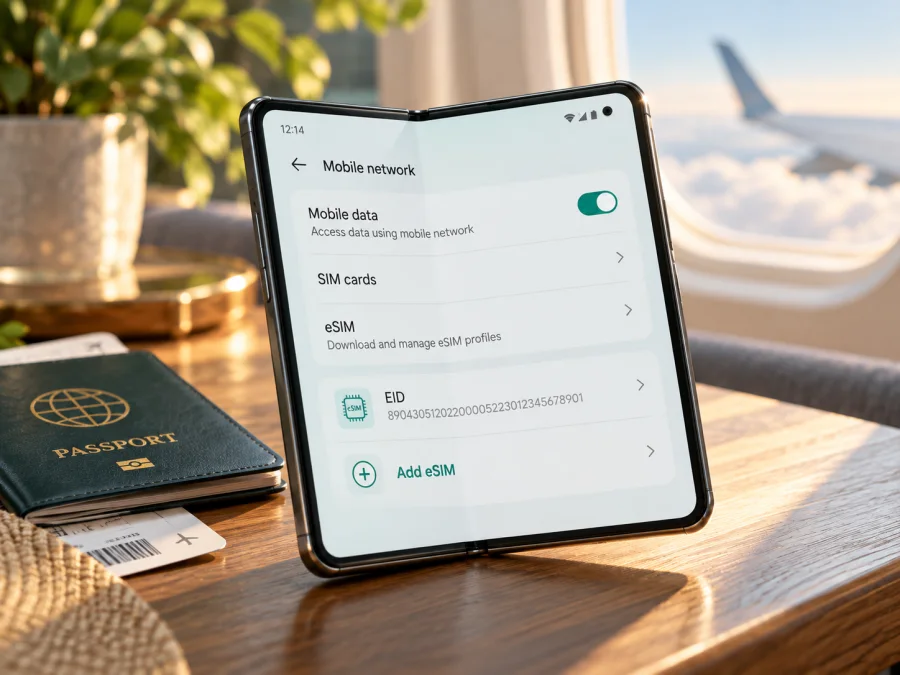
HONOR Magic V2 256GB eSIM compatibility and setup guide
The HONOR Magic V2 is listed by HONOR among its eSIM-capable phone models, but that list does not guarantee support on every regional build. HONOR explicitly cautions that a device may not support eSIM depending on its country of origin. The name “HONOR Magic V2 256GB” alone does not identify the sales region, firmware, or exact model code, so the reliable answer for this particular handset is conditional: it can use eSIM only if its own settings show an EID and an option to add an eSIM, and if the device is unlocked and the intended plan supports it. Check the phone itself before buying a travel plan.
HONOR’s global eSIM compatibility page, checked on November 1, 2026, lists the HONOR Magic V2 in its supported-device family and carries the country-of-origin warning. HONOR’s regional product pages show that storage configurations can differ across markets; 256GB is not by itself proof of either eSIM support or lack of support. A Chinese-market handset, an international-market handset, and a phone imported and resold elsewhere may share the Magic V2 name while having different firmware, SIM features, or carrier restrictions. Do not rely on a shop title, box photo, or a generic model list to settle the question.
Does the HONOR Magic V2 256GB support eSIM?
At model-family level, HONOR says yes: the Magic V2 appears on HONOR’s global list of devices that support eSIM. At the level of the exact 256GB unit, the answer depends on its regional version. HONOR’s warning matters here: even a listed model may lack eSIM when it comes from a particular country or market. The storage size does not settle that distinction.
Use this practical rule:
- EID is present and Settings offers “Add eSIM”: the handset has an eSIM function available in its current software. Continue by checking the carrier lock and travel-plan requirements.
- EID or “Add eSIM” is missing: treat this phone as not ready for eSIM. Confirm the exact model code and original sales region with the seller or HONOR support before purchasing a plan. A software update may change menus, but do not assume it will add eSIM capability to a build that lacks it.
- The menu is present but installation fails: the phone may still be locked, the plan or QR code may not be compatible, or the eSIM service may be restricted by the issuing provider. Check those items before retrying.
A dual-SIM label is not enough. A phone can support two physical SIM cards without having an embedded SIM, and an eSIM-capable phone can still be restricted by its market software or carrier. The installed eSIM profile is also different from the eSIM hardware: deleting a profile does not create eSIM capability, while an EID indicates an embedded SIM identifier is available to the system.
HONOR Magic V2 256GB: quick compatibility summary
| Item | What to know |
|---|---|
| Exact device name | HONOR Magic V2 256GB |
| Manufacturer model-family listing | HONOR includes HONOR Magic V2 on its global eSIM device list |
| Is every regional unit compatible? | No guarantee. HONOR says country of origin can affect eSIM availability |
| Does “256GB” identify the eSIM version? | No. Storage capacity alone does not identify market or firmware |
| Best on-device check | Find the EID and “Add eSIM” in Settings |
| Other requirements | The device must be carrier-unlocked; the plan and local network must support the device |
| Travel-plan use | Select the travel eSIM for mobile data and enable data roaming for that eSIM if its instructions require it |
This table gives a verification path, not a universal guarantee. If you are buying the phone second-hand or from an import seller, ask for the full model code and a clear screenshot of the SIM management screen. Have the seller show the actual phone, not a photograph from another listing. If the seller cannot confirm EID and “Add eSIM,” budget and plan for a physical SIM or another compatible device instead.
Check compatibility before choosing a plan
Run these checks before purchase. They take only a few minutes and help prevent the common mistake of buying a data plan for a phone that cannot download it.
- [ ] Find an EID in Settings → About phone.
- [ ] Confirm Add eSIM appears in SIM management.
- [ ] Verify the model code, sales region, and unlocked status.
- [ ] Check that the plan covers the destination and dates of your trip.
1. Look for the EID
On HONOR’s current global instructions, the EID can be found at Settings → About phone → EID. The label or menu position can vary slightly with MagicOS version and region. You can also check the original box if the EID is printed there, but the phone’s own Settings screen is the stronger check because it reflects the handset you will actually use.
The EID is a device identifier for its embedded SIM hardware; it is not a phone number, activation code, or QR code. Do not post it publicly. If a seller or plan provider needs it for an eligibility check, share it only through a trusted support channel and only when requested.
2. Check SIM management
Open Settings → Mobile network → SIM management. Look for Add eSIM or an equivalent eSIM option. HONOR’s menu names may vary by language and software release. If you only see physical SIM slots and no eSIM entry, restart the phone once, install available official system updates, and check again. If the option remains absent, do not assume that a third-party app, a QR code, or a regional setting can make the phone compatible.
3. Confirm regional version and lock status
Check Settings → About phone for the model code and software information. Compare that code with the seller’s listing and ask which country or region the handset was originally sold in. If it is an imported device, request confirmation from the seller or HONOR support for that model code and original market. A listing that says “global ROM” is not by itself proof of global hardware or eSIM support.
Ask whether the phone is network-unlocked. A carrier-locked handset may reject an eSIM from another provider even when its EID and Add eSIM menu are present. The current home SIM working does not prove that a second provider’s eSIM can be installed.
4. Check the plan and destination
Before paying, make sure the exact plan covers every destination on your itinerary, is valid for the dates you need, and has a data allowance that suits your expected use. Check whether it is country-specific, regional, or global; a regional label is not a promise that every nearby country is included. Review whether activation starts at purchase, on installation, or on first network connection, and whether tethering is allowed if you need a hotspot.
Check your HONOR Magic V2 256GB against the device compatibility guide before choosing a plan. You can also browse current travel eSIM options and read the plan conditions shown for your destination. The Kaspersky eSIM Store app and website help you choose, arrange, and activate an eSIM with a suitable mobile-data plan for an international trip; the mobile service itself is provided through the applicable network partners.
How to install an eSIM on the HONOR Magic V2 256GB
Install the profile while you have a reliable Wi-Fi connection. Some steps may appear differently depending on the handset’s region and MagicOS version. Do not delete a successfully installed profile just to retry activation: many QR codes can be used only once. If your Settings screen does not have the eSIM menus described below, stop and verify compatibility instead of scanning the code repeatedly.
Before you start
- Confirm that EID and Add eSIM are present and that the phone is unlocked.
- Read the plan’s installation and activation instructions. Keep the confirmation email or in-app profile accessible on a second screen if you need to scan a QR code.
- Connect the Magic V2 to stable Wi-Fi and keep it charged. The phone usually needs internet access to download the profile.
- Decide which SIM should remain your default for calls and messages. If you keep a home SIM active abroad, review its roaming settings to avoid unexpected charges.
- Keep the QR code private. It is an activation credential, not a public label to share.
Install by QR code
- Open Settings → Mobile network → SIM management.
- Tap Add eSIM. If the phone offers different methods, choose the QR-code option.
- Scan the QR code supplied with the plan. If the code is shown on the same phone, open the provider’s manual installation method instead, or display the QR code on another device. Some plans provide activation details to enter manually.
- Follow the prompts to download and add the profile. Keep the phone connected to Wi-Fi and do not close the setup flow while it is working.
- Give the profile a memorable label, such as Travel data, so it is easy to distinguish from your primary SIM.
- When prompted, choose whether to enable the line now or later. Follow the plan’s activation timing; installing a profile does not always mean that the validity period or data session starts immediately.
- In SIM management, turn on the travel eSIM and select it for Mobile data when you are ready to use it. Keep the home SIM selected for calls and texts if you want to preserve that function.
- If the plan’s instructions require it, enable Data roaming for the travel eSIM. Confirm that roaming is off for your home SIM if you want to avoid home-carrier roaming charges.
- Once you are in a covered destination, wait a few minutes for the profile to register. The provider may specify an APN; enter it only if the plan instructions tell you to. Do not copy an APN from an unrelated plan.
For a general Android walkthrough, see the Kaspersky eSIM Store Android installation guide. Its screenshots use Samsung menu labels, so the HONOR path may differ. The iOS installation guide is for iPhone users and does not describe the Magic V2, but it can help when another Apple device is part of your travel setup.
Manual installation or app-assisted setup
If the provider supports manual installation, use only the server address and activation code provided for your purchased plan. Enter them in the Add eSIM flow and check every character before continuing. Codes are case-sensitive or format-sensitive in some systems, and a copied space can cause an error. If the store or provider app offers a supported install button, follow its on-screen process instead of entering a QR code and manual details for the same profile.
Do not use a QR code from a search result, a forum, or an unrelated email. A QR code is specific to an eSIM profile and may expose access to the plan. If the email is missing, check the account in the app or website where the plan was arranged, then contact that service’s support. Avoid buying a replacement profile until you know whether the original code has already been used.
Using the eSIM for mobile data on a trip
Keep your usual SIM available for calls or messages if you need it, and assign mobile data to the travel eSIM. On the HONOR Magic V2, look under Settings → Mobile network → SIM management. Choose the eSIM for mobile data and your preferred line for calls. When you arrive, turn on the travel eSIM and mobile data. Some data-only profiles require Data roaming to be enabled for that eSIM; follow the plan instructions. To reduce home-carrier charges, disable data roaming on your regular SIM or turn that line off. Calls, texts, and voicemail remain subject to your home operator’s terms.
Kaspersky eSIM Store is an app and website where users can choose, arrange, and activate an eSIM plan for mobile internet on an international trip. The homepage describes travel plans as data-only: they do not include a normal phone number, voice calls, or SMS unless a particular plan says otherwise. Messaging and calling apps can use the data connection. The service does not unlock a phone or guarantee service at a particular location.
Before installing, read when the plan starts: at purchase, installation, activation, or first connection to a supported network. Check the destinations, data allowance, validity, top-up and hotspot conditions for your route. For several countries, make sure each one is included rather than assuming that a nearby destination is covered. Keep the installation details accessible offline and use Wi-Fi for large updates or backups when practical.
Common problems and checks
EID or Add eSIM is missing
Check Settings → About phone and SIM management, verify the full model code and original sales market, install available official updates, and restart once. If the EID and eSIM menu remain absent, ask the seller or HONOR support whether that exact version supports eSIM. Until confirmed, use a physical SIM or another known-compatible device. A QR code cannot add a feature the handset does not expose.
QR code will not scan or the profile will not download
Make sure Wi-Fi works, the code is clear and intended for this plan, and the phone is scanning a code displayed on another screen. If the QR code is on the Magic V2 itself, use the provider’s manual setup option or another display. Check for spaces or mistyped characters in manual details. A code may be single-use; if it may already have been scanned, ask the plan provider whether it can be reissued before trying again.
Profile is installed but there is no service
Confirm the eSIM is switched on and selected for mobile data, airplane mode is off, and you are in a destination covered by the plan. Enable data roaming for the travel line if required, then allow a few minutes to register and restart once. Enter an APN only when the plan provider supplies one. If service still fails, contact that provider with the model code, destination, and error message; keep the QR code private.
Connected, but apps have no internet
Check which SIM is assigned to mobile data, remaining allowance, plan validity, and destination eligibility. Verify any provider-specified APN. If you use a VPN or private DNS, temporarily disable it only as a diagnostic when appropriate, then restore it. Test more than one app or website.
Home-SIM charges or eSIM rejection
Set the travel eSIM as the data line and turn off roaming on the home SIM if you want to avoid its data charges; calls and texts may still incur fees under your carrier’s terms. If the plan is rejected, confirm the phone is unlocked, the model code is eligible, the code has not been used, and the plan is for a phone rather than another device type. Contact the plan provider before deleting the profile.
Useful scenarios
Before buying a used HONOR Magic V2 256GB: ask the seller to show EID in About phone and Add eSIM in SIM management on the actual device. Confirm the model code and country of origin; a screenshot from another phone or the storage capacity alone is not proof.
Before a near-term trip: check EID, Add eSIM, and unlock status while you still have Wi-Fi and time to contact support. Read the destination and activation terms. If the menu is missing, arrange a physical SIM or a verified compatible device instead of relying on a last-minute workaround.
For a multi-country route: verify that every country is included and check the eSIM remains selected for data after each border. A country-specific plan may not cover the next stop.
Frequently asked questions
Can every HONOR Magic V2 256GB use eSIM?
No universal guarantee applies. HONOR lists Magic V2 at model-family level, but warns that country of origin can affect availability. Check the EID and Add eSIM menu on the exact phone and confirm that it is unlocked.
Does 256GB mean that this is a China version?
No. Storage alone does not identify the market. Check the complete model code and original sales region with the seller or HONOR.
Can I keep my physical SIM active?
If the device configuration and carrier allow it, you can keep a physical SIM active while assigning mobile data to the eSIM. Check the available line combinations in Settings.
Does a travel eSIM include calls and texts, and can I move it later?
Many travel plans are data-only and have no regular number or SMS. Some profiles also cannot be transferred after activation. Check the exact plan terms before installing; internet messaging apps can use the data connection.
What if EID is present but the provider rejects activation?
Check network lock status, model-code eligibility, plan requirements, and whether the QR code has already been used. An EID does not guarantee that every provider accepts the handset. Contact the provider with the exact model and error details.
Final check before your trip
For the HONOR Magic V2 256GB, use the actual handset—not the product name or storage capacity—to decide. Confirm the EID in Settings, find Add eSIM in SIM management, and verify that the phone is unlocked and accepted by the plan provider. Review destinations, allowance, validity, activation timing, roaming instructions, and any APN details.
Once compatibility is confirmed, use the Kaspersky eSIM Store app or website to choose, arrange, and activate a travel eSIM plan for mobile data. Set the eSIM as your data line when needed and keep the home SIM’s roaming settings in mind. If there is no EID or Add eSIM option, confirm the regional version with HONOR or the seller; a physical SIM or another verified compatible phone is the practical alternative.


