
Travel connectivity guide
eSIM for Hungary: mobile internet guide
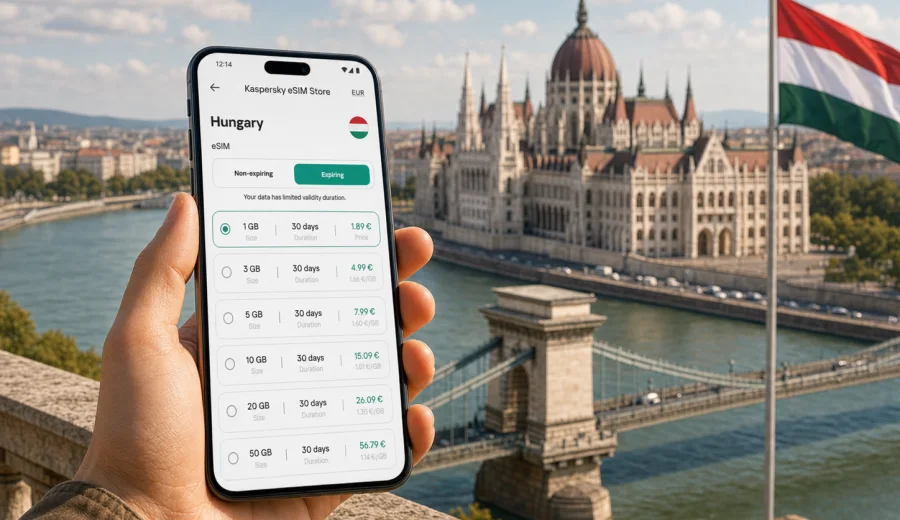
eSIM for Hungary: mobile connection and internet for your trip
Hungary is a compact country, but a trip there can still depend heavily on mobile internet. You may need maps after landing in Budapest, train times for a day trip to Szentendre, hotel messages in Eger, taxi apps at night, restaurant bookings near Lake Balaton, or work access during a business visit. An eSIM helps you prepare mobile connection before you start looking for a shop that sells a physical SIM card.
This guide explains how to use an eSIM for Hungary, how to estimate data needs, what to check before buying a plan, and how Kaspersky eSIM Store can help you choose, set up, and activate an eSIM tariff for mobile internet during your trip.
Why an eSIM is useful in Hungary
An eSIM is a digital SIM profile installed on a compatible phone or tablet. For travel, it lets you use mobile data without swapping a plastic SIM card. That matters in Hungary because many everyday travel tasks happen in the first hour after arrival: finding the airport bus, messaging your host, checking a train platform, downloading a museum ticket, or navigating from a station to your hotel.
For many travelers, the main advantage is control. Before you confirm a plan, you can review the destination, data allowance, validity period, and price. You can also keep your regular SIM in the device for calls or messages if you need it.
Common travel scenarios where mobile data helps
| Scenario in Hungary | Why mobile internet matters | Practical tip |
|---|---|---|
| Arrival in Budapest | Airport transfer, hotel route, taxi or ride app, messaging | Install the eSIM before departure, then activate data after landing if the plan allows it. |
| City breaks | Maps, restaurant bookings, museum tickets, public transport information | Keep offline maps as backup, but use mobile data for live updates. |
| Business travel | Email, calendar changes, video calls, document access | Choose a data allowance that covers tethering needs if your plan and device support it. |
| Rail trips | Timetables, platform changes, navigation between stations | Check the plan validity period against your full route, not only your flight dates. |
| Lake Balaton or rural routes | Maps, weather, messaging, bookings | Do not promise yourself that public Wi-Fi will be available when you need it. |
The practical value of eSIM is not only speed or convenience. It also reduces dependence on public Wi-Fi in airports, cafes, hotels, and stations. Public Wi-Fi can help, but it is not always available or stable when you need to make a decision quickly.
How to choose an eSIM tariff for Hungary
Start with your trip length and the way you use data. A weekend in Budapest with light maps and messaging is different from a two-week route with video calls, cloud backups, and hotspot use. The right plan is the one that matches your actual behavior, not the largest package by default.
Consider these factors:
- Data allowance: messaging and maps use less data than streaming, video calls, or cloud uploads.
- Validity period: the plan should cover your full stay, including arrival and departure days.
- Destination: choose Hungary if your trip stays in the country, or consider a regional Europe option if your route includes Austria, Slovakia, Croatia, Romania, or other nearby countries.
- Activation rules: check when the validity period starts and whether the plan activates on installation or on first network connection.
- Hotspot use: if you plan to share data with a laptop or another traveler, confirm that tethering is supported by the selected plan and device.
- Calls and SMS: travel eSIM plans are usually focused on mobile data and may not include a local phone number, voice calls, or SMS unless the plan conditions say otherwise.
Quick estimate of data needs
| Travel style | Typical use | What to look for |
|---|---|---|
| Light | Maps, chat, email, ticket apps | Smaller package, short validity, careful app updates. |
| Standard | Maps, social media, browsing, occasional uploads | Moderate package that covers the whole stay. |
| Heavy | Video calls, hotspot, cloud tools, frequent media | Larger package, clear hotspot conditions, extra margin. |
| Work trip | Email, files, calls through apps, laptop hotspot | Stable allowance over the full business schedule. |
These are planning categories, not technical guarantees. Actual data use depends on app settings, background sync, video quality, navigation time, and whether your device downloads updates over mobile data.
Hungary-specific travel points to think through
Hungary is easy to navigate compared with many larger destinations, yet mobile data can still shape the trip. Budapest has several transport options from the airport and within the city, and visitors often rely on map apps, ticket apps, QR codes, and messenger confirmations.
If your route includes the Danube Bend, Debrecen, Szeged, Pecs, Gyor, Eger, or Lake Balaton, plan data for transport days. Those are the moments when you may need maps, accommodation instructions, translation, or a quick message to a driver.
For a Schengen-area route, check whether you need a Hungary-only plan or a wider Europe plan. A traveler who visits Budapest only may prefer a country tariff. Someone combining Budapest with Vienna, Bratislava, Zagreb, or Prague may need a regional option that matches the whole itinerary.
What to check before you buy
Before paying for any eSIM tariff, confirm that your device can actually use it. eSIM support depends on the exact model, region, and sometimes carrier settings. A phone name alone is not always enough.
Use this checklist:
- Check whether your device supports eSIM.
- Check that the device is not locked to one mobile operator.
- Make sure you have a stable internet connection for installation.
- Confirm that the plan is for Hungary or the region you will visit.
- Read the validity period and the moment when data usage starts.
- Check whether hotspot sharing is allowed if you need it.
- Keep your regular SIM active only if you need calls, SMS, or banking messages.
If you travel with a dual-SIM phone, label the profiles clearly after installation: your home SIM for calls or SMS, and the travel eSIM for mobile data.
How to install and activate an eSIM for Hungary
The exact flow depends on your device, but the basic process is simple: choose a destination and plan, complete the order, install the eSIM profile, then select it for mobile data when you are ready to use it.
General steps:
1. Check that your phone or tablet supports eSIM.
2. Choose Hungary, or a regional plan if your route covers more countries.
3. Review data allowance, validity, price, and plan conditions.
4. Complete the order and open the eSIM details in your profile or app.
5. Install the eSIM using the on-screen steps or QR code.
6. On arrival, select the eSIM as the mobile data line and enable data roaming for that eSIM if the instructions require it.
7. Test maps, browser access, and messaging before you leave the airport or station area.
For device-specific setup, use the Android installation guide or the iOS installation guide. Keep Wi-Fi available during installation because the phone needs internet access to download and register the eSIM profile.
Do not delete the eSIM profile unless you are sure you no longer need it. If something looks wrong during setup, check the instructions again and contact support before removing the profile.
When to prepare the eSIM
For most travelers, the best time is before departure. Installing the eSIM at home or in the hotel Wi-Fi before travel gives you time to handle account access, QR codes, and device settings without airport pressure. Activation timing depends on the plan conditions, so read whether the validity period begins on installation or on first connection to a supported network.
If you prefer to activate after landing, make sure you can still access the eSIM instructions. Save the installation details where you can reach them if airport Wi-Fi is unstable.
Once your article preparation and device checks are complete, you can choose an eSIM tariff for your trip to Hungary and review available data options for the destination. Kaspersky eSIM Store helps you select, set up, and activate a suitable eSIM tariff for mobile internet in a foreign trip through the site or app.
How eSIM compares with other options
| Option | Strengths | Limitations |
|---|---|---|
| Travel eSIM | Can be prepared in advance, no plastic SIM swap, useful for data on arrival | Requires a compatible unlocked device; usually focused on data. |
| Home operator roaming | Keeps your existing number and billing relationship | Costs and data rules depend on your home plan and may be high. |
| Local physical SIM | May suit long stays or specific local needs | Requires finding a shop, possible language barriers, and a SIM slot. |
| Public Wi-Fi | Useful as backup in hotels or cafes | Not always available, may be slow, and can be inconvenient for sensitive tasks. |
There is no single best option for every traveler. eSIM is a strong choice when you want mobile data ready for maps, messages, tickets, and everyday trip tasks without replacing your physical SIM.
Managing data during the trip
Even a generous package can run down quickly if your phone treats mobile data like home Wi-Fi. A few settings make the plan easier to manage:
- Turn off automatic app updates over mobile data.
- Pause cloud photo and video uploads until Wi-Fi is available.
- Download offline maps for Budapest and any intercity route.
- Reduce video streaming quality or avoid streaming on mobile data.
- Use messaging apps for calls when voice service is not included.
- Check data use in your phone settings and in the plan interface when available.
- Keep the eSIM selected only for mobile data if your regular SIM should handle calls or SMS.
For a short city break, the biggest data consumers are often maps, social media video, and photo backups. For business travel, hotspot and video meetings usually matter more.
Troubleshooting: what to do if mobile data does not work
Most setup issues come from profile selection, roaming settings for the eSIM, activation timing, or device compatibility.
Try this sequence:
1. Confirm that the eSIM profile is installed and not deleted.
2. Check that the eSIM is selected for mobile data.
3. Enable data roaming for the eSIM if the instructions say it is required.
4. Turn airplane mode on and off.
5. Restart the device.
6. Check whether the plan has already activated and whether data remains.
7. Move to an area with better signal and test again.
8. Review the Android or iOS setup guide for your device.
9. Contact support if the issue continues.
Do not repeatedly delete and reinstall the profile unless support or the instructions clearly tell you to do that.
What eSIM does not replace
An eSIM tariff for travel is mainly about mobile data. Unless the selected plan states otherwise, do not assume it includes a Hungarian phone number, ordinary voice calls, or SMS. Banking messages and calls to your existing number may still depend on your home SIM and roaming settings.
Also, eSIM is not a tool for anonymity, not a VPN, and not a way to bypass local rules or restrictions. Treat it as a practical data option for maps, messaging apps, bookings, translation, and work tools.
FAQ: eSIM and internet in Hungary
Can I install the eSIM before I travel to Hungary?
Yes, in many cases you can install the eSIM before departure. Check the plan rules to understand when validity starts, and keep Wi-Fi available during installation.
Will I get a Hungarian phone number?
Usually travel eSIM tariffs are focused on mobile data. Voice calls, SMS, and a local phone number are not included unless the selected plan conditions say so.
Can I keep my regular SIM active?
Yes, on many dual-SIM devices you can keep your regular SIM for calls or SMS and use the eSIM for mobile data. Check your phone settings carefully to avoid unwanted roaming data on your home SIM.
Can I share data with my laptop?
It may be possible if the selected plan and your device support hotspot use. Check the tariff conditions before relying on tethering for work.
What happens if I use all data?
Check the plan interface or profile options. Depending on the selected tariff, you may be able to top up or choose another suitable plan.
Final checklist before departure
- Your device supports eSIM and is not carrier-locked.
- The eSIM tariff covers Hungary or your wider regional route.
- The validity period covers arrival and departure days.
- Installation instructions are saved and accessible.
- Your mobile data line is clearly labeled.
- Data roaming settings for the eSIM are understood.
- App updates and cloud backups over mobile data are limited.
- Offline maps and booking details are saved as backup.
Choose an eSIM tariff for Hungary
If Hungary is on your travel plan, prepare mobile internet before you need it at the airport, station, hotel desk, or street corner. Use Kaspersky eSIM Store to compare the available destination options, review the data allowance and validity period, and prepare an eSIM tariff for Hungary that fits your trip.
Check device compatibility first, install the eSIM while you still have a stable connection, and keep the setup instructions nearby. That way, your phone is ready for maps, messages, bookings, and everyday mobile internet tasks as soon as your trip begins.