
Travel connectivity guide
Hurghada eSIM: mobile internet for your trip
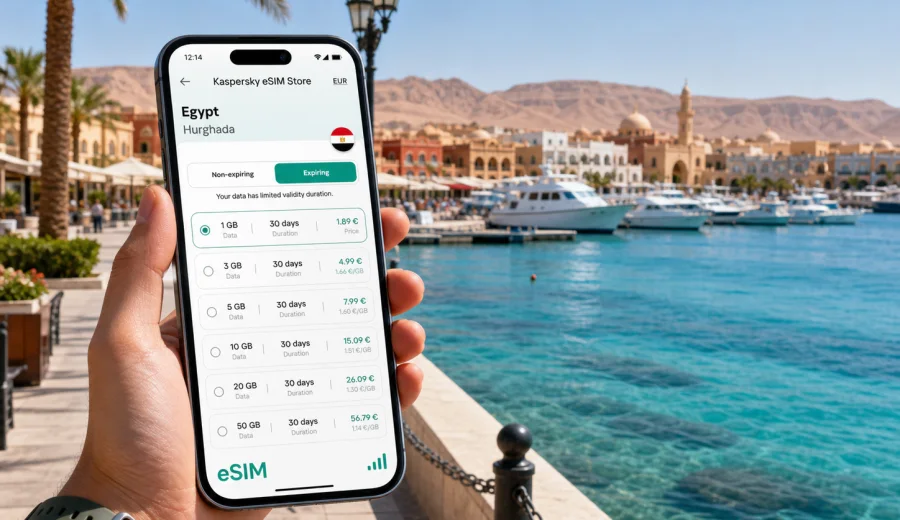
Hurghada eSIM guide: mobile connection and internet for your trip
Hurghada is built around movement: airport transfers, resort check-ins, marina walks, dive boats, desert excursions, and day trips along the Red Sea coast. For many travelers, the first practical question is not only where to stay, but how to keep mobile internet ready from the moment the plane lands.
An eSIM can make that part of the trip simpler. Instead of looking for a physical SIM card after arrival, you can prepare a digital SIM profile on a compatible phone and use mobile data for maps, messengers, ride coordination, hotel apps, restaurant searches, and travel updates. In Hurghada, where many plans involve moving between beach areas, marinas, hotels, tour meeting points, and nearby resorts, a predictable data setup is especially useful.
This guide focuses on Hurghada, not Egypt in general. It explains where mobile data matters most in the city, how to think about data volume, what to check before buying an eSIM tariff, and how Kaspersky eSIM Store can help you choose, order, install, and activate an eSIM with a suitable data package for your trip.
Why mobile internet matters in Hurghada
Hurghada is a resort city, but it is not one single walkable center. Travelers often move between Hurghada International Airport, the hotel districts south and north of the city, Hurghada Marina, Sheraton Road, Mamsha promenade, dive centers, beaches, and pickup points for boat or desert tours. Some hotels are self-contained resorts, while others are closer to restaurants, shops, and nightlife.
Mobile internet helps with everyday travel tasks:
| Travel moment in Hurghada | Why data helps |
|---|---|
| Arrival at Hurghada International Airport | Message your hotel, check transfer details, open booking confirmations, and use maps |
| Moving between districts | Compare routes, share live location, and coordinate with drivers or tour operators |
| Resort stays | Use hotel apps, messengers, translation, online banking, and travel documents outside room Wi-Fi |
| Diving and boat trips | Confirm meeting points, weather changes, boat schedules, and pickup times |
| Day trips from Hurghada | Keep maps and messages available on the road to El Gouna, Makadi Bay, Safaga, or Luxor |
| Business travel | Join calls, receive documents, and stay reachable between meetings and hotel areas |
Hotel Wi-Fi can be enough for some tasks, but it does not help much while you are in a taxi, walking to a marina, waiting for a tour pickup, or trying to message someone from a beach club. Public Wi-Fi may also require logins, may be slow at busy times, and is not always convenient for sensitive tasks.
An eSIM is useful because it puts the data plan directly on your phone. You can keep your physical SIM in place for your usual number, if your device supports dual SIM use, and use the eSIM for travel data.
Where you will probably use data in the city
Hurghada travel plans usually combine resort time with short local trips. Even if you spend most of the day on the beach, data becomes important in the transitions: airport to hotel, hotel to marina, marina to restaurant, dive center to pickup point, or resort to another coastal town.
Typical data-heavy places and situations include:
- Hurghada International Airport, where you may need booking references, transfer messages, maps, and online payments.
- Mamsha, the long tourist promenade with restaurants, cafes, shops, and hotels.
- Hurghada Marina, where visitors often search for restaurants, boat tours, meeting points, and taxi pickup locations.
- Sheraton Road and central Hurghada, where maps and translation can make local movement easier.
- Resort areas south of the city, including Sahl Hasheesh, Makadi Bay, and Soma Bay routes.
- El Gouna trips, where you may rely on navigation and messaging during the drive.
- Dive centers and boat departures, where pickup instructions can change early in the morning.
For travelers who use ride apps where available, hotel transfers, private drivers, or tour buses, mobile data is less about browsing and more about coordination. A missed message can mean waiting in the wrong lobby, going to the wrong gate, or losing time before a boat trip.
eSIM basics for a Hurghada trip
An eSIM is a digital SIM profile installed on a compatible smartphone or tablet. For travel, it is usually used for mobile data. It does not normally include a local phone number, voice calls, or SMS unless those are clearly included in the selected tariff. You can still use internet-based calls and messages through apps that work over mobile data.
Before you choose an eSIM tariff for Hurghada, check three things:
1. Your device supports eSIM.
2. Your device is not locked to one mobile carrier.
3. The selected tariff covers Egypt and has enough data and validity for your dates.
If you are not sure about your phone, check your device before you buy. This is especially important if you use an older smartphone, a carrier-financed device, or a model bought in a market where eSIM support can vary by version.
The setup itself is usually straightforward: choose a tariff, complete the order, install the eSIM profile, and activate it according to the instructions. If you need step-by-step setup help, use the Android installation guide or the iOS installation guide. Keep in mind that the exact screens can differ by device model and operating system version.
Arrival scenario: from airport to hotel
Hurghada International Airport is close to many resort areas, but the arrival process can still feel busy. Travelers often need to find a transfer desk, identify a driver, message a hotel, check a booking number, or open a map while still handling luggage.
A practical arrival checklist:
- Install the eSIM before the trip if the tariff instructions allow it.
- Save your hotel name, address, and booking confirmation offline.
- Keep the QR code or eSIM details available in case you need to reinstall or check setup information.
- Turn on the travel eSIM only when you are ready to use it, according to the tariff activation rules.
- Make sure mobile data is assigned to the eSIM in your phone settings.
- If the eSIM requires data roaming to be enabled, turn it on for the eSIM line only.
Do not wait until you are standing outside the arrivals hall to understand your settings. Airport Wi-Fi, if you use it, may be enough to finish setup, but it is better to know in advance where the eSIM appears in your phone menu and which line handles mobile data.
Moving around Hurghada with mobile data
Hurghada is easier when you can use your phone as a travel tool. Distances between resorts, beaches, the marina, and shopping areas can be longer than they look on a map. Some visitors stay in all-inclusive hotels and only leave for excursions, while others spend evenings moving between restaurants, cafes, and waterfront areas.
Mobile internet helps in several everyday routes:
- Airport to Mamsha hotels: check transfer timing and send arrival updates.
- Mamsha to Hurghada Marina: use maps, compare travel time, and find the exact entrance.
- Hotel to dive center: confirm pickup location, boat name, and departure time.
- Hurghada to El Gouna: keep navigation active during a coastal drive.
- Hurghada to Makadi Bay or Sahl Hasheesh: coordinate with drivers and resort security gates.
- Hurghada to Luxor on a long day trip: keep messages, maps, and travel documents accessible during the road journey.
Choosing a data plan for Hurghada
The right data volume depends on how you travel. A visitor who mainly uses hotel Wi-Fi and needs data only for transfers can use much less than someone who works remotely, uploads videos, joins video calls, or shares a hotspot with a laptop.
Use this simple planning table:
| Traveler profile | Typical use | Planning logic |
|---|---|---|
| Light traveler | Maps, messaging, boarding passes, occasional searches | Choose a smaller package if hotel Wi-Fi covers most browsing |
| Resort traveler | Messaging, photos, restaurant searches, ride coordination | Pick enough data for daily movement outside the hotel |
| Diver or tour-focused traveler | Early pickup messages, boat updates, maps, weather checks | Prioritize reliability and validity across the full trip |
| Business traveler | Email, documents, calls, hotspot use | Choose more data and avoid relying only on hotel Wi-Fi |
| Family coordinator | Maps, bookings, group chats, child entertainment in transit | Allow extra data for shared planning and waiting times |
For many Hurghada trips, the most useful balance is not the smallest possible data package, but a package that fits the full stay. You can review available options and prepare an eSIM tariff for your trip to Egypt before you arrive, then choose based on data volume, validity period, destination coverage, and price shown for the selected tariff.
Kaspersky eSIM Store is a site and app where you can choose, order, install, and activate an eSIM with a suitable tariff for mobile internet during an overseas trip. The store lets you review the key tariff conditions before ordering, including data allowance and validity. It is not a mobile operator and does not own or manage the network; coverage and connection quality depend on the selected tariff, local network conditions, your device, and the location where you use it.
Hotel Wi-Fi, roaming, local SIM, or eSIM?
There is no single best option for every traveler. The right choice depends on how soon you need data, how long you are staying, whether your device supports eSIM, and how much time you want to spend on setup after arrival.
| Option | Strengths | Limits in Hurghada |
|---|---|---|
| Hotel Wi-Fi | Convenient inside the resort or room | Does not help during transfers, tours, marina walks, or road trips |
| Standard roaming | Uses your usual SIM and number | Pricing and data limits depend on your home operator |
| Physical local SIM | Can be useful for longer stays | Requires finding a sales point and handling setup after arrival |
| Travel eSIM | Can be prepared before or during the trip on a compatible device | Mainly for mobile data; device compatibility must be checked |
For a short resort holiday, eSIM can be especially convenient because the setup does not require changing physical cards. For a business trip, it can reduce dependence on hotel Wi-Fi between meetings. For a stopover or quick visit, it can help you avoid spending limited time searching for a SIM counter.
Step-by-step setup before you fly
The exact activation timing depends on the selected tariff, so always follow the instructions shown after your order. As a general preparation flow, use this sequence:
1. Check that your phone supports eSIM and is not carrier-locked.
2. Choose Egypt as the destination and compare available tariff conditions.
3. Select a data volume and validity period that match your Hurghada itinerary.
4. Complete the order and keep the eSIM details accessible.
5. Install the eSIM on your phone using the provided instructions.
6. Before departure, confirm which SIM line is assigned to mobile data.
7. After arrival, activate or switch on the eSIM according to the tariff rules.
8. Test maps and messaging before leaving the airport or hotel lobby.
If something does not work immediately, check airplane mode, mobile data line selection, data roaming settings for the eSIM, and whether the tariff has become active. Connection can take a few minutes and may depend on the local network and device settings.
FAQ: eSIM and mobile internet in Hurghada
Can I use an eSIM as soon as I land in Hurghada?
You can use it when the eSIM is installed, the selected tariff is active according to its rules, the eSIM is chosen for mobile data, and local network conditions allow connection. It is better to install and review the settings before travel.
Does an eSIM give me a local Egyptian phone number?
Usually travel eSIM tariffs are focused on mobile data and do not include a standard local number, voice calls, or SMS unless the tariff conditions state otherwise. You can use internet-based calling and messaging apps over mobile data.
Is eSIM useful if my hotel has Wi-Fi?
Yes, because many important moments happen outside the hotel: airport arrival, taxi rides, marina walks, dive center pickups, restaurant searches, and day trips.
Should I install the eSIM before or after arrival?
Installation before travel is often more comfortable because you can use a stable home connection and avoid rushing at the airport. Activation timing depends on the selected tariff, so follow the instructions for that tariff.
Final preparation for a smoother Hurghada trip
Hurghada rewards simple preparation. If your mobile internet is ready, the first day becomes easier: you can message your transfer, open maps, find the marina entrance, confirm a boat pickup, translate a short phrase, or check the next day of your itinerary without hunting for Wi-Fi.
Before you go, check your device compatibility, choose the data volume and validity period that match your route, and install the eSIM while you have a stable connection. Kaspersky eSIM Store helps you compare the available tariff details and manage the setup through the site or app, while the actual connection depends on the selected tariff, device settings, and local network conditions.
If Hurghada is your next Red Sea stop, you can choose an eSIM tariff for your trip to Egypt and prepare mobile internet before arrival.