Travel connectivity guide
Huye eSIM: Mobile Internet for Your Rwanda Trip
Huye eSIM: mobile connection and internet for your trip
Huye is a useful base for exploring Rwanda’s Southern Province, with an academic atmosphere, a compact town centre and the National Ethnographic Museum among its best-known cultural stops. Whether you arrive after time in Kigali, come for a university visit or use Huye as a pause on a longer road journey, mobile internet can make the practical parts of the day easier: checking a hotel address, coordinating a pickup, finding a place to eat or keeping an itinerary close at hand.
An eSIM lets you add a digital mobile data plan to a compatible phone without replacing its physical SIM card. Preparing one before travelling can reduce the number of tasks to handle when you arrive. The right plan depends on how long you will be in Rwanda, how often you expect to use maps and messaging, and whether Huye is one stop on a wider route.
Why mobile internet is useful in Huye
Huye is not a huge city with one obvious tourist corridor. Plans may involve a hotel, a campus, the museum, a restaurant and a bus or car connection onward. Addresses and meeting points are easier to manage when you can look them up as you go, while a map can help you understand how separate stops fit into the same day.
A working data connection may be useful for:
- confirming directions between your accommodation and a campus or cultural venue;
- messaging a host, colleague, driver or travel companion about a meeting point;
- checking current opening information directly before setting out;
- translating a short message or reading a booking confirmation;
- planning the next leg toward Nyanza, Nyamagabe or another destination in the south;
- keeping a digital ticket, reservation or work document available while away from Wi-Fi.
Availability and performance depend on local conditions, your device and plan. Save essential details offline, especially before a long drive or a day with several stops.
Getting oriented after arrival
Many visitors reach Huye overland after spending time in Kigali or another Rwandan town. The exact arrival point and onward arrangements depend on how you travel, so confirm the drop-off location with your carrier, accommodation or driver before departure. If someone is meeting you, agree on a recognizable point and exchange a message when you are close rather than assuming that both of you will interpret the same map pin in the same way.
Once in town, take a few minutes to orient yourself before walking or arranging the next ride. Check the accommodation address, save it in your map app and note a nearby landmark or junction that you can describe aloud. If the map suggests an unfamiliar route, ask your host or a local contact to confirm it. A digital map is helpful, but it cannot replace local judgment about the best entrance, road condition or pickup point.
On arrival, confirm your drop-off and meeting point, save the accommodation address and contact number, and clarify any imprecise map pin. Screenshot essential details for offline access and start the day with a charged phone.
Moving around town without overplanning
Huye’s academic and cultural character means that visitors may move between different kinds of places rather than follow a single sightseeing circuit. The University of Rwanda has a Huye campus, and the town is also associated with the National Ethnographic Museum. A meeting on campus, a museum visit and an evening meal may all be part of one stay, but the best order depends on opening hours, appointments and your starting point.
For short journeys, ask your accommodation or local contact which transport option is practical at that time. Agree on the destination before setting off and confirm the fare or other terms directly with the provider when relevant. If you arrange a pickup by message, share a clear location and a description of where you will wait. For walking, use a map to orient yourself, then pay attention to traffic, weather and local advice rather than looking at the screen continuously.
| Situation | A useful phone task | A sensible backup |
|---|---|---|
| Finding your guesthouse | Open the saved address and message the host if the pin is unclear | Keep the address written or saved in a screenshot |
| Going to a campus meeting | Confirm the building or gate with your contact | Save the person’s name and meeting time offline |
| Visiting the museum | Check the latest visitor information before leaving | Ask your accommodation to confirm locally |
| Arranging a ride | Share a specific pickup point and destination | Agree on the meeting point in a call or in person |
| Leaving Huye | Check the departure details and allow time to reach the terminal | Keep the ticket or booking reference available offline |
The table is a planning aid, not a timetable. Transport schedules, opening hours and local arrangements can change; verify time-sensitive details close to your visit.
Plan a day around your actual destination
Group nearby activities and leave room for changes. A university visitor can confirm the campus meeting before arranging a meal nearby; a culture-focused traveller can make the museum the main stop and ask locally about the route from the hotel. For a stop between longer journeys, keep the schedule light. Before leaving, save the first destination and contact details, and allow extra time for appointments. Use navigation at safe stopping points rather than watching the screen while moving.
Choosing a data plan for Huye and the rest of Rwanda
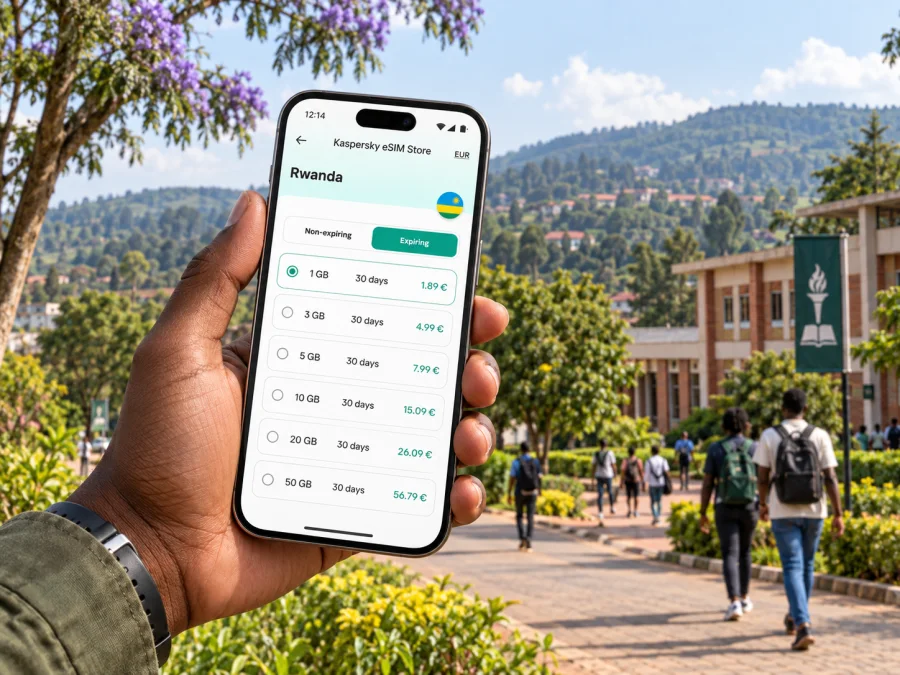
Choose a plan for the whole itinerary, not just the time spent in Huye. If you will continue to other parts of Rwanda, check that the selected destination and plan conditions match the full route. Compare the data allowance and validity period with your likely use: maps and messaging usually require less than frequent video calls, uploading large files or streaming media.
A practical estimate starts with your habits. Consider how often you will use navigation, whether you expect to join work calls, and whether your hotel or workplace offers Wi-Fi. If you are unsure, review the plan terms before checkout and select an allowance that gives you reasonable room without paying for data you do not expect to use. Conditions, supported networks, activation rules and validity can differ by plan, so read the details shown for the option you choose.
Kaspersky eSIM Store is an app and website that helps travellers choose, arrange and activate an eSIM with a suitable plan for mobile internet abroad. You can review eSIM plan options for Rwanda and compare the displayed allowance and validity with your stay in Huye and any onward travel.
Before you travel, check whether your phone supports eSIM and confirm that it is not carrier-locked. An eSIM data plan is intended for mobile internet; it does not automatically provide a regular phone number, standard voice calls or SMS unless the plan details specifically say otherwise. You can continue using your usual SIM for calls and texts where your existing service allows, while choosing which line handles mobile data in your device settings.
Install before the journey, activate with care
If you want to arrive with the setup mostly complete, install the eSIM while you have a dependable internet connection and enough time to follow the on-screen steps. Keep the QR code or setup details accessible on another screen or device if your installation method requires them. Do not delete an eSIM profile during troubleshooting unless the instructions or support team tell you to do so; some profiles may not be reusable after removal.
The exact menu names vary by phone model and operating system version. Follow the steps supplied with your plan and your device’s prompts. If you need a walkthrough, use the Android eSIM installation instructions or the iOS eSIM installation instructions.
Setup checklist:
- Confirm that the phone is not carrier-locked.
- Review destination, allowance, validity and activation conditions.
- Install the profile over a dependable connection and label the line clearly.
- Check when validity begins; rules differ by plan.
- Select the travel eSIM for data and enable roaming for that line only if instructed. Keep your primary SIM settings in mind if you need its usual calls or messages.
If the connection does not start as expected, check that the eSIM line is switched on, the correct line is selected for data and the plan’s activation conditions have been met. Restarting the phone may help with some temporary registration issues. If you still cannot connect, consult the plan instructions or support rather than deleting the profile. Local signal conditions may vary, so try again from a different spot if it is safe and practical.
Staying connected on work trips
For academic or business visits, download essential documents, confirm the meeting point and share the venue details with your contact. Test any call app before leaving the accommodation. Maps and messaging use less data than long video calls or large uploads, so defer backups and downloads to Wi-Fi if your allowance is limited. Confirm the right campus entrance on the day rather than relying only on an old screenshot.
Huye as a stopover and a base for nearby journeys
Some travellers stay in Huye for a night before continuing through the Southern Province; others use it as a base for a more deliberate visit. Either way, onward travel is easier when you separate what needs a live connection from what can be prepared ahead. Confirm departure time and pickup details directly with the transport provider, save the booking reference and check the route before setting out. Do not assume that a data plan’s coverage or performance will be identical on every road or in every settlement.
For a day trip, download map information where your app allows it, share your rough itinerary with someone you trust and keep the accommodation contact details available. If plans change, check locally before committing to a new route. Estimate usage across the whole itinerary, including Kigali or other destinations: a short stop may need only messages and directions, while a longer stay can involve regular navigation and work.
Common questions about using eSIM in Huye
Will one eSIM work throughout Huye?
The answer depends on the plan, its supported network arrangements and local signal conditions. Check the plan details for Rwanda and remember that coverage and performance can vary by location, building and device. A city name alone does not guarantee service in every place you visit.
Can I use an eSIM for ordinary calls?
A data-only eSIM does not provide a standard phone number or conventional voice and SMS service unless those features are expressly included in the specific plan. Internet-based messaging and calls may work through apps when you have a data connection. Keep your existing line available if you need its normal calling features and your operator’s terms allow it.
Should I install the eSIM before reaching Huye?
Installing before departure can make arrival easier if you have a reliable connection and can follow the plan instructions without rushing. Check when the validity period begins, since activation rules vary. If you prefer to set it up after arrival, arrange another dependable internet connection for the installation steps.
What if I am visiting for only a few hours?
For a brief stop, estimate what you will actually do: perhaps check a pickup, send a few messages and confirm the next departure. Compare the plan’s validity and allowance with the entire itinerary, and check whether an existing connection or Wi-Fi already meets your needs. Avoid buying more data than the trip calls for.
What information should I save offline?
Keep your accommodation address, host or driver contact, key reservation details, departure information and any meeting location accessible without mobile data. A screenshot or note can help if a map or messaging app is temporarily unavailable. Keep your phone protected and charged while travelling.
A quick Huye travel connectivity checklist
Before you leave, use this short list:
- Confirm the correct accommodation, campus or visitor destination and save its address.
- Agree on pickup and drop-off points with the person or service meeting you.
- Check your plan’s Rwanda destination, allowance, validity and activation rules.
- Make sure your device is eSIM-compatible and not carrier-locked.
- Install the eSIM using a stable connection and keep the setup details available.
- Save essential addresses and bookings offline; download map information if useful.
- Choose the correct line for mobile data and follow the plan’s instructions on data roaming.
- Keep your usual SIM settings clear if you need its phone number for calls or texts.
- Verify time-sensitive transport and visitor details close to the day.
- Carry a charging option and use local guidance when directions are uncertain.
The most useful setup is the one that fits your actual route. For Huye, that may mean a simple connection for navigation and messages, a fuller allowance for work and frequent map use, or a plan that also covers the rest of your Rwanda itinerary. Review the conditions before you choose, and keep offline details ready for the moments when a live connection is not available.
Prepare your eSIM for Huye
Before travelling, open Kaspersky eSIM Store, check the available plan details for your route and choose an option that fits your intended data use and travel dates. Install and activate the eSIM according to its instructions, then keep the essential Huye addresses and onward travel details available on your phone. Explore eSIM options for Rwanda and prepare for the parts of your stay where mobile internet will be useful.


