Travel connectivity guide
eSIM for Ibb: Mobile Internet for Your Trip
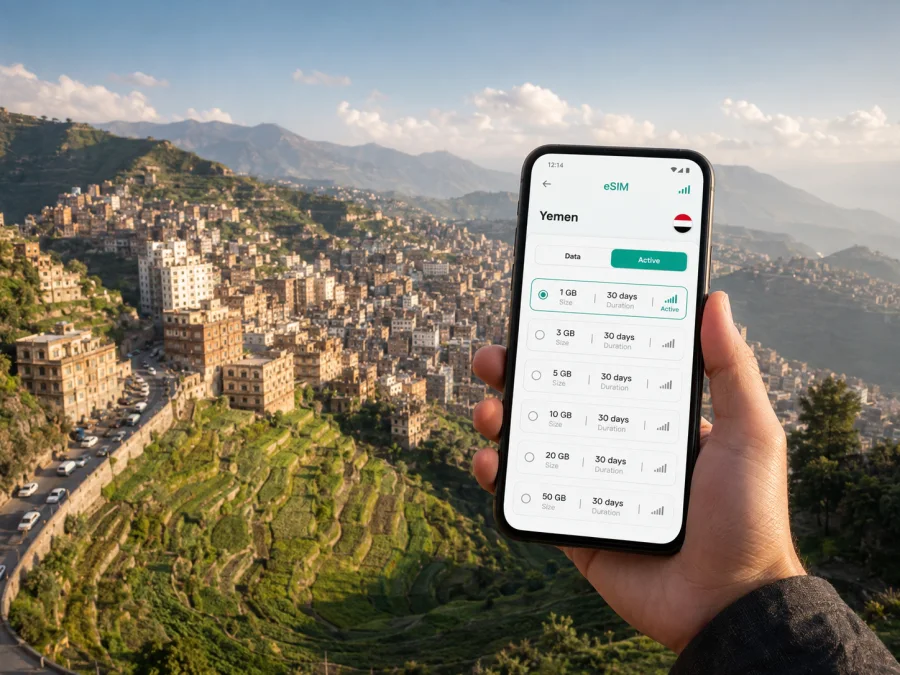
eSIM for Ibb: Mobile Connection and Internet for Your Trip
Ibb is a mountain city in Yemen and the capital of Ibb Governorate. The city sits amid fertile highlands and terraced landscapes, so a visit can combine an urban stay with short trips into the surrounding countryside. For a traveller, the practical question is simple: how will you get mobile internet when you need directions, a message, a booking confirmation or a way to coordinate a road transfer?
An eSIM, or digital SIM, can help you prepare mobile data for Yemen without buying a physical SIM card on arrival. Kaspersky eSIM Store is an app and website where you can choose, arrange and activate an eSIM with a suitable plan for mobile internet during an overseas trip. The useful part is the preparation: you can review the destination, data allowance, validity period and price before you travel, then keep your regular SIM available for the functions you still need.
Why mobile internet matters in Ibb
Ibb is not a compact resort destination where every visitor follows the same route. A day may begin in the built-up centre, continue through a busy market area and finish near the greener slopes outside the city. You may also arrive after a longer journey from another Yemeni city, meet a driver, change accommodation or continue towards another part of the country. Each transition creates a small need for reliable data.
Mobile internet is useful in Ibb for:
- checking a map before leaving your accommodation;
- sharing your location with a travel companion or local contact;
- coordinating a pickup or road transfer by messenger;
- confirming an address when English and Arabic spellings differ;
- accessing a hotel, meeting or reservation message;
- translating a short phrase while buying food or asking for directions;
- keeping family or colleagues informed without searching for public Wi-Fi.
The goal is not to turn every moment into a screen-based itinerary. It is to have a practical connection available when the street layout, local spelling or changing travel plans make an offline note insufficient.
Arriving in Ibb: plan the first few hours
The best time to think about connectivity is before the journey, not when you are standing with luggage and a low battery. Depending on your itinerary and current travel conditions, reaching Ibb may involve a road transfer from another Yemeni city rather than a direct international arrival. Confirm the route, meeting point and local arrangements shortly before departure. Road conditions and security guidance can change, so a digital plan should support your judgement, not replace it.
Before you leave for Ibb, save the essentials in more than one place:
- Write down the accommodation name and its address as supplied by the property or host.
- Save the phone numbers of your driver, host, colleague or local contact.
- Download the map area you expect to use and keep a screenshot of the arrival route.
- Share your broad itinerary with someone you trust.
- Charge your phone and carry a power bank if you have a long transfer ahead.
- Install or prepare the eSIM while you still have a stable internet connection, if your device and plan allow it.
An eSIM does not solve every arrival problem. It does, however, reduce the number of tasks that depend on finding a shop, handling a physical card or locating an open Wi-Fi network immediately after a long journey. You can keep the phone’s normal line for calls or texts where appropriate and select the travel eSIM for mobile data, subject to your device settings and the terms of the selected plan.
Moving through the city
Ibb’s highland setting makes movement different from navigating a flat, grid-like city. A destination that looks close on a map may involve a slope, a busy junction or a route that is easier with a local driver than on foot. Maps and live messages are most helpful when used together with local advice.
Walking in central areas
For short walks, download or save the route before leaving. Keep the phone accessible but discreet, especially in crowded streets. A pin alone may not identify the correct entrance, so save a nearby landmark, the name of the building and a local-language spelling when you have one.
Taking a car or local transfer
If you arrange a car, send the pickup point in writing and repeat it verbally when practical. A data connection can help you notice when the driver has arrived or explain that you are at a different entrance. Ask about the destination before setting off; a familiar place name may refer to a wider area rather than one exact building.
Travelling beyond the centre
The green terraces and mountain scenery around Ibb are part of the region’s character. If you plan a short excursion, treat it as a separate transport and safety plan. Tell someone where you are going, keep offline directions available and do not rely on a continuous signal in every rural or mountainous stretch. Check the day’s local conditions before setting out, particularly during rain or when roads are unfamiliar.
Where an Ibb connection is most useful
A business visit
Business travellers often need a dependable sequence rather than a large amount of content: confirm a meeting, find the correct entrance, share a document, then return to the accommodation or next appointment. Keep a digital copy of the agenda and addresses, and avoid assuming that an online calendar entry contains every local detail. If a meeting moves, mobile internet can help you receive the update and answer promptly.
A short stopover
During a brief stay, an eSIM can be useful because you may not want to spend your limited time looking for a physical SIM card. Prepare the destination settings before you depart, keep the transfer information offline and use data for the few actions that matter: contact, navigation, confirmation and safety updates.
How to choose a plan for a trip to Ibb
The right choice depends on the whole Yemen itinerary, not only on the number of nights in Ibb. If Ibb is one stop in a longer route, check that the selected destination plan applies across the places you will visit. If you will remain mostly in the city and use Wi-Fi for large files, a smaller data allowance may be enough. If you work remotely, navigate frequently or share photos, allow more room for mobile data.
Use this planning table before selecting an option:
| Travel pattern | What to estimate | What to look for |
|---|---|---|
| One or two days in Ibb | Messages, maps and confirmations | A short validity period and enough data for navigation |
| Several days in the city | Daily navigation, chats and occasional uploads | A plan whose validity covers the complete stay |
| Ibb plus road transfers | Data used outside the city as well as in it | Yemen or regional availability that matches the route |
| Business travel | Maps, messages, email and document access | An allowance that leaves room for work-related use |
| Rural excursions | Offline preparation plus occasional live checks | Battery planning and a suitable data reserve |
Do not choose only by the largest number on the screen. Check four things together:
- Destination. Confirm that the plan applies to Yemen and fits every stop on your itinerary.
- Validity. Make sure the period begins when you expect and lasts through the return or onward journey, according to the plan conditions.
- Data volume. Estimate your normal use and add a reasonable reserve for navigation, messages and unexpected changes.
- Device and activation conditions. Read the requirements before purchase and keep the installation details available.
When you are ready to compare the current options for the country, you can choose an eSIM plan for a trip to Yemen. Kaspersky eSIM Store helps you review the available destination options and activate the selected eSIM for mobile internet; the underlying network service and coverage depend on the local arrangements associated with the chosen plan.
Install an eSIM before departure or after arrival
Prepare the eSIM while you have a reliable internet connection. Some travellers install the profile before leaving and enable it when they need data; others complete the process after arriving. Follow the conditions shown for your selected plan, because installation, activation and the beginning of data use are not always the same event.
1. Check the device
Before purchasing, check whether your device supports eSIM and confirm that it is not locked to another operator. Some models vary by region of sale. Keep your regular SIM and any important authentication method in mind before changing the default data line.
2. Open mobile network settings
Go to the phone’s mobile network or cellular settings and choose the option for adding an eSIM or mobile plan. The wording differs between operating systems and manufacturers.
3. Add the profile
Use the QR code or installation flow supplied after the order. Keep the display with the code available if the phone asks you to scan it from another screen. If you need step-by-step help, use the Android eSIM installation instructions or the iOS eSIM installation instructions.
4. Select the travel line for data
After the profile appears, choose the eSIM as the line for mobile data when you want to use it. Decide whether calls and messages should remain on your regular line. To avoid unexpected charges, review which line is selected before enabling data and disable data switching if your phone offers that setting.
5. Activate and test carefully
Follow the plan’s activation conditions and allow a few minutes if the device needs to register. Test a lightweight page or message first. If data does not work, check the selected data line, signal indicator, device settings and any requirement to enable data roaming for the eSIM. Do not delete the eSIM profile while troubleshooting unless support or the plan instructions tell you to do so.
What to check before you travel
Use this checklist 24–48 hours before departure, then review it again when you pack:
- [ ] Ibb is listed as the city in my itinerary and Yemen is the selected destination.
- [ ] My device supports eSIM and is not operator-locked.
- [ ] I understand the plan’s data amount, validity and activation conditions.
- [ ] I know which line will be used for mobile data.
- [ ] I have saved the accommodation address, local contacts and transfer details offline.
- [ ] I have downloaded essential maps or kept screenshots of the first route.
- [ ] I have the Android or iOS installation steps available for my device.
- [ ] I have a charging cable, power bank if needed and a backup of important information.
- [ ] I have checked current local travel and security conditions before setting out.
The last item matters particularly for a journey that includes mountain roads or transfers between cities. Connectivity is useful for receiving updates, but it does not replace local guidance, careful route planning or a decision to postpone a journey when conditions are unsuitable.
Common questions about using eSIM in Ibb
Do I need a city-specific plan for Ibb?
Usually, the relevant destination is the country rather than the city. Ibb is in Yemen, so check the Yemen plan and make sure it matches every other place on your route. A city name in a search query does not automatically mean that a separate city product exists.
Can I use an eSIM for ordinary calls and SMS?
Not necessarily. The eSIM described here is intended for mobile internet and may not include a conventional phone number, voice calls or SMS unless the selected plan says otherwise. You can use messaging and calling apps over data when those services are available to you.
Should I install the eSIM before reaching Ibb?
Installing before departure can make the arrival routine simpler, but follow the plan’s instructions about when activation and data use begin. If you prefer to install after arrival, keep the QR code or account access available and make sure you have another way to reach the internet for setup.
What if the eSIM does not connect?
First check that the eSIM is enabled, selected for mobile data and allowed to use data roaming if the device requires it. Confirm the plan conditions and restart the phone if appropriate. Keep the profile installed while you check the instructions; if the issue continues, contact support with the device model and the exact error message.
How does Kaspersky eSIM Store fit into the process?
Kaspersky eSIM Store is the app and website used to choose, arrange and activate an eSIM with a suitable travel plan. It is not a mobile operator. The plan’s network access, coverage and conditions come from the local service arrangements associated with the selected destination option.
Prepare your Ibb connection before the journey
Ibb rewards practical preparation: save the first route, keep addresses in a form you can show locally, allow time for mountain roads and make sure you can contact the people involved in your stay. An eSIM can make the digital part of that preparation easier by giving you a way to select a Yemen plan before the trip, install it on a compatible device and use mobile internet for navigation and coordination when you are away from Wi-Fi.
When your destination, dates and data needs are clear, review the eSIM options for Yemen and choose a plan for your trip to Ibb. Check the conditions, prepare the profile and keep your offline backup information ready before you leave.


