Travel connectivity guide
Ibri eSIM: Mobile Internet in Oman
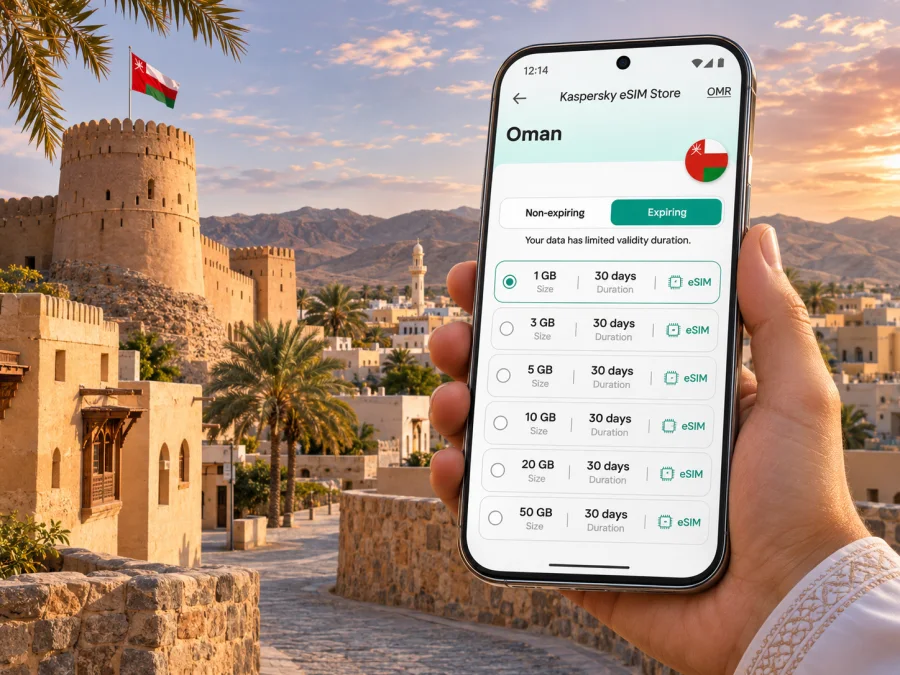
Ibri eSIM: mobile connection and internet for your trip
Ibri is a practical base for exploring Oman’s Al Dhahirah Governorate: a working town, a historic fort and market, and a starting point for visits to the Bronze Age sites around Bat, Al-Khutm and Al-Ayn. A reliable mobile connection helps with the less visible parts of the trip too: checking directions before setting out, coordinating a driver, confirming opening details and finding your way back after a day away from the centre.
An eSIM can make mobile internet planning simpler if your phone supports it and the selected plan covers Oman. You can arrange a data plan before travelling, install its eSIM profile and choose when to use it. Coverage, activation rules, data allowance and supported networks depend on the individual plan, so check those details before checkout rather than assuming every Oman eSIM works the same way.
What to plan before travelling to Ibri
Ibri is in north-western Oman, within Al Dhahirah. It is not a coastal resort or a compact city break where every stop is a short walk from the hotel. The town and surrounding governorate are spread out, and points of interest beyond the centre are best planned as separate stops. A map saved offline is useful even when you expect to have mobile data: it remains available if reception drops, your phone battery is low or you have not yet activated the travel profile.
Many international itineraries begin at Muscat International Airport, but the right arrival point depends on your flights and onward route. Check the full journey to Ibri before booking ground transport. If you arrive in Muscat, allow time for the road transfer and do not plan a close connection based on an assumed driving time. Road conditions, stops, daylight and the exact destination can all change the journey. Travellers arriving overland from another part of Oman or a neighbouring country should check border procedures and route conditions separately.
Before leaving your hotel or airport, save the address of your accommodation in a format your driver can use, along with a map pin. If you are relying on mobile data to navigate, confirm that your device is using the intended data line. Keep the hotel name and location available offline as a backup. This is especially helpful if your booking uses a transliterated street or area name that appears differently in map apps.
A quick arrival checklist
- Confirm the arrival airport or border crossing and the onward transfer to Ibri.
- Save your accommodation address, map pin and contact details offline.
- Download the area around Ibri in your preferred map app while connected to Wi-Fi.
- Check whether your phone is unlocked and supports eSIM in its exact regional version.
- Review the plan’s Oman coverage, supported network, activation trigger and validity period.
- Keep your passport and any required travel documents accessible for the journey; mobile data does not replace them.
Getting around town and beyond
Use Ibri’s centre as the practical reference point for accommodation, everyday errands and local services. The town’s historic area, market and fort are worthwhile map destinations, but do not assume that a pin marks a pedestrian entrance or that a site is open at the moment you arrive. Confirm visiting information close to the day, and check the final approach with your driver or host when needed.
The official Oman tourism guide describes Ibri Fort as a short drive from the town centre and notes the traditional market nearby. These are useful orientation points, but distances on a map can feel different in heat or when sidewalks are discontinuous. For a visit, map the door-to-door route, carry water and plan a return ride if you do not have a car. A data connection can help with navigation and coordination, but local arrangements and site access should be confirmed independently.
| Trip pattern | Useful connection task | Practical backup |
|---|---|---|
| Arrival and hotel transfer | Share a location pin and message your host or driver | Keep the hotel address saved offline |
| Errands in Ibri | Check directions and opening details before departure | Note a nearby landmark in addition to the street name |
| Fort and market visit | Confirm the route and coordinate a pickup | Agree a meeting point before separating |
| Day trip to Bat, Al-Khutm or Al-Ayn | Load maps and key information before leaving town | Download the route and carry a charger or power bank |
| Long onward drive | Check the next stop and message contacts during service | Do not rely on continuous signal outside settled areas |
Mobile service can vary with location, terrain, buildings, network conditions and the plan’s roaming arrangement. A signal that works in the town centre does not guarantee the same experience on every road or at every archaeological site. If uninterrupted navigation is important, download offline maps and agree on a meeting point before the trip. Do not use your phone while driving; set navigation before departure or ask a passenger to manage it.
Ibri’s heritage sites and mobile planning
Ibri is a useful base for more than the town itself. The UNESCO-listed Archaeological Sites of Bat, Al-Khutm and Al-Ayn are in the wider area. UNESCO places the core site at Bat about 24 kilometres east of Ibri and describes the complex as settlements, towers, irrigation features and tombs dating to the third millennium BCE. Treat the sites as a planned excursion rather than a spontaneous walk from the centre.
A visit may involve several locations rather than one continuous attraction. Before setting out, agree which site or sites you intend to see, how you will travel between them and when you will return. Check access and any current visitor arrangements through reliable local channels. The landscape and archaeological remains deserve care: follow signs and instructions, avoid climbing on structures, and do not remove stones or objects.
Mobile internet is useful for route changes and messages, but the signal may be weaker or unavailable away from town. Prepare for that possibility:
- Open the route while you have a stable connection.
- Save the map area for offline use and mark your starting point and return destination.
- Share the day’s route and estimated return with someone you trust.
- Carry water, sun protection and a charged phone; a power bank adds another fallback.
- Keep a screenshot of essential directions or booking information in case the app refreshes offline.
The same preparation helps on drives toward other parts of Al Dhahirah. The governorate includes several wilayats and varied terrain, so an Oman-wide plan should be considered for the whole route, not just Ibri. Check whether the chosen plan allows data in every destination you intend to visit, including any cross-border leg. A country-specific plan should not be assumed to include neighbouring countries.
Choosing an eSIM plan for an Ibri visit
A city name is a useful starting point for planning, but eSIM plans are generally selected for a country, region or travel area. For a stay in Ibri, verify that Oman is explicitly included in the plan. If your itinerary includes Muscat, Ibri and other Omani stops, compare the plan’s validity and data allowance with the full length of the trip. If you cross a border, verify that the plan covers the next country too or plan for a separate option.
Estimate data from what you will actually do. Turn-by-turn maps, messaging and basic browsing usually consume less than frequent video calls, high-resolution uploads, streaming or using your phone as a hotspot for a laptop. Your phone’s data-usage screen can help you estimate a typical day. Leave room for navigation and unexpected changes rather than choosing a package solely from the number of days away.
| Your use in Ibri | What to check when comparing plans |
|---|---|
| Maps, messages and occasional browsing | A modest allowance may be enough; verify how long it remains valid |
| Regular photo sharing and web research | Choose an allowance with room for uploads and updates |
| Remote work or frequent video calls | Review data limits, hotspot conditions and network details carefully |
| A multi-stop Oman itinerary | Check that the destination list and validity cover every stop |
| Oman plus a neighbouring country | Confirm multi-country coverage explicitly before purchase |
Do not treat the label “unlimited” as a substitute for reading the conditions. Fair-use limits, speed management, hotspot restrictions, validity and activation rules can differ. The exact terms shown for a particular plan are the ones to use when making your decision. Price and availability can also change, so check the current details at the time you choose.
If you want to review the current Oman options, browse eSIM plans for Oman. Kaspersky eSIM Store is an app and website where you can select, arrange and activate an eSIM with a suitable data plan for an international trip. The plan’s individual terms determine its included destinations, allowance, duration and network arrangements; the country page should not be read as a promise of coverage at every point around Ibri.
Check your phone before choosing
Confirm that eSIM is supported by the exact phone model and regional variant you own. Product names can cover different hardware versions, and support may differ by market. Your device also needs to be unlocked for use with another provider. Check the manufacturer’s specifications or the device settings, and use the device compatibility check before completing a purchase.
Also consider how you will keep your usual number available. A travel data eSIM may not include a regular phone number, voice calls or SMS unless the plan explicitly says otherwise. You may be able to keep your home SIM active for calls or verification messages, but your home carrier may charge roaming fees. Review those settings and charges before departure. Messaging and voice apps can use the travel data connection when their services are available to you.
Install and activate before the drive
Install the eSIM while you have a dependable internet connection, such as at home or on hotel Wi-Fi. Follow the plan’s instructions and do not delete the profile if activation appears delayed; some eSIM profiles cannot be reinstalled with the same code. The start of validity may be tied to installation, first connection or another event, so check the specific terms before adding the profile if timing matters.
A practical setup sequence is:
- Check the plan details. Confirm Oman is covered, then note its data allowance, validity, activation conditions and support contact.
- Confirm device readiness. Check eSIM compatibility, software updates and carrier lock status. Keep access to the email or account that contains the installation details.
- Install the profile. Use the QR code or in-app flow provided for your plan. Keep the installation screen available until the phone confirms that the profile has been added.
- Label the lines clearly. For example, use “Home” for your usual SIM and “Travel data” for the eSIM. Exact menu names vary by phone.
- Choose the data line deliberately. Select the travel eSIM for mobile data when you are ready to use it. Keep calls and messages assigned to the line you intend to use.
- Check roaming settings. Some travel eSIMs require data roaming on for that eSIM. Follow the plan’s own instructions; avoid changing the setting on your home line unless you understand the charges.
- Test at a convenient time. Once the plan should be active, check that data works before you depend on it for directions. If it does not, use the provider’s troubleshooting steps or support channel.
For device-specific steps, see the Android eSIM installation guide or the iPhone eSIM installation guide. Menu wording can change across software versions, so follow the instructions displayed on your device and in the plan details.
Keep data use predictable
Ibri trips often combine hotel time, errands and drives outside the centre. A few simple settings can help preserve data for navigation and messages:
- Disable automatic video playback in social and news apps.
- Set photo and cloud backups to run on Wi-Fi only, if that suits your needs.
- Download maps, playlists and work files before leaving reliable Wi-Fi.
- Check which line is selected for mobile data after restarting the phone.
- Review usage in your phone settings and, where available, in the eSIM account or app.
- Use a trusted Wi-Fi connection for large updates, while remembering that availability and quality vary by location.
If you use a laptop for work, check hotspot support and any limits before relying on tethering. A phone can use data differently when sharing a connection, and a video meeting may consume more than ordinary browsing. Download important documents and keep an offline copy of meeting details in case the connection is interrupted.
If the eSIM does not connect
Start with the basics and change one setting at a time:
- Confirm that the eSIM profile is installed and enabled.
- Check that the eSIM is selected for mobile data.
- Turn airplane mode on briefly, then off, or restart the phone.
- Check the plan instructions for a required network selection or roaming setting.
- Confirm that the plan is active, valid and includes Oman.
- If it still does not connect, contact the support channel listed with the plan while keeping Wi-Fi available if possible.
Avoid deleting the eSIM profile as an early troubleshooting step. If a QR code is single-use or linked to the first device, deleting the profile can make recovery harder. Keep the original installation details and any order information until the trip is over.
Short visits, work trips and longer stays
For a short stop in Ibri, prioritize a plan whose validity fits the exact dates and whose activation timing will not start too early. Install ahead if the instructions allow it, then activate when appropriate. Keep the hotel address and onward transport details offline, since a brief visit leaves little time to recover from a setup issue.
For a work trip, plan around predictable tasks: messages, maps, email, cloud documents and calls. If you need to join meetings, check the expected data use and hotspot conditions before travelling. Save the venue address in both text and map form, and send a colleague the local time and meeting point. A travel eSIM can provide data access under its plan terms, but it does not guarantee a particular speed or uninterrupted service.
For a longer stay, review whether a travel data plan remains suitable for the whole period and whether you need a local number for calls, SMS or services that require one. Compare the terms of the options available to you and confirm local registration requirements directly with the relevant provider. Keep your home number’s roaming settings in mind if you leave that SIM enabled.
Frequently asked questions
Is Ibri an airport destination?
Ibri is a town in Al Dhahirah, and your flight itinerary may involve arrival elsewhere in Oman followed by a road transfer. Confirm the airport and onward transport for your own booking rather than assuming there is a direct international flight to Ibri.
Will an Oman eSIM work at every Ibri attraction?
No plan should be assumed to provide uninterrupted service at every location. Reception can vary with terrain, buildings, network conditions and the specific plan’s arrangements. Download maps and essential information before leaving town.
Does a travel eSIM give me a local phone number?
Not necessarily. Many travel eSIMs are data-focused. Check the plan terms if you need voice calls, SMS or a local number. Internet messaging and calling apps may work over data, subject to their availability and your account setup.
Can I install the eSIM once I reach Ibri?
Usually, installation requires an internet connection and a compatible, unlocked device. You can install before departure or use reliable Wi-Fi after arrival, depending on the plan’s timing rules. Read when validity begins before installing, and do not rely on public Wi-Fi as your only setup option.
Can I use the same plan for a drive outside Oman?
Only if the plan explicitly includes the other country. Oman coverage does not imply regional or cross-border coverage. Check the destination list and validity for every leg before you leave.
What should I do if navigation loses data?
Use the offline map you saved, follow the route agreed with your driver, and stop safely before changing directions. If you are travelling with others, decide on a meeting point and check-in plan before the trip.
A simple plan for staying connected
For Ibri, prepare for both town errands and excursions beyond the centre. Confirm your route, accommodation and transport; save maps offline; check that your device supports eSIM in its exact regional version; and read the selected plan’s coverage and activation terms. A mobile connection is most useful when it supports a prepared trip rather than replacing basic route planning.
When you are ready, choose an eSIM plan for your Oman trip, review its current conditions and follow the installation steps for your phone. Kaspersky eSIM Store helps you select, arrange and activate an eSIM for mobile data abroad through its app and website. Set it up on a compatible device, keep your essential directions available offline and enjoy your time in Ibri with a clear plan for getting around.


