
Travel connectivity guide
eSIM for Iceland: mobile internet guide
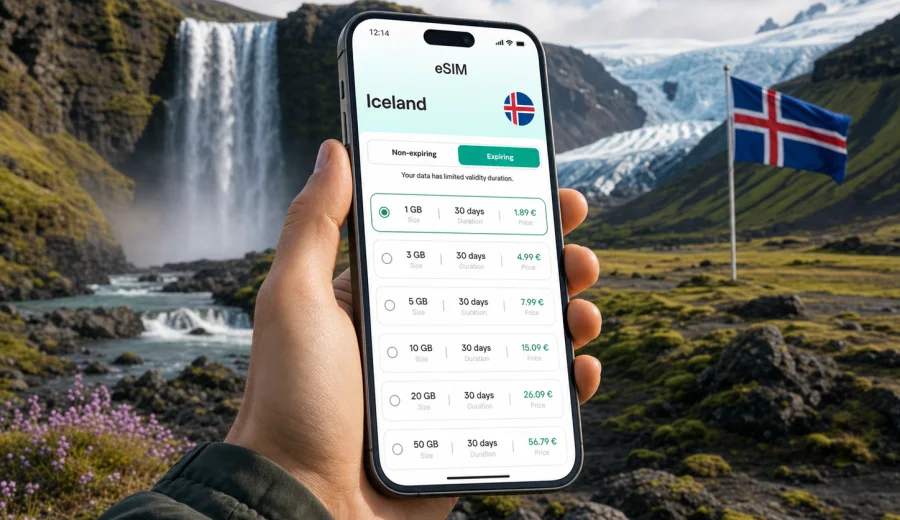
eSIM for Iceland: mobile connection and internet for your trip
Iceland is a country where mobile internet quickly becomes part of the trip itself. You use it after landing at Keflavik Airport, while finding your transfer to Reykjavik, when checking road conditions before a drive, and when sharing a waterfall stop with family or colleagues back home. An eSIM can make that routine simpler because you do not need to look for a physical SIM card after arrival or change the main SIM in your phone.
For a trip to Iceland, eSIM is mainly about mobile data. It helps you use maps, messengers, booking apps, weather updates, translation tools, banking apps, and travel documents on a compatible smartphone or tablet. It is not a magic replacement for every local telecom service, and it usually does not include a regular phone number, voice calls, or SMS unless the selected tariff says so. The practical value is clear: you can prepare a data plan for the destination before the trip and start using mobile internet when your device is ready and the local network is available.
Why eSIM is useful in Iceland
An eSIM, or embedded SIM, is a digital SIM profile installed on a compatible device. Instead of inserting a plastic card, you add a mobile data profile through your phone settings, a QR code, or an app flow. In travel use, the main advantage is preparation: you can choose a data package for Iceland, install it before departure, and keep your primary SIM in the device for your regular number.
This is especially convenient in Iceland because many everyday travel actions happen on the move:
- using navigation between Keflavik Airport and Reykjavik;
- checking accommodation details when you arrive late;
- following route changes caused by weather or road conditions;
- messaging your host, guide, car rental office, or travel group;
- opening tickets, confirmations, and boarding passes;
- using translation or payment apps when Wi-Fi is not nearby;
- sharing photos without waiting until you return to the hotel.
The benefit is not only speed. It is also control. With a prepaid eSIM tariff, you can see the data volume, validity period, destination, and price before you choose. That makes it easier to match the plan to your itinerary instead of discovering roaming costs after the trip.
Where mobile data matters most during an Iceland trip
Iceland looks compact on a map, but travel days can be data-intensive. You may spend several hours away from your hotel, moving between natural sights, fuel stops, small towns, and parking areas. A data plan does not replace sensible offline preparation, but it supports the small decisions that keep the day moving.
| Travel situation | Why internet helps | Practical tip |
|---|---|---|
| Arrival at Keflavik Airport | Transfers, rental car details, messages, hotel route | Install the eSIM before the flight if possible, then activate data after arrival according to the tariff rules. |
| Reykjavik city break | Maps, restaurant reservations, event tickets, ride apps | A smaller data package may be enough if most use happens in the city and at the hotel. |
| Golden Circle | Navigation, weather checks, parking information, messaging | Download offline maps too, because terrain and network conditions can vary. |
| South Coast drive | Long route planning, accommodation updates, photo backup | Choose enough data for maps, messaging, and regular weather checks. |
| Ring Road itinerary | Multi-day navigation, bookings, family contact, cloud sync | Look closely at validity duration, not only the number of gigabytes. |
| Remote work stop | Email, calls over apps, file access | Estimate data generously and check whether tethering is allowed by the selected tariff. |
eSIM, roaming, Wi-Fi, and local SIM cards
There is no single best option for every traveler. Standard roaming is convenient but depends on your home operator's terms. Public Wi-Fi helps in hotels and cafes, yet it is not always available when you need maps or messages on the road. A physical local SIM may suit travelers who need a local number, but it takes time to arrange after arrival. Travel eSIM is a practical middle option for many visitors because it focuses on mobile data, can be prepared before the trip, and keeps your main SIM available.
How much data to choose for Iceland
The right data amount depends on your behavior, not only on the country. A traveler who uses maps and messages lightly may need far less data than someone who uploads high-resolution videos, joins work calls, or shares a hotspot with a laptop.
Use this practical estimate before selecting a plan:
- Light use: maps, messaging, occasional search, tickets, and email. This is suitable for a short city break or a trip where most heavy use happens on hotel Wi-Fi.
- Moderate use: daily navigation, weather checks, social media, photo sharing, restaurant and attraction searches, and regular messenger calls.
- Heavy use: video calls, cloud backup, streaming, large file transfers, or using the phone as a hotspot for another device.
For Iceland, add a buffer if you plan to drive between regions. Navigation, weather checks, road updates, and photo sharing can quietly increase usage over several days. If your trip includes the South Coast, Snaefellsnes, Akureyri, Myvatn, or a Ring Road route, choose a plan whose validity period covers the whole itinerary, not just the first few days.
Before you finalize the choice, check four details:
1. The data volume included in the tariff.
2. The validity period and when it starts.
3. Whether the tariff is for Iceland only or a wider region.
4. Whether your device supports eSIM and is not locked to one operator.
A practical selection checklist
Use this checklist if you are comparing mobile internet options before your Iceland trip:
- Confirm the exact dates when you need mobile data.
- List the regions you will visit: Reykjavik, Golden Circle, South Coast, North Iceland, Westfjords, or a full Ring Road route.
- Estimate whether your data use is light, moderate, or heavy.
- Decide whether you need hotspot use for a laptop or another phone.
- Check if your main SIM should remain active for banking messages or calls.
- Review roaming costs from your home operator.
- Make sure your phone supports eSIM.
- Save key documents offline before departure.
- Install the eSIM while you still have stable Wi-Fi.
- Read the tariff conditions before activation.
If your goal is simple mobile internet for maps, messages, and travel apps, you can review available options and choose an eSIM plan for Iceland before the trip. That timing gives you space to check compatibility, install the profile calmly, and avoid solving connectivity under airport pressure.
How to install and activate eSIM for Iceland
The exact steps depend on your device, operating system, and the selected tariff, but the general process is straightforward. First, choose the Iceland destination and a suitable data package. After purchase, the eSIM profile appears in your account or app flow, and you can install it on the compatible device where you plan to use it.
A typical setup looks like this:
1. Connect your phone to stable Wi-Fi.
2. Open the eSIM installation details after choosing the tariff.
3. Add the eSIM profile to your device settings or follow the app instructions.
4. Label the profile clearly, for example "Iceland travel data".
5. Keep your primary SIM for calls and messages if you need it.
6. When the tariff rules allow it, activate mobile data for the eSIM profile.
7. Turn on data roaming for the eSIM profile if the instructions or device settings require it.
8. Test basic internet access after arrival.
For device-specific setup, use the official installation guides: Android installation guide and iOS installation guide. Follow the instructions on the device you will actually carry in Iceland, because transferring an activated eSIM to another device may not be available under the tariff or profile conditions.
Check device compatibility before you pay
Not every phone or tablet supports eSIM, and some devices are locked to a mobile operator. This matters more than the destination. If the device cannot install an eSIM profile, a travel data plan will not work on it.
Before buying, check your device and confirm these points:
- the device model supports eSIM;
- the device is not locked to one operator;
- the operating system is updated enough for stable eSIM setup;
- you have Wi-Fi available for installation;
- you know which SIM profile should be used for mobile data;
- you understand whether the selected tariff includes data only or other services.
What eSIM does and does not include
It is important to set expectations correctly before you travel. In most travel scenarios, an eSIM tariff is primarily for mobile data. It lets you use internet-based services, but it may not give you a local Icelandic phone number.
Usually suitable for:
- maps and navigation;
- messengers and internet calls;
- email and browser use;
- travel apps and booking confirmations;
- online banking and payment checks;
- translation tools;
- ride, parking, and transport apps where available;
- photo sharing and cloud access within the data allowance.
Usually not included unless the tariff explicitly says so:
- a regular local phone number;
- standard voice calls;
- SMS;
- unlimited data;
- guaranteed service in every location;
- transfer of the eSIM profile to another device after activation.
If you need a phone number for reservations, delivery services, or local calls, check whether your existing SIM can receive calls or messages abroad and what it will cost. Many travelers keep their primary SIM active for calls and use eSIM for mobile data.
Tips for using mobile internet in Iceland
Small settings can make a meaningful difference during the trip:
- Download offline maps for your full route before departure.
- Save hotel addresses, booking references, and car rental details offline.
- Turn off automatic app updates over mobile data.
- Pause cloud photo backup when you are away from Wi-Fi.
- Use low-data mode for social media and video apps.
- Keep a power bank in the car or daypack.
- Label your travel eSIM clearly in phone settings.
- Check which SIM profile is assigned to mobile data after arrival.
- Keep the installation email or account access available.
- Contact support if the installation flow does not behave as expected.
For road trips, avoid leaving all planning to live mobile data. Iceland's terrain and weather can affect travel plans, and network conditions can vary by area. The strongest setup is a combination: eSIM for flexible mobile internet, offline maps for resilience, and saved documents for important details.
Frequently asked questions
Can I install an eSIM before flying to Iceland?
In many cases, yes. Installing before departure is often calmer because you can use stable Wi-Fi. Activation timing and data validity depend on the selected tariff, so read the conditions before turning on mobile data.
Does eSIM give me a local Iceland phone number?
Usually, travel eSIM tariffs are focused on mobile data and do not include a regular phone number, voice calls, or SMS unless the tariff states otherwise. You can use messengers and internet calling apps over data.
Should I remove my regular SIM?
No, not if your phone supports using your regular SIM and eSIM together. Many travelers keep the primary SIM for calls or account messages and assign mobile data to the travel eSIM.
Will eSIM work in every part of Iceland?
No travel connectivity option should be described that way. Availability depends on local network conditions, terrain, device settings, and the selected tariff. Use offline maps and saved documents for remote routes.
Can I use eSIM for hotspot sharing?
Hotspot use depends on the selected tariff, device, and settings. If you need to connect a laptop or share data, check the tariff conditions before relying on tethering.
What should I do if mobile data does not start after arrival?
Check that the eSIM profile is installed, mobile data is assigned to that profile, and data roaming is enabled for the eSIM if required. Restarting the device can help. If the issue remains, contact support with your device model, destination, and tariff details.
Choose mobile internet for Iceland before you travel
Iceland rewards preparation. When your mobile connection is ready, the first minutes after arrival are simpler: you can open maps, message your host, check your route, and continue your trip without searching for a SIM card counter. eSIM is especially useful when your itinerary includes airport transfers, nature routes, several accommodation stops, or regular contact with people back home.
Kaspersky eSIM Store helps you select, set up, and activate an eSIM with a suitable data tariff for an overseas trip. Before you go, check your device, compare the data volume and validity period, install the profile on the phone you will use, and keep offline backups for essential travel information.
If Iceland is your next destination, prepare an eSIM plan for Iceland in advance and travel with a clearer mobile internet setup from the start.