
Travel connectivity guide
India eSIM: mobile internet for travel
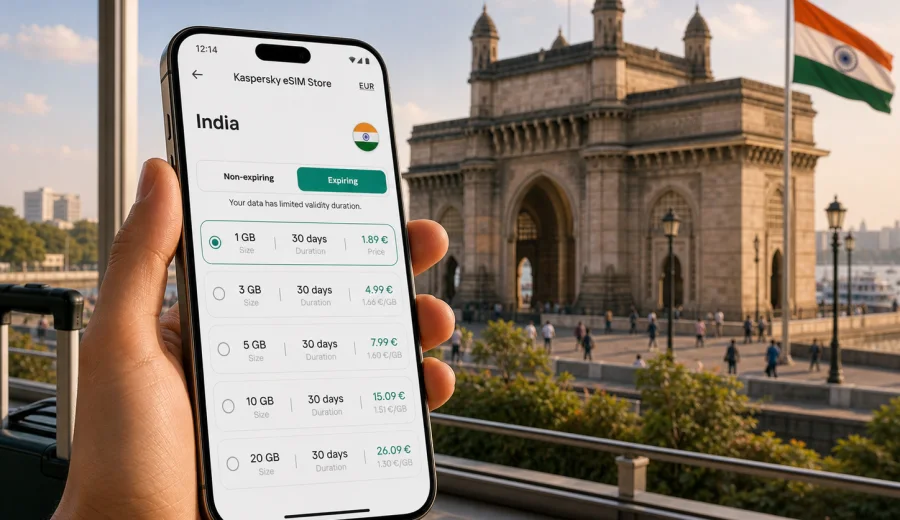
India eSIM: mobile connection and internet for your trip
If you are planning a trip to India, a prepared eSIM setup can help you arrange mobile internet before you arrive or shortly after landing. India is a large country with different travel styles: business days in Bengaluru, transfers through Delhi, a family route through Rajasthan, a beach break in Goa, or a long itinerary from Mumbai to Kerala. In all these cases, your phone is not just a map. It is your hotel address, train ticket, ride-hailing app, translation tool, banking confirmation, and way to contact people when plans change.
An eSIM is a digital SIM profile that you install on a compatible smartphone or tablet. It helps you use mobile data without inserting a physical SIM card. With Kaspersky eSIM Store, you can choose India as your destination, compare the available data packages by size and validity period, complete the order, and activate the eSIM on a compatible device. The store is an app and website for choosing, setting up, and managing an eSIM plan for mobile internet during international travel.
This guide explains how to think about mobile connection and internet in India: when an eSIM is useful, how much data to choose, what to check before payment, how installation works, and how to avoid common travel mistakes.
Why mobile internet matters in India
India is easy to explore when your phone is ready, but it can feel slow and complicated if you need to solve connectivity after arrival. Major airports such as Delhi, Mumbai, Bengaluru, Chennai, Hyderabad, and Kolkata are busy, and the first hour after landing often includes immigration, baggage, transport, hotel messages, and payment checks. Reliable mobile data can make those steps calmer.
Typical travel tasks that need internet in India:
- opening maps for airport pickup points, metro exits, and hotel streets;
- checking ride-hailing apps and train or flight updates;
- messaging your hotel, driver, colleagues, or family;
- translating menus, signs, addresses, and service messages;
- using mobile banking, card notifications, and one-time confirmations;
- finding restaurants, coworking spaces, ATMs, pharmacies, or clinics;
- sharing location during day trips or late transfers.
Public Wi-Fi can be useful in airports, hotels, and cafes, but it is not a full travel plan. It may require registration, may be slow at busy times, and may not be available exactly when you need directions or payment confirmation. An eSIM gives you a practical way to prepare mobile data for the trip and reduce dependence on public Wi-Fi.
What an eSIM does for a trip to India
An eSIM for India is mainly about mobile data. It usually does not include a regular local phone number, voice calls, or SMS unless the terms of a specific plan say otherwise. For most travelers, that is enough because calls and messages can be handled through internet-based apps.
The main benefit is preparation. Instead of looking for a physical SIM card shop after arrival, you can arrange the eSIM in advance, install it on a compatible phone, and turn it on when the trip starts according to the plan rules. That is useful if you arrive late, have a short connection, or need internet immediately for transport.
Kaspersky eSIM Store helps you choose an eSIM plan for India by showing the country, data amount, validity period, and price before you proceed. You can review the conditions and pick the plan that fits your route. The exact availability, data size, and validity depend on the plan shown at the time you choose it.
eSIM, roaming, local SIM: what is different
There is no single best option for every traveler. The right choice depends on the length of your stay, your phone, your home mobile plan, and how much time you want to spend arranging connectivity.
| Option | Good for | What to check |
|---|---|---|
| eSIM for India | Travelers who want mobile data without a physical SIM card | Device compatibility, data amount, validity period, activation rules |
| Home roaming | People who need their usual number active with minimal setup | Roaming prices, daily fees, speed limits, included data |
| Local physical SIM | Long stays or travelers who need a local number | Registration process, shop availability, device SIM slots, plan terms |
| Public Wi-Fi | Light use in hotels, airports, and cafes | Login steps, security, speed, and availability outside buildings |
For a short trip, an eSIM can be the simplest way to have data ready. For a long stay, you may still compare local options after arrival, but an eSIM is useful for the first days: maps, messages, transport, and hotel coordination. For business travel, it can also help separate travel data from your main SIM while keeping your primary number available.
How much data do you need in India?
Data use depends more on habits than on the country. A traveler who mostly uses maps and messages may need far less data than someone who uploads videos, works on mobile hotspot, or watches streaming services on trains.
Use this practical estimate:
| Trip style | Typical data needs | Notes |
|---|---|---|
| Minimal | 1-3 GB | Maps, messaging, email, light browsing |
| Balanced | 5-10 GB | Daily navigation, social apps, ride-hailing, photo sharing |
| Work-focused | 10-20 GB | Video calls, cloud documents, hotspot for a laptop |
| Heavy media | 20 GB or more | Streaming, large uploads, frequent hotspot use |
If you are visiting one city for a few days, a smaller data package may be enough. If your route includes several regions, long train rides, daily navigation, and frequent photo backup, choose more data or a plan with a longer validity period. If you are unsure, look for an option that leaves room for unexpected use: transport delays, video calls, document downloads, or extra map searches.
Choose an India eSIM plan before you travel
You can review available options for India in Kaspersky eSIM Store and choose a plan that matches your route, data habits, and travel dates: choose an eSIM plan for India. Check the data amount, validity period, price, and activation details before proceeding. If your trip includes nearby countries, compare whether a country plan or a regional plan is more suitable for your itinerary.
What to check before choosing an eSIM
Before you choose any eSIM plan for India, check the practical details. This avoids most setup problems.
- Your device must support eSIM.
- Your device should not be locked to one mobile carrier.
- The plan must cover India and match your travel dates.
- The data amount should fit your expected use.
- The validity period should cover your whole stay or the part of the trip when you need data.
- You should understand when the validity period starts.
- You need internet access to install the eSIM profile before it can be used.
- You should keep your QR code or installation instructions available until setup is complete.
If you are not sure whether your phone or tablet supports eSIM, check your device before you choose a plan. Device compatibility is especially important if you bought your phone in a market where some models have different SIM configurations.
How to install and activate an eSIM for India
The exact setup flow depends on your device, but the general process is simple. Choose your destination and plan, complete the order, open the eSIM details, then install the eSIM profile on your phone. You can follow the Android installation guide or the iOS installation guide depending on your device.
A practical setup sequence:
1. Connect your phone to a stable Wi-Fi network.
2. Open the eSIM details in the app, website profile, or email instructions.
3. Add the eSIM profile to your device.
4. Give the eSIM a clear label, such as India data.
5. Keep your main SIM active if you need your usual number for calls or messages.
6. Set mobile data to the India eSIM when you are ready to use it.
7. Turn on data roaming for the eSIM if the instructions or device settings require it.
8. Test mobile data after arrival or when the plan rules allow activation.
Do not delete the eSIM profile after installation unless you are sure you no longer need it. Some eSIM profiles cannot be transferred to another device or reinstalled after removal. If something does not work, check the setup steps first and contact support if needed.
When to install the eSIM
Many travelers prefer to install the eSIM profile before departure while they have reliable Wi-Fi. This can be convenient because the installation itself needs internet access. Activation and the start of validity depend on the plan terms, so read those details before turning the eSIM on for data.
There are three common approaches:
- Install before departure, activate when you arrive.
- Install at the hotel or airport using Wi-Fi, then switch to mobile data.
- Install shortly before a business or travel day when you know you will need data.
For India, installing before departure is often the calmest option. Your arrival may include queues, baggage, transport messages, and a different time zone or climate. Preparing the eSIM in advance gives you one fewer task at the airport.
How to reduce data use during the trip
Even with a comfortable data package, small settings can make the plan last longer.
- Download offline maps for cities and regions on your route.
- Turn off automatic app updates on mobile data.
- Pause cloud photo and video backup until Wi-Fi is available.
- Lower video quality in streaming and social apps.
- Use Wi-Fi for large files, system updates, and long video calls.
- Disable mobile data for apps you do not need during the trip.
- Check data use in your phone settings every few days.
For a route such as Delhi, Agra, Jaipur, and Mumbai, offline maps are especially useful because sightseeing days can involve many small navigation checks. For a work route such as Bengaluru, Hyderabad, and Pune, review hotspot and video-call use because those can consume data quickly.
Common mistakes to avoid
Many eSIM issues come from rushed setup or unclear expectations. Avoid these mistakes:
- choosing a plan before checking device compatibility;
- assuming that a data eSIM includes a regular phone number;
- deleting the eSIM profile after installation;
- forgetting to set the eSIM as the mobile data line;
- leaving heavy cloud backups active on mobile data;
- waiting until the last minute to install the eSIM without reliable Wi-Fi;
- choosing too little data for a route with hotspot use or video calls;
- ignoring validity dates and activation rules.
The safest approach is simple: check your device, choose the country and plan, install the eSIM while you still have stable internet, and keep your main SIM settings clear.
Quick checklist before departure
Use this checklist a day or two before your flight:
- Your passport, tickets, hotel addresses, and insurance details are saved offline.
- Your phone supports eSIM and is not locked to one carrier.
- Your India eSIM plan matches your travel dates and expected data use.
- The eSIM profile is installed or ready to install with Wi-Fi.
- Your phone battery, charger, and power bank are ready for arrival day.
- Offline maps are downloaded for your first city and airport area.
- App updates and cloud backups are limited on mobile data.
- Your main SIM remains available if you need your usual number.
FAQ: eSIM and mobile internet in India
Can I use an eSIM in India for calls and SMS?
Most travel eSIM plans are intended for mobile data. They usually do not include a regular local phone number, voice calls, or SMS unless the specific plan terms say otherwise. You can use internet-based calling and messaging apps over mobile data.
Do I need to remove my physical SIM card?
Usually no. On many compatible phones, you can keep your physical SIM or main eSIM active and use the India eSIM for mobile data. Check your phone settings so you know which line is used for data, calls, and messages.
Can I install the eSIM after arriving in India?
Yes, if you have internet access for installation, such as airport or hotel Wi-Fi. Many travelers prefer installing the eSIM before departure so setup is already done when they land.
Will an eSIM replace public Wi-Fi?
It can reduce your dependence on public Wi-Fi, but you may still use Wi-Fi for large downloads, streaming, backups, or long video calls. A balanced approach helps preserve mobile data.
What happens if I use all my data?
Check the plan conditions in Kaspersky eSIM Store. Depending on the available options, you may be able to choose another suitable package or top up if that is supported for the plan.
Final advice for India mobile connection and internet
An eSIM is a practical way to prepare mobile internet for India without adding a physical SIM card to your arrival tasks. It is especially useful if you want data for maps, transport, bookings, messaging, and work tools from the start of the trip. The important part is to choose the plan carefully: check device compatibility, data amount, validity period, activation rules, and your expected use.
Kaspersky eSIM Store helps you select and activate an eSIM plan for a foreign trip through the app or website. Before you travel, review the available options for India, install the eSIM on a compatible device, and keep your setup instructions available until everything is working.
Choose an eSIM plan for your trip to India: open India eSIM options.