
Travel connectivity guide
Indonesia eSIM: mobile internet for travel
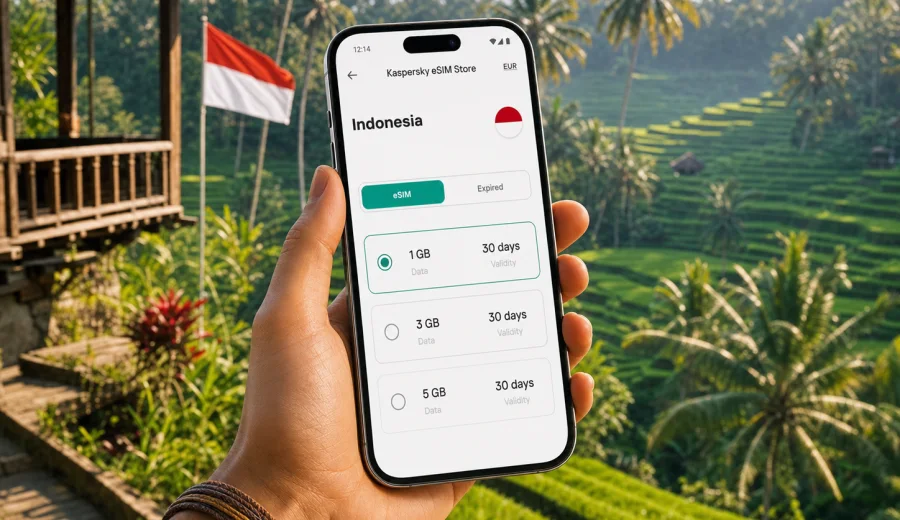
Indonesia eSIM: mobile connection and internet for your trip
If you are planning a trip across Java, Bali, Lombok, Sumatra or several islands, a reliable mobile connection can make the difference between a calm route and a day spent looking for Wi-Fi. With mobile internet for a trip to Indonesia options in Kaspersky eSIM Store, you can prepare mobile internet before departure or shortly after arrival, without buying a physical SIM card at the airport.
An eSIM is a digital SIM profile installed on a compatible smartphone or tablet. For travel, it is useful because you can choose a prepaid data package for your destination, install it on the device and use mobile data for maps, ride-hailing, hotel messages, boarding passes and everyday communication. Kaspersky eSIM Store is an app and website where you can choose, arrange and activate an eSIM with a suitable mobile internet plan for an international trip.
Indonesia is not a single-city destination. You may land in Jakarta, continue to Yogyakarta, fly to Bali or take a boat to the Gili Islands. On that kind of route, public Wi-Fi is not enough. You need data before hotel check-in, during transfers and when plans change. An eSIM helps you keep internet access on the device you already use, while your regular physical SIM can stay in the phone if your model supports dual SIM settings.
Why mobile internet matters in Indonesia
Indonesia is spread across thousands of islands, and travel often involves international flights, domestic flights, airport trains, taxis, ferries, scooters and walking routes. Mobile internet is useful from the first hour because many practical tasks happen before you reach stable Wi-Fi.
Common scenarios include:
- opening a map after landing at Soekarno-Hatta International Airport or Ngurah Rai International Airport;
- checking a ride-hailing pickup point outside the terminal;
- messaging a hotel, villa host, guide or diving center;
- showing booking confirmations and domestic flight details;
- sharing a live location with family or colleagues;
- checking weather before ferries, hikes or island tours;
- using mobile banking confirmations and two-factor prompts.
An eSIM does not replace every communication need. Most travel eSIM data plans are focused on mobile internet and may not include a local phone number, voice calls or SMS unless this is stated in the selected plan conditions. For calls and messages, many travelers use internet-based apps. Before purchase, check the plan details and device support.
eSIM, roaming, public Wi-Fi and local SIM cards
There is no single best connection option for every trip. The right choice depends on your route, phone, budget, time and how much control you want before arrival.
| Option | When it can be convenient | What to check |
|---|---|---|
| Travel eSIM | You want to prepare data before departure and avoid a physical SIM swap | Device compatibility, plan validity, data amount and activation rules |
| Home operator roaming | You prefer keeping your existing mobile setup unchanged | Daily roaming fees, speed limits and fair use conditions |
| Local physical SIM | You stay longer and do not mind visiting a shop or kiosk | Registration process, physical SIM slot, language and opening hours |
| Public Wi-Fi | You only need occasional internet in hotels or cafes | Security, coverage outside buildings and whether login pages work smoothly |
For many short and medium trips, an eSIM is practical because you see the data amount, validity period and destination before payment. It can also help reduce dependence on public Wi-Fi in airports, cafes and hotels. Still, you should not assume that any plan will suit every island route or heavy usage. If you plan to stream video, upload many photos or work on calls, choose the data package with that behavior in mind.
How to choose an eSIM plan for Indonesia
Start with the trip, not with the number of gigabytes. A three-day business trip to Jakarta, a week in Bali and a three-week island route are different internet scenarios.
Use this simple planning method:
1. Count the number of travel days when you will rely on mobile data.
2. Mark high-data days: airport transfers, long navigation, remote work, video calls or photo uploads.
3. Decide whether you need data only in Indonesia or also in nearby destinations.
4. Check the plan validity period and when it starts.
5. Compare the available data packages and choose a size that leaves a margin.
For light use, messaging, maps, email and booking apps may fit a smaller package. For active sightseeing, ride-hailing, short videos and social media uploads, choose more data. For remote work, cloud files or video meetings, be conservative: mobile data can disappear faster than expected.
Kaspersky eSIM Store helps you view available options for the destination and choose a suitable prepaid plan for your trip. Read the plan conditions before payment: data amount, validity, coverage, price and activation instructions can differ between plans.
Practical data planning for Indonesia
The table below is not a promise of exact consumption. It is a planning guide that helps you estimate your behavior before choosing a plan.
| Trip style | Typical mobile data tasks | Planning note |
|---|---|---|
| Weekend in Jakarta | Maps, taxi apps, messages, restaurant searches | A smaller package may be enough if hotel Wi-Fi is reliable |
| One week in Bali | Navigation, bookings, beach club messages, photo sharing | Choose extra data if you post videos or use maps for scooters |
| Java route | Trains, domestic flights, city maps, hotel communication | Prioritize validity period and enough data for transfer days |
| Islands and outdoor tours | Messaging, weather, maps, guide coordination | Download offline maps too; mobile coverage can vary by area |
| Remote work trip | Email, calls, tethering, cloud apps | Pick a larger package and test setup before critical work |
Before you travel, download offline maps for Jakarta, Bali or your planned region, save hotel addresses and booking PDFs, disable automatic video playback and set cloud photo backup to Wi-Fi only. These steps help the data package last longer.
Once your route and approximate data needs are clear, you can choose a suitable eSIM data plan for the trip and compare data volume, validity period, and activation conditions before installation.
Prepare before departure
The best time to prepare mobile internet is before you need it. You can arrange the eSIM while you still have stable Wi-Fi, time to read instructions and access to your usual payment method. This is useful if you arrive late or need internet immediately for transport.
Preparation checklist:
- check that your phone or tablet supports eSIM;
- check that the device is not locked to one mobile operator;
- update the operating system if an update is pending;
- keep your regular SIM active if you need banking SMS or calls;
- choose the Indonesia plan in advance and read the validity rules;
- save installation instructions before the flight;
- keep your device charged for arrival;
- download offline maps for your first city or island.
Choose an eSIM plan for Indonesia in Kaspersky eSIM Store when you are ready to prepare mobile internet for the trip: https://kasperskyesimstore.com/plans/id/
How to install and activate an eSIM
Installation is usually simple, but it still deserves attention. You need internet access to install the eSIM profile, so it is often easier to complete installation over stable Wi-Fi before the trip. Activation and data use depend on the selected plan and local network conditions.
Basic steps:
1. Open Kaspersky eSIM Store on the website or in the app.
2. Choose Indonesia as the destination and select a suitable data plan.
3. Complete the purchase and open the eSIM details in your profile or email.
4. Install the eSIM on the compatible device by following the provided instructions.
5. When you are ready to use it, select the eSIM for mobile data.
6. If the instructions or device settings require it, enable data roaming for that eSIM profile.
7. Check that background apps are not using data unnecessarily.
For detailed installation guidance, use the Android installation guide or the iOS installation guide. Follow the steps for your device and do not delete the eSIM profile after installation unless the plan instructions or support team advise you to do so.
Device compatibility is essential
Not every phone supports eSIM, and some devices that support eSIM can still be restricted by operator lock or regional model differences. Before you buy a plan, check your device and confirm that the phone or tablet can install an eSIM profile.
Pay attention to these points:
- the model must support eSIM;
- the device should not be locked to a single operator;
- the operating system should be recent enough for stable eSIM setup;
- you should know which SIM profile is used for mobile data;
- if you use a physical SIM and eSIM together, check dual SIM behavior;
- after activation, the eSIM may not be transferable to another device, depending on plan and profile conditions.
If you are traveling with more than one device, do not assume that you can move one activated eSIM between them. Prepare the profile on the device you plan to use for mobile data in Indonesia.
What to check in the plan conditions
Before you pay, read the plan conditions calmly. A few minutes of checking can prevent confusion later.
Look for:
- destination: the plan should include Indonesia or a relevant regional route;
- data amount: choose enough for maps, messages, bookings and expected media use;
- validity period: match the number of travel days;
- start rules: check when the validity period begins;
- top-up options: see whether you can add data if needed;
- supported devices: confirm that your phone or tablet is compatible;
- installation method: QR code, app flow or manual details;
- support path: know where to ask for help if setup is unclear.
Avoid choosing only by the lowest price. A plan that is too small can become inconvenient if you rely on maps, ride-hailing and messaging every day. A plan with a validity period that is too short can also become a problem on longer routes. Choose the plan that fits the actual trip.
Data settings for Indonesia routes
Indonesia is diverse, so your connection needs can change during the same trip. In Jakarta, mobile data is useful for transport apps, traffic updates and meetings across districts. In Bali, it often supports scooter routes, villa communication, restaurant bookings and driver pickup points. On island routes, it helps with ferry messages, guide coordination and weather checks, but you should keep offline maps ready because coverage can vary by area.
If your phone supports dual SIM settings, you can usually keep your regular SIM available for calls, banking messages or home-country notifications while using the eSIM for mobile data. After installation, confirm which SIM is selected for data, whether data switching is enabled, and whether your home SIM roaming data is off if you do not want roaming charges.
To make the data package last longer, set photo backups and app updates to Wi-Fi only, disable automatic video playback, download maps before departure and monitor per-app usage during the first day. If you plan to tether a laptop, check the plan conditions and avoid automatic system updates over mobile data.
Quick checklist for arrival in Indonesia
Use this short list when the plane lands or when you are ready to switch from airport Wi-Fi to mobile data.
- Turn off airplane mode.
- Select the travel eSIM as the mobile data line.
- Keep your regular SIM for calls or messages if needed.
- Enable data roaming for the eSIM only if the instructions say so.
- Open a browser or map app to confirm data works.
- Check that cloud backup and app updates are not using mobile data.
- Save support details in case setup needs attention.
If mobile data does not start immediately, wait a few minutes, check the selected data line and restart the device if needed. Make sure the eSIM profile is installed, active and selected for data. Connection behavior can depend on the device, local network and plan conditions.
Frequently asked questions
Does an eSIM for Indonesia include calls and SMS?
Many travel eSIM plans are data-only. If calls or SMS are included, this should be clearly stated in the selected plan conditions. For many travel tasks, internet-based calling and messaging apps are enough.
Can I install the eSIM before I travel?
In many cases, yes. Installing before departure is convenient because you have stable Wi-Fi and time to check settings. Read when validity starts: rules can differ by plan.
Can I use the eSIM in Bali only?
Choose the country plan for Indonesia if your route is within Indonesia, including Bali. If your trip also includes other countries, compare Indonesia-specific and regional options if they are available.
What happens if I run out of data?
Check the plan details in Kaspersky eSIM Store. Depending on the selected plan, you may be able to choose another package or top up if the option is available.
Is public Wi-Fi enough for a trip to Indonesia?
Public Wi-Fi can help in hotels, airports and cafes, but it is not a complete travel plan. You may need internet between Wi-Fi spots, during transport and at pickup points.
Choose an eSIM plan for Indonesia
Before your trip, prepare mobile internet like flights and hotels. Check device compatibility, choose the right data amount, read the validity rules and install the eSIM while you still have stable Wi-Fi.
Kaspersky eSIM Store helps you choose, arrange and activate an eSIM with a suitable mobile internet plan for an international trip. For Indonesia, start with the destination page and select a plan that matches your route, trip length and expected data use: https://kasperskyesimstore.com/plans/id/
Before departure, open Kaspersky eSIM Store and review mobile internet options for your destination. Choose the data volume and validity period deliberately, then install the eSIM on a compatible device over a stable Wi-Fi connection.