
Travel connectivity guide
eSIM in Iraq: mobile internet for travel
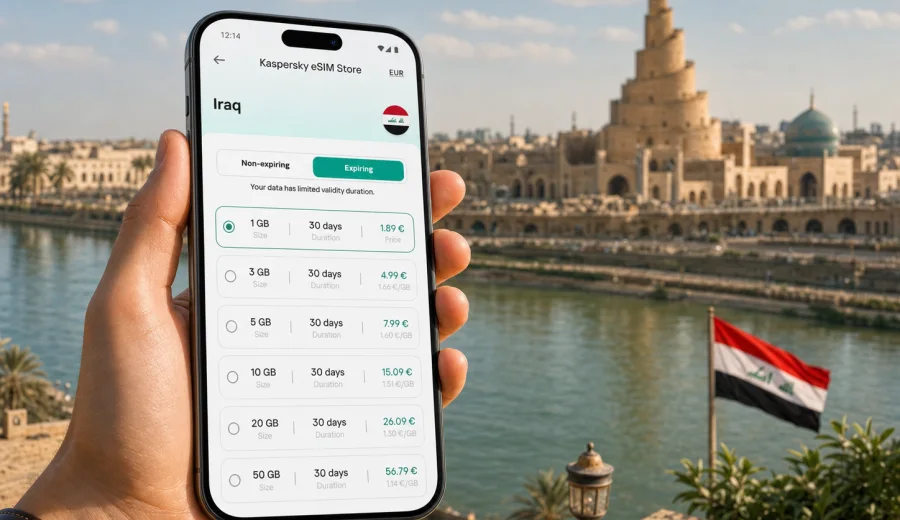
eSIM in Iraq: mobile connection and internet for your trip
Iraq is a country where mobile internet can matter from the first minutes of a trip. You may need a map after landing in Baghdad, a ride-hailing app near the hotel, a messenger call with family, a booking confirmation in Najaf, or a route update before travelling to Erbil, Basra, Karbala, Mosul, or the marshlands in the south. An eSIM helps you prepare mobile data before you leave, so you are not depending only on airport Wi-Fi, roaming settings, or finding a local SIM card counter when you are tired after the flight.
For most travellers, eSIM is useful because it separates internet preparation from the physical SIM card. You keep your regular SIM in the phone for your home number, install a digital SIM profile for data, and choose when to activate it according to the terms of the selected tariff. This is especially convenient in Iraq, where trips often combine large cities, religious sites, business meetings, family visits, and regional routes with different internet needs.
Kaspersky eSIM Store is an app and website where you can quickly choose, arrange, and activate an eSIM with a suitable mobile data tariff for an international trip. It does not replace a local mobile operator and it is not a mobile network. It helps you prepare an eSIM option for mobile internet abroad, review tariff conditions before purchase, and manage the profile from your device.
Why mobile internet planning is important in Iraq
Iraq is not a single-city destination. Many trips start in Baghdad International Airport, continue through central Baghdad, then move toward Karbala, Najaf, Babylon, Erbil, Sulaymaniyah, Basra, or other regions. A traveller may use mobile data for navigation, translation, hotel messages, banking confirmation, flight updates, and contact with local hosts on the same day.
Public Wi-Fi can help in hotels, airports, restaurants, and offices, but it is rarely a complete plan. It may require registration, may be slow at peak times, and may not be available when you are between locations. Standard roaming may be simple, but the price and data limits depend on your home operator. A local physical SIM can be useful for longer stays, but it may take time to buy, register, and configure.
An eSIM gives you another option: prepare mobile data in advance, keep the setup on a compatible device, and activate the plan when you are ready to use it. That does not remove the need to check tariff details, device support, or local conditions, but it makes the internet part of the trip more predictable.
Where eSIM can help during an Iraq trip
Typical mobile data scenarios in Iraq are practical and often time-sensitive:
- checking a route from Baghdad International Airport to your hotel;
- sharing a live location with a colleague, guide, driver, or family member;
- using maps between Baghdad, Karbala, Najaf, Erbil, Basra, and other stops;
- translating signs, addresses, and short messages;
- receiving booking, flight, and transport notifications;
- using messenger calls when voice calls are not included in the selected eSIM tariff;
- checking work email or documents before a meeting;
- keeping access to banking apps and two-factor authentication methods that work over data;
- uploading essential travel photos or documents when you have enough data available.
The exact experience depends on the selected tariff, device settings, local network conditions, and the places you visit. eSIM is best treated as a prepared mobile data option, not as a promise that every location will have the same speed or signal.
eSIM, roaming, local SIM, and Wi-Fi: how they compare
| Option | Best for | What to check before relying on it |
|---|---|---|
| eSIM for Iraq | Travellers who want mobile data prepared before arrival | Device compatibility, tariff validity, data amount, activation rules |
| Standard roaming | Short trips where convenience matters more than cost control | Roaming price, daily caps, included data, fair use rules |
| Local physical SIM | Longer stays or users who need a local number | Registration process, shop availability, phone SIM slot, documents required by local rules |
| Public Wi-Fi | Hotels, offices, cafes, and light browsing | Availability, speed, login process, security of the network |
Many travellers use more than one option. For example, you can keep your home SIM active for calls and messages, use an eSIM for mobile data, and connect to trusted Wi-Fi at a hotel for larger downloads. The main advantage is flexibility: you are not locked into one connection method for the whole trip.
How much data you may need
Data use depends more on habits than on the country. Navigation and messaging use relatively little data. Video calls, cloud backups, social media uploads, and streaming can use much more. For Iraq, think about both the length of the trip and the amount of time you will spend moving between places.
| Travel style | Typical use | Practical approach |
|---|---|---|
| Light | Maps, messages, email, web searches | Choose a smaller data package and keep video use for Wi-Fi |
| Balanced | Maps, messenger calls, work messages, social media | Choose a medium package with enough validity for the whole route |
| Heavy | Frequent uploads, video meetings, large files | Choose a larger package and disable automatic cloud backups on mobile data |
| Group or work trip | Navigation, coordination, documents, online tools | Plan extra data for unexpected schedule changes |
If you are unsure, choose a tariff that matches the number of travel days and your essential tasks first. It is better to plan around maps, messages, bookings, and work needs than around unlimited entertainment. Check whether the selected tariff can be topped up or whether you need to add another plan if the first one runs out.
Before you buy: device compatibility
Not every phone or tablet supports eSIM. Even some models that support eSIM in one region may be sold without eSIM support in another market. Before you arrange a tariff for Iraq, confirm that your exact device model supports eSIM and is not locked to one mobile operator.
You should also check whether your phone can use your regular SIM and the eSIM at the same time. Many recent devices support dual SIM mode with one physical SIM and one eSIM, but the exact behaviour differs by model. If you plan to keep your home number available for calls or SMS while using eSIM data, this detail matters.
Check your device before you choose a plan. This step is simple, but it prevents the most frustrating mistake: buying a mobile data option that your phone cannot install.
When to set up your eSIM for Iraq
The safest preparation is to arrange the eSIM before departure while you still have stable Wi-Fi and time to read the instructions. You do not need to rush through setup at the airport, in a taxi, or in a hotel lobby. Installation and activation are separate concepts, and the rules may depend on the selected tariff, so read the plan details carefully.
A practical sequence looks like this:
1. Check that your phone supports eSIM and is unlocked.
2. Choose Iraq as the destination.
3. Compare data amount, validity period, and tariff conditions.
4. Arrange the eSIM tariff while connected to reliable Wi-Fi.
5. Install the eSIM profile on the device you will take with you.
6. Keep your regular SIM available if you need your home number.
7. Activate data for the eSIM according to the tariff instructions, either before departure or after arrival.
8. Turn off mobile data for apps that may consume traffic in the background.
If your phone asks which SIM should use mobile data, choose the eSIM profile for travel data when you are ready. If it asks which SIM should handle calls and SMS, keep the setting that matches your personal needs. eSIM data tariffs usually focus on mobile internet and may not include a traditional phone number, voice calls, or SMS unless this is clearly stated in the tariff conditions.
Choosing an eSIM tariff for Iraq
The best tariff is not simply the largest data package. It is the one that fits your route, trip length, phone habits, and backup options. A three-day business visit to Baghdad may need less data than a two-week route through Baghdad, Najaf, Karbala, Erbil, and Basra. A traveller who uses offline maps and hotel Wi-Fi may need less than someone who runs video meetings over mobile data.
When comparing options, look at these details:
- destination: confirm that the plan is for Iraq or includes Iraq in a broader regional package;
- data amount: choose enough for navigation, messaging, bookings, and necessary work;
- validity: make sure the plan lasts for the full trip, including arrival and departure days;
- activation rule: check when the validity period starts;
- hotspot use: confirm whether tethering is available if you plan to share data with a laptop or another device;
- top-up options: see whether you can add data or need another plan;
- support: know where to look if installation or activation questions appear.
After you know your travel dates and likely data needs, you can choose an eSIM tariff for Iraq and prepare mobile internet before the trip. This is most useful after you understand your route, your data habits, and the validity period you need.
Practical scenarios by route
Baghdad business trip
For a short business trip, mobile data is mainly about reliability during transfers, meetings, and schedule changes. You may need email, maps, messenger calls, document access, and ride coordination. A balanced data package with validity that covers the whole stay is usually more useful than a very large package with a shorter validity period.
Before arrival, download hotel details, office addresses, and a backup map area. Keep important contacts available offline. If you expect video meetings, test whether hotel or office Wi-Fi can handle them and keep eSIM data as a backup for urgent calls.
Pilgrimage or family route to Najaf and Karbala
Trips to Najaf and Karbala may involve busy streets, changing meeting points, and group coordination. Messaging apps, maps, and location sharing can be more important than heavy browsing. Choose enough data for daily navigation and communication, then reduce unnecessary background use.
If several people travel together, each traveller should avoid depending entirely on one person’s phone. At least one backup connection in the group can make coordination easier if plans change.
Kurdistan Region itinerary
Erbil and Sulaymaniyah are common stops for business, family, and tourism. If your route includes flights, road transfers, and several hotels, mobile data helps with maps, translation, bookings, and local communication. Check whether your selected plan covers the locations you intend to visit and read the tariff conditions before purchase.
For longer regional routes, offline maps are useful even when you have mobile data. They reduce data use and help if signal quality changes during travel.
Basra and southern Iraq
Basra trips may involve work sites, hotels, transport coordination, and hot weather that affects how you use your phone outdoors. Keep the phone charged, carry a power bank, and avoid leaving the device in direct sun. Mobile internet is useful for route updates and communication, but a low battery can become a bigger problem than data limits.
Installation notes for Android and iOS
Install the eSIM while connected to reliable Wi-Fi. The process usually involves scanning a QR code or following in-app instructions, then adding the eSIM profile to your phone. Keep the installation screen open until the profile is added, and do not delete the eSIM after activation unless you are sure you no longer need it. Some eSIM profiles cannot be transferred to another device after installation.
For device-specific steps, use the Android installation instructions or the iOS installation instructions. The exact menu names can differ by phone model and operating system version, so follow the instructions for your device type and read any messages shown on the screen.
After installation, name the eSIM profile clearly, for example "Iraq data". This helps you avoid confusing it with your home SIM. Before you start using it, check that mobile data is assigned to the eSIM and that data roaming is enabled for the eSIM profile if the tariff instructions require it. Do not enable roaming for your home SIM unless you intentionally want to use roaming through your home operator.
How to reduce data use while travelling
Small settings can make a data package last longer:
- download offline maps for Baghdad, Najaf, Karbala, Erbil, Basra, and other planned stops;
- turn off automatic photo and video backups on mobile data;
- disable automatic app updates until you are on Wi-Fi;
- use lower video quality for calls if the connection is limited;
- send photos in standard quality when high resolution is not needed;
- close apps that constantly refresh in the background;
- preload tickets, hotel confirmations, and key documents before departure;
- check data usage every day, especially on a longer route.
If you travel for work, separate essential data from optional data. Email, maps, calendars, documents, banking apps, and messengers should have priority. Streaming, large uploads, and system updates can usually wait for Wi-Fi.
Common mistakes to avoid
The most common eSIM problems are not complicated technical failures. They are usually preparation issues:
- buying a plan before checking that the phone supports eSIM;
- installing the eSIM on a device you will not take to Iraq;
- deleting the eSIM profile after installation and expecting to reinstall it freely;
- leaving mobile data assigned to the home SIM by mistake;
- forgetting that the eSIM tariff may provide data only, not a phone number;
- starting a validity period too early because activation rules were not read carefully;
- using video, cloud backup, and app updates on mobile data without noticing;
- depending on public Wi-Fi for every important task.
You can avoid most of these issues with a short checklist before the trip.
Pre-trip checklist
Before you leave for Iraq, confirm the following:
- your device supports eSIM and is unlocked;
- your travel dates match the tariff validity period;
- the selected destination is Iraq or a regional plan that includes Iraq;
- you understand when the plan becomes active;
- you have installed the eSIM while connected to stable Wi-Fi;
- you know which SIM is assigned to mobile data;
- you saved important addresses and documents offline;
- you have a charger, cable, and power bank for long travel days;
- your essential apps are logged in and updated before departure;
- you know where to find support if installation questions appear.
This checklist is useful for any trip, but it is especially important when your itinerary includes several Iraqi cities or regions. The more moving parts you have, the more valuable a prepared mobile internet setup becomes.
Quick answers about eSIM in Iraq
Does an eSIM give me a local Iraqi phone number?
Usually, travel eSIM tariffs focus on mobile data. They may not include a regular phone number, voice calls, or SMS unless the tariff conditions say otherwise. You can use internet-based calling and messaging apps over mobile data.
Can I keep my usual SIM card active?
On many compatible phones, yes. You can often keep your regular SIM for your home number and use the eSIM for mobile data. Check your phone’s dual SIM settings before the trip.
Should I install the eSIM before arrival?
It is usually more convenient to install it before departure while you have stable Wi-Fi. Activation timing depends on the selected tariff, so read the instructions and validity rules before you start using it.
Is eSIM better than public Wi-Fi?
It depends on the task. Public Wi-Fi can be useful in hotels and offices, but eSIM mobile data is more practical when you are moving, checking maps, arranging transport, or contacting someone outside a Wi-Fi area.
What should I do if mobile data does not start immediately?
Check that the eSIM is installed, mobile data is assigned to the eSIM, data roaming is enabled for that profile if required, and the phone has been restarted if the instructions recommend it. Also confirm that the plan is active and that you are in a covered area according to the tariff conditions.
Final preparation for mobile internet in Iraq
The best time to think about mobile connection is before you need it. If your phone is compatible with eSIM, preparing a data plan for Iraq can make arrival, transfers, daily navigation, and communication easier. You still need to read the tariff conditions, manage data use, and keep backup options, but you avoid starting the trip with only airport Wi-Fi or uncertain roaming settings.
For a smoother trip, check your device, compare data amount and validity, install the eSIM on the phone you will use, and keep your regular SIM settings clear. When your dates and route are set, you can prepare an eSIM tariff for your Iraq trip through Kaspersky eSIM Store and keep mobile internet planning off your arrival-day to-do list.