
Travel connectivity guide
Island Harbour eSIM for Anguilla Travel
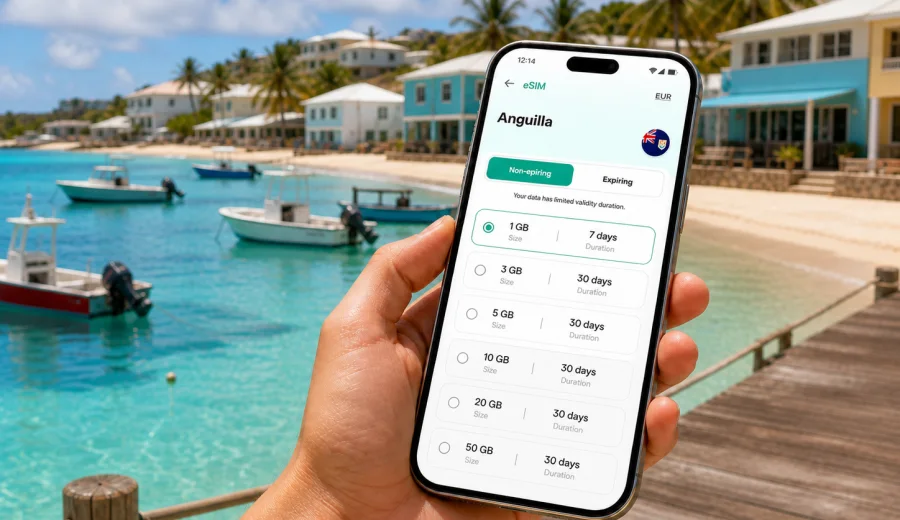
Island Harbour eSIM: mobile connection and internet for your Anguilla trip
Island Harbour is one of Anguilla's most relaxed coastal bases: a small east-end village with fishing boats, calm mornings by the water, easy drives to Shoal Bay East, and a slower rhythm than the busier resort areas. That quiet setting is exactly why mobile internet matters. You may not spend the day moving through a dense city grid, but you will still need maps, taxi messages, villa check-in details, restaurant bookings, ferry updates, and quick contact with people you are meeting.
An eSIM can make that part of the trip easier because you can prepare mobile data before you arrive or set it up shortly after landing. Instead of searching for a physical SIM card at the airport, ferry terminal, or in a shop, you can choose a prepaid data plan for Anguilla, install the eSIM on a compatible phone, and use mobile internet for the everyday tasks that keep a trip moving.
This guide focuses on Island Harbour specifically: arrival routes, local movement, beaches, nearby districts, hotel and villa stays, business visits, short stopovers, and day trips from the village. Anguilla is compact, but the east end can feel inconvenient if you are offline at the wrong moment. A working data connection helps you confirm directions, coordinate transport, and avoid relying only on hotel Wi-Fi.
Why mobile internet matters in Island Harbour
Island Harbour is not a high-rise business center or a large resort strip. It is a coastal village where your day may move between a villa, the harbor, a beach, a restaurant, and a scenic drive across the island. The practical need for internet comes from small moments:
- finding the correct road to your accommodation after arrival;
- messaging a taxi driver or car rental contact;
- checking restaurant hours before you drive across the island;
- opening a map when road signs are limited;
- sharing your live location with travel companions;
- using translation, banking, airline, or ferry apps;
- keeping work messages available during a quiet stay.
Public Wi-Fi can help in hotels, villas, cafes, and restaurants, but it is not a full travel plan. You may need internet before you reach the property, while walking near the harbor, or when returning from Shoal Bay East after sunset. Mobile data gives you a more flexible option for the in-between parts of the day.
Arrival scenarios: airport, ferry, and the east-end drive
Most travelers reach Island Harbour after entering Anguilla through either Clayton J. Lloyd International Airport or the Blowing Point ferry terminal. Some arrive after connecting through nearby St. Martin or St. Maarten, then continue to Anguilla by ferry. In each case, Island Harbour is not the first place you see after entry, so the first practical challenge is getting across the island smoothly.
If you land at the airport, you may need to message a host, check a car rental pickup point, or confirm the exact location of a villa. If you arrive at Blowing Point, you may be managing luggage, ferry timing, and onward transport at the same time. A prepaid eSIM data plan helps because you can keep the same phone ready for maps, booking confirmations, and messaging apps without waiting for a shop visit.
The drive to Island Harbour is part of the island experience, but it is easier when your map is available. Anguilla has a simple road network compared with larger destinations, yet villa entrances, beach roads, and side streets can still be easy to miss. Mobile internet is useful for:
- opening route guidance before leaving the airport or ferry terminal;
- checking whether your accommodation shared a map pin or written directions;
- contacting the property if the gate, driveway, or meeting point is unclear;
- updating your arrival time if immigration, baggage, or ferry transfer takes longer than expected.
For short stays, that first hour matters. If you are in Island Harbour for only a weekend, a business visit, or a stop between Caribbean islands, you may not want to spend your arrival time solving connectivity.
How Island Harbour travel patterns affect data use
Island Harbour trips often mix quiet local time with movement around Anguilla. You may stay near the harbor, visit nearby beaches, drive to The Valley for errands, go to Sandy Ground for dinner, or spend part of the day at Shoal Bay East. The data plan that works best depends less on the village itself and more on how you move from it.
| Travel pattern in Island Harbour | Typical internet tasks | Data planning tip |
|---|---|---|
| Villa or guesthouse stay | check-in messages, maps, food delivery or restaurant search, video calls on Wi-Fi | Choose enough mobile data for navigation and messaging outside the property. |
| Beach-focused trip | route planning, photo backup, messaging, weather checks | Use Wi-Fi for heavy uploads when possible and keep mobile data for movement. |
| Business visit | email, calendar, taxi coordination, video meeting backup | Pick a plan with more data and keep roaming settings clear for the eSIM profile. |
| Family holiday | shared maps, group chats, activity planning, emergency contact | Install eSIM before travel and explain which phone will handle navigation. |
| Short stopover | maps, ferry updates, ride coordination, quick browsing | A smaller data package may be enough if you avoid streaming. |
The safest approach is to estimate your real behavior. Messaging and maps usually use modest data. Video calls, cloud photo backup, streaming, and hotspot use can consume much more. If your accommodation has reliable Wi-Fi, you can keep mobile data for the moments when you are away from it.
Local movement: taxis, rental cars, and walking near the harbor
Island Harbour is a place where many travelers rely on taxis or rental cars rather than public transport. A rental car gives flexibility for beaches and restaurants, while taxis are useful if you prefer not to drive unfamiliar roads. In both cases, mobile internet helps with coordination.
For taxis, keep your phone ready for calls or messages through internet-based apps, depending on how your driver or host communicates. eSIM data plans are primarily for mobile internet and usually do not include a regular phone number, voice calls, or SMS unless a specific plan states otherwise. If you need traditional calls, check the details of your mobile setup before travel and keep another option available.
For rental cars, mobile data is useful even if you download offline maps in advance. Offline maps can help with basic navigation, but live search, updated opening hours, route changes, and messaging still need internet. Around Island Harbour, this becomes practical when you are looking for a beach entrance, deciding whether to drive west for dinner, or checking the fastest route back from another part of Anguilla.
Walking near the harbor is simpler, but data still helps. You may want to identify a restaurant, contact a boat operator, share your location with a friend, or check whether a planned stop is open. A small amount of mobile data can remove a lot of friction from a slow day.
Choosing an eSIM data plan for Island Harbour
When you choose a plan for Island Harbour, start with the country rather than the village. For a city or village stay in Anguilla, the relevant destination is Anguilla. Then compare the plan duration, data allowance, and activation conditions against your itinerary.
Use this simple planning method:
1. Count the full days you will spend in Anguilla, including arrival and departure days.
2. Decide whether your accommodation Wi-Fi will handle heavy use such as video calls or photo backup.
3. Estimate mobile tasks outside Wi-Fi: maps, messaging, ride coordination, browsing, bookings, email.
4. Add extra data if you plan to use your phone as a hotspot, work remotely, or move around the island daily.
5. Check when the plan validity starts and how activation works for your device.
If Island Harbour is one stop in a wider Caribbean route, compare whether a country plan for Anguilla or a broader regional option fits your itinerary better. If most of your mobile data use will happen in Anguilla, a destination plan is often the clearest choice. If you will move between several countries, read the plan coverage and validity conditions carefully before purchase.
For a straightforward Island Harbour stay, you can use Kaspersky eSIM Store to choose an eSIM data plan for Anguilla and prepare mobile internet before you start moving between the airport, ferry terminal, accommodation, beaches, and restaurants.
Before you buy: device and plan checks
Before paying for any eSIM plan, confirm that your phone or tablet can use eSIM and is not locked in a way that prevents another mobile profile from working. This step matters more than the destination. Even the most carefully chosen plan cannot help if the device cannot install or activate the eSIM.
Check your device before you buy, especially if the phone is older, was purchased through a carrier, or has never used eSIM before. Also confirm these points:
- the plan is valid for Anguilla;
- the data volume matches your expected use;
- the validity period covers arrival, stay, and departure;
- you understand whether the plan starts counting from installation, activation, or first network connection;
- you know whether data roaming should be enabled for the eSIM profile;
- your main SIM remains available if you need regular calls or SMS.
Keep the setup details accessible offline. Save your booking confirmation, accommodation address, and any eSIM installation instructions before the trip. If your phone needs a stable internet connection to complete installation, do that at home or on trusted Wi-Fi before departure.
How to install and activate an eSIM for Anguilla
The exact steps depend on your phone model and operating system, but the flow is usually simple: choose a plan, complete the order, install the eSIM profile, then select it for mobile data when appropriate. You can follow the Android installation guide or the iOS installation guide for step-by-step instructions.
A practical sequence for an Island Harbour trip looks like this:
1. Install the eSIM before travel if the plan conditions allow it.
2. Keep your primary SIM active if you need your regular number for bank codes or calls.
3. On arrival in Anguilla, select the eSIM profile for mobile data.
4. Enable data roaming for the eSIM profile if the instructions for your plan require it.
5. Open a map or browser to confirm that mobile data is working.
6. Monitor data use during the trip, especially if you upload video or use hotspot mode.
Do not remove the eSIM profile too early. Some eSIM profiles cannot be moved to another device after activation, and deleting a profile may make it difficult or impossible to use again. If you are unsure, keep the profile installed until the trip is over and check the plan conditions.
Data-saving tips for beaches, boats, and villas
Island Harbour invites slow travel, but phones can still use data quickly in the background. A few settings help your data plan last longer:
- download offline map areas before arrival;
- pause automatic cloud backup on mobile data;
- set messaging apps to download media only on Wi-Fi;
- use accommodation Wi-Fi for app updates and large files;
- avoid streaming video on mobile data unless your plan is sized for it;
- turn off hotspot mode when you are not actively using it;
- check which SIM profile is assigned to mobile data before leaving your room.
If you plan to take many photos near the harbor, Shoal Bay East, or on a boat trip, upload them later on Wi-Fi. For most travelers, maps, messaging, and light browsing are the most important mobile data tasks while moving around Island Harbour.
Practical scenarios in Island Harbour
You arrive by ferry and go straight east.
Mobile data helps you message the driver, confirm the villa address, and follow the route from Blowing Point without searching for Wi-Fi at the terminal.
You stay near the harbor and visit beaches by car.
Use mobile internet for route guidance, parking location, restaurant searches, and quick weather checks. Keep heavy uploads for Wi-Fi.
You work remotely from a villa.
Accommodation Wi-Fi should handle the main workload, but eSIM data can be a backup for email, calendar changes, or messaging if you step out or the Wi-Fi is temporarily unavailable.
You are in Anguilla for a short break.
Prepare the eSIM before arrival so the first day is not spent arranging connectivity. A smaller plan can be enough if you mainly need maps and messages.
You move around the island every day.
Choose more data if you will navigate often, research restaurants, share photos, and coordinate plans from different parts of Anguilla.
Island Harbour connectivity checklist
Use this checklist before you leave for Anguilla:
- Your device supports eSIM.
- Your phone is not carrier-locked for eSIM use.
- You have selected a plan that includes Anguilla.
- You understand the plan duration and data allowance.
- You have saved installation instructions.
- Your accommodation address is available offline.
- Offline maps are downloaded.
- Your main SIM settings are clear, especially for calls and SMS.
- Mobile data is assigned to the right SIM profile after arrival.
- You know how to contact support if installation or activation questions come up.
This preparation is useful in any destination, but it is especially helpful in a quiet village where you may not want to spend the first afternoon looking for technical help.
Quick answers for Island Harbour travelers
Is an eSIM useful if my hotel or villa has Wi-Fi?
Yes, because Wi-Fi covers the property, not the whole trip. You may still need mobile internet for maps, taxis, check-in coordination, restaurants, and beach days away from your room.
Does an eSIM data plan include a local Anguilla phone number?
Usually no. In this context, eSIM plans are for mobile internet. Regular calls and SMS are not included unless the selected plan says otherwise. You can use internet-based calling and messaging apps over data.
Should I install the eSIM before I travel or after I arrive?
If the plan conditions allow it, installing before travel is often more convenient. Activation and validity rules can vary, so read the plan details before you install or switch on the eSIM profile.
How much data do I need for Island Harbour?
For maps, messaging, bookings, and light browsing, moderate data may be enough. Add more if you plan to work remotely, use hotspot mode, upload many photos, stream video, or move around Anguilla daily.
Can I use the same eSIM for other Caribbean stops?
Only if the plan you choose covers those destinations. If your trip includes several countries, compare country and regional options carefully before purchase.
Prepare mobile internet before you reach the harbor
Island Harbour is best enjoyed without turning every stop into a search for Wi-Fi. A prepared eSIM data plan helps you move from arrival to accommodation, from the harbor to the beach, and from a quiet evening meal back to your villa with maps, messages, and travel details available on your own phone.
Before you go, check device compatibility, read the plan conditions, and decide how much data your itinerary really needs. Then use Kaspersky eSIM Store to prepare an eSIM data plan for your trip to Anguilla so your mobile internet is ready for the practical parts of an Island Harbour stay.