
Travel connectivity guide
eSIM for Israel: mobile internet guide
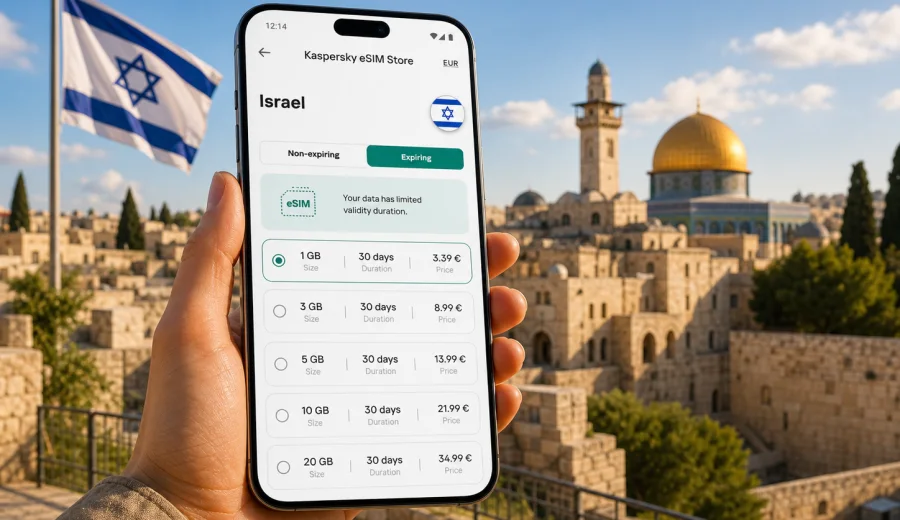
eSIM for Israel: mobile connection and internet for your trip
Israel is a compact country, but a trip there can be surprisingly mobile-data heavy. You may land at Ben Gurion Airport, take a train toward Tel Aviv, use maps in Jerusalem, message a host in Haifa, book a ride to the Dead Sea, check museum opening hours, and keep travel documents available on your phone. A reliable mobile connection and internet access are not just conveniences. They help you move between airports, cities, beaches, desert roads, hotels, meetings, and family visits with less friction.
An eSIM is a practical way to prepare mobile internet before you travel. Instead of looking for a physical SIM card after arrival, you install a digital SIM profile on a compatible phone and activate a data plan for the trip. Kaspersky eSIM Store is an app and website where you can choose, arrange, and activate an eSIM with a suitable data plan for international travel. It does not replace every part of a local mobile subscription: ordinary voice calls and SMS are included only if the selected plan says so. For most travel scenarios, the core value is mobile data for maps, messengers, bookings, translation, and everyday online tasks.
This guide explains how to use eSIM for Israel, how to estimate your data needs, what to check before purchase, and how to avoid common mistakes when you arrive.
Why mobile internet matters in Israel
Many travelers underestimate how often they will need data in Israel because distances look short on the map. In practice, mobile internet becomes useful throughout the day:
- at the airport, when you need a ride app, hotel address, or train route;
- in Tel Aviv, where plans can change quickly between the beach, restaurants, work meetings, and nightlife;
- in Jerusalem, where walking routes, security checks, and historic districts can make offline navigation less flexible;
- around the Dead Sea and desert routes, where you may want maps, weather updates, and group coordination;
- during business trips, when email, calendar updates, and authentication messages need a stable connection;
- on family visits, when you may move between several homes, cities, and shared plans.
Public Wi-Fi can help in hotels, cafes, airports, and coworking spaces, but it is not a full travel plan. You still need data when you are between locations, checking transport, confirming a reservation, or contacting someone on the way. A prepared eSIM helps reduce dependence on Wi-Fi passwords, shop opening hours, and last-minute decisions at the airport.
What an eSIM gives you in Israel
An eSIM is a digital SIM profile stored inside a compatible device. For a trip to Israel, it usually gives you a prepaid mobile data plan for a defined destination, validity period, and traffic volume. You can keep your main SIM card in the phone and use the eSIM for travel data, if your device supports that setup.
For travelers, the important parts are simple:
| Travel need | How eSIM helps |
|---|---|
| Maps and navigation | You can load routes, check traffic, and adjust plans outside Wi-Fi zones. |
| Messaging | You can use internet-based calls and messages through apps. |
| Bookings | You can open hotel, flight, train, restaurant, and event confirmations. |
| Work access | You can use email, cloud tools, calendar updates, and authentication apps. |
| Family coordination | You can share locations, send photos, and stay reachable through messengers. |
The exact experience depends on your phone, the selected plan, local network conditions, and how much data you use. Before buying, check plan details such as data volume, validity, destination coverage, price, activation rules, and whether hotspot use is important for you.
Who benefits most from eSIM in Israel
eSIM is especially useful when the trip is short, busy, or spread across several places. Israel often combines city travel, beach time, historic sites, business meetings, and day trips, so a single approach to mobile data can simplify the whole route.
Good use cases include:
- a weekend in Tel Aviv with maps, ride apps, restaurant bookings, and beach photos;
- a first visit to Jerusalem where you need navigation between neighborhoods and historic sites;
- a business trip with email, calendar changes, taxi apps, and video call backup;
- a family visit where you do not want to depend on someone else’s hotspot;
- a regional trip that includes Israel and other countries, where you compare country and regional plan options;
- a late arrival, when finding a physical SIM card is inconvenient.
eSIM is not only for heavy data users. Even a modest data package can cover practical travel tasks if you reserve video streaming, large backups, and app updates for Wi-Fi. The key is to choose the plan by trip length and habits, not by the destination name alone.
Check device compatibility first
Before you choose a data plan, make sure your smartphone or tablet supports eSIM and is not locked to a mobile carrier. This matters more than the country you are visiting: if the device cannot install an eSIM profile, the plan will not help during the trip.
Use the compatibility option before purchase: check your device. You should also confirm that your device software is updated, you can access settings, and you understand where mobile data and roaming options are located. Some devices may require data roaming to be enabled for the travel eSIM, depending on the profile and plan conditions.
Quick compatibility checklist:
- your device model supports eSIM;
- the device is unlocked for mobile network use;
- you have a stable internet connection for installation;
- you can receive any account or security messages needed during setup;
- you have enough time to install and test the profile before you rely on it;
- you keep your main SIM settings clear so calls, messages, and data use do not get mixed up.
If you are traveling with more than one phone, check each device separately. eSIM profiles are usually tied to the device where they are installed and may not be transferable after activation.
How much data to choose for Israel
Data use depends on behavior, not only on trip length. A traveler who uses maps, messaging, and email may need far less data than someone who uploads videos, watches streams, or works from a hotspot. Use the table below as a practical planning tool.
| Scenario | Typical data pressure | What to consider |
|---|---|---|
| Light city trip | Low | Maps, messengers, web searches, booking confirmations. |
| Standard vacation | Medium | Navigation, photo sharing, social apps, ticket apps, translation. |
| Business travel | Medium to high | Email, cloud documents, calendar, video call backup, tethering. |
| Family travel | Variable | Several people may depend on one phone for navigation and coordination. |
| Content-heavy trip | High | Video upload, streaming, large photo sync, hotspot use. |
For a short visit, a smaller data package may be enough if you use hotel Wi-Fi for large downloads. For a longer stay or a work trip, a larger plan can reduce the need to monitor every app. When comparing plans, look at both data volume and validity: a plan with more data but the wrong duration may not fit your itinerary.
Practical routes where eSIM helps
Israel’s travel routes often mix dense urban areas with day trips. The value of eSIM becomes clear when you move between them.
Ben Gurion Airport to Tel Aviv. You may need data immediately for arrival instructions, rail information, ride apps, and messaging your hotel or host. If your eSIM is already installed, you can switch data settings after landing and avoid searching for a SIM shop while tired.
Jerusalem old and new city routes. Navigation can be more useful than expected because walking routes, light rail stops, and pickup points may not be obvious. A data plan helps you adjust plans without returning to a hotel lobby for Wi-Fi.
Haifa and the north. If your trip includes coastal routes, family visits, or business meetings, mobile data helps with trains, bus connections, weather, and changing schedules.
Dead Sea and desert day trips. Offline maps are helpful, but live data adds flexibility for route changes, meeting points, and unexpected delays. Coverage and speed still depend on local network conditions, especially outside dense urban areas, so do not treat any mobile option as a guarantee for every remote spot.
Prepare before departure
The best time to prepare your eSIM is before the moment you urgently need mobile internet. You do not have to activate travel data too early, but you should give yourself time to install the profile, read the plan rules, and understand how your phone will handle two SIMs.
Pre-trip checklist:
1. Confirm that your phone supports eSIM and is unlocked.
2. Compare plans by data volume, validity, destination, and price.
3. Install the eSIM while you still have a stable Wi-Fi connection.
4. Label the eSIM clearly, for example “Israel travel data”.
5. Keep your primary SIM available for calls or SMS if you need them.
6. Turn off automatic cloud backup, large app updates, and video autoplay on mobile data.
7. Save your hotel address, travel insurance details, and key documents offline.
At this stage, you can also decide whether the eSIM will be your only travel data option or a backup. For example, business travelers may use hotel Wi-Fi for large work files but keep eSIM ready for transport, meetings, and authentication apps.
Choosing a plan through Kaspersky eSIM Store
Kaspersky eSIM Store helps you choose, arrange, and activate an eSIM with a data plan for your trip. You can review available options by destination and compare practical details before you travel: data volume, validity period, price, and whether the plan matches your route. The product should be understood as a convenient way to prepare travel mobile internet through an app or website, not as a mobile network operator.
When comparing Israel options, focus on these questions:
- How many days will you be in the country?
- Will you rely on maps and messaging only, or also work online?
- Do you plan to share a hotspot with a laptop or another device?
- Will you spend most time in cities or also travel between regions?
- Do you need a country plan only, or is a broader regional route relevant?
- Do you understand when the plan validity starts?
Once you have passed the first planning steps and know your trip length, you can choose an eSIM plan for your trip to Israel and match the package to your expected data use. This is the point where a plan comparison becomes useful: you already know the device is compatible, the destination is correct, and the data allowance can be judged against your itinerary.
Installing and activating your eSIM
Installation is usually a short process, but it is worth doing carefully. You need a stable internet connection, enough battery, and access to your phone settings. Follow the instructions for your device type: Android installation guide or iOS installation guide.
General installation steps:
1. Open the eSIM details after arranging the plan.
2. Add the eSIM profile to your compatible phone.
3. Give the profile a clear label, such as “Israel eSIM”.
4. Keep your primary SIM as the default line for calls if you need your usual number.
5. Set the travel eSIM as the line for mobile data when appropriate.
6. Check whether data roaming must be enabled for that eSIM profile.
7. Test a small data action after activation, such as loading a map or web page.
Do not delete the eSIM profile unless you are sure you no longer need it. Reinstalling or moving an eSIM after activation may be limited by the profile and plan conditions.
Settings that help control data use
Even with a well-chosen plan, a few phone settings can make travel data last longer. Before you leave for Israel, review background activity and automatic downloads. These settings are especially useful if your plan has a fixed data allowance.
Useful data-saving actions:
- download offline maps for Tel Aviv, Jerusalem, Haifa, and planned day trips;
- disable automatic video playback in social apps;
- pause cloud photo and video backup on mobile data;
- update apps over Wi-Fi before departure;
- keep streaming in standard quality or use Wi-Fi for entertainment;
- restrict background refresh for apps you will not use during the trip;
- monitor data use in phone settings during the first day.
If you plan to use a laptop through hotspot mode, be careful. Laptops can consume data quickly through system updates, sync tools, browser tabs, and video calls. Hotspot use may also depend on plan conditions, so check the details before relying on it for work.
eSIM, roaming, local SIM, and Wi-Fi: what to compare
There is no single best option for every traveler. The right mobile internet setup depends on trip length, device support, budget, and how much control you want before arrival.
| Option | Strengths | Limits |
|---|---|---|
| Travel eSIM | Can be prepared before or during the trip; no physical SIM swap; useful for data-focused travel. | Requires compatible unlocked device; usually data-focused; plan rules vary. |
| Standard roaming | Uses your existing SIM and number; convenient if your home plan has good travel terms. | May be expensive or limited depending on your home operator and plan. |
| Local physical SIM | Can include local offers in some cases. | Requires finding a point of sale, handling setup, and possibly changing SIM cards. |
| Public Wi-Fi | Useful for large downloads in hotels or cafes. | Not available everywhere; may require passwords; not ideal as the only plan. |
Many travelers use a mixed approach: eSIM for mobile data outside Wi-Fi, their primary SIM for important calls or messages, and hotel Wi-Fi for large downloads. This keeps the setup flexible without making mobile data carry every task.
Common mistakes to avoid
Small setup mistakes can create unnecessary stress. Avoid these before and during your trip:
- buying a plan before checking eSIM compatibility;
- choosing data volume without considering video, hotspot, or cloud backups;
- installing the eSIM at the airport with low battery and weak Wi-Fi;
- deleting the profile after installation because it appears inactive before travel;
- forgetting to set the eSIM as the mobile data line;
- leaving data-intensive apps running in the background;
- assuming the plan includes a local phone number, SMS, or voice calls without checking;
- expecting the same speed and coverage in every urban, rural, and remote location.
The safest habit is to read the plan details, install calmly, label the eSIM, and verify mobile data settings before you depend on the connection for navigation or work.
A short decision guide
Use this quick guide if you are not sure which direction to take:
- If your phone does not support eSIM, use another mobile internet option.
- If you are visiting Israel for a few days and mostly need maps and messaging, start with a modest data allowance.
- If you will work, upload media, or use hotspot mode, consider a larger allowance and review plan conditions.
- If you arrive late or have a tight schedule, prepare the eSIM before departure.
- If you need ordinary voice calls or SMS, keep your primary SIM active or check whether the selected plan includes those features.
- If your route includes more than Israel, compare country and regional options before choosing.
For most travelers, the main benefit is preparation. You can decide on mobile internet while you still have time, Wi-Fi, and a clear view of your route.
FAQ about eSIM for Israel
Can I install an eSIM before flying to Israel?
Yes, in many cases you can install the eSIM profile before departure while connected to Wi-Fi. Read the plan rules so you understand when validity and data use begin.
Will eSIM give me a local phone number?
Most travel eSIM plans are focused on mobile data. Voice calls and SMS are included only if the selected plan states that clearly. For calls and messages, many travelers use internet-based apps.
Can I keep my usual SIM active?
On many dual-SIM devices, you can keep your primary SIM and use the eSIM for mobile data. Check your phone settings so you know which line handles data, calls, and messages.
Do I need Wi-Fi to install eSIM?
You need an internet connection to install the profile. It is usually easiest to do this over stable Wi-Fi before departure or at your accommodation.
What happens if I use all my data?
Your options depend on the selected plan and account settings. Review whether top-ups or additional plans are available before you rely on the connection for work or long day trips.
Is eSIM enough for navigation in Israel?
It can be enough for many travelers, especially when combined with offline maps. Still, mobile performance can vary by location and network conditions, so save key addresses and documents offline.
Final preparation for your trip
A good mobile internet plan for Israel should be simple: compatible device, suitable data volume, clear validity period, and settings you understand before you land. Install the eSIM with a stable connection, keep your main SIM settings organized, and reduce background data use so the plan supports the tasks that matter most: maps, messages, bookings, translation, work access, and coordination.
When your dates and route are clear, choose an eSIM plan for Israel through Kaspersky eSIM Store and prepare mobile internet for your trip before you need it on the road.