
Travel connectivity guide
Ivory Coast eSIM: mobile connection and internet
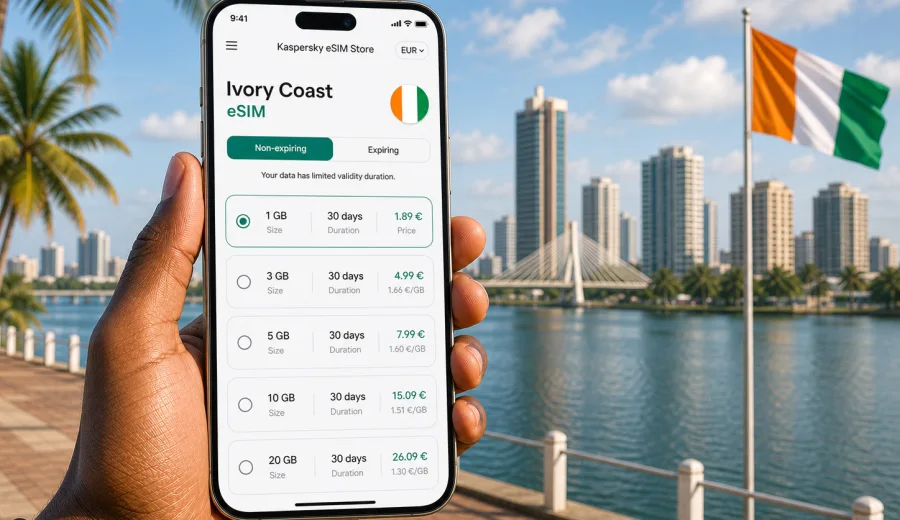
Ivory Coast eSIM: mobile connection and internet for your trip
Ivory Coast is a country where mobile internet can matter from the first hour of the trip. You may need a map after landing in Abidjan, a messenger to reach a hotel driver, a ride-hailing app in the city, or translation when arranging transport outside the airport. An eSIM can make this part of the journey easier because it lets you prepare a mobile data plan without looking for a physical SIM card on arrival.
This guide explains how to plan mobile connection and internet for Ivory Coast with an eSIM, what to check before travel, how much data you may need, and how to avoid common mistakes.
Kaspersky eSIM Store is an app and website where you can choose, arrange, install, and activate an eSIM with a suitable mobile data plan for an international trip. It is not a mobile network operator. The useful part for travelers is that the eSIM setup can be handled before or during the trip, with plan details shown before you proceed.
Why an eSIM is useful in Ivory Coast
For many travelers, Ivory Coast means moving between different types of places: Abidjan for business or arrival logistics, Grand-Bassam or Assinie for the coast, Yamoussoukro for government and cultural landmarks, and inland routes toward Bouake, Korhogo, Man, or national parks. Each scenario creates a different need for mobile data.
An eSIM is especially useful when you want to:
- get online without visiting a mobile shop immediately after arrival;
- keep your primary physical SIM card in your phone for calls or banking messages;
- use mobile data for maps, email, messengers, hotel apps, and transport;
- choose a prepaid data plan with a defined volume and validity period;
- avoid relying only on hotel Wi-Fi or airport Wi-Fi;
- prepare the connection before a work trip, family visit, or multi-city route.
The main limitation is also important: travel eSIM plans are usually focused on mobile data. They normally do not include a local phone number, traditional voice calls, or SMS unless the specific plan says otherwise. For calls and messages, most travelers use internet-based apps.
What to check before you choose a plan
Before you arrange an eSIM for Ivory Coast, start with the device. Not every phone supports eSIM, and some phones are locked to a mobile operator. A quick check before payment saves time and helps avoid a plan that cannot be installed on your device.
Use this short compatibility checklist:
| Check | Why it matters |
|---|---|
| eSIM support | The phone must support digital SIM profiles. |
| Carrier lock status | A locked phone may not accept a travel eSIM. |
| Operating system version | Older software can make eSIM setup less reliable. |
| Available eSIM slots | Some devices limit the number of stored eSIM profiles. |
| Data roaming setting | Some eSIM plans may require roaming data to be enabled. |
If you are unsure, check your device before choosing a plan. This is especially useful for older phones, regional Android models, company-managed devices, or phones purchased through a mobile operator contract.
How much mobile data you may need
The right data volume depends less on the country and more on what you do online. A short business trip with email and maps uses data differently from a holiday with video calls, photo backups, and constant social media uploads.
Here is a practical way to estimate your needs:
| Travel style | Typical use | Suggested approach |
|---|---|---|
| Light use | Maps, messengers, email, ride apps | Choose a smaller plan and use Wi-Fi for updates. |
| Standard travel | Navigation, browsing, social apps, bookings | Pick a mid-size plan for daily flexibility. |
| Work trip | Email, cloud files, calls, hotspot for laptop | Choose more data and monitor usage closely. |
| Family trip | Several people sharing one phone hotspot | Consider a larger plan or separate connections. |
| Content-heavy trip | Video calls, uploads, streaming | Use a bigger allowance and avoid automatic backups on mobile data. |
Maps, text messages, and booking apps are relatively light. Video, cloud synchronization, app updates, and high-resolution uploads can consume data quickly. Before departure, download offline maps, save booking confirmations, and update important apps on Wi-Fi.
Ivory Coast travel situations where mobile internet helps
Mobile internet is useful across the country, but the exact use case changes by location and travel purpose.
| Route or situation | How mobile data helps |
|---|---|
| Arrival in Abidjan | Hotel messages, pickup coordination, maps, traffic checks, and document access. |
| Business meetings | Email, calendars, files, route changes, and quick communication between districts. |
| Grand-Bassam or Assinie | Navigation, accommodation messages, restaurant searches, and sharing location with companions. |
| Yamoussoukro, Bouake, Korhogo, Man | Live updates where service is available, with offline route details kept as backup. |
Do not assume that mobile data will feel the same everywhere. Coverage and speeds can vary by area, building, weather, network load, and device settings, so save essential addresses and route information offline before long transfers.
When to install and activate your eSIM
The best time depends on the plan terms. Some eSIM profiles can be installed before travel and activated later, while others may start counting validity from installation or first network connection. Always read the plan details before you proceed.
A careful setup flow looks like this:
1. Confirm that your phone supports eSIM and is not locked.
2. Choose Ivory Coast as the destination.
3. Select a data amount and validity period that match the trip.
4. Install the eSIM while you have stable Wi-Fi.
5. Keep your primary SIM active if you still need calls or SMS.
6. Turn on the eSIM data line when you are ready to use it.
7. Check whether data roaming needs to be enabled for the eSIM.
For installation details, use the official setup guides: Android eSIM instructions and iOS eSIM instructions. The exact menu names can differ by phone model and operating system version, so follow the steps that match your device.
Choosing an eSIM plan for Ivory Coast
By the time you compare plans, you should already know three things: how long you will stay, how intensively you use data, and whether you need mobile internet mainly in Abidjan or across a wider route. That makes the choice more concrete.
For a short visit, a smaller prepaid data allowance may be enough if you use it for maps, hotel messages, and light browsing. For a week or more, choose a plan that gives you room for everyday use without checking the balance every few hours. If you expect to work from the phone, use video calls, or share a hotspot with a laptop, choose a larger allowance and keep automatic uploads disabled.
You can choose an eSIM plan for Ivory Coast in Kaspersky eSIM Store and compare available options by data volume, duration, destination, and price before arranging the plan. This keeps the decision tied to your actual route instead of a generic idea of mobile data.
Practical data-saving tips for the trip
Even with a comfortable data allowance, a few settings can make the connection more predictable.
- Download offline maps for Abidjan, Grand-Bassam, Yamoussoukro, and inland routes.
- Save hotel addresses and booking confirmations in a notes app or PDF.
- Disable automatic app updates on mobile data.
- Pause cloud photo and video backups until you are on Wi-Fi.
- Reduce video call quality if the connection is unstable.
- Use messaging apps for short updates instead of sending large media files.
- Check your data balance regularly during the first day to understand your usage pattern.
Travel days can be uneven: one day may involve only maps and messages, while the next includes transport coordination, navigation, calls, and file sharing.
eSIM, roaming, Wi-Fi, and local SIM: what is the difference?
There is no single best option for every traveler. The right choice depends on how much control, time, and flexibility you need.
| Option | Strong point | What to consider |
|---|---|---|
| eSIM | Can be prepared without a physical SIM card | Requires a compatible unlocked device. |
| Home roaming | Keeps your usual mobile line simple | Costs and data limits depend on your home operator. |
| Public Wi-Fi | Useful for large downloads | Availability, speed, and privacy conditions vary. |
| Local physical SIM | May suit long stays or local calling needs | Requires time, local process, and a SIM slot. |
For many short trips, an eSIM reduces arrival friction. You can keep your usual SIM in the phone and use the eSIM for mobile data. For longer stays, compare it with local options if you need a local phone number.
A preparation checklist before departure
Use this checklist one or two days before you fly:
- Save passport copies, tickets, hotel details, and travel insurance documents offline.
- Check that your phone supports eSIM and has no operator lock.
- Update your phone operating system and important travel apps on Wi-Fi.
- Choose a data plan that matches the trip length and expected usage.
- Install the eSIM while connected to stable Wi-Fi if the plan terms allow it.
- Save the QR code or installation details where you can access them.
- Decide which SIM line will handle mobile data and which line will handle calls or SMS.
- Disable data-heavy automatic updates.
- Download maps and key route information.
- Make sure a power bank is packed for long travel days.
Navigation, camera use, and messaging can drain a phone faster than expected, especially during long transfers.
Common mistakes to avoid
The most common eSIM problems are usually preventable. They happen when travelers skip a device check, activate too early, or misunderstand what a data-only travel plan includes.
Avoid these mistakes:
1. Buying before confirming eSIM support. Always check compatibility first.
2. Assuming the eSIM includes a local phone number. Most travel eSIM plans are data-focused.
3. Deleting the eSIM profile after activation. Reinstallation may not always be possible.
4. Activating too early without reading validity rules. Some plans start the validity period from activation or first use.
5. Leaving automatic photo backup on. This can use a large part of the data allowance.
6. Using mobile data for app updates. Update apps on Wi-Fi before the trip.
7. Forgetting roaming data settings. Some eSIM plans need data roaming enabled on the eSIM line.
If something does not work after installation, check the basics first: selected mobile data line, roaming setting for the eSIM, airplane mode, signal availability, and whether the eSIM profile is active in device settings.
Suggested plan logic by trip length
This is not a price list or a guarantee of availability. It is a practical way to decide how much mobile data to compare before you arrange a plan.
| Trip length | Expected data behavior | Plan logic |
|---|---|---|
| 1-3 days | Arrival, maps, messengers, ride apps | A smaller plan can work if video use is limited. |
| 4-7 days | Daily navigation, browsing, bookings | A mid-size plan gives more comfort. |
| 8-14 days | City travel plus regional movement | Choose enough data for regular daily use. |
| 15+ days | More routines, uploads, and work use | Consider a larger allowance and monitor usage. |
If you use one phone as a hotspot for other people, data and battery can drop quickly. Hotspot mode is useful for short laptop tasks, but it should not be the default plan for a whole group unless you choose enough data and carry a power bank.
FAQ
Does an eSIM for Ivory Coast give me mobile internet immediately?
Setup can be quick, but installation and activation depend on the device, plan terms, network conditions, and phone settings. Prepare the eSIM on stable Wi-Fi and read the plan details before using it.
Can I make normal phone calls with a travel eSIM?
Usually, travel eSIM plans are designed for mobile data. They do not normally include a local number, voice calls, or SMS unless the plan terms state otherwise. Use internet-based calling and messaging apps over the data connection.
Should I install the eSIM before flying to Ivory Coast?
Often, yes, because you can use stable Wi-Fi and avoid rushing on arrival. Check when the validity period starts, then install and activate according to the plan terms.
Is an eSIM better than public Wi-Fi?
It depends on the task. Wi-Fi is useful for large downloads in hotels or offices. Mobile data is more practical when you are moving, booking transport, using maps, or messaging outside Wi-Fi areas. Many travelers use both.
What happens if I use all my data?
Options depend on the selected plan and account settings. Monitor usage during the trip and reduce data-heavy activities if you are close to the limit.
Final preparation for mobile internet in Ivory Coast
An eSIM is most useful when it is part of a simple travel routine: check device compatibility, choose the right data volume, install on stable Wi-Fi, confirm the active data line, and keep offline backups for essential information. This gives you more control over mobile connection and internet in Ivory Coast without depending only on roaming, airport counters, or public Wi-Fi.
Before you leave, review your route, estimate your data needs, and choose an eSIM plan for your Ivory Coast trip in Kaspersky eSIM Store. Pick the option that matches your stay, install it on a compatible device, and keep the setup details available until the trip is complete.