
Travel connectivity guide
Izmir eSIM for mobile internet in Turkey
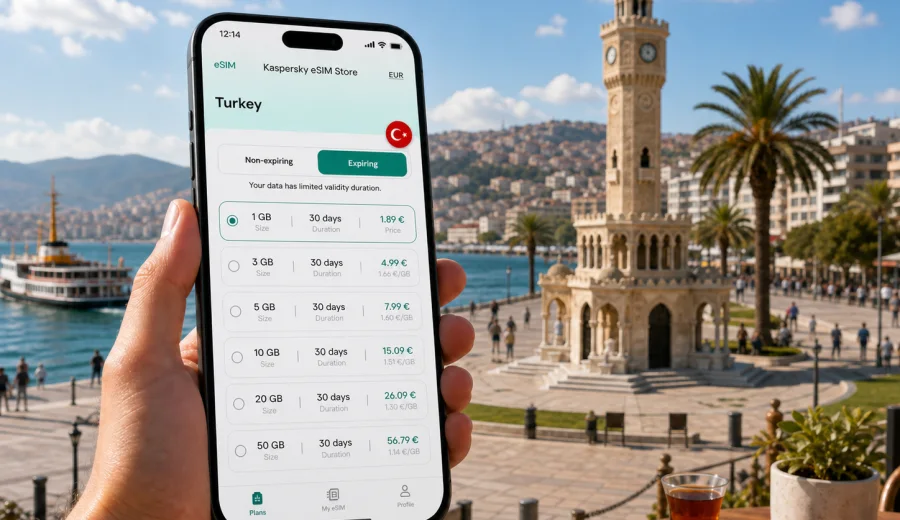
Izmir eSIM: mobile connection and internet for your trip
Izmir is a city where mobile internet quickly becomes part of the travel plan. You may need it at the airport, while finding your hotel in Alsancak, when checking ferry times in Karsiyaka, or during a day trip to Ephesus, Cesme, Alacati, Pergamon, or Sirince. A working mobile connection is useful from the first minutes after arrival, because Izmir is spread along the bay and many everyday routes combine taxis, metro, trams, ferries, buses, and walking.
An eSIM can make that first day easier. Instead of looking for a physical SIM card after landing or relying only on hotel Wi-Fi, you can prepare a digital SIM profile before the trip and activate mobile data on a compatible phone when the timing is right. For many visitors, this is the simplest way to keep maps, ride-hailing apps, messengers, email, translation tools, and booking confirmations available while moving through the city.
This guide explains how to plan mobile internet for Izmir with eSIM in mind: where connection matters most, how much data you may need, what to check before buying a plan, and how Kaspersky eSIM Store can help you choose and activate a suitable eSIM tariff for a trip to Turkey.
Why mobile internet matters in Izmir
Izmir is relaxed compared with Istanbul, but it is not a compact old town where you can walk everywhere. The city stretches along the Aegean coast, and popular areas are separated by water, hills, boulevards, and commuter routes. Mobile data helps you move between these places without stopping to search for Wi-Fi.
Common situations where internet access helps in Izmir:
- finding the best route from Izmir Adnan Menderes Airport to Konak, Alsancak, Bornova, Balcova, or Karsiyaka;
- checking public transport options such as IZBAN, metro, tram, ferry, and bus routes;
- navigating the Kordon waterfront, Kemeralti Bazaar, Konak Square, Kadifekale, and seaside districts;
- confirming hotel check-in details, apartment entry codes, or meeting points;
- using translation, maps, restaurant reservations, and mobile payments where supported;
- arranging business meetings, video calls, or file access during a work trip;
- planning day trips from Izmir to Ephesus, Cesme, Alacati, Urla, Pergamon, or Pamukkale.
Public Wi-Fi can be useful in hotels, cafes, airports, and some public areas, but it is not a reliable base for the whole trip. You may need internet while standing outside a terminal, sitting in a taxi, walking through a market, or waiting for a ferry. A travel eSIM gives you a separate mobile data option that stays with your phone as you move.
Arrival in Izmir: where eSIM is useful first
Most international visitors arrive through Izmir Adnan Menderes Airport, about 15-20 kilometers south of the central districts depending on where you stay. The first hour is often when mobile connection matters most. You may need to message your host, check transfer instructions, compare taxi and rail options, or open a map before leaving the arrivals area.
If you already have an eSIM installed, your arrival routine can be simple:
1. Land in Izmir and turn off airplane mode.
2. Make sure mobile data is assigned to the travel eSIM.
3. Enable data roaming for that eSIM if the plan instructions require it.
4. Wait a few minutes for the phone to register on a local mobile network.
5. Open maps, messenger, email, or your transport app and continue to the city.
This is especially helpful if your hotel is outside the most central tourist area. Business travelers may stay near Bayrakli, Bornova, or Gaziemir. Families may choose the waterfront or Balcova. Visitors heading straight to Cesme or Alacati may not stop in central Izmir at all. In each case, having mobile data ready reduces friction after the flight.
Izmir routes where mobile connection helps
Izmir is easy to enjoy, but its transport network has several layers. A single day might include a metro ride, a tram along the coast, a ferry across the bay, a taxi in the evening, and walking navigation through older streets. Mobile internet helps you compare those choices in real time.
| Travel situation in Izmir | Why mobile internet helps |
|---|---|
| Airport to the city | Check train, taxi, transfer, and hotel directions after landing. |
| Konak and Kemeralti | Use walking navigation through markets, side streets, and historic areas. |
| Alsancak and Kordon | Find restaurants, ferry piers, hotels, and evening transport options. |
| Karsiyaka and Bostanli | Check ferry schedules and route options across the bay. |
| Bornova or Bayrakli | Navigate business districts, malls, universities, and meetings. |
| Cesme, Alacati, Urla | Keep maps and messages available on day trips outside the city center. |
| Ephesus or Selcuk | Coordinate trains, buses, guides, tickets, and return routes. |
If you are visiting for a short weekend, the need is simple: maps, messages, bookings, and ride coordination. If you are staying longer, mobile data becomes part of daily life: checking beach weather, finding local transport, uploading photos, using banking apps, or working remotely from cafes and hotels.
Choosing data for Izmir: practical scenarios
The right eSIM tariff depends less on the city itself and more on your behavior. Izmir has many moments where you may use small amounts of data frequently: checking maps, messaging, searching opening hours, translating menus, or confirming bookings. Video streaming, cloud backups, and long video calls are what usually increase consumption.
Use these scenarios as a planning guide:
| Trip style | Typical data use | What to consider |
|---|---|---|
| Stopover or 1-2 days | Low | Maps, messages, taxi apps, hotel details, light browsing. |
| Weekend in Izmir | Low to medium | Navigation, restaurant searches, photos, social apps, ferry checks. |
| 5-7 day city break | Medium | Daily maps, day trips, messaging, browsing, occasional uploads. |
| Business trip | Medium to high | Email, documents, calendar, messaging, hotspot use if allowed. |
| Remote work stay | High | Video calls, file sync, hotspot, cloud tools, backup connection. |
| Family trip | Variable | Several devices may need data; one phone may handle navigation and bookings. |
Before selecting a plan, check the data allowance, validity period, destination coverage, price, and activation rules. A plan with more data is useful only if the validity period matches your schedule. A longer validity period is useful only if the data allowance fits your actual use. For Izmir, many travelers do well by matching the plan to the number of active travel days rather than the total calendar length of the trip.
eSIM, roaming, local SIM, and Wi-Fi in Izmir
There is no single best option for every traveler. The practical choice depends on how much control you want before arrival, whether your phone supports eSIM, and whether you need mobile internet only or also a local phone number.
| Option | Strengths | Limits |
|---|---|---|
| Travel eSIM | Can be prepared before the trip, no physical SIM swap, useful on arrival. | Requires a compatible unlocked device; usually focused on mobile data. |
| Standard roaming | Uses your existing mobile plan and number. | Prices and included data depend on your home operator. |
| Local physical SIM | May include local voice options depending on the offer. | Requires in-person purchase and SIM swap; conditions vary. |
| Public or hotel Wi-Fi | Useful for large downloads and hotel work sessions. | Not available everywhere; less convenient while moving. |
For a city like Izmir, eSIM is often a strong fit because the main need is data for navigation, communication apps, and travel services. It is not a full replacement for a local mobile subscription. eSIM tariffs for travel usually do not include a regular phone number, voice calls, or SMS unless the selected tariff explicitly says so. For calls and messages, many travelers use internet-based apps over mobile data.
Check your phone before the trip
Do this before you choose any travel eSIM plan. Your device must support eSIM, and it should not be locked to one mobile operator. Support can vary by model, region, and purchase channel, so do not rely only on the phone name. A model sold in one country may differ from a model with a similar name sold elsewhere.
Pre-trip checklist:
- confirm that your phone or tablet supports eSIM;
- check that it is not locked to your home mobile operator;
- update the operating system if you have postponed important updates;
- make sure you can access email or the app where eSIM instructions will arrive;
- keep your main SIM active if you need banking SMS or calls from your usual number;
- download offline maps for the city as a backup;
- check your device before paying for a plan.
It is also useful to decide which line will handle mobile data. Many phones can keep your primary SIM for calls and messages while using the eSIM for data. Review the labels in your phone settings so you do not accidentally use roaming data on the wrong line.
Preparing an eSIM for Izmir with Kaspersky eSIM Store
Kaspersky eSIM Store is an app and website where you can choose, set up, and activate an eSIM with a suitable data tariff for mobile internet during an international trip. For Izmir, the relevant destination is Turkey, because the city belongs to Turkey and the eSIM plan is selected for the country rather than for a separate city page.
When your travel dates are clear, you can review available options and choose an eSIM tariff for a trip to Izmir before you leave. Compare the included data, validity period, price, and activation details. If your trip includes Izmir plus other Turkish destinations, choose a plan that fits the full route rather than only the first hotel night.
A simple decision flow:
1. Choose Turkey as the destination.
2. Compare data allowance and validity period.
3. Check whether your device supports eSIM and is unlocked.
4. Complete the order through the site or app.
5. Install the eSIM profile using the provided instructions.
6. Activate mobile data when you are ready to use the plan.
Avoid leaving installation until the last possible moment if you are traveling for work, arriving late, or moving directly from the airport to another town. It is better to have the eSIM profile ready and only activate data when your plan conditions make sense.
How to install and activate an eSIM
The exact steps depend on your phone. In general, you receive an eSIM profile or QR code, add it in the mobile network settings, label it clearly, and then choose when it should handle mobile data. Some plans start validity after installation, while others start after first connection to a supported mobile network. Always read the instructions for the selected tariff.
Basic setup steps:
1. Connect to a stable Wi-Fi network before installation.
2. Add the eSIM profile on your phone.
3. Name it clearly, for example "Turkey data" or "Izmir trip".
4. Keep your primary SIM for calls if needed.
5. Assign mobile data to the travel eSIM.
6. Enable data roaming for the eSIM if the instructions require it.
7. Test the connection after arrival or when activation is intended.
For detailed setup, use the official Android installation guide or iOS installation guide. If you travel with more than one device, install the eSIM only on the device you plan to use. In many cases, an activated eSIM profile cannot simply be moved to another phone.
Data-saving tips for Izmir
Izmir is a good city for long walks and day trips, which means your phone may spend many hours on mobile data. A few settings can help a modest data package last longer.
Useful habits:
- download offline map areas for Izmir, Cesme, Alacati, Selcuk, and Ephesus before departure;
- disable automatic cloud photo backups on mobile data;
- set video apps to Wi-Fi only;
- download playlists, podcasts, and documents before the flight;
- use hotel Wi-Fi for operating system updates and large app updates;
- close navigation when you no longer need turn-by-turn guidance;
- monitor data use in your phone settings during the first day.
For a typical city break, maps and messaging usually use less data than travelers expect. Heavy use comes from video, cloud sync, and laptop tethering. If hotspot use matters, check whether the selected tariff allows it.
District-by-district connection planning
Izmir travel is easier when you think in zones. You do not need a different eSIM for each district, but your data needs can change by activity.
Konak, Kemeralti, and the Clock Tower
This is one of the main sightseeing areas. Mobile internet helps with walking navigation, restaurant searches, translation, and meeting friends in busy streets.
Alsancak and Kordon
Alsancak is practical for hotels, cafes, restaurants, nightlife, and waterfront walks. You may use data for reservations, taxi apps, ride coordination, and evening routes back to your hotel.
Karsiyaka and Bostanli
The northern side of the bay is popular for local life, cafes, markets, and sunsets. Mobile internet helps you check ferry schedules, pier locations, and return options.
Bornova, Bayrakli, and business areas
These districts matter for universities, offices, malls, and meetings. Business travelers should choose a data allowance that covers email, calendar, messaging, and possible hotspot sessions.
Cesme, Alacati, Urla, and Ephesus
Many Izmir trips include time outside the city. Mobile data helps with intercity routes, beach plans, restaurant bookings, meeting points, parking searches, and route changes.
Short trips and stopovers
If you have only a short stop in Izmir, you may not need a large data package. The priority is dependable access for transport, maps, messaging, and booking confirmations. Install the eSIM before travel if the plan rules allow it, then activate it when you need mobile data.
For a stopover, prepare:
- hotel address in offline notes;
- offline map around the airport and your destination;
- eSIM installation instructions saved on the phone;
- passport, booking, and transfer details available offline;
- a small power bank if you will navigate for several hours.
This approach gives you a backup even if the airport is crowded, Wi-Fi is slow, or your transfer plan changes after landing.
Business travel in Izmir
Izmir is a major commercial city with industrial zones, ports, universities, fairs, and regional offices. Business travelers often need a more predictable data setup than leisure visitors. The goal is continuity for email, documents, calendar changes, messaging, and sometimes laptop connection.
For business trips, consider:
- a data allowance that covers work apps, not only navigation;
- validity that covers arrival day and departure day;
- whether hotspot use is allowed by the tariff;
- keeping your usual SIM active for bank confirmations or calls;
- installing the eSIM before the flight, if permitted by the plan;
- testing key apps on Wi-Fi before leaving home.
If you attend meetings in different districts, mobile internet also helps with live route changes across the bay.
FAQ: eSIM and mobile internet in Izmir
Is eSIM useful for a trip to Izmir?
Yes, if your phone supports eSIM and you mainly need mobile data. It is useful for airport arrival, maps, transport, messaging, day trips, hotel coordination, and business tasks.
Do I need a separate Izmir eSIM?
Usually no. For a city article like this, the relevant destination is Turkey. Choose a Turkey plan that fits your route, including Izmir and any trips to other Turkish destinations.
Can I use eSIM for calls and SMS?
Travel eSIM tariffs are usually focused on mobile internet. They may not include a regular phone number, voice calls, or SMS unless the selected tariff says so. You can use internet-based calling and messaging apps over mobile data.
Should I install the eSIM before flying?
Often, yes, as long as you follow the activation rules of the selected plan. Installing in advance can reduce stress after landing, but some plans may start validity at installation or first network connection, so read the instructions first.
How much data do I need for Izmir?
For a short city break, light users may need only a modest allowance for maps and messaging. Business use, hotspot, video calls, cloud backup, and frequent video upload require more data.
Final checklist before you go
Before leaving for Izmir, make the mobile part of the trip as ready as your flights and hotel:
- confirm that your device supports eSIM;
- choose a Turkey data plan that fits the trip length and route;
- install the eSIM while you have stable Wi-Fi if the plan rules allow it;
- save the Android or iOS setup guide for offline reference;
- keep your main SIM available if you need regular calls or SMS;
- download offline maps for Izmir and planned day trips;
- check data usage during the first day and adjust app settings if needed.
Izmir rewards flexible travel: a ferry ride across the bay, a late walk on Kordon, a spontaneous meal in Alsancak, or a day outside the city can all become easier when your phone stays online. To prepare before arrival, open Kaspersky eSIM Store and select a mobile internet plan for Turkey that matches your Izmir itinerary, device, and data needs.