
Travel connectivity guide
Jaco eSIM: Mobile Internet for Costa Rica
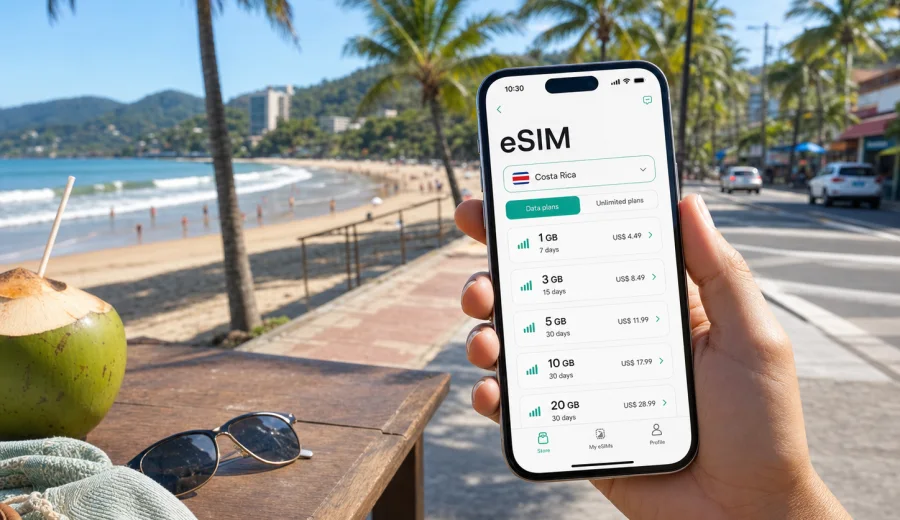
Jaco eSIM: mobile connection and internet for your Costa Rica trip
Jaco is a practical base for Costa Rica's Central Pacific coast: close enough to San Jose for a short transfer, busy enough for hotels and restaurants, and easy to combine with Playa Hermosa, Tarcoles, Carara National Park, Manuel Antonio, and other coastal stops. For this kind of trip, mobile internet is not a small detail. You may need maps before your hotel room is ready, messaging for a shuttle driver, ride booking after dinner, surf lesson updates, online banking, weather checks, and translation when a sign or menu is not clear.
An eSIM can make that first day smoother because you do not need to look for a physical SIM card as soon as you arrive. With a compatible device, you can prepare a digital SIM profile before the flight, keep your usual SIM in the phone, and use mobile data from the eSIM tariff during the trip. This guide focuses on Jaco city scenarios: arrival from the airport, movement around town, beach days, hotels, remote work, short stays, and day trips along the coast.
Why mobile internet matters in Jaco
Jaco is compact, but the travel pattern around it is spread out. You may stay near the beach, take a taxi to Playa Hermosa, join a tour that starts before sunrise, stop at viewpoints on the highway, or move between apartments, hostels, villas, and surf schools. Public Wi-Fi is useful when it is available, but it is not always where you need it: on the road from San Jose, at a bus stop, near the beach, or while coordinating a pickup.
Mobile data is especially useful in Jaco for:
- opening offline and live maps while moving between the beach, the main street, and hotel areas;
- confirming shuttle times from Juan Santamaria International Airport or San Jose;
- checking tide, surf, and weather updates before a lesson or board rental;
- messaging hotels, tour guides, restaurants, and drivers;
- using banking apps, booking platforms, and travel documents without relying on cafe Wi-Fi;
- sharing location with friends or colleagues during a group trip;
- handling work messages if Jaco is part of a remote-work stay.
The best setup is usually simple: install the eSIM before departure while you have stable Wi-Fi, check that the device supports eSIM, and activate mobile data when you are ready to use the tariff. Conditions vary by selected tariff and local network, so you should review the data allowance, validity period, destination, and activation rules before checkout.
Arrival: getting online before you reach the beach
Most international travelers heading to Jaco arrive through the San Jose area, then continue by private transfer, shuttle, rental car, bus, or taxi. The road trip can take time depending on traffic and stops, and this is exactly when mobile internet becomes useful. You may need to send your driver a message, open the hotel address, track the route, or warn your accommodation about a late arrival.
If you rely only on airport Wi-Fi, you may lose connection as soon as you leave the terminal. If you plan to buy a physical SIM card after arrival, you need time to find a sales point, choose an option, and handle setup. An eSIM gives you another route: prepare the mobile data profile in advance and use it when the trip begins.
For the first hours, keep these tasks in mind:
| Moment | Why internet helps | Practical tip |
|---|---|---|
| At the airport | Find your shuttle, open booking details, message the hotel | Save important confirmations offline as a backup |
| On the road to Jaco | Track the route, check traffic, coordinate arrival | Keep a power bank nearby if you use maps for a long ride |
| First walk in town | Navigate between the beach, supermarket, ATM, and hotel | Download an offline map, then use mobile data for live updates |
| First evening | Book restaurants, taxis, or tours | Avoid sending sensitive details over public Wi-Fi if mobile data is available |
Jaco is not a city where you need a complicated connectivity plan. You need dependable access at the moments when travel decisions happen: the transfer, check-in, the first grocery run, the first beach plan, and the first trip outside town.
How to choose an eSIM tariff for Jaco
For a Jaco trip, choose the tariff by country, route, length of stay, and how much data you usually consume. Since Jaco is in Costa Rica, a country tariff for Costa Rica is the natural starting point. If your itinerary includes other countries in Central America or a longer regional route, compare the destination coverage in the tariff details before checkout.
Data needs differ by travel style:
- Light use: maps, messaging, occasional browsing, restaurant searches, and boarding passes.
- Medium use: social media, photo uploads, frequent maps, ride apps, and tour coordination.
- Heavy use: video calls, hotspot use for a laptop, cloud backups, streaming, and remote work.
Do not choose only by the number of gigabytes. Check the validity period too. A short surf weekend may need less data but tight timing. A two-week coastal stay may need a longer validity period even if your daily use is moderate. If you plan to work from Jaco, leave a buffer for video calls and file transfers, and confirm whether tethering is allowed by the selected tariff.
Before you choose, open the tariff details and review:
- destination coverage for Costa Rica;
- included data volume;
- validity period;
- activation timing and when the validity period starts;
- whether top-ups are available;
- whether roaming data must be enabled for the eSIM profile;
- support options if installation or activation needs attention.
If you want to prepare before departure, you can choose an eSIM tariff for your Costa Rica trip through Kaspersky eSIM Store. The site and app help you select the destination and a suitable data package, then install and activate the eSIM on a compatible device.
Jaco movement: beach, main street, hotels, and side trips
Inside Jaco, many daily routes are short, but mobile internet still saves time. The main beach area, restaurants, supermarkets, surf schools, apartment rentals, and nightlife spots can be close together, yet addresses may be described by landmarks rather than a neat street number. A live map and messaging app make it easier to meet a driver, find a rental entrance, or share the right pin with friends.
Common Jaco scenarios include:
- walking from a beachfront hotel to a restaurant after sunset;
- taking a taxi or shuttle to Playa Hermosa for surfing;
- checking whether a tour pickup starts from the lobby, a nearby agency, or a roadside meeting point;
- moving between a rented apartment and co-working-friendly cafes;
- coordinating a day trip to Tarcoles or Carara National Park;
- keeping in touch with family while spending the day on the beach.
For navigation, it is smart to combine offline preparation with live mobile data. Save your hotel, the beach access point, shuttle meeting location, and return route in your map app. Then use mobile data for the parts that change: traffic, driver messages, opening hours, weather, and route corrections.
eSIM for hotels, villas, and remote work in Jaco
Jaco has hotels, apartments, villas, hostels, and longer-stay rentals. Many offer Wi-Fi, but quality can vary by room, building, weather, and how many guests are online. If you are traveling for work or need to stay reachable, mobile data gives you an extra option when the hotel connection is slow or unavailable.
An eSIM does not replace a professional fixed connection, and conditions depend on the selected tariff and local network. Still, it can help with practical travel tasks: joining a short call, sending a document, checking a reservation, opening a banking app, or using a messaging app when the Wi-Fi password is not available yet.
For remote work in Jaco, prepare like this:
1. Check your expected call schedule and file-transfer needs.
2. Choose a data package that leaves room for unexpected use.
3. Install the eSIM before the trip while you have reliable Wi-Fi.
4. Test that the eSIM profile is visible on your device before departure.
5. Keep important work files available offline where possible.
6. Use mobile hotspot only if the selected tariff and your device settings allow it.
If you plan long video calls, avoid assuming that any travel data package will be enough. Video can use data quickly, especially if several calls happen in one day. A better approach is to use hotel or apartment Wi-Fi for heavy sessions and keep eSIM mobile data for backup, movement, and essential tasks outside the room.
Device compatibility and installation
Before choosing a tariff, confirm that your phone or tablet supports eSIM and is not locked to one operator. Compatibility can depend on the model, region of purchase, and device settings. A device that looks similar to another model may not have the same eSIM support, so it is worth checking before checkout. You can check your device before you plan the setup.
The installation flow is usually straightforward: choose the destination, complete the order, open the eSIM details, and add the profile to your device. You may use a QR code or on-screen instructions, depending on the device and selected method. Keep a stable internet connection during installation, because the phone needs to download the eSIM profile before it can use mobile data through it.
If your article or trip plan includes installation steps, use the official setup guides for your device type: follow the Android installation guide or the iOS installation guide. The exact screens can differ by model and operating-system version, but the key checks are the same: the eSIM profile is installed, mobile data is assigned to the right line, and data roaming is enabled for the eSIM if the tariff instructions require it.
Useful setup checklist:
- Install the eSIM before departure if possible.
- Do not delete the eSIM profile after activation unless support instructions tell you to do so.
- Keep your primary SIM available for calls or SMS if you need your usual number.
- Remember that many travel eSIM tariffs focus on mobile data and may not include a regular phone number, voice calls, or SMS.
- Save the QR code or setup details in a place you can access if you need to review them.
- Check the tariff's validity start rules before activating it too early.
Data planning for common Jaco trips
A good data estimate depends on what you do in Jaco. A traveler who spends most of the day surfing and uses messaging at night will need far less data than someone working from a rental apartment and using hotspot for a laptop. The table below gives a practical way to think about usage without pretending that one number fits every visitor.
| Trip type | Typical online tasks | Planning note |
|---|---|---|
| Weekend in Jaco | Maps, messaging, restaurant searches, shuttle updates | A smaller package may work if you avoid streaming and large uploads |
| Surf-focused stay | Surf reports, weather, photos, chat with schools and friends | Keep data for transport and safety, not only social posting |
| Family vacation | Maps, bookings, group messaging, kids' entertainment | Streaming and cloud backups can increase usage quickly |
| Remote-work stay | Email, video calls, hotspot, file sharing | Choose more data and keep Wi-Fi as the primary connection for heavy work |
| Coastal route | Jaco plus Tarcoles, Playa Hermosa, Manuel Antonio, or San Jose | Confirm the tariff covers the full country route, not only one city |
Use Wi-Fi when it is trusted and convenient, especially for large uploads and long video calls. Use mobile data for the parts of the trip that happen away from a stable connection: route changes, driver messages, translation, banking, and urgent work checks.
Short stopovers and flexible travel days
Jaco is often part of a wider Costa Rica route rather than the only destination. Travelers may arrive from San Jose, stay for a few nights, then continue to Manuel Antonio, Monteverde, La Fortuna, or back to the airport. This style of trip creates many small moments when mobile data matters: confirming a bus, finding a rental-car office, checking road timing, or messaging an accommodation before arrival.
If Jaco is a short stop, focus on fast setup and predictable validity. You do not want to spend the first evening solving connectivity. Install the eSIM profile before you travel, save your route details offline, and activate mobile data when the trip begins. If your tariff validity starts at installation, plan the timing carefully; if it starts when the eSIM connects to a supported network, check the tariff details so you understand when the clock begins.
For a flexible travel day, keep this mini-checklist:
- hotel and next-stop addresses saved offline;
- shuttle, rental-car, or bus details saved as screenshots;
- eSIM installed and visible in device settings;
- power bank charged;
- mobile data assigned to the eSIM line when needed;
- passport, payment cards, and travel insurance details stored securely and offline.
The goal is not to be online every second. The goal is to have internet available when plans change.
FAQ: eSIM and mobile internet in Jaco
Is an eSIM useful if my hotel in Jaco has Wi-Fi?
Yes, it can still be useful. Hotel Wi-Fi helps in the room, but mobile data helps on the road, at the beach, during transfers, and when you need maps, messaging, or bookings away from the property.
Do travel eSIM tariffs include calls and SMS?
Many travel eSIM tariffs are focused on mobile data. A regular phone number, voice calls, and SMS are not always included unless the selected tariff says so. For calls and messages, many travelers use internet-based apps.
Can I install the eSIM after arriving in Costa Rica?
You can often install it after arrival if you have stable internet access, such as airport or hotel Wi-Fi. For a smoother first day, installing before departure is usually more convenient, as long as you understand the tariff's validity and activation rules.
Should I keep my physical SIM in the phone?
In many cases, yes. Keeping your usual SIM can help you receive calls or SMS on your main number if your home operator and device settings allow it. Use the eSIM for mobile data and check roaming settings to avoid unwanted charges on your primary line.
What if the eSIM does not connect immediately?
Check that the eSIM profile is installed, mobile data is assigned to the eSIM line, and data roaming is enabled for the eSIM if required by the instructions. Restarting the phone can also help. If the issue continues, contact support with your device model, destination, and tariff details.
Final checklist before your Jaco trip
Before you leave for Jaco, prepare mobile internet the same way you prepare accommodation and transport. Confirm that your device supports eSIM, choose a tariff with the right destination and validity period, install the eSIM profile on stable Wi-Fi, and keep key travel details offline as a backup.
For most Jaco visitors, the practical value is simple: mobile data helps during the airport transfer, hotel check-in, beach days, restaurant searches, surf plans, day trips, and remote-work moments. It also reduces dependence on public Wi-Fi when you are moving around town.
If you want to set up mobile internet before the trip, prepare an eSIM tariff for Costa Rica in Kaspersky eSIM Store, then follow the installation instructions for your device and activate the eSIM when you are ready to use it in Costa Rica.