
Travel connectivity guide
Jaipur eSIM Guide for Mobile Internet
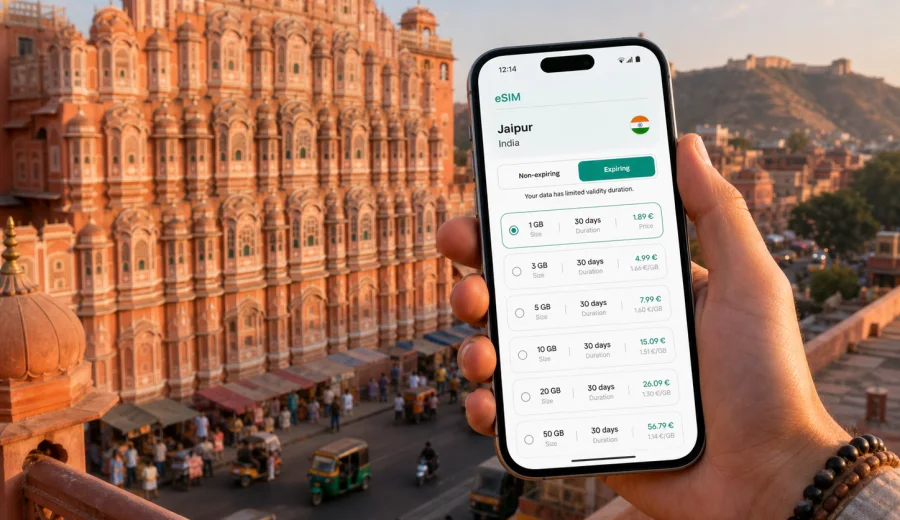
Jaipur eSIM guide: mobile connection and internet for your trip
Jaipur is a city where mobile internet quickly becomes part of the trip itself. You may need maps before leaving the airport, a ride-hailing app for the transfer, hotel messages in Bani Park or C-Scheme, digital tickets near the City Palace, or a video call after a long day around Amber Fort. A Jaipur eSIM can help you prepare mobile data before you start looking for a shop, a SIM counter, or reliable Wi-Fi.
This guide focuses on practical connectivity in Jaipur, not on a broad India travel overview. It explains when eSIM is useful in the city, how much data different travel styles may need, what to check before buying a tariff, and how to use mobile internet calmly across arrivals, sightseeing, business days, stopovers, and short trips from Jaipur.
Why mobile internet matters in Jaipur
Jaipur is easy to explore, but it is not a city where you want to depend only on hotel Wi-Fi. Distances between the airport, old city gates, forts, railway station, business hotels, and resort areas can be longer than they look on a map. Traffic changes during market hours, festivals, wedding seasons, and public events, so live navigation is useful even when the route seems simple.
Mobile data is especially helpful for:
- checking your airport transfer or ride-hailing pickup point;
- sharing your location with a driver or hotel contact;
- navigating lanes around Johari Bazaar, Bapu Bazaar, and Tripolia Bazaar;
- confirming opening times and booking details for palaces, forts, and restaurants;
- translating short messages, menu items, and directions;
- using messenger calls when your regular SIM is not convenient for voice;
- staying in touch during day trips to Amber, Nahargarh, Jaigarh, or nearby towns.
An eSIM is not a magic travel tool and it does not replace common sense. It is a practical way to prepare mobile internet on a compatible phone without handling a physical SIM card after arrival. For many travelers, that single difference matters most in the first hour of the trip.
Arrival scenarios: airport, railway station, and first transfer
Many visitors arrive through Jaipur International Airport. The airport is south of the city, so your first useful online task may be checking the route to a hotel in the old city, Civil Lines, MI Road, Malviya Nagar, Tonk Road, or a resort outside the center. If your phone already has an eSIM profile installed, you can switch on the data line after landing and check the transfer details before leaving the terminal.
If you arrive by train, mobile data is just as useful. Jaipur Junction is busy, and meeting points can become confusing when several passengers are looking for cars at the same time. Having a working data connection lets you send a precise location pin, check platform updates, or compare the estimated travel time to your hotel.
For an overnight arrival or a short business stop, the benefit is even clearer: you do not need to spend the first part of the trip searching for public Wi-Fi or deciding whether to buy a local SIM for only one or two days. You can focus on getting to the hotel, confirming the next morning's schedule, and saving offline backups once you are settled.
Where eSIM helps most inside Jaipur
Jaipur has several different travel patterns. A visitor who stays in a heritage hotel near the old city uses mobile data differently from a business traveler moving between Tonk Road, Sitapura, and conference venues. A family visiting forts may need more mapping and photo backups, while a solo traveler may rely heavily on messaging and ride apps.
| Jaipur situation | Why mobile data helps | Practical tip |
|---|---|---|
| Old city sightseeing | Narrow streets and changing traffic can make walking routes confusing | Save the hotel location and use live maps for final turns |
| Amber Fort and nearby sights | The route can include hills, parking areas, and changing pickup points | Share a location pin with your driver before you separate |
| Business meetings | Delays and venue changes often happen through messaging apps | Keep the eSIM data line active for calendar and messenger updates |
| Market visits | You may want translation, payments, maps, and photo sharing | Avoid large uploads until you are back on stable Wi-Fi |
| Resort stay outside the center | The property may be far from quick SIM shops or cafes | Prepare mobile data before leaving the airport or station |
The city is highly photogenic, but photo and video uploads can drain a small data package quickly. If you expect to post stories, back up images, or use video calls often, choose a larger data allowance rather than relying on the smallest package.
Choosing an eSIM tariff for Jaipur
For a Jaipur trip, the relevant destination is India. A city article does not require a separate Jaipur-only tariff; you need a tariff that covers the country where the city is located. Check the destination, data allowance, validity period, and whether the tariff matches the way you will actually travel.
Think through these questions before choosing:
1. How many days will you be in Jaipur?
2. Will you stay only in Jaipur or continue to Delhi, Agra, Udaipur, Jodhpur, Pushkar, or another city?
3. Will you use mobile data mostly for maps and messages, or also for video calls and uploads?
4. Do you have reliable hotel Wi-Fi for heavy downloads?
5. Do you need the eSIM active from arrival, or only after you leave the hotel?
For a short Jaipur stopover, a modest data package may be enough if you mainly use maps, ride apps, and messaging. For a week of sightseeing, remote work, and frequent photo sharing, a larger package is usually more comfortable. For a longer India route, choose based on the whole itinerary, not only the Jaipur segment.
A simple data-use guide for Jaipur
Exact data use depends on your apps and settings, so treat this as a planning framework rather than a guarantee.
| Traveler profile | Common mobile internet use | Suggested planning approach |
|---|---|---|
| Light user | Maps, text messages, hotel confirmations, occasional browsing | Choose a smaller package and keep auto-updates off |
| Standard tourist | Maps, ride apps, restaurant search, social media, messenger calls | Pick a medium package with enough validity for the full stay |
| Heavy uploader | Reels, cloud photo backup, frequent video calls, streaming | Choose more data and use Wi-Fi for large uploads when possible |
| Business traveler | Email, calendar, documents, hotspot for laptop in emergencies | Choose extra data and check whether hotspot use is allowed by the tariff |
Jaipur days can be long: airport transfer in the morning, market navigation at noon, a fort visit in the afternoon, and restaurant directions at night. Even if each task uses little data, the total adds up. A little reserve is useful, especially if you are sharing location, using translation, or switching hotels.
When to set up eSIM for a Jaipur trip
The most comfortable option is to prepare the eSIM before departure while you still have stable home internet. You can choose the destination, complete the purchase flow, and keep the installation details ready. Activation behavior depends on the selected tariff, so read the conditions carefully before you switch the line on.
Before buying, check your device to make sure it supports eSIM and is not locked to one mobile operator. This matters more than the destination: a compatible and unlocked phone is the basic requirement for using any travel eSIM.
After that, Kaspersky eSIM Store can help you choose, arrange, and activate an eSIM with a suitable data tariff for travel. If Jaipur is your main destination, you can prepare an eSIM tariff for your trip to India and use it for mobile internet while moving around the city and continuing your route elsewhere in the country.
Installing and activating your eSIM
Installation usually means adding the eSIM profile to your compatible phone, then selecting when it should be used for mobile data. The exact screens differ by device. If you want step-by-step setup help, use the Android installation instructions or the iOS installation instructions.
A careful setup sequence looks like this:
1. Check that your phone supports eSIM and is not carrier-locked.
2. Buy the tariff for the correct destination and review the validity period.
3. Install the eSIM profile while you have stable internet.
4. Keep your regular SIM active if you need calls, bank messages, or your usual number.
5. On arrival in Jaipur, select the eSIM line for mobile data.
6. Enable data roaming for the eSIM if the phone or tariff instructions require it.
7. Test maps and messaging before leaving the airport, station, or hotel.
Do not delete the eSIM profile unless you are sure you no longer need it. Some eSIM profiles cannot simply be reinstalled on another device after activation, and conditions can vary by tariff.
What to check before you rely on eSIM in Jaipur
Good preparation reduces friction. Before you travel, check the details that affect real use:
- destination coverage shown in the tariff conditions;
- data allowance and validity period;
- when the validity period starts;
- whether calls and SMS are included or whether the tariff is data-only;
- whether hotspot or tethering is allowed;
- device compatibility and carrier lock status;
- whether your primary SIM should stay active for bank codes or calls;
- refund and support conditions.
Most travel eSIM tariffs are designed for mobile data. If you need voice calls, check whether your chosen tariff includes them. If it does not, you can usually use internet-based calling and messaging apps over mobile data, subject to the apps and local conditions.
Transport, districts, and day trips
For many travelers, transport is where mobile internet pays off first. Jaipur has taxis, app-based rides, auto-rickshaws, local buses, a limited metro route, and private drivers for fort visits. Use data to compare routes, send your live location, confirm pickup points, and decide whether walking is realistic in heat or evening traffic.
Your hotel area also changes the connectivity pattern:
| Area or stay type | Typical travel pattern | eSIM planning note |
|---|---|---|
| Old city and heritage stays | Markets, palaces, short rides | Prioritize maps, messages, and location sharing |
| MI Road and C-Scheme | Restaurants, shopping, meetings | Keep data ready for rides and schedule changes |
| Bani Park and station area | Train arrivals and onward travel | Save station and hotel pins before arrival |
| Airport side and Malviya Nagar | Early flights, malls, business visits | Activate data before transfers |
| Resorts outside the center | Longer car rides | Choose enough validity and keep offline backups |
If you visit Amber Fort, Jaigarh Fort, Nahargarh Fort, Pushkar, Ajmer, or continue toward Delhi, Agra, Jodhpur, or Udaipur, plan data for the wider route. Mobile internet helps with route checks, booking messages, translation, and arrival updates, but keep screenshots of addresses and tickets in case the signal is weaker in transit.
Business trips, stopovers, and data-saving settings
Business travelers need continuity more than heavy browsing. Choose extra data if you may open documents, join a short call, or use hotspot for a laptop, and check whether hotspot use is allowed by the tariff. Keep your regular SIM available if work or banking services require your usual number.
For a Jaipur stopover, prepare the essentials before travel: hotel address, eSIM installation details, airport or station pin, driver contact, and meeting location. The benefit of eSIM in a short visit is reduced setup time; you can use mobile data as soon as the phone is configured and the local network registration is complete.
To make a data package last longer:
- disable automatic app updates on mobile data;
- pause cloud photo and video backup until Wi-Fi is available;
- download offline map areas for Jaipur and planned day trips;
- lower streaming quality if you must stream on mobile data;
- keep your primary SIM and eSIM labels clear.
Avoid the common mistakes: buying a tariff for the wrong destination, waiting to install the eSIM until you no longer have reliable internet, deleting the profile while troubleshooting, assuming calls and SMS are included, or ignoring the validity start rules. If something does not work immediately, check the selected mobile data line, data roaming setting for the eSIM, airplane mode, and network registration status.
Quick checklist before flying to Jaipur
Use this checklist the day before travel:
- Your phone supports eSIM and is unlocked.
- You selected India as the destination.
- The tariff validity matches the full Jaipur stay or wider route.
- eSIM installation details are saved and accessible.
- Android or iOS installation instructions are bookmarked.
- Hotel, airport, and station addresses are saved offline.
- App updates and cloud backups are limited on mobile data.
- Your primary SIM plan is checked for roaming charges and SMS needs.
- A power bank is packed for long sightseeing days.
This preparation keeps the trip more predictable. You do not need to solve every connectivity question at the airport, in a taxi, or at a hotel reception desk.
FAQ
Is a Jaipur eSIM different from an India eSIM?
Usually, you choose a tariff for India because Jaipur is a city within India. The city matters for your travel scenario, but the tariff destination should match the country or region shown in the tariff conditions.
Can I use eSIM for calls in Jaipur?
Many travel eSIM tariffs focus on mobile data. If calls or SMS are important, check the selected tariff conditions before buying. You can often use messenger calls over mobile data, but that is different from having a standard local phone number.
Should I install eSIM before arriving in Jaipur?
It is usually more convenient to install the eSIM profile before departure while you have stable internet. Activation timing and validity rules depend on the selected tariff, so read the instructions before switching it on.
Is hotel Wi-Fi enough for Jaipur?
Hotel Wi-Fi may be enough for large downloads or evening planning, but it does not help while you are in a car, at a fort, walking through markets, or trying to find a pickup point. Mobile data covers the moving parts of the day.
How much data do I need for Jaipur?
For maps, ride apps, and messaging, a smaller package may work for a short stay. If you plan video calls, frequent uploads, or remote work, choose a larger data allowance and use Wi-Fi for heavy transfers when possible.
Prepare mobile internet for Jaipur before you travel
Jaipur rewards good preparation. With an eSIM-ready phone, you can land, open maps, message your driver, check hotel details, and continue through the city without making a physical SIM card your first errand. The right tariff depends on your route, length of stay, and data habits, so review the conditions carefully and keep a small data reserve for changes in plan.
Kaspersky eSIM Store is an app and website that helps you choose, arrange, and activate an eSIM with a suitable mobile data tariff for travel. Before your trip, check your device, choose the destination, install the eSIM profile, and keep the setup instructions close. When you are ready, choose an eSIM tariff for your trip to India and use it to prepare mobile internet for Jaipur and the rest of your route.