
Travel connectivity guide
Jakarta eSIM: mobile internet for travel
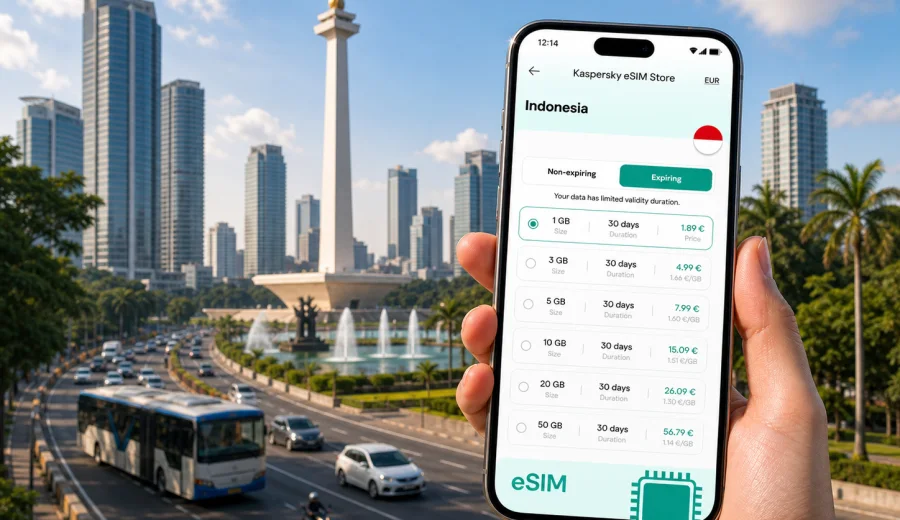
Jakarta eSIM: mobile connection and internet for your trip
Jakarta is a city where mobile internet starts to matter before you even leave the airport. You may need to message a driver at Soekarno-Hatta International Airport, check the route into Central Jakarta, confirm a hotel address in Menteng or Sudirman, or decide whether the fastest option is rail, taxi, MRT, TransJakarta, or a ride-hailing app. A Jakarta eSIM can make those first steps easier because you can prepare mobile data before the trip and avoid searching for a physical SIM card after arrival.
This guide focuses on practical city travel: arrival, transport, hotel check-in, business districts, sightseeing, stopovers, and day trips from Jakarta. It explains how to think about eSIM data for Jakarta, what to check before buying a plan, and how Kaspersky eSIM Store can help you choose, set up, and activate an eSIM with a suitable mobile data plan for Indonesia.
Why mobile internet matters in Jakarta
Jakarta is large, busy, and spread across several urban centers. Many trips involve moving between the airport, Central Jakarta, South Jakarta, business areas, malls, hotels, government offices, convention spaces, and railway stations. Mobile data is useful because plans often change during the day: traffic conditions shift, meeting locations move, and a short ride can become a longer route if the city is congested.
With mobile internet on your phone, you can handle the tasks that define a smooth Jakarta trip:
- check airport rail, taxi, or ride-hailing options after landing;
- use maps while moving between neighborhoods such as Menteng, Kuningan, Senayan, Kota Tua, Kemang, and SCBD;
- receive hotel messages and booking updates;
- translate short signs, menus, and service messages;
- use messaging apps for calls and texts over data;
- keep travel documents, tickets, and meeting details accessible;
- share location with colleagues, family, or a driver;
- manage delays during tropical rain or heavy traffic.
Public Wi-Fi can help in hotels, airports, and cafes, but it is not a reliable plan for a full day in Jakarta. You may be between locations, waiting at a pickup point, inside a mall, or walking to a station. An eSIM gives you a prepared mobile data option on a compatible device, so you are less dependent on finding Wi-Fi at the exact moment you need directions or confirmations.
Arrival in Jakarta: from airport to city
Most international visitors arrive through Soekarno-Hatta International Airport, west of the city. The airport is not in the central business districts, so the first mobile internet task is usually route planning. Depending on where you are staying, you may compare airport rail, taxi, private transfer, ride-hailing, or hotel pickup. Each option is easier when your phone is already online.
For the first hour in Jakarta, mobile data can help with:
- checking which terminal you arrived at and where to meet your driver;
- messaging the hotel if your flight is delayed;
- opening a map before leaving the terminal;
- confirming the address in Indonesian spelling;
- comparing estimated travel times to Central Jakarta, Kuningan, Senayan, or Kemang;
- saving screenshots or offline notes if you expect patchy indoor signal.
If you have a long stopover, mobile internet can also help you decide whether to stay near the airport or go into the city. Jakarta traffic can be unpredictable, so a short layover is often better spent near the terminal or airport hotel, while a longer stopover may allow a planned visit to Central Jakarta. In both cases, data helps you keep track of time, transport, and flight updates.
City movement: MRT, commuter rail, TransJakarta, taxis, and walking
Jakarta transport is a mix of rail, buses, taxis, ride-hailing, and walking between dense blocks. The MRT is useful for parts of South and Central Jakarta. Commuter rail can be useful for wider metropolitan routes. TransJakarta buses cover many corridors. Taxis and ride-hailing services are common, especially for door-to-door trips between hotels, offices, malls, and restaurants.
Mobile internet helps you combine these options instead of guessing. For example, you might take the MRT to a station near your destination, then use a short ride-hailing trip for the final segment. You might choose a taxi in heavy rain, then switch to walking inside a connected mall complex. You might check whether a meeting venue is closer to the front lobby, a mall entrance, or an office tower entrance.
Practical Jakarta transport uses for an eSIM include:
| Situation | Why mobile data helps |
|---|---|
| Airport transfer | You can message drivers, compare route times, and share location. |
| Business meetings | You can check building entrances, tower names, and updated schedules. |
| MRT and bus routes | You can look up station exits, walking links, and next connections. |
| Ride-hailing pickup | You can confirm the pickup point and avoid waiting in the wrong lane. |
| Rainy weather | You can change transport mode quickly if walking is no longer practical. |
| Late return to hotel | You can keep maps and messages available after malls or restaurants close. |
Jakarta is not a city where every route is obvious from a paper map. Blocks can be large, pedestrian access can vary, and the most convenient entrance is not always the closest point on the map. A prepared eSIM plan gives you more control when you need real-time navigation.
Choosing an eSIM data plan for Jakarta
For a city trip to Jakarta, choose a plan based on how you will use data rather than only on the number of travel days. A person who mainly uses hotel Wi-Fi and maps may need less data than a traveler who works from taxis, uploads documents, joins video calls, or uses hotspot sharing for a laptop. The right plan depends on your behavior, the trip length, and whether Jakarta is your only destination in Indonesia.
Use this simple planning model:
1. Estimate your trip length. A one-night stopover, a three-day business visit, and a two-week Indonesia trip need different validity periods.
2. List your high-data tasks. Video calls, cloud backups, large file uploads, and streaming use much more data than maps and messaging.
3. Check whether you will leave Jakarta. If you continue to Bandung, Yogyakarta, Bali, Surabaya, or another Indonesian destination, choose a plan suitable for the country route, not only one city day.
4. Decide when to install the eSIM. Many travelers prefer to install before departure and activate according to the plan instructions.
5. Keep your main SIM available if you need your usual phone number for banking messages or account verification.
As a rough travel pattern, light users often focus on maps, messaging, ride-hailing, translation, and booking apps. Moderate users add social media, photo sharing, document access, and work email. Heavy users may need video calls, tethering, frequent uploads, or long working sessions away from hotel Wi-Fi. Avoid choosing only by price: data volume, validity, destination, and device compatibility matter more for a reliable plan.
Once your route, data use, and device readiness are clear, you can review eSIM plan options for Indonesia in Kaspersky eSIM Store and choose a plan that fits your Jakarta stay or wider Indonesia itinerary.
Compatibility checks before you buy
Before selecting an eSIM plan for Jakarta, confirm that your device supports eSIM and is not locked to a carrier in a way that prevents adding another mobile plan. This matters more than the destination itself: if the phone cannot install an eSIM, the plan cannot be used on that device.
Check these points before purchase:
- your phone or tablet supports eSIM;
- the device is unlocked for adding a travel eSIM profile;
- your operating system is up to date enough for eSIM setup;
- you can access the email address or account where setup details will arrive;
- you understand when the plan validity and data usage begin;
- you know whether ordinary voice calls and SMS are included. Most travel eSIM data plans are for mobile internet, so calls and messages usually go through apps unless the plan conditions say otherwise.
You can use the internal compatibility check before buying: check your device. It is better to verify this at home than at the arrival hall in Jakarta, where you may already need data to contact a driver or open booking details.
Best Jakarta scenarios for an eSIM
An eSIM is especially useful in Jakarta when the trip has moving parts. The city often requires quick decisions: which route is faster, where the pickup point is, whether a meeting moved, or how long it will take to reach the airport. Prepared mobile data keeps those decisions on your phone instead of making you depend on a Wi-Fi network or a shop visit.
Business trips in Sudirman, Kuningan, SCBD, and Senayan
Jakarta business travel often involves office towers, hotels, malls, and meeting venues across Central and South Jakarta. Building names, tower entrances, and security desks can be confusing if you are visiting for the first time. Mobile data helps you confirm meeting messages, share your live location, translate short instructions, and move between appointments without losing contact.
If you work during transfers, consider a plan with enough data for email attachments, calendar updates, messaging, and occasional hotspot use. Video calls over mobile data can use a lot of traffic, so use hotel or office Wi-Fi for long calls when possible and save eSIM data for movement between locations.
Hotel stays, short breaks, and stopovers
For a weekend, a one-night stay, or a long airport connection, mobile internet is useful for restaurant bookings, mall navigation, ride-hailing, hotel messages, and flight updates. Areas such as Menteng, Thamrin, Senayan, Kemang, and Kota Tua each have different movement patterns, so you may walk in one district, take a car in another, and use MRT links for part of the route.
Stopovers are especially sensitive to timing because the airport is outside the center. If the connection is tight, you may use data mostly for airport services and hotel shuttles. If it is long, you may need navigation and ride-hailing across several hours. Choose a plan that is easy to activate and valid for the period you actually need.
Trips from Jakarta to other Indonesian destinations
Jakarta is often the first stop before another Indonesian city or island. Travelers may continue to Bandung by rail or car, fly to Bali, visit Yogyakarta, or connect through Jakarta for work in another city. In that case, treat Jakarta as the start of your Indonesia mobile data plan, not the whole trip.
If your route continues beyond the capital, choose a plan that fits the whole Indonesia stay instead of thinking only about the airport transfer. Check the destination, data volume, validity period, and activation rules before you travel.
How to install and activate an eSIM for Jakarta
The setup process depends on your device and the selected plan, but the general flow is straightforward. Kaspersky eSIM Store helps you choose a destination and suitable data plan, then you follow the installation and activation instructions for your phone.
Typical steps:
1. Check that your device supports eSIM and can add another mobile plan.
2. Choose Indonesia or another suitable destination for your route.
3. Select a plan by data volume, validity period, and conditions.
4. Complete the checkout and open the setup details in your profile, app, or email.
5. Install the eSIM using the instructions for your device.
6. Activate it according to the plan instructions, often before travel or after arrival depending on the plan rules.
7. Set mobile data to the eSIM profile when you want to use it in Jakarta.
For device-specific setup, use the Android installation guide or the iOS installation guide. Keep a stable internet connection during installation, because adding an eSIM profile requires your phone to download and save the profile correctly.
What to prepare before flying to Jakarta
Preparation matters because your first data needs may appear immediately after landing. The best time to handle eSIM setup is usually before you are standing in an airport queue, tired from the flight, and trying to contact a driver.
Use this checklist before departure:
- confirm your phone supports eSIM and is not locked;
- choose a plan that covers Indonesia if Jakarta is part of a wider route;
- save your hotel address in English and Indonesian spelling if available;
- keep your passport, booking references, and onward tickets accessible offline;
- install maps for Jakarta if you expect to move around immediately;
- tell colleagues or family which messaging app you will use;
- check whether your main SIM should stay active for banking or account verification messages;
- read the plan conditions, including validity and any activation rules.
If you plan to use mobile hotspot for a laptop, check whether the selected plan allows tethering and estimate data carefully. A few email attachments may be fine, while operating-system updates, cloud sync, and long video calls can consume data quickly. Turn off automatic updates and cloud backups on mobile data before the trip.
Practical mobile internet tips for Jakarta
Small settings can make a Jakarta data plan last longer and work more predictably:
- set the eSIM profile as the mobile data line when you want to use the travel plan;
- disable automatic app updates on mobile data;
- pause cloud photo and video backups until you are on trusted Wi-Fi;
- download maps, boarding passes, and hotel details for offline access;
- monitor data usage during the first day to understand your pace;
- keep the eSIM QR code or setup instructions accessible until installation is complete;
- save exact tower, mall, and hotel entrance names when moving between business districts.
Also plan for Jakarta weather. Heavy rain can change a walking route into a car route, which can mean more ride-hailing, map checks, and messaging than expected.
FAQ: Jakarta eSIM and mobile internet
Can I use an eSIM as soon as I land in Jakarta?
You can use it after it is installed, activated according to the selected plan rules, and set as the mobile data line on a compatible device.
Does a travel eSIM include calls and SMS?
Many travel eSIM plans are focused on mobile internet and do not include a standard phone number, voice calls, or SMS unless the plan conditions say otherwise.
Is an eSIM useful if my hotel has Wi-Fi?
Yes. Airport transfer, ride-hailing pickup, maps, restaurant plans, meeting updates, and route changes often happen outside the hotel.
What should I do if installation does not work?
Check your internet connection, device compatibility, and whether the phone is locked. Then review the relevant Android or iOS setup instructions. If you still cannot complete installation, contact support through the service channel available in Kaspersky eSIM Store.
Final checklist before you choose a plan
Before you travel to Jakarta, make sure your mobile internet plan matches the real trip: first transfer planned, hotel and meeting addresses saved, device compatibility checked, plan conditions reviewed, installation instructions available, and high-data app behavior controlled.
Kaspersky eSIM Store is an app and website where you can choose, set up, and activate an eSIM with a suitable mobile data plan for travel. For a Jakarta trip, prepare the plan before you need it at the airport, in a taxi, or between meetings. When your route and data needs are clear, prepare an eSIM plan for your trip to Jakarta and Indonesia and check the conditions before you travel.