Travel connectivity guide
Janakpur eSIM: Mobile Internet for Your Trip
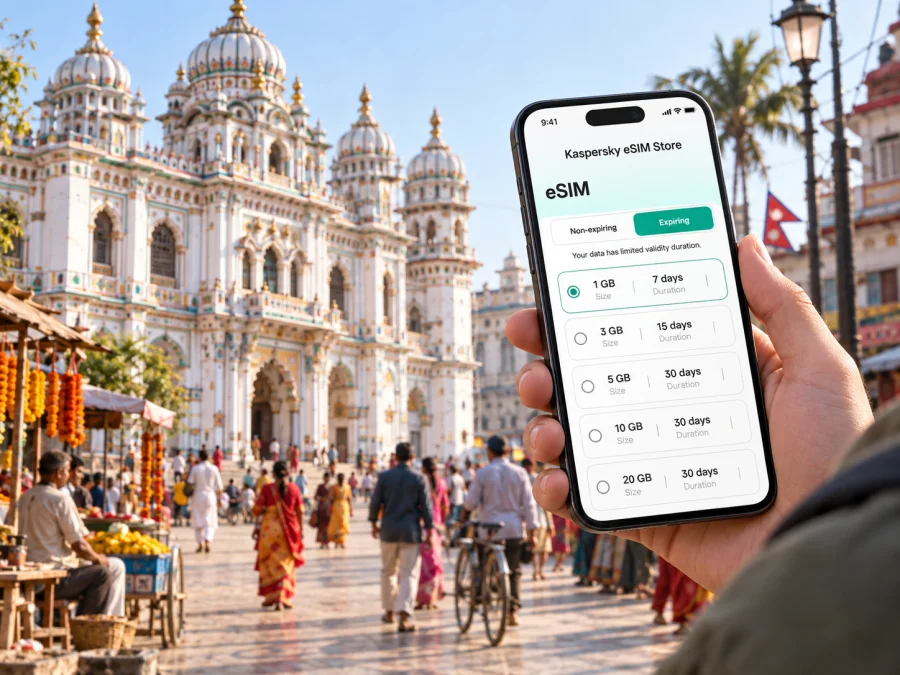
Janakpur eSIM: Mobile Connection and Internet for Your Visit
Janakpur is a city best explored at a human pace. A visit may begin with the bright façade of Janaki Mandir, continue through the lanes around the temple and nearby ponds, and finish with a meal or a longer trip across the Mithila region. Mobile internet can make those transitions easier: you can check your route, confirm a hotel address, message a driver, and keep plans in view while you move around.
An eSIM is a digital SIM profile for a compatible phone. Kaspersky eSIM Store is an app and website where you can choose, purchase, and activate an eSIM with a data plan for an international trip. Check the selected plan’s Nepal coverage, allowance, validity, and conditions before purchase.
Plan around Janakpur, not just your arrival
Janakpur, also called Janakpurdham, lies in Nepal’s Mithila region in the southern plains. The city’s main landmark, Janaki Mandir, is at its cultural and devotional heart. The temple is associated with Sita, also known as Janaki, and draws pilgrims as well as visitors interested in architecture and local traditions. Nearby, the Ram-Sita Vivah Mandap and other shrines make it easy to build a walking visit around the central area.
A map is especially useful when your day includes several stops. Temple names can appear in different spellings, and a driver may recognize a local name more readily than a translated one. Save the spelling shown by your hotel or host, and pin the exact entrance or meeting point before setting out. For a large complex, choose a landmark such as the main gate rather than relying on a general pin placed somewhere inside the grounds.
First hours after landing
If you arrive by air, treat the airport as the start of a short transfer into the city rather than assuming that all services will be available at the terminal. Flight schedules and ground transport can change; confirm your arrival arrangements close to the travel date. Before leaving, keep your hotel name and address available offline as well as on your phone. That gives you a fallback if the battery is low or data is temporarily unavailable.
A simple arrival routine can prevent avoidable confusion:
- Check that your phone has charge and that your accommodation details are saved.
- Confirm the driver, pickup point, and fare arrangement before you leave the airport area.
- Open the route to your hotel while you still have a reliable connection.
- Share your estimated arrival time with your host or travel companion.
- Once checked in, save the locations you plan to visit that day.
If you enter Nepal by land or arrive in Janakpur after travelling from another city, the same preparation helps. Avoid assuming that a route shown on a map reflects current road conditions or a particular vehicle’s schedule. Use the map to orient yourself, then confirm the last part of the journey with your driver, hotel, or local contact.
Keep a written or offline copy of the hotel address, and agree on the destination before a vehicle departs. A neighbourhood or nearby landmark can help distinguish properties with similar names.
Moving between temples, ponds, and neighbourhoods
The central sights are often visited on foot, but distances, heat, crowds, and the pace of your group may make a short vehicle ride more comfortable. For local transfers, ask your accommodation which options are operating and how to describe your destination. Depending on what is available at the time, a taxi, rickshaw, or other local vehicle may suit a point-to-point trip. Agree on the destination and fare before setting off, and allow extra time during busy worship periods.
Janaki Mandir is a natural starting point for a heritage walk. From there, visitors commonly plan around nearby sacred sites and water bodies such as Ganga Sagar and Dhanush Sagar. These places have religious meaning; follow posted guidance, observe local customs, and ask before photographing people or ceremonies. If you are visiting a shrine, dress respectfully and be prepared to leave footwear where requested.
A route that looks short on a screen may take longer in practice. Streets can be lively, crossings may require attention, and the most convenient walking line may not be obvious from a small map. Zoom in before you leave, note one or two recognizable landmarks, and use live navigation for the final approach. If you lose your orientation, stop somewhere safe before checking your phone rather than walking while looking at the screen.
| Visit style | A useful connection task | A practical preparation |
|---|---|---|
| Temple-focused morning | Check the route and meeting point | Save the temple name and entrance pin |
| Several central stops | Reorder locations as the day changes | Keep a short list of pins in one map |
| Family or group visit | Share arrival updates | Agree on a clear meeting point |
| Evening return | Message your accommodation | Keep the hotel address accessible offline |
The table is a planning aid, not a promise of coverage at every location. Signal and data performance depend on the selected plan, local conditions, and your device. If navigation pauses, stop somewhere safe before refreshing the map or asking for directions.
Choosing an eSIM plan for a Janakpur itinerary
Start with the shape of your trip rather than a guess about how much data a city requires. A short visit centred on a few temples may involve occasional maps and messages. A longer stay with remote work, video calls, photo sharing, and onward travel can use data differently. Think about what you will actually do, then compare the allowance and validity shown for each available option.
Before you select a plan, review these points:
- Destination: Check that Nepal is included in the plan’s coverage.
- Data amount: Estimate the use of maps, messaging, browsing, uploads, and video.
- Validity: Match the plan period to the dates when you expect to use mobile data.
- Activation conditions: Read when the validity period begins and what actions are required.
- Tethering: If you plan to connect a laptop or another device, check whether hotspot use is supported by the plan and phone.
- Calls and texts: An eSIM data plan does not provide a regular phone number, calls, or SMS unless the plan details explicitly say otherwise.
Kaspersky eSIM Store helps you compare the available plan details for your destination and complete the purchase and activation flow. You remain in control of which option fits your itinerary. To review the current Nepal options before travelling, choose an eSIM plan for your trip to Nepal. Availability and plan conditions can change, so rely on the details shown for the option you select.
Prepare your phone before the trip
Before buying, confirm that your phone supports eSIM and is not restricted by a carrier lock. Device support can differ between models and regional versions. Check whether your device supports eSIM before you choose a plan. Also make sure you can access the email or account where installation details will be available, and keep your usual SIM active if you need its number for calls or verification messages.
A practical setup sequence is:
- Choose the destination and plan. Check Nepal coverage, data allowance, validity, and activation rules.
- Complete the purchase. Keep the confirmation and installation information available in your account or email.
- Install while you have a stable internet connection. Follow the on-screen instructions and do not delete the profile after installation unless support tells you to.
- Label the eSIM. A label such as “Nepal data” can make it easier to distinguish from your usual line.
- Set mobile data to the intended line. Keep your usual number available for calls or messages if needed, and select the travel eSIM for data when appropriate.
- Activate according to the plan instructions. The timing can depend on the plan. Some devices may require data roaming to be enabled for the eSIM to connect.
For device-specific steps, use the Android eSIM installation instructions or the iOS eSIM installation instructions. Menu names vary by operating-system version and device manufacturer. Follow the steps shown for your phone, and check the plan conditions before changing data-roaming settings.
An eSIM is a data connection option, not automatically a replacement for your home number. Keep track of which line is selected for mobile data and which line handles calls or SMS. If your regular SIM remains enabled, check its roaming terms with your existing provider so that background use does not create an unexpected charge.
A day in Janakpur: keep the route flexible
A relaxed day might begin near Janaki Mandir, continue to the Vivah Mandap, and include a nearby pond or shrine. Check local opening arrangements, leave space for worship and breaks, and allow time to move between stops. Save the hotel, first destination, and a fallback meeting point; if a ceremony or crowd changes your route, update the map and message anyone waiting for you.
Mithila art and local markets add another layer to a visit, with vivid geometric patterns and painted motifs. Save a workshop or shop’s exact location and confirm that it is open that day; a pin from your host can be more useful than a broad category search in a busy lane.
For a respectful visit, keep these habits in mind:
- Ask before photographing worshippers, artists, or private spaces.
- Follow signs and instructions at temples and sacred ponds.
- Carry water and take breaks, especially during warm weather.
- Keep your phone secure in crowded areas and avoid blocking walkways while checking directions.
- Download or save essential maps and addresses before a long outing.
The main value of mobile internet here is often small and practical: finding the right entrance, coordinating a pickup, translating a place name, or telling your hotel that plans have changed. Those tasks are easier when the phone is configured before you leave, while a little offline preparation makes the day less dependent on a single connection.
Business travel and short stopovers
A work trip may leave only a few hours between meetings and an onward departure. Save appointment locations, confirm the exact entrance or meeting point, and keep the organizer’s contact details available offline. Navigation and calls can drain battery, so carry a charger and defer large transfers. For a stopover, choose one central visit, leave a buffer for the return journey, and confirm onward transport with the carrier or local contact.
Connectivity habits that help in the city
Mobile internet can support maps, translation, messaging, and bookings, but prepare for brief gaps in service. Keep the accommodation address, booking reference, meeting point, and transport instructions offline. Save important confirmations and check your phone’s battery before heading out.
A few settings can keep data use easier to understand:
- Disable automatic media backup and set app updates to Wi-Fi where possible.
- Download maps for planned areas and review the eSIM’s balance and validity in the app when available.
- Turn on data roaming for the travel eSIM only if the plan instructions require it.
If the eSIM does not connect after arrival, check that the profile is enabled and selected for mobile data, airplane mode is off, and the phone follows the plan’s activation steps. Network settings can vary by plan. If the issue continues, contact support through the app or account and share your device model and where setup stopped.
Frequently asked questions
Is an eSIM useful for a short visit to Janakpur?
It can be useful if you expect to use maps, messaging, or online travel details and your phone supports eSIM. Compare the plan’s validity and data amount with the length and activities of your stay before choosing.
Can I use the eSIM for ordinary phone calls?
Only if the selected plan explicitly includes voice service. A data-only eSIM does not add a standard phone number or SMS service; you can use internet-based calling and messaging apps when you have data and the other person can use them too.
Do I need mobile data inside every temple or hotel?
No. Save routes, addresses, and confirmations before leaving. A connection is convenient for live updates, but essential details should remain accessible offline in case signal or Wi-Fi is unavailable.
Should I install the eSIM before reaching Janakpur?
You can install it before travel if the plan instructions allow it and you have a stable internet connection. Read when activation and validity begin so that you do not start the plan earlier than intended.
Will the same plan work on an onward trip?
That depends on the plan’s coverage. Check the included destinations if you are travelling beyond Janakpur, and verify the data allowance and validity for the full route.
Make the connection part of your preparation
Janakpur rewards a thoughtful pace: give the temples and local traditions time, keep routes simple, and stay flexible when the day changes. Before departure, save your hotel and meeting points, check your phone’s eSIM support, and choose a plan whose Nepal coverage, data allowance, and validity match your itinerary.
When you are ready, use Kaspersky eSIM Store to review the available details and complete the eSIM setup for your trip. Choose an eSIM plan for Nepal, then install and activate it according to the selected plan’s instructions. Keep offline copies of essential travel details so you can move around Janakpur with a useful backup as well as mobile data.


