
Travel connectivity guide
Jermuk eSIM: Mobile Internet for Armenia Travel
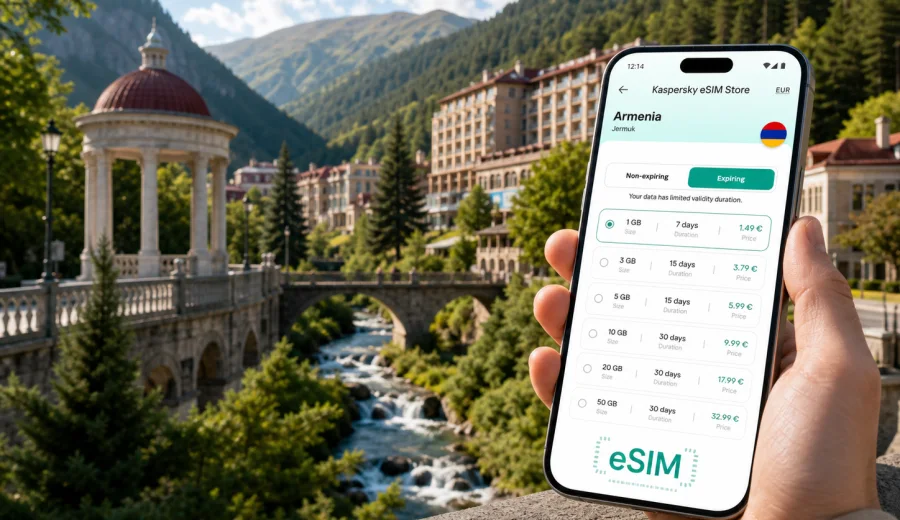
Jermuk eSIM: mobile connection and internet for a trip to Armenia
Jermuk is a mountain spa city where the practical parts of a trip often depend on mobile internet: confirming a transfer from Yerevan, finding a hotel entrance after a long road journey, checking weather before a canyon walk, sharing your location with family, or joining a work call from a resort lobby. An eSIM can make that first online step easier because you do not need to look for a physical SIM card after arrival.
For a Jermuk trip, the main question is simple: how will you stay online between the airport, the road through Vayots Dzor, your hotel, mineral-water galleries, restaurants, viewpoints, and day trips? Kaspersky eSIM Store helps you choose, arrange, and activate an eSIM with a suitable plan for mobile internet in an international trip. It is useful when you want to prepare connectivity before you leave, then use a compatible phone for maps, messengers, bookings, and travel services in Armenia.
Why mobile internet matters in Jermuk
Jermuk is not a city where every travel task happens in one dense downtown grid. Visitors usually move between hotels, spa facilities, parks, the waterfall area, the canyon, and mountain roads. Many trips also start with a long transfer from Yerevan or another Armenian city, so you may need mobile data before you even reach the resort.
Mobile internet is especially useful in these Jermuk scenarios:
- checking your driver's location after landing in Armenia;
- opening a hotel reservation when reception asks for details;
- using maps on the road to Vayots Dzor;
- translating menus, treatment descriptions, and local signs;
- coordinating with family if part of the group walks while others rest at the hotel;
- checking weather before going to viewpoints or the waterfall;
- using messenger calls when your eSIM plan is data-only;
- keeping business chats open during a short wellness trip.
Jermuk is calm, scenic, and compact compared with a large capital city, but that does not make connectivity less important. In a mountain resort, the value of mobile data often appears at practical moments: finding a taxi, confirming a spa appointment, calling a hotel, or checking whether a road route is still convenient after weather changes.
Arrival in Armenia and the road to Jermuk
Many international visitors reach Jermuk after arriving at Zvartnots International Airport near Yerevan, then continue by car, transfer, bus, or private driver. The trip to Jermuk is part of the travel experience: the route crosses changing landscapes, smaller towns, mountain sections, and places where you may want navigation or messenger access.
An eSIM can help during the first hours because you can:
1. Land in Armenia with mobile data already prepared on a compatible device.
2. Message your driver or hotel before leaving the airport.
3. Share your live location with other travelers in your group.
4. Check the route while moving toward Vayots Dzor.
5. Keep booking confirmations, maps, and translation tools available.
This is different from a city break where you can walk out of the airport and immediately choose between several familiar transport apps, metro lines, or nearby shops. For Jermuk, the transfer itself is a major part of the itinerary, and mobile internet helps you keep that transfer predictable.
Where eSIM is useful around the city
Jermuk travel is usually built around a few repeated zones: accommodation, wellness facilities, walking areas, cafes, viewpoints, and short drives. A data connection helps you move between them without treating every small task as a separate errand.
| Jermuk situation | How mobile internet helps |
|---|---|
| Hotel check-in | Open booking details, contact reception, confirm arrival time |
| Spa or sanatorium stay | Check schedules, message the hotel, translate service details |
| Walking near the canyon | Use maps, share location, check weather before going farther |
| Jermuk Waterfall visit | Navigate to the viewpoint, coordinate pickup, send photos later |
| Restaurant search | Compare locations, working hours, reviews, and walking routes |
| Business trip | Keep email, chats, video links, and document access available |
| Day trip from Jermuk | Plan stops, follow navigation, message a driver or guide |
Public Wi-Fi can be convenient in hotels and cafes, but it is not a complete travel plan. You may need internet before check-in, outside a building, on the road, or when a network password is not available. eSIM gives you another option for mobile data in those moments, while the exact experience depends on the selected plan, device, and local network conditions.
Choosing an eSIM plan for Jermuk
For a city article, the correct destination is still the country where the city is located. Jermuk is in Armenia, so you should choose an eSIM plan that covers Armenia or a broader regional route if your trip continues beyond Armenia.
Before choosing a plan, think through these details:
- Trip length: a weekend spa break needs a different validity period than a two-week Armenia route.
- Data habits: maps and messages use less data than video calls, cloud backups, or streaming.
- Route: if you combine Jermuk with Yerevan, Areni, Noravank, Lake Sevan, or another region, choose coverage for the full Armenian itinerary.
- Work needs: business travelers may need more data for calls, file sharing, and hotspot use, if the chosen plan and device support it.
- Timing: some travelers prefer installing the eSIM before departure and activating mobile data after arrival.
A practical rule is to estimate data by task, not only by number of days. If you mostly use maps, hotel messages, ride coordination, and occasional browsing, a smaller package may be enough. If you plan to use video meetings, upload many photos, or use your phone as a hotspot, choose a larger package and check whether tethering is allowed under the plan conditions.
Quick planning checklist before you leave
Use this checklist before starting your trip to Jermuk:
- Confirm that your phone supports eSIM.
- Make sure the device is not locked to one carrier.
- Choose Armenia as the destination if Jermuk is your main stop.
- Check the data volume, validity period, and activation details of the selected plan.
- Install the eSIM while you still have a stable internet connection.
- Save hotel, transfer, and emergency contact details offline as a backup.
- Keep your primary SIM active if you need banking SMS or calls from your usual number.
- Turn off automatic cloud backups and large app updates if you want to preserve mobile data.
Before buying or activating any eSIM plan, check your device compatibility. Some models differ by region of sale, and an operator-locked device may not accept another mobile profile.
When to prepare mobile internet for Jermuk
The most convenient time is usually before departure, when you have reliable Wi-Fi and time to read the plan conditions. You can install the eSIM profile in advance and then choose when to use it for mobile data, depending on the plan rules and your device settings.
Some travelers wait until they land in Armenia. That can also work, but it means you need internet access at the airport or hotel to complete setup. If you are arriving late, meeting a driver, or going directly to Jermuk after the flight, preparing earlier is often more comfortable.
For a Jermuk itinerary, the first high-value online moment may happen before you reach the city. You may need to message a driver, confirm a stop on the road, or tell the hotel that you are arriving later than expected. That is why mobile internet is part of the arrival plan, not only part of the city stay.
If you are ready to compare options, you can choose an eSIM plan for your trip to Armenia and then prepare the eSIM before traveling to Jermuk.
How to install and activate an eSIM
The exact setup flow depends on your phone model and operating system, but the travel logic is consistent: check compatibility, choose a plan, add the eSIM profile, select it for mobile data, and test the connection after arrival.
General setup sequence:
1. Check that your phone supports eSIM and is not carrier-locked.
2. Choose Armenia or the relevant route in Kaspersky eSIM Store.
3. Review data volume, validity period, destination, and plan conditions.
4. Complete the order and open the eSIM details in your profile or app.
5. Add the eSIM to your device using the on-screen instructions or QR code.
6. Select the eSIM for mobile data when you want to use it.
7. If required by the plan or device, enable data roaming for that eSIM profile.
8. Wait a few minutes for registration on a local network after arrival.
For device-specific setup, use the Android installation guide or the iOS installation guide. Install the eSIM while you have stable internet, because adding the profile itself requires a connection.
Practical data use in Jermuk
Jermuk is a place where many online tasks are short but frequent. You may not stream for hours, but you might open maps twenty times, check weather before every walk, and send updates throughout the day. Planning for that pattern helps you choose a suitable data package.
Common data-light tasks:
- text messages in messengers;
- checking hotel or spa appointment details;
- route searches inside Jermuk;
- translation of short phrases;
- restaurant browsing;
- boarding pass and booking access.
Common data-heavy tasks:
- video calls with family or colleagues;
- uploading large photo and video sets;
- streaming music or video on mobile data;
- cloud backup over cellular;
- using your phone as a hotspot for a laptop;
- downloading offline map regions after arrival.
If your hotel Wi-Fi is good, use it for large downloads and photo backups. Keep mobile data for movement, navigation, messenger calls, and tasks that happen away from the hotel.
City movement: walks, taxis, hotels, and viewpoints
Jermuk rewards slow movement: a walk near the mineral water gallery, a route toward the waterfall, a stop near the gorge, or a quiet evening near resort buildings. Mobile internet helps you decide whether to walk, ask for a taxi, or arrange pickup.
For local movement, keep these habits:
- download an offline map of the Jermuk area before you go;
- keep mobile data available for live route updates and messaging;
- save your hotel address in English and Armenian if possible;
- agree on pickup points with drivers before entering areas with weaker signal;
- carry a power bank if you plan a long walk with navigation and photos.
Mobile data is also useful for groups. Shared locations and messenger calls reduce confusion when travelers split between a hotel, cafe, viewpoint, or sanatorium.
Business trips and remote work from Jermuk
Jermuk can be a quiet base for a work-and-rest trip, but business travelers should plan connectivity carefully. Hotel Wi-Fi may be enough for some tasks, yet a mobile data backup is valuable for calendar changes, two-factor authentication, cloud documents, and calls away from your room.
For work trips, check:
- whether your phone and laptop workflow needs hotspot use;
- whether the chosen eSIM plan allows tethering;
- how much data a typical video meeting uses for your setup;
- whether you need your usual SIM for banking, corporate login, or SMS verification;
- whether important files are available offline before the road transfer.
An eSIM plan is not a guarantee that every call will be perfect in every location. Buildings, mountains, local network conditions, and device settings can affect the experience. The practical benefit is having a prepared mobile internet option beyond hotel Wi-Fi.
Stopovers and short stays in Jermuk
Some visitors stop in Jermuk for one or two nights while traveling through Armenia, or visit for a short rest between Yerevan, Vayots Dzor wineries, mountain roads, and cultural sites. In a short stay, time matters.
For a one-night or two-night Jermuk stop, prioritize:
- a plan with enough data for navigation, messages, and bookings;
- installation before departure or before leaving Yerevan;
- offline copies of hotel and transfer details;
- a clear decision about which SIM profile handles mobile data;
- battery management, especially if you use maps all day.
A short stay often creates many navigation tasks per hour: check-in, walks, meals, spa questions, the next road segment, and tomorrow's departure. Mobile internet keeps those small tasks from becoming delays.
Trips from Jermuk to nearby routes
Jermuk is often part of a broader Armenia itinerary. Travelers may combine it with Areni wine region, Noravank Monastery, Yeghegnadzor, mountain viewpoints, or a return to Yerevan. If you leave the city for a day trip, choose and use your eSIM with the whole route in mind.
Before leaving Jermuk for the day:
1. Check the route while still at the hotel.
2. Save key addresses and meeting points offline.
3. Charge your phone and power bank.
4. Confirm pickup times with your driver or guide.
5. Limit background data if you need the package to last longer.
6. Keep screenshots of booking details and important contacts.
The more rural or mountainous the route, the more useful it is to plan ahead. Offline backups remain important even when you use an eSIM.
eSIM compared with roaming, Wi-Fi, and local SIM cards
There is no single best option for every traveler. The right choice depends on your phone, trip length, budget, itinerary, and comfort with setup.
| Option | Strength | Limitation |
|---|---|---|
| eSIM for Armenia | Can be prepared before the trip and used without a physical SIM card | Requires a compatible, unlocked device and suitable plan conditions |
| Standard roaming | Uses your existing mobile number and operator relationship | Costs and data limits may be less predictable, depending on your home operator |
| Public or hotel Wi-Fi | Useful for large downloads and work from the hotel | Not available everywhere and may require passwords or registration |
| Local physical SIM | Can be familiar for longer stays | Requires time, an offline purchase point, and a free physical SIM slot |
For many Jermuk visitors, the appeal of eSIM is preparation before a long transfer, without making your first travel task a search for a SIM card shop.
What to check before using eSIM in Jermuk
Before your trip, review the technical and plan details carefully:
- Device support: not every smartphone or tablet supports eSIM.
- Carrier lock: a locked device may not accept an additional mobile profile.
- Destination: the plan should cover Armenia for a Jermuk trip.
- Validity: check when the plan starts and how long it remains active.
- Data volume: choose enough data for maps, messages, calls, and work.
- Voice and SMS: many travel eSIM plans are data-only unless stated otherwise.
- Roaming setting: some devices may require data roaming enabled for the eSIM profile.
- Transfers: an activated eSIM profile may not be transferable to another device.
This check protects you from the most common travel connectivity mistakes. It is better to resolve a compatibility issue at home than while standing in an airport arrival hall or hotel lobby.
FAQ: eSIM and mobile internet in Jermuk
Do I need an eSIM specifically for Jermuk?
No. For Jermuk, choose a plan that covers Armenia, because the city is in Armenia. A city article helps you plan local scenarios, but the destination for the plan is the country or region shown in the plan conditions.
Can I install the eSIM before I travel?
Yes, in many cases you can install the eSIM before departure, while you have reliable internet. Read the plan details so you understand when validity starts and when to switch mobile data to the eSIM profile.
Will an eSIM give me a phone number for calls?
Usually no, unless the selected plan says otherwise. Travel eSIM plans in this context are mainly for mobile internet. For calls and messages, you can use internet-based apps when data is available.
Is hotel Wi-Fi enough for Jermuk?
Hotel Wi-Fi may be enough while you are inside the hotel, but it does not cover the road from Yerevan, walks, taxis, viewpoints, restaurants, or day trips. Mobile data is useful when you need internet away from a fixed network.
Can I use eSIM for a laptop in Jermuk?
Possibly, if your phone and selected plan support hotspot use. Check the plan conditions before relying on tethering for work calls or large files.
What if the eSIM does not connect immediately after arrival?
Check that the eSIM profile is selected for mobile data, confirm that data roaming is enabled if required, and wait a few minutes for network registration. If the issue continues, review the installation instructions and contact support.
Final preparation for a smoother Jermuk trip
For Jermuk, mobile internet is less about constant screen time and more about control: a smoother transfer, easier check-in, better navigation, clearer communication with drivers and hotels, and fewer interruptions during a mountain wellness stay. Prepare the eSIM before the trip, keep offline backups for essential details, and use mobile data for the moments when Wi-Fi is not available.
To get ready, choose an eSIM plan for Armenia in Kaspersky eSIM Store, check the conditions, install the eSIM on a compatible device, and keep your Jermuk route ready before you travel.