
Travel connectivity guide
Jersey eSIM: mobile internet travel guide
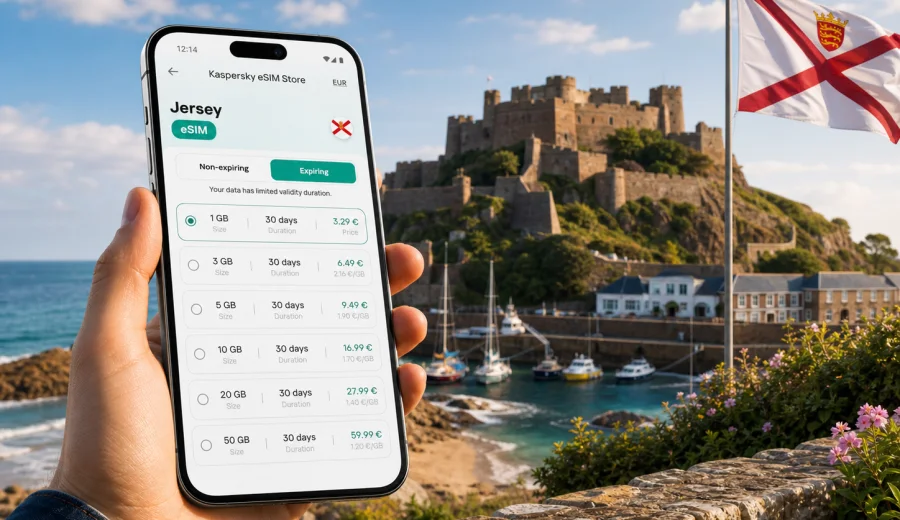
eSIM for Jersey: mobile connection and internet for a smoother island trip
Jersey is compact, coastal, and easy to underestimate. On a map it looks small; in practice, a trip can include St Helier meetings, beach walks near St Brelade, cycling lanes in the west, cliff paths in the north, ferries, airport transfers, restaurant bookings, parking apps, and quick changes of plan when the weather moves in from the Channel. A reliable mobile connection and internet access make those small decisions easier.
For many travellers, eSIM is the simplest way to prepare mobile internet before arriving in Jersey. Instead of looking for a physical SIM card after landing or depending on hotel Wi-Fi, you can install a digital SIM profile on a compatible phone and use a data plan for the trip. The main value is practical: maps, messengers, booking confirmations, digital tickets, payment checks, taxi apps, and work tools stay available when you are away from a fixed connection.
This guide explains how to think about eSIM for Jersey, how much data you may need, what to check before you travel, and how Kaspersky eSIM Store fits into the preparation process. The focus is the whole island, not only St Helier, because your connection needs may change between the airport, the capital, beaches, heritage sites, coastal roads, and ferry terminals.
Why mobile internet matters in Jersey
Jersey is a British Crown Dependency in the Channel Islands. It is close to France, connected with the United Kingdom by air and sea, and popular for short breaks, business visits, family trips, and longer stays. That combination creates a common travel problem: people often assume their usual mobile setup will behave exactly as it does at home, then discover that roaming conditions, fair-use rules, or costs are different from what they expected.
Even on a short island trip, mobile internet supports many everyday tasks:
- checking the route from Jersey Airport to St Helier or your hotel;
- comparing bus times, taxi options, and walking routes;
- opening boarding passes, ferry confirmations, and accommodation details;
- using messengers for calls instead of relying on ordinary voice roaming;
- checking restaurant reservations and opening-hours changes;
- sharing photos from beaches, harbours, castles, and coastal paths;
- using work email, video calls, cloud documents, or two-factor authentication;
- navigating when you drive, cycle, or walk outside the town centre.
Jersey also has many places where you may not want to pause and hunt for Wi-Fi: a windy viewpoint above the sea, a bus stop between villages, a car park near a beach, a harbour queue, or a narrow road where you need navigation to be ready. eSIM does not remove the need to travel thoughtfully, but it reduces one common friction point.
What eSIM does for a Jersey trip
An eSIM is a digital SIM profile built into supported smartphones and some tablets. It can be installed without a plastic SIM card. In travel use, it is usually chosen for mobile data: you keep your primary SIM for your usual number if you want, and use the eSIM profile for internet access abroad.
For Jersey, that means you can prepare a data option before departure or soon after arrival, depending on your plan and device. You do not need to find a shop just to get online. You can also see the plan conditions before you activate it: data amount, validity period, destination, and price.
It is important to set expectations correctly. Travel eSIM plans are mainly for mobile internet. They usually do not include a local phone number, ordinary voice calls, or SMS unless the selected plan clearly says otherwise. For calls and messages, many travellers use internet-based apps. If you need bank SMS, airline SMS, or calls to local services, check your usual SIM and roaming settings as part of your preparation.
Jersey travel scenarios where eSIM is useful
Different trips need different data habits. A weekend visitor may only need maps and messages, while a remote worker may need a more careful plan. Use these scenarios to estimate your own needs.
| Trip scenario | Typical mobile internet use | What to watch |
|---|---|---|
| Weekend break | Maps, restaurant search, messaging, boarding pass | Avoid background photo backup on mobile data |
| Family holiday | Navigation, group chats, attraction searches, occasional streaming | Several people may share one hotspot if the plan and device allow it |
| Business visit | Email, calendar, video calls, document access, authentication | Video calls can use data quickly |
| Road or cycling route | Maps, weather, route changes, emergency contacts | Download offline maps as a backup |
| Ferry and airport travel | Check-in, delays, transfers, hotel messages | Keep eSIM installed before the travel day if possible |
The key point is not to buy the largest data amount automatically. It is to match the plan to the way you actually travel. If you mostly use messaging, maps, email, and light browsing, your needs are different from someone uploading videos, running long hotspot sessions, or joining calls from a laptop.
Before you choose an eSIM plan
Preparation takes only a few minutes, but it prevents most avoidable problems. Check these points before you rely on eSIM for Jersey:
- Your phone supports eSIM.
- Your phone is not locked to one mobile operator.
- You have a stable internet connection for installation.
- You understand when the selected plan starts and how long it remains valid.
- You know whether data roaming must be enabled for the eSIM profile.
- You keep your main SIM active or inactive according to your roaming preferences.
- You have saved booking confirmations offline in case you need them before activation.
If you are not sure whether your phone can use eSIM, check your device before choosing a plan. Compatibility is not only about the phone model; regional versions and operator locks can also matter.
How much data do you need in Jersey?
Data use depends on habits more than geography. Jersey is small, so navigation distances are shorter than in many countries, but that does not automatically mean low data use. A single video call, cloud backup, or social media upload can use more data than a full day of map checks.
Use this practical estimate:
| Activity | Light use | Heavier use |
|---|---|---|
| Messaging | Low | Medium if sending many photos and videos |
| Maps and route checks | Low to medium | Medium with constant live navigation |
| Email and browsing | Low to medium | Medium with large attachments |
| Social media | Medium | High with video upload |
| Video calls | High | Very high on long calls |
| Hotspot for laptop | Medium to high | Very high with cloud sync |
For a short Jersey stay, a smaller plan may be enough if you use hotel Wi-Fi for heavy updates and keep mobile data for maps, messages, and travel logistics. For a longer stay, work trip, or family holiday, consider more data and a validity period that covers the whole route, including the day you arrive and the day you leave.
A practical data-saving setup
You can make a modest eSIM plan last longer with a few settings. These steps are useful before you leave home or while you are still on Wi-Fi:
1. Download offline maps for Jersey and nearby travel areas.
2. Disable mobile-data backup for photos and videos.
3. Turn off automatic app updates on mobile data.
4. Set your eSIM as the data line and keep your usual SIM for calls only if needed.
5. Check whether messaging apps download media automatically.
6. Use Wi-Fi for operating system updates and large file transfers.
7. Monitor data use in your phone settings during the first day.
This is especially helpful if you plan to move around the island: St Helier in the morning, Mont Orgueil Castle or Gorey later, then a beach or cliff walk before dinner. A plan that feels generous at breakfast can shrink quickly if cloud backup starts during the afternoon.
Choosing a plan through Kaspersky eSIM Store
Kaspersky eSIM Store is an app and website where you can quickly choose, arrange, and activate an eSIM with a suitable data plan for mobile internet during an international trip. It helps you compare the destination, data volume, validity period, and price before you prepare the eSIM on a compatible device.
For Jersey, look for a plan that fits the length and style of your trip. A short business visit may need a different setup from a family holiday with navigation, shared photos, and occasional hotspot use. If you want to prepare before departure, you can choose an eSIM plan for Jersey and keep the installation details ready for your travel day.
When comparing options, do not look only at the data amount. Check the validity period, the destination coverage shown for the plan, and the activation conditions. If the plan starts when you install it, your timing may be different from a plan that starts when it first connects to a supported network. Conditions can vary by selected plan, so read the plan details before checkout.
How to install and activate eSIM
The exact installation flow depends on your phone. In general, you choose the plan, receive installation instructions, add the eSIM profile to your device, then select it for mobile data. You may need to enable data roaming for that eSIM profile. This does not mean ordinary roaming on your main SIM has to be used; it is a common setting required for travel data eSIM profiles.
Use the device-specific instructions if you want a step-by-step setup: Android installation guide and iOS installation guide.
A sensible setup sequence looks like this:
1. Install the eSIM while you have reliable Wi-Fi.
2. Name the line clearly, for example “Jersey travel”.
3. Keep your primary line for your usual number if you need calls or SMS.
4. Set the eSIM as the mobile data line when you are ready to use it.
5. Confirm that data roaming is enabled for the eSIM profile if required.
6. Open a map or browser page to check that data is working.
7. Watch data use during the first few hours of the trip.
Avoid deleting the eSIM profile unless you are sure you no longer need it. Some eSIM profiles cannot simply be moved or reinstalled on another device after activation. If you change phones before travelling, check the plan conditions and device support first.
eSIM, roaming, public Wi-Fi, and local SIM: what is different?
There is no single best option for every traveller. The right choice depends on cost, convenience, duration, and how much control you want before arrival.
| Option | Useful when | Possible drawback |
|---|---|---|
| Travel eSIM | You want mobile data prepared without a physical SIM | Requires a compatible, unlocked device |
| Standard roaming | You want to keep everything on your usual SIM | Costs and fair-use terms can vary |
| Public Wi-Fi | You are mostly in hotels, cafes, or offices | Not available everywhere and not ideal for all tasks |
| Physical local SIM | You want a traditional SIM-card setup | Requires finding a point of sale and may take more time |
For Jersey, eSIM is often attractive because the island is easy to explore quickly. You may arrive in the morning and already need directions, messaging, parking information, or a transfer update within minutes. Preparing mobile internet before that moment keeps the first hour of the trip calmer.
What to check for Jersey specifically
Jersey’s location makes it worth checking your mobile settings carefully. It sits between the United Kingdom and France, and travellers may arrive from either direction. If your usual SIM has different roaming rules for the UK, the EU, and Crown Dependencies, do not assume they are identical. Review your current provider’s terms separately if you plan to keep that line active.
For the eSIM plan itself, check the destination name and terms shown before you confirm. If your route includes other islands or nearby countries, do not assume one country plan covers every stop. A Jersey-focused trip is different from a wider itinerary that includes Guernsey, France, the United Kingdom, or several European destinations.
Useful preparation questions:
- Will you stay only in Jersey, or combine it with another destination?
- Do you need mobile data immediately at Jersey Airport or the ferry terminal?
- Will you use hotspot for a laptop or another traveller?
- Do you need your regular phone number for SMS verification?
- Is your travel group relying on one person’s connection for navigation?
- Does your accommodation have dependable Wi-Fi for heavier tasks?
The answers help you choose data volume and validity more accurately.
Suggested setup for common Jersey itineraries
For a two- or three-day leisure stay, choose enough data for maps, messaging, searches, and photo sharing, then keep video streaming and cloud backup on Wi-Fi. This gives you flexibility without treating mobile data as your only connection.
For a week-long holiday, choose a validity period that covers the entire stay, not just the main sightseeing days. Arrival and departure are often data-heavy because you check routes, transport changes, boarding information, and accommodation messages.
For a business trip, prioritise reliability of setup. Install the eSIM before the first meeting day, test data as soon as you can, and keep a backup plan for important calls. If you expect video meetings, choose more data than you would for ordinary browsing.
For a road, cycling, or coastal-walk itinerary, download offline maps and keep a battery pack with you. Mobile internet is useful for live updates, but navigation should not depend on a single live connection at every moment.
Quick checklist before departure
Use this checklist the day before you travel:
- Phone supports eSIM and is unlocked.
- eSIM plan destination and validity match the Jersey trip.
- Installation instructions are saved or accessible.
- Main SIM roaming preferences are set intentionally.
- Offline maps and booking documents are downloaded.
- App updates and cloud backup are restricted on mobile data.
- Payment app, airline app, ferry app, and hotel contacts are ready.
- Battery pack and charger are packed.
This simple preparation is especially useful for short trips. When time on the island is limited, you do not want to spend the first morning solving phone settings that could have been handled at home.
FAQ: eSIM and mobile internet in Jersey
Does eSIM give me a Jersey phone number?
Usually no. Travel eSIM plans for mobile internet are mainly data plans. Ordinary voice calls and SMS are not included unless the selected plan clearly states otherwise. You can use internet-based calling and messaging apps over mobile data.
Can I keep my normal SIM active?
In many phones, yes. You can often keep your usual SIM for calls or SMS and use the eSIM for mobile data. Check your device settings carefully so your primary SIM does not use roaming data unexpectedly.
Should I install eSIM before travelling?
It is often convenient to install it while you still have stable Wi-Fi. Before doing so, read the plan conditions so you understand when validity begins. Some travellers install before departure and activate data use after arrival.
Is public Wi-Fi enough for Jersey?
Public or hotel Wi-Fi can be useful, but it may not help when you are walking between places, driving, waiting outside, or checking live travel updates. eSIM is useful because mobile internet travels with the device.
Can I use eSIM as a hotspot?
That depends on your device settings and the selected plan conditions. If hotspot use is important, check before relying on it. Laptop hotspot sessions can use data quickly.
What happens if I run out of data?
Options depend on the plan and account setup. You may be able to add more data or choose another plan. It is better to monitor usage from the first day, especially if you upload media or use video calls.
Final preparation for your Jersey trip
Jersey is easy to enjoy when the basics are ready: route planning, accommodation details, payment access, tickets, messages, and maps. eSIM is a practical part of that preparation because it lets you arrange mobile internet without changing a physical SIM card or searching for a store after arrival.
Before you go, check device compatibility, choose the right data volume and validity period, install the profile on a stable connection, and set your phone’s data line deliberately. If you want to prepare your mobile connection in advance, select an eSIM plan for Jersey through Kaspersky eSIM Store and travel with your internet setup already planned.