
Travel connectivity guide
Juffair eSIM: mobile internet for Bahrain trips
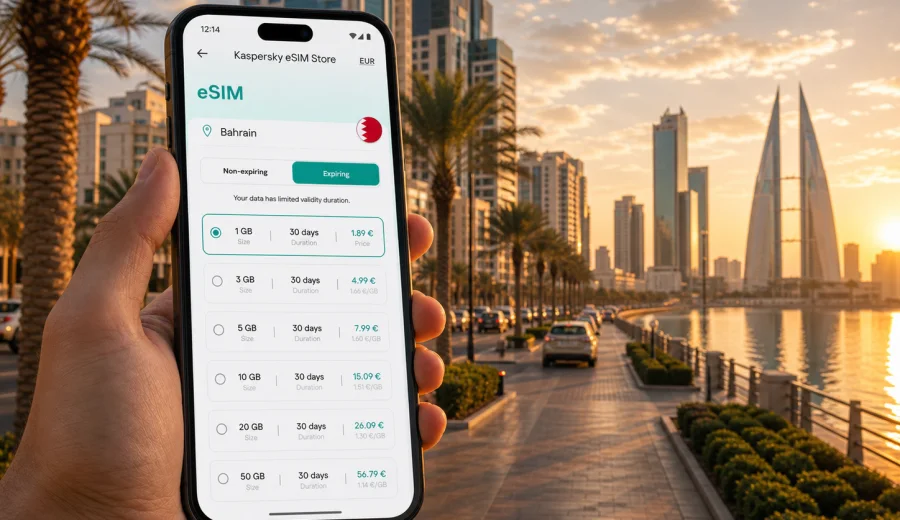
Juffair eSIM: mobile connection and internet for a Bahrain trip
Juffair is one of the most practical places to stay in Bahrain if your trip is built around hotels, meetings, restaurants, serviced apartments, short taxi rides, and quick access to central Manama. It is close enough to the airport for a smooth arrival, close enough to the business districts for a short commute, and lively enough that you may use maps, taxi apps, messenger calls, booking apps, and mobile payments from the first hour of the trip.
That is why mobile internet matters in Juffair. You may not be crossing a large country every day, but you will still depend on your phone constantly: confirming a hotel address, finding the right entrance, sharing a location with a driver, checking restaurant hours, using navigation between Juffair and Bahrain Bay, or answering work messages from a hotel lobby. An eSIM can help you prepare mobile data for Bahrain without looking for a physical SIM card after landing.
This guide explains how to think about eSIM for Juffair specifically: airport arrival, local movement, hotel stays, business schedules, short stopovers, and day trips from the district. It also explains what to check before choosing a tariff, how much data different travel styles may need, and how Kaspersky eSIM Store fits into the preparation process.
Why eSIM is useful in Juffair
Juffair is compact, but travel days there are often phone-heavy. Many visitors arrive with a packed schedule: check in, find a meeting point, move between a hotel and a restaurant, visit Manama or Muharraq, and stay reachable on messaging apps. A mobile data connection helps you handle these tasks without waiting for hotel Wi-Fi or searching for a shop that sells local SIM cards.
An eSIM is a digital SIM profile that can be installed on a compatible smartphone or tablet. For a trip to Juffair, it is mainly useful for mobile internet: maps, messaging, travel apps, email, browser use, and internet-based calls. It usually does not include a local phone number, standard voice calls, or SMS unless that is clearly stated in the conditions of a specific tariff.
In practice, eSIM is convenient in Juffair because it supports the small decisions that make a city trip smoother:
- finding the hotel after arrival;
- checking a driver pickup point;
- navigating between Juffair, Adliya, the Diplomatic Area, Bahrain Bay, Seef, and Muharraq;
- using messenger calls instead of ordinary international calls;
- checking restaurant reservations and event details;
- joining work calls from a hotel, cafe, or serviced apartment;
- using maps for short trips around Manama.
The main benefit is preparation. You can choose an eSIM tariff for the destination before the trip, install it on a compatible device, and be ready to use mobile data when local network conditions allow the profile to connect.
Arrival in Bahrain: why the first hour matters
Many Juffair trips start at Bahrain International Airport. The ride to Juffair is usually one of the first moments when mobile internet becomes useful. You may need to message the hotel, open a taxi or ride-hailing app, check the route, share your live location, or confirm whether a colleague is waiting in the lobby.
Airport Wi-Fi can be helpful, but it is not always the best foundation for the whole arrival process. You may lose it outside the terminal, in the car, or while moving between pickup zones. If your eSIM is already installed, you can switch to the prepared data profile when you are ready and avoid spending the first part of the trip looking for connectivity.
For Juffair arrivals, mobile data is especially useful for:
1. Confirming the exact hotel or apartment tower.
2. Checking the route from the airport to Juffair.
3. Sending your estimated arrival time.
4. Opening booking details without relying on saved screenshots.
5. Contacting a driver if the pickup point changes.
6. Receiving two-factor codes through apps or email where available.
The goal is not to keep your phone online every second at any cost. The goal is to avoid the small gaps that make the first hour harder: no map, no messenger, no booking reference, no way to update someone waiting for you.
Local movement: Juffair, Manama, and nearby districts
Juffair works well as a base because many useful places are a short ride away. You might go to Adliya for restaurants, the Diplomatic Area for meetings, Bahrain Bay for modern waterfront views, Seef for malls and offices, or Muharraq for cultural stops and airport access. These are not complex long-distance routes, but they often involve precise addresses and quick decisions.
Mobile internet helps when the name of a tower, hotel entrance, or restaurant is not enough for a driver. Maps, pinned locations, and messenger updates can prevent confusion. If you move between appointments, data also helps you check traffic, revise a route, or tell someone that you are five minutes away.
For a city stay, eSIM is often less about heavy data use and more about continuity. You want the phone to work during the exact moments when Wi-Fi is unavailable: in a taxi, outside a building, between hotel and restaurant, or while walking to a meeting point.
Common Juffair scenarios and mobile data needs
The amount of data you need depends on how you use your phone. A short business trip with email and maps may need far less than a week of video calls, hotspot use, and social media uploads. Use this table as a practical planning framework, not as a guarantee.
| Trip style in Juffair | Typical mobile data use | What to watch |
|---|---|---|
| One-night stopover | Maps, messages, hotel check-in, taxi apps | Keep video and cloud backups on Wi-Fi |
| Weekend city break | Maps, restaurant search, photos, messaging | Social video can use data quickly |
| Business trip | Email, calendar, messenger calls, documents | Video calls and hotspot use need more data |
| Remote work stay | Calls, file sharing, browser work, hotspot | Choose a larger allowance and track balance |
| Family trip | Multiple maps, messaging, entertainment | Separate devices can multiply data use |
If you will mostly use hotel Wi-Fi and only need data outside, a smaller tariff may be enough. If you expect to use your phone as a fallback for work, directions, and calls, choose a larger package so you are not forced to manage every megabyte.
How to choose an eSIM tariff for Juffair
Choose a tariff by destination, length of stay, expected data use, and device compatibility. For a Juffair stay, the destination should be Bahrain, because Juffair is a district in Bahrain and a city article should use the country tariff that covers the country where the city belongs.
Start with four questions:
1. How many days will you stay in Juffair or elsewhere in Bahrain?
2. Will you mainly use mobile data for maps and messaging, or also for video calls and hotspot?
3. Will you travel only in Bahrain, or continue to another country in the region?
4. Does your phone or tablet support eSIM and allow adding a new eSIM profile?
If your trip is focused on Juffair and Manama, choose a tariff that matches Bahrain and the length of your stay. If your route includes several countries, compare whether a regional option is more suitable. Conditions vary by tariff, so always read the destination, data allowance, validity period, and activation rules before you pay.
When you are ready to prepare mobile data for the trip, you can choose an eSIM plan for Bahrain before travelling to Juffair through Kaspersky eSIM Store. The service helps you select, arrange, and activate an eSIM with a suitable tariff for mobile internet in an international trip, while the actual conditions depend on the selected tariff.
A practical data plan for different Juffair stays
For a short stopover, think about essential tasks: airport transfer, hotel check-in, maps, messaging, and a few searches. You may not need a large data allowance if you avoid video and use hotel Wi-Fi for backups and updates.
For a three- to five-day stay, include restaurant searches, taxi apps, navigation, messenger calls, emails, and social updates. This is where a medium allowance may feel more comfortable because you will use data repeatedly throughout the day.
For a business trip, allow extra room for work. Email attachments, cloud documents, conference calls, and hotspot use can raise consumption quickly. If your hotel Wi-Fi is unstable or your schedule takes you between several locations, a larger allowance gives you more flexibility.
For a longer serviced-apartment stay in Juffair, check whether the tariff validity period matches your dates. A large allowance with a short validity period may not help if your trip is longer than the tariff duration. A smaller allowance with the right validity may be more practical for light users.
Before you buy: compatibility and device checks
Not every device supports eSIM, and some devices can differ by region of sale. Before choosing a tariff, check your device and confirm that it supports eSIM, is not locked by a carrier, and can add a new mobile data profile.
Use this quick checklist before a Juffair trip:
- Check that your smartphone or tablet supports eSIM.
- Make sure the device is not carrier-locked.
- Update the operating system if an update is required for eSIM setup.
- Keep access to Wi-Fi or another internet connection during installation.
- Read the tariff conditions, including destination, data volume, validity, and activation rules.
- Decide which line will be used for mobile data after arrival.
If you use a dual-SIM phone, you can usually keep your primary SIM for your usual number and use the eSIM profile for mobile data. Exact options depend on the device model and operating system.
How to install and activate eSIM for Juffair
The installation flow depends on your device, but the travel scenario is usually simple: choose the destination, arrange the tariff, install the eSIM profile, and select it for mobile data when you want to use it. If you need step-by-step setup details, use the Android installation guide or the iOS installation guide.
A safe preparation sequence looks like this:
1. Check device compatibility before choosing a tariff.
2. Choose Bahrain as the destination for a Juffair stay.
3. Review the data allowance, validity period, and conditions.
4. Install the eSIM profile while you still have a reliable internet connection.
5. Keep your primary SIM active if you need your usual number.
6. After arrival, select the eSIM profile for mobile data.
7. If required by the device or tariff, enable data roaming for the eSIM profile.
8. Wait a few minutes for the device and local network to complete connection.
Do not delete the eSIM profile unless you are sure you no longer need it. Some eSIM profiles cannot be transferred to another device after activation, and removing a profile may make it difficult or impossible to use again depending on the tariff conditions.
Hotel stays and serviced apartments in Juffair
Juffair has many hotels and serviced apartments, so Wi-Fi is usually part of the travel routine. Still, hotel Wi-Fi does not solve every mobile internet need. You may need data before check-in, after checkout, in elevators or parking areas, in taxis, or when walking between nearby places.
For hotel stays, use Wi-Fi for heavy tasks where possible:
- cloud photo backup;
- operating system updates;
- large app downloads;
- long video calls;
- streaming;
- file transfers.
Use eSIM mobile data for tasks where mobility matters:
- maps and directions;
- ride-hailing or taxi coordination;
- messenger calls on the move;
- restaurant and meeting confirmations;
- checking bookings outside the hotel;
- emergency access to email or documents.
This division helps preserve your data allowance while keeping the phone useful during the parts of the trip where Wi-Fi is not available.
Business trips to Juffair
Juffair is a common base for business travelers because it combines hotels, apartments, restaurants, and access to central Manama. If you are visiting for meetings, mobile data becomes part of time management. You may need to answer messages between appointments, open a presentation from cloud storage, join a call from a lobby, or navigate to an office in another district.
For business travel, choose a tariff with enough data for real work, not only for maps. Also consider the validity period. If your trip is four days, a tariff that covers the whole stay is easier than trying to conserve data because the package ends too soon or does not match your schedule.
Before leaving for a meeting, check three things:
1. Your eSIM profile is selected for mobile data.
2. The route and address are loaded.
3. Critical documents are available offline in case indoor reception or Wi-Fi is limited.
The eSIM is a useful backup, but it should not be your only preparation for an important meeting. Save key addresses, room names, and contact details before you leave the hotel.
Short stopovers and late arrivals
Juffair is also practical for short Bahrain stopovers. If you arrive late or leave early, you may not want to spend time looking for a SIM card. A prepared eSIM can help you focus on the basics: transfer, check-in, dinner, sleep, and the next departure.
For a stopover, keep the setup simple:
- choose Bahrain as the destination;
- install the eSIM before travel if possible;
- avoid heavy streaming on mobile data;
- keep hotel and flight details saved offline;
- use mobile data for maps, messaging, and ride coordination.
If you land late, do not wait until you are outside the airport and under pressure to solve connectivity. Install the profile earlier, then activate or select it for mobile data when you are ready and the conditions of the selected tariff allow it.
Juffair travel checklist for mobile internet
Use this checklist a day or two before departure:
- Save your hotel address in English and in your booking app.
- Save a map area around Juffair, Manama, and the airport for offline use.
- Install the eSIM profile while you have reliable internet access.
- Keep your QR code or profile access details available.
- Check which SIM line is used for calls, messages, and mobile data.
- Turn off automatic cloud backups on mobile data if you want to save allowance.
- Download important documents before travel.
- Keep a charger or power bank ready for long arrival days.
This preparation is especially useful if you arrive in the evening, travel for work, or depend on your phone for navigation and communication.
FAQ: eSIM and mobile internet in Juffair
Is eSIM useful if my hotel in Juffair has Wi-Fi?
Yes. Hotel Wi-Fi is useful for heavy tasks, but eSIM mobile data helps outside the hotel: airport transfer, taxis, maps, restaurant searches, and messages while moving around the city.
Should I choose a city or country tariff for Juffair?
For a Juffair trip, choose Bahrain as the destination because Juffair is in Bahrain. A city article should point to the country tariff that covers the city.
Can I use eSIM for calls in Juffair?
Usually, travel eSIM tariffs are intended for mobile data. Standard voice calls and SMS are not included unless the conditions of a specific tariff say otherwise. You can use messenger calls over mobile internet.
Can I install eSIM after arriving in Bahrain?
Yes, if you have an internet connection for setup and your device supports eSIM. However, installing it before departure is often more comfortable because you can solve setup questions before the arrival day.
Do I need to enable data roaming?
On some devices or tariffs, data roaming may need to be enabled for the eSIM profile. Check the setup instructions and tariff conditions, and make sure your phone uses the eSIM profile for mobile data.
What if my eSIM does not connect immediately?
Wait a few minutes, check that the eSIM profile is active, confirm that mobile data is assigned to the eSIM line, and review whether data roaming is required. If the issue continues, contact support through the available Kaspersky eSIM Store channels.
Choose an eSIM plan for your Juffair trip
Juffair is a city district where mobile data is useful in small but important moments: leaving the airport, finding a hotel entrance, coordinating a taxi, moving between meetings, checking a booking, or making an internet-based call from outside Wi-Fi coverage.
Before you travel, check that your device supports eSIM, choose Bahrain as your destination, review the tariff conditions, and install the profile while you have a reliable connection. Then, when you arrive in Bahrain, you can use the prepared eSIM profile for mobile internet according to the selected tariff conditions.
To prepare mobile data for the trip, choose an eSIM plan for Bahrain and use it for your stay in Juffair through Kaspersky eSIM Store.