Travel connectivity guide
Jyväskylä eSIM: Mobile Internet for Your Trip
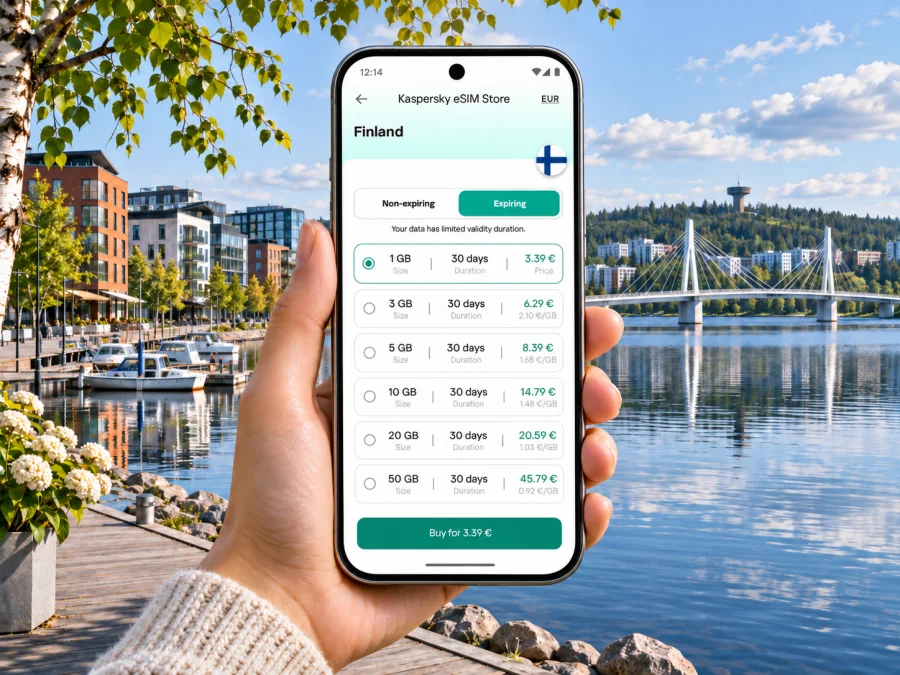
Jyväskylä eSIM: mobile connection and internet for your city trip
Jyväskylä is a compact university city in Central Finland, set among lakes and wooded ridges. A phone with mobile internet can make arrival, bus changes, accommodation check-in and lakeside walks easier to coordinate. An eSIM is one way to prepare that access before you travel: it is a digital SIM profile installed on a compatible, unlocked device. Choose a plan whose destination, validity and data allowance match your days in Finland.
This guide focuses on getting connected around Jyväskylä: arriving by air or rail, finding the city centre, moving between the Travel Centre, Lutakko and other districts, and deciding what to prepare before departure. It does not assume that a particular phone supports eSIM or that one plan will suit every route. Check the conditions shown for the plan you select and confirm current transport information on the day you travel.
What mobile internet helps with in Jyväskylä
The centre is easy to understand once you have a few reference points. Harju ridge rises beside the central streets; Jyväsjärvi and the harbour lie to the south, with Lutakko between the lakefront and the city centre. The Travel Centre (Matkakeskus) is the main local reference for rail and long-distance bus arrivals. These landmarks make a downloaded map useful, while live data helps when you need to compare a route, check a stop, contact a host or adjust plans because of weather.
You may use mobile data for:
- walking directions from the station or bus terminal to a hotel or meeting;
- checking local bus routes, stop locations and timetable changes;
- confirming a train or intercity bus departure and finding the right platform or boarding area;
- messaging a host, colleague or travel companion when an arrival time changes;
- translating a short sign or menu, and looking up opening hours before crossing town;
- booking a taxi or finding a pickup point when luggage, snow or a late arrival makes walking inconvenient;
- sharing a location or checking a lakeside route while keeping an offline map as a backup.
When plans change, live data helps. Save your address, bookings, a city map and ticket details in advance in case reception or battery is limited.
Arriving: airport, train and coach
Jyväskylä Airport is at Tikkakoski, outside the central urban area. Finavia lists Linkki public transport route 140 as serving the airport ramps. There is no direct train between the airport and the city centre. Because flight schedules and local timetables can change, check the current route and departure time before relying on a connection. If you arrive outside the bus service window or have a tight onward connection, plan a taxi or other transfer in advance rather than assuming a bus will be waiting.
The airport is not the only way to reach the city. Jyväskylä railway station and the long-distance bus terminal share the Travel Centre at Hannikaisenkatu 20. From there, the centre, Lutakko harbour and the Paviljonki event area are close enough to orient yourself on foot, depending on luggage, weather and your exact destination. The Travel Centre has waiting facilities and luggage lockers; verify operating hours and service details before building a long layover around them.
Before leaving the airport or Travel Centre, take a moment to check three things: your accommodation address, the best route for the time of day, and whether the final leg is on foot, by Linkki bus or by taxi. A map can distinguish a short-looking route from one that crosses a bridge or follows a lakeshore. With mobile data, you can update directions as you move; with an offline map saved, you retain a fallback if the connection drops.
A simple arrival checklist
- Save your hotel or apartment address in both text and map form.
- Check the airport route or the onward train/coach details using the current operator information.
- Keep the ticket and booking confirmation accessible offline.
- If taking a local bus, verify the stop, route direction, fare zone and ticket method before boarding.
- Leave enough time for a change between the airport, Travel Centre and your final destination.
In winter, cold can shorten battery life and snow can make walking slower. Carry a power bank and save your route.
Getting around the city without losing your bearings
Jyväskylä’s local public transport is called Linkki. Its green buses serve the city and surrounding municipalities, and the network extends beyond the centre. The airport route is numbered 140. Routes, timetables and ticket conditions can change, so use the current Linkki journey planner and ticket information rather than relying on a screenshot from an earlier visit. A phone connection lets you compare departure options and follow a route, but it does not replace a valid transport ticket.
The central area is compact enough for many short trips on foot. The Travel Centre sits by Lutakko, while the main shopping streets and pedestrian areas are uphill and north of the lakefront. The Kuokkala Bridge links the central area through Lutakko to Kuokkala; it is a useful landmark as well as a walking and cycling route. Around Jyväsjärvi, the Rantaraitti lakeside route connects places to stroll, run or cycle. Distances can feel different in wind, rain, snow or darkness, so check the forecast and the path surface before choosing a long walk.
| Trip situation | Useful digital check | Practical backup |
|---|---|---|
| Airport to central Jyväskylä | Current Linkki route 140 timetable and stop | Pre-arranged taxi or transfer if the bus timing does not fit |
| Travel Centre to a nearby stay | Walking route and entrance details | Save the address and ask the accommodation about late arrival |
| Centre to Kuokkala | Route planner, bridge crossing and walking time | Use Linkki if weather, mobility or luggage makes walking unsuitable |
| Centre to a meeting in another district | Bus direction, stop name and ticket rules | Keep the destination address in text for a taxi or local assistance |
| Lakeside outing | Map, daylight and weather | Download the route and carry a charged phone |
Treat the table as a planning aid, not a timetable. Check current operator information, especially around events, holidays and roadworks.
Choosing an eSIM for a stay in Jyväskylä
For a city break, the right amount of data depends on what you do on your phone. Messaging, web searches and occasional route checks use less than frequent video calls, cloud photo uploads, streaming or using your phone as a hotspot for a laptop. Estimate your normal daily habits, then add a sensible margin for the unexpected. If your visit includes more than one Finnish city, consider the full route and total travel days rather than selecting a plan based only on nights in Jyväskylä.
When comparing options, check that Finland is included, plus validity, activation timing, data allowance and hotspot terms. The Finland page currently lists DNA and Telia as local telecommunications providers; the available network depends on the chosen plan, device and local conditions. Offers and terms can change, and no listing guarantees a particular speed or reception inside a building.
If you are travelling from another country, Kaspersky eSIM Store is an app and website where you can choose, arrange and activate an eSIM with a suitable data plan for an international trip. You can check the currently available Finland options and compare their displayed allowances and validity before deciding. This is a country-level destination page, not a Jyväskylä-specific tariff or a guarantee of local coverage. Review the plan terms and your itinerary before purchase.
Match the plan to the way you travel
- A short city visit: use your expected map, messaging and browsing habits to estimate data. Download large files and maps over Wi-Fi before leaving.
- A work visit: account for video meetings, email attachments and any laptop connection. Check whether the selected plan allows hotspot use, and keep a reliable Wi-Fi option for calls that require it.
- A multi-stop Finland itinerary: check the full destination list and validity window. A plan that includes Finland may be convenient across several stops, but confirm every country and territory on the route in the plan conditions.
- A longer stay: compare the validity period with the full travel dates, including arrival and departure days. Do not assume unused data carries over or that an expired plan can be extended.
A data-only travel eSIM generally does not replace your regular number for conventional calls or SMS unless the selected plan explicitly says otherwise. Keep your normal SIM available if you need calls, bank verification messages or other services tied to your home number. Ask your regular provider how roaming behaves on your existing line so you can avoid unintended charges.
Before you buy: device and account checks
An eSIM works only when the phone or tablet supports eSIM and is not restricted by a carrier lock or other device limitation. Support varies by model, regional version and the market for which a device was made; two devices with similar names can differ. Check the manufacturer’s information for the exact model number and confirm that the device is unlocked. If you are unsure, check whether your device supports eSIM before selecting a plan.
Also check that you can access the email address or account used for the purchase, that your phone has enough battery for setup, and that you have a stable internet connection while downloading the eSIM profile. Keep your usual SIM active if you need its number. If you use two SIMs, learn where your phone’s settings let you choose which line handles mobile data, calls and messages.
Some phones require data roaming to be enabled for the travel eSIM to connect to its partner network. The right setting depends on the plan instructions and device. Enable it only for the eSIM line when the plan says to do so; do not assume that turning on roaming is necessary for every plan. Review the provider’s instructions before changing settings, and check that your home SIM is not selected for mobile data if you want to avoid using its roaming allowance.
Install and activate before or after arrival
You can often install an eSIM before departure when the plan instructions allow it, then activate or select it for data at the appropriate time. Installation and activation are not always the same event: the profile may be added earlier, while the plan’s validity may start according to its specific activation rule. Read that rule carefully. Do not delete an installed eSIM profile during troubleshooting unless the instructions or support team tell you to; some profiles cannot be installed again after removal.
A sensible setup sequence is:
- Connect to stable Wi-Fi and open the plan’s installation instructions.
- Add the eSIM using the method shown for your device, such as an in-app flow or QR code, if offered.
- Label the new line something clear, such as “Finland travel”, so it is easy to identify beside your regular SIM.
- Leave your regular line configured for calls and messages if you need it, and select the travel eSIM for mobile data when the plan is ready to use.
- Follow the plan’s guidance on data roaming and activation timing.
- After arrival, check the selected data line, signal indicator and plan status. If service does not start, use the troubleshooting steps below before changing several settings at once.
For step-by-step instructions, see the Android eSIM installation guide or the iPhone eSIM installation guide. Menu labels differ across operating-system versions and manufacturers, so follow the steps for your device rather than expecting every screen to look identical.
Troubleshooting if mobile data does not start
Start with low-risk checks. Confirm that the eSIM line is enabled and selected for mobile data, that the plan is within its validity period, and that the phone has a usable signal. Check whether the plan requires data roaming on that line. Toggle airplane mode once or restart the phone if the connection remains unavailable. Avoid deleting the eSIM profile or resetting network settings until you have reviewed the plan’s troubleshooting instructions, since those actions can remove settings you need.
Reception can vary indoors and by location; try again near a window or outside. If the problem persists, note your device model, location and checks already tried, then contact the support channel shown in your purchase or app.
Where a connection is useful in Jyväskylä
At the Travel Centre: check departures, share an arrival update and navigate to a stop or accommodation. Save your address before you arrive, when you may be handling luggage.
Around Lutakko and the harbour: maps help locate the lakeside route, an event venue or the Kuokkala Bridge crossing. If you are attending an event near Paviljonki or Lutakko, check the venue’s current entrance and transport advice.
In the centre, around Harju and across to Kuokkala: use a map to plan uphill paths, bridge crossings and onward streets. Check weather and daylight, and choose Linkki when walking is uncomfortable. For a meeting or campus visit, save the exact building entrance as well as its name.
Quick preparation checklist
Before leaving home, confirm the exact device variant supports eSIM, check that it is unlocked, and compare current Finland plan terms with your travel dates. Install the profile only using the supplied instructions and keep a copy of relevant setup details. At the same time, prepare your city logistics:
- save accommodation and event addresses, including postal codes where available;
- download an offline map of central Jyväskylä and the area around your stay;
- check the airport bus or your train/coach arrival against the current timetable;
- note how you will pay for local transport and where to check current ticket rules;
- keep your regular SIM settings and home-provider roaming terms in mind;
- pack a charger or power bank, especially for cold-weather travel;
- store tickets, emergency contacts and booking information so they remain available offline.
On arrival, select the travel eSIM for data only when you are ready to use it, following its activation terms. Keep your normal number available if you rely on it. Once connected, test a lightweight task such as opening a map or sending a message before depending on data for a time-sensitive transfer.
Common questions
Is eSIM useful for a short visit to Jyväskylä?
It can be useful if you want mobile data for maps, messages and travel updates without changing a physical SIM. Compare the plan’s destination, data amount, validity and activation rules with your actual stay. For a very short visit, Wi-Fi and roaming may also be options; compare their costs and convenience using your own provider’s terms.
Does an eSIM give me a Finnish phone number?
A travel data eSIM is generally intended for mobile data and may not include a conventional phone number, voice calls or SMS. Check the selected plan’s terms for the exact inclusions. Keep your regular SIM for calls or verification messages if needed, and use internet-based messaging or calling where appropriate.
Will one plan work throughout the trip?
Availability depends on the plan, partner networks, device and local conditions. Review the selected plan’s destination information and save offline maps for areas beyond the centre. Indoor reception and temporary network conditions can affect service.
Is every phone variant eSIM-compatible?
No. Support may depend on the exact model and regional variant, and the device may also be carrier-locked. Check the manufacturer’s specifications and your carrier status for the exact device, then use the compatibility checker before purchase if uncertain.
Should I install the eSIM before I fly?
Often it is convenient to install it while you have stable Wi-Fi, but follow the plan’s own instructions. Installation may not start the validity period, but activation rules differ. Confirm when the plan begins before you install or turn on the line.
What if my phone shows no service after landing?
Check that the eSIM is enabled and chosen for mobile data, that the plan is valid, and that any required roaming setting is enabled for that line. Move to a location with better reception and restart or toggle airplane mode once. Follow the plan’s troubleshooting guidance and contact the listed support if the issue continues. Keep the profile installed unless you are specifically told to remove it.
Plan the connection around the trip
For Jyväskylä, pair a suitable Finland data plan with current transport information, saved addresses and offline essentials. Check the airport route, use the Travel Centre for rail and coach journeys, and choose walking or Linkki according to your destination, luggage and the weather.
Before departure, compare the current plan details for Finland, confirm your device variant and decide when the eSIM should become active. Kaspersky eSIM Store lets you use its app or website to choose and activate a travel eSIM plan; review the available Finland options and select one that fits your route and expected data use. Keep your regular number for services that need it, save key travel information offline, and enjoy a more prepared arrival in Jyväskylä.


