
Travel connectivity guide
Kabul eSIM for mobile internet
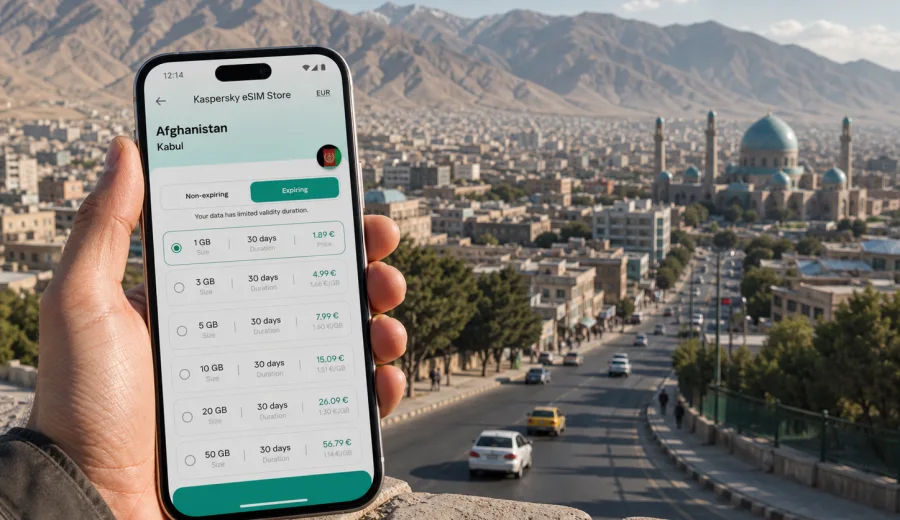
Kabul eSIM: mobile connection and internet for a city trip
Kabul is a city where a working mobile internet plan can shape the first hour of the trip. You may need a map before you leave the airport area, a messaging app to reach a hotel driver, a translation tool for a street address, or online access to confirm meetings and local transport. An eSIM is useful because it lets you prepare mobile data before travel without depending on a physical SIM card after arrival.
This guide is focused on Kabul, not on Afghanistan in general. It looks at how mobile connection and internet fit into real city scenarios: arrival, hotel check-in, local movement, business days, short stopovers, and trips that start from Kabul to other parts of the country. It also explains how to choose an eSIM plan with practical limits in mind: data volume, validity period, device compatibility, and the moments when you may still want offline backups.
Kaspersky eSIM Store is an app and website where you can choose, arrange, and activate an eSIM with a suitable data plan for mobile internet during an international trip. It is not a mobile network operator and does not provide coverage itself. The point is the travel scenario: you select the destination, check the plan terms, install the eSIM on a compatible device, and use the selected plan for data when local network conditions allow.
Why eSIM planning matters in Kabul
Kabul is spread across valleys, hills, official districts, markets, residential areas, hotels, and roads that can feel different from one neighborhood to the next. A visitor often moves between the airport area, central hotels, offices, guesthouses, diplomatic compounds, shopping streets, and departure points for routes out of the city. Even if your schedule is organized by a local host, mobile data helps you stay in control of small details.
Typical Kabul travel moments where data is useful include:
- sending your arrival time to a driver or hotel;
- sharing a live location with a colleague or family member;
- checking a saved map when street names are written differently across apps;
- translating short messages, menus, or address notes;
- confirming meeting times during a business trip;
- uploading travel documents to a secure cloud folder before a meeting;
- using messaging apps when voice calls are not included in a data-only eSIM plan;
- checking whether your route has changed before leaving the hotel.
An eSIM does not remove the need for local judgment. Traffic, security procedures, road closures, and access rules can change. For Kabul, it is sensible to keep key addresses, hotel contacts, and driver details available offline as well. Think of mobile internet as one layer in a practical travel setup, not the only layer.
Arrival in Kabul: what to prepare before landing
The best time to prepare mobile internet is before you are tired, carrying luggage, and trying to coordinate your next step. If your phone supports eSIM, you can install the eSIM profile while you still have a stable home or airport Wi-Fi connection. Then, after arrival, you can switch mobile data to the travel eSIM according to the instructions for your device and the selected plan.
Before you travel to Kabul, prepare this short checklist:
| Item to check | Why it matters in Kabul |
|---|---|
| eSIM compatibility | Not every phone or regional model supports eSIM. |
| Carrier lock status | A locked device may not accept another mobile profile. |
| Data volume | Maps, messaging, ride coordination, and video calls use data differently. |
| Validity period | A two-day stopover and a two-week assignment need different plan lengths. |
| Offline copies | Store hotel address, driver number, passport scan, and meeting locations. |
| Activation timing | Some plans start when installed, others when first connected; check terms. |
If your phone has one physical SIM and one eSIM profile, decide which line will handle mobile data and which line will remain active for calls or SMS from home. Many travel eSIM plans are designed for data and may not include a local phone number, standard voice calls, or SMS unless the plan terms say so. For calls, most travelers use internet-based messaging apps.
Moving around the city with mobile data
Kabul movement is rarely only about distance. A short route can take longer than expected because of traffic, checkpoints, road works, security procedures, or local access rules. Online maps and messaging help, but they should be combined with local advice from your hotel, host organization, or trusted driver.
Useful ways to use mobile internet in Kabul include:
1. Save your hotel and meeting locations in a map app before leaving.
2. Share your live location only with people who need it for coordination.
3. Keep a screenshot of the destination address in English and, if available, local script.
4. Confirm pickup points before you start moving, especially near busy entrances.
5. Download offline map areas when you have Wi-Fi, so navigation does not stop if data is weak.
Kabul's main travel patterns often include movement between central hotels, office locations, embassy or organization areas, local markets, restaurants, and departure roads. A data connection helps you update people when plans shift, but it is better not to rely on last-minute messages for essential safety or logistics. Agree on pickup points and fallback times in advance.
How much data do you need for Kabul?
There is no single correct data amount for every traveler. The right plan depends on how often you use maps, whether your hotel Wi-Fi is reliable, and how much work you do from the phone. A practical approach is to estimate by scenario rather than by guesswork.
| Trip type | Likely mobile internet use | Practical planning note |
|---|---|---|
| 1-2 day stopover | Messaging, maps, airport and hotel coordination | A smaller short-validity plan may be enough if Wi-Fi covers most use. |
| 3-5 day city visit | Daily navigation, translation, calls through apps, light browsing | Choose enough data for maps and messaging without constant monitoring. |
| Business trip | Email, calendars, document previews, messaging, taxi coordination | Consider extra data if you will tether a laptop or join calls. |
| Field work from Kabul | Maps, image uploads, long messaging threads, route updates | Plan more data and keep offline backups for critical documents. |
| Family visit | Messaging, photo sharing, video calls, local errands | Video calls can use data quickly; use Wi-Fi for long calls when possible. |
Data use can rise quickly if apps update in the background, cloud photo backup is active, or video autoplay is enabled. Before the trip, limit background data for nonessential apps. In Kabul, this helps preserve data for navigation, messaging, translation, and urgent work.
Choosing an eSIM plan for Afghanistan when your base is Kabul
For a Kabul city trip, select the Afghanistan destination rather than looking for a separate city-only plan. A city article uses the country plan because the mobile service terms are defined for the destination country or region. Review the plan details carefully: data amount, validity period, price, activation terms, and any instructions about roaming data on your device.
When you are ready to compare options, you can choose an eSIM plan for your trip to Kabul through the Afghanistan page in Kaspersky eSIM Store. Do this after you have checked device compatibility and confirmed that the plan duration matches your itinerary.
A good plan choice for Kabul usually answers four questions:
- Will the plan cover the entire stay, including arrival and departure days?
- Is the data volume enough for maps, messaging, and work apps?
- Do you know when the plan validity starts?
- Can your phone keep your primary SIM active for bank messages or important calls if needed?
Kaspersky eSIM Store helps you choose, arrange, and activate an eSIM with a suitable data plan for an international trip. The selected plan's performance depends on the terms of that plan, the device, and local network conditions. Avoid choosing only by the smallest data amount if you will need reliable access for meetings, family coordination, or route changes.
Districts, hotels, and daily routines
Your internet needs in Kabul may change by area. At a hotel, you may use Wi-Fi for laptop work and the eSIM for moving between appointments. In a market or restaurant area, you may use the eSIM for maps, translation, and messaging. In office or compound environments, access rules may limit where you can use devices, so it is useful to load information before you arrive.
For hotel-based trips, prepare these items:
- hotel name, address, and phone number saved offline;
- a map pin for the entrance, not only the street;
- the name of the area or nearby landmark;
- the driver's contact and vehicle details if arranged;
- screenshots of booking information;
- a backup meeting point if the main entrance is hard to access.
For business trips, mobile data is especially useful between fixed locations. Calendar changes, document links, and message threads often move faster than printed itineraries. Still, do not assume that every file will open smoothly on the move. Download meeting agendas, presentation PDFs, and contact lists before leaving the hotel or office Wi-Fi.
Installation and activation: a calm sequence
Install the eSIM while you have stable Wi-Fi and enough time to read each step. You usually receive an eSIM profile or QR code after arranging the selected plan. The exact flow depends on the phone model and operating system. You can follow the Android installation guide or the iOS installation guide for device-specific steps.
A practical installation sequence looks like this:
1. Check that your phone supports eSIM and is not locked to one carrier.
2. Arrange the plan for Afghanistan and keep the QR code or profile access available.
3. Add the eSIM in the mobile network settings while connected to Wi-Fi.
4. Label the new line clearly, for example "Travel data".
5. Keep your primary SIM for calls or messages if you need it.
6. Set mobile data to the eSIM when you are ready to use the plan.
7. Enable data roaming for the eSIM if the plan instructions require it.
8. Test messaging and maps before leaving the airport or hotel.
Before arranging a plan, check your device to confirm that it supports eSIM. This is important because eSIM support can vary by model, region, and carrier lock status. If your device is not compatible, you will need another connectivity option.
Kabul scenarios: which setup fits your trip?
Different travelers use mobile internet differently. Use these scenarios to decide how much preparation you need.
Short stopover
For a short stay, your priorities are arrival messages, hotel coordination, maps, and departure updates. Install the eSIM before the flight if the plan terms allow it, then keep data use focused. Download maps and booking details in advance. A small data plan may work if most browsing happens on Wi-Fi.
Business visit
For business travel, assume your phone will handle more than navigation. You may need calendar updates, email, messaging, two-factor prompts, document previews, and app-based calls. Choose a plan with enough data for work routines and keep important files offline. If you use a laptop hotspot, monitor data carefully because tethering can use a plan faster than phone-only browsing.
Family or personal trip
For personal travel, messaging and photo sharing can become the main data use. Use Wi-Fi for long video calls and cloud backups. Keep mobile data available for maps, translation, local coordination, and urgent messages when you are away from the hotel.
Trips from Kabul
If Kabul is the starting point for travel to other Afghan cities or provinces, check whether the selected country plan and local conditions fit the route. Save maps, contacts, and documents offline before leaving the city. Mobile internet may be less predictable outside major urban areas, so route planning should not depend only on live data.
Quick comparison: eSIM, roaming, local SIM, and Wi-Fi
| Option | Useful for | Main limits to consider |
|---|---|---|
| Travel eSIM | Preparing mobile data before or soon after arrival | Requires eSIM-compatible, unlocked device and suitable plan terms. |
| Home roaming | Keeping your usual SIM active with familiar billing | Costs and data limits can vary by operator and package. |
| Local physical SIM | Longer stays or local-number needs | May require time, documents, store visit, and language support. |
| Public or hotel Wi-Fi | Large downloads, video calls, laptop work | Not always available while moving and may require extra caution. |
For many Kabul visitors, the most practical setup is mixed: eSIM for mobile data while moving, hotel or office Wi-Fi for heavier work, and the home SIM kept active if you need bank messages or calls. This gives you flexibility without treating any single option as perfect.
Data-saving tips for Kabul
Use these settings before your first full day in the city:
- turn off automatic app updates on mobile data;
- disable cloud photo and video backup until Wi-Fi is available;
- download offline maps for Kabul and key route areas;
- save translation language packs if your app supports them;
- restrict background refresh for social apps;
- send compressed images in messaging apps when possible;
- use Wi-Fi for long video calls and large document uploads;
- keep a small data reserve for departure day.
These small changes make the eSIM plan more predictable. They also reduce the chance that a background task uses data you expected to keep for navigation or airport coordination.
Common mistakes to avoid
The most common eSIM mistakes are simple and preventable:
- buying or arranging a plan before checking eSIM support;
- installing the eSIM but leaving mobile data on the home SIM;
- forgetting to enable roaming data for the eSIM when required;
- choosing a plan that expires before the departure day;
- using video and cloud backup on mobile data without noticing;
- deleting the eSIM profile before the trip is over;
- assuming a data-only plan includes ordinary phone calls or SMS.
If you are unsure which line is active, open your phone's mobile data settings and check the label of the selected data line. Rename the travel eSIM clearly so you can recognize it during the trip.
FAQ
Is eSIM useful for a trip to Kabul?
Yes, if your phone supports eSIM and the selected plan fits Afghanistan. It can help you prepare mobile data for maps, messaging, translation, and travel coordination before you search for other options after arrival.
Does an eSIM include a local Afghan phone number?
Usually no, unless the specific plan terms say otherwise. Many travel eSIM plans are intended for mobile data. For calls and messages, you can use internet-based apps or keep your primary SIM active for regular calls and SMS.
Should I install the eSIM before flying to Kabul?
Install it before travel if the plan terms allow and you have stable Wi-Fi. Check when validity starts, because activation rules can differ. If in doubt, install the profile in advance and turn on mobile data for the eSIM when you are ready to use it.
Can I use an eSIM outside Kabul?
The destination is Afghanistan, not only Kabul, but actual usability depends on the selected plan, local networks, device settings, and conditions along your route. For travel outside the city, save critical information offline.
Is public Wi-Fi enough in Kabul?
Wi-Fi may help at hotels, offices, or cafes, but it is less useful when you are moving, waiting for a driver, or checking directions. A travel eSIM can reduce dependence on fixed Wi-Fi points, while Wi-Fi remains useful for large downloads and video calls.
Choose mobile internet for your Kabul trip
A good Kabul connectivity plan is practical and layered: install an eSIM on a compatible phone, keep important details offline, use Wi-Fi for heavy tasks, and reserve mobile data for navigation, messaging, translation, and travel coordination. Before you depart, review the plan terms, data amount, validity period, and activation instructions.
If Kabul is your destination, you can prepare an eSIM plan for Afghanistan in Kaspersky eSIM Store and use it as part of your mobile internet setup for the trip.