
Travel connectivity guide
Kampot eSIM: Mobile Internet in Cambodia
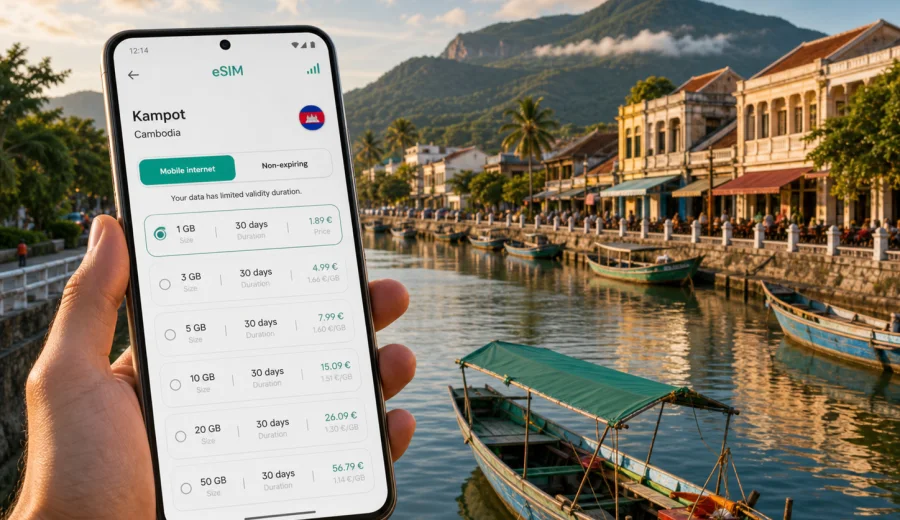
Kampot eSIM guide: mobile connection and internet for a calm Cambodia trip
Kampot is a relaxed riverside city, but mobile internet still matters from the first hour of the trip. You may need maps after a minivan ride, a message to your guesthouse, translation at a market, a route to a pepper farm, or a quick weather check before Bokor Mountain. An eSIM helps keep these small travel tasks on your phone instead of depending only on hotel Wi-Fi or a last-minute physical SIM search.
This guide is about using eSIM and mobile connection in Kampot, Cambodia. It focuses on arrival, local movement, hotels, transport, riverside plans, day trips, business stays, and short stopovers. The goal is practical: prepare mobile internet before you need it, choose a data amount that fits your route, and avoid solving connectivity while you are tired, carrying luggage, or trying to find your accommodation.
Why mobile internet matters in Kampot
Kampot is smaller than Phnom Penh, but it is not a single-street destination. The city spreads along the Kampot River, with central cafes, riverside guesthouses, bridges, markets, tour desks, and quieter stays outside the main blocks. Some routes are easy on foot, while others are better by tuk-tuk, bicycle, scooter, or private car.
Mobile internet is useful for:
- finding your hotel after arriving by bus, train, or private transfer;
- sharing a map pin with a tuk-tuk driver;
- checking routes before crossing the river or leaving the center;
- comparing restaurant opening hours and recent reviews;
- translating menus, pharmacy questions, and market conversations;
- receiving booking messages for river cruises, pepper farms, and day trips;
- managing onward travel to Kep, Phnom Penh, Sihanoukville, or border areas.
The main benefit is not constant screen time. It is control. If plans change because of weather, transport timing, or a hotel pickup message, your phone can help you adjust without looking for public Wi-Fi.
Where an eSIM helps most in the city
Kampot travel often combines a compact town center with short trips outside the city. You might walk to a cafe in the morning, ride to the salt fields in the afternoon, and return to a riverside bungalow after dark. That mix makes a prepared eSIM practical.
| Kampot situation | Why internet helps | Useful phone tasks |
|---|---|---|
| Arrival by bus or minivan | Drop-off points can vary | Open maps, message the hotel, confirm pickup |
| Riverside stay | Some guesthouses sit outside central blocks | Share location, arrange rides, check walking routes |
| Scooter or bicycle route | Roads become quieter outside town | Use navigation, save return route, check weather |
| Pepper farm visit | Farms are outside the city | Confirm tour time, translate questions, keep the route |
| Bokor Mountain trip | Timing and weather matter | Check forecast, stay in contact with driver or group |
| Kep side trip | Plans often change around stops | Compare routes, keep tickets and booking details online |
For a one-night stop, eSIM is mostly about convenience. For a longer stay, it becomes part of daily planning: laundry, cafes, coworking, transport, food delivery where available, and contact with hotels or tour providers.
Arrival in Kampot: prepare before the last ride
Many visitors reach Kampot by road from Phnom Penh or Sihanoukville, and some arrive by rail. The final transfer can be simple, but it is easier when mobile data is ready before you step out with bags. If your transport stops away from your exact hotel, you can open the map, send your location, and decide whether to walk or take a ride.
Before the journey, save these details outside a live internet connection:
- hotel name, address, phone number, and map pin;
- booking confirmation and check-in time;
- transport company name and ticket details;
- onward travel information after Kampot;
- passport and insurance copies in a secure offline folder;
- offline map areas for Kampot and any planned side trips.
Then prepare the online layer: install the eSIM on stable Wi-Fi if possible, read the activation rules, and keep the app or QR code available. This reduces pressure if you arrive late, if the weather changes, or if your driver needs a more precise location.
Choosing data for Kampot, Cambodia
The right eSIM data amount depends on how you use your phone. A light traveler may only need maps, messaging, translation, and occasional browsing. A remote worker, family organizer, or traveler uploading photos can need much more.
| Trip style | Typical data need | What to consider |
|---|---|---|
| Short stopover, 1-2 days | Low to moderate | Maps, messages, hotel coordination |
| Long weekend, 3-4 days | Moderate | Day trips, bookings, navigation, photo sharing |
| Slow travel, 1 week or more | Moderate to high | Daily planning, cloud sync, social media |
| Remote work base | High | Video calls, tethering, file transfers |
| Group travel | Varies | One phone may handle routes and bookings for everyone |
For Kampot, choose a Cambodia destination plan rather than looking for a city-only product. Check data volume, validity period, destination, price, and activation conditions before purchase. If your trip includes another country, compare whether a country plan or regional plan better fits the full route.
Coverage expectations and smart habits
Mobile experience can vary between central Kampot, riverside hotels, mountain roads, rural pepper farms, and indoor spaces. Building materials, weather, network conditions, and device settings can all affect performance. Treat eSIM as a mobile data option for the destination, not as a guarantee that every corner of every route will behave the same way.
Good habits help:
- download offline maps for Kampot, Kep, and your onward route;
- keep your hotel address saved outside the booking app;
- avoid large cloud backups on mobile data;
- save tour confirmations before leaving town;
- carry a power bank if you will use maps for several hours;
- check whether hotspot use is supported if you plan to work from a laptop.
This is especially important outside the center. If you ride independently toward Bokor Mountain, the salt fields, or a pepper farm, open the route first and avoid checking the phone while moving.
When to set up your eSIM
For most travelers, the best time to install the eSIM is before departure, while you have stable Wi-Fi and time to read the instructions. Activation timing depends on the selected plan, so check the plan details carefully. Some travelers install before flying and select the eSIM for mobile data after arrival; others complete setup shortly before entering Cambodia.
A practical setup sequence:
1. Check that your phone supports eSIM and is not carrier-locked.
2. Choose Cambodia as the destination for your Kampot trip.
3. Compare data amounts and validity periods.
4. Complete the order through the site or app.
5. Install the eSIM using the provided instructions.
6. On arrival, select the eSIM for mobile data if required.
7. Turn on data roaming for the eSIM if the plan instructions say it is needed.
8. Test maps and messaging before leaving the arrival point.
If you need detailed installation steps, use the Android setup instructions or the iOS setup instructions before you travel. Exact menu names can vary by device model and operating system version.
The first data decision in Kampot
The moment mobile internet becomes valuable in Kampot is often simple: you are outside a bus office, your hotel is across the river, a driver asks for a map pin, or you want to change dinner plans after sunset. If the eSIM is already installed, you can make the decision instead of searching for Wi-Fi.
For a city trip, Kaspersky eSIM Store can help you choose an eSIM data plan for Cambodia before visiting Kampot. Use the plan page to compare data volume and validity, then pick the option that matches your stay length, route, and expected internet use.
This is useful if Kampot is one stop in a wider Cambodia itinerary. You may start in Phnom Penh, slow down in Kampot, visit Kep, and continue toward the coast or another country. A prepared eSIM keeps the mobile data decision tied to the destination instead of to a shop visit in each city.
Kampot areas and travel patterns
Central Kampot and the riverside are convenient for cafes, restaurants, guesthouses, and evening walks. In this area, mobile data is usually used in short bursts: opening maps, checking reviews, arranging a ride, or translating a menu.
Across the river, stays can feel quieter and more scenic, but transport coordination matters more. Save your accommodation pin and send it directly when arranging pickup. If you plan to return after dark, confirm the route before leaving the center.
Outside town, mobile internet supports trips to pepper farms, salt fields, cave temples, and rural viewpoints. Save directions while the connection is strong, keep enough battery for the return, and do not rely only on live navigation if you are riding a scooter or bicycle.
For hotels and longer stays, eSIM can work as a backup when Wi-Fi is crowded or unstable. It is also useful when you leave the property for errands, cafes, coworking, or transport planning.
Transport in Kampot with mobile internet
Kampot transport is flexible: walking, bicycles, scooters, tuk-tuks, private cars, buses, minivans, and train connections can all be part of the trip. Mobile internet helps you compare routes and communicate clearly when landmarks or hotel names are not obvious.
Before moving around, check:
- destination name and map pin;
- agreed price or booking details where relevant;
- phone battery and power bank level;
- offline route for rural trips;
- enough mobile data for the return;
- meeting point if your group splits up.
For scooter trips, stop safely before checking maps. For mountain or rural routes, confirm the weather, distance, and return time before leaving central Kampot.
Business trips and remote work
Kampot can be a quiet base for a few working days. If you need to handle calls, documents, or client messages, plan data more carefully than a casual traveler.
Consider:
- a data allowance that can cover unexpected tethering;
- whether your phone supports hotspot with the selected eSIM;
- a backup cafe or hotel space for important calls;
- cloud sync settings that do not consume data in the background;
- a charger and power bank for long work sessions.
An eSIM can be useful as a backup connection if Wi-Fi is unstable, but important presentations or large uploads should have a second plan. Test the connection before a critical call and keep essential files available offline.
Stopovers and day trips
Some travelers use Kampot as a short stop between Phnom Penh, Kep, Sihanoukville, or the coast. In that case, the goal is speed and simplicity.
For a short stay, prioritize:
1. Mobile data working before you leave the arrival point.
2. Offline map saved for the center and your hotel area.
3. Hotel and onward ticket details available without Wi-Fi.
4. Enough data for maps, messaging, bookings, and translation.
5. A clear plan for the next transfer.
Common trips from Kampot include Kep, pepper farms, salt fields, Bokor Mountain, cave temples, and rural villages. Before leaving the city, open the route, confirm pickup details, and save essential messages. If your group separates, agree on a meeting point that does not depend only on live location sharing.
Device compatibility before you buy
Not every phone supports eSIM, and some compatible phones can still be locked by a carrier. Check this before paying for a plan. Verify the exact model, operating system settings, and carrier lock status before your trip.
Before buying, check your device and make sure it supports eSIM for travel use. Also confirm that you can add a new cellular plan and that your phone has enough battery to complete setup. If you use dual SIM, decide which line will handle mobile data and which line will remain available for calls or messages.
Data-saving tips for Kampot
Kampot is a good place to slow down, but your phone may not reduce data use automatically. App updates, cloud backup, video autoplay, and photo sync can use data quickly.
Use these settings before relying on mobile data:
- disable automatic app updates on mobile data;
- pause cloud photo and video backup unless you have enough allowance;
- download offline maps and translation language packs;
- use reliable hotel Wi-Fi for large uploads;
- monitor data use in phone settings;
- limit autoplay video in social apps;
- keep messaging and maps as the priority uses.
For most Kampot travel days, maps and messaging are essential. Streaming, uploads, and tethering are the heavy uses. Separate these categories before choosing a plan and your data estimate will be more realistic.
Quick checklist before arrival
- Your phone supports eSIM and is not carrier-locked.
- Cambodia is selected as the destination for the Kampot trip.
- The plan validity covers arrival, stay, and onward transfer.
- You understand when the data period starts.
- The eSIM is installed or ready to install on stable Wi-Fi.
- Installation instructions are saved.
- Data roaming settings are understood for the selected eSIM.
- Offline maps are downloaded for Kampot and side trips.
- Hotel and transport confirmations are saved.
- A power bank is packed for long travel days.
FAQ: eSIM and mobile internet in Kampot
Is an eSIM useful if my hotel has Wi-Fi?
Yes. Hotel Wi-Fi helps at the property, while eSIM data helps outside: maps, tuk-tuks, restaurant searches, translation, day trips, and onward travel.
Should I choose a Kampot-specific plan?
Choose a Cambodia destination plan for a Kampot trip. The city is the travel focus, but the mobile data plan is tied to the country destination.
Can I use eSIM data for calls?
Most travel eSIM data plans focus on mobile internet. Voice calls and SMS are not usually included unless the selected plan clearly says so. Many travelers use messaging apps over mobile data.
When should I install the eSIM?
Install it before travel on stable Wi-Fi, then activate or select it for mobile data according to the plan instructions. Check activation rules before installing if timing matters.
Is eSIM enough for remote work in Kampot?
It can help as a mobile data option or backup connection. For important calls, check hotspot support, data allowance, battery, and a backup Wi-Fi location.
Final preparation before you travel
Kampot is easier when simple things are ready: a saved hotel pin, an offline map, transport details, and mobile internet on a compatible phone. The city is calm, but your first hour is smoother when you can message a driver, open a map, check a booking, and confirm the route without searching for Wi-Fi.
Before departure, choose a data amount that fits your stay, check device compatibility, install the eSIM on stable Wi-Fi, and keep the setup instructions available. Then use mobile internet for the practical parts of Kampot: arrival, riverside movement, day trips, translation, booking changes, and onward travel.
To prepare your phone for the trip, use Kaspersky eSIM Store to select a Cambodia eSIM data plan for your Kampot visit and complete the setup before you need mobile internet on the road.