Travel connectivity guide
Kanazawa eSIM: Mobile Internet for Your Trip
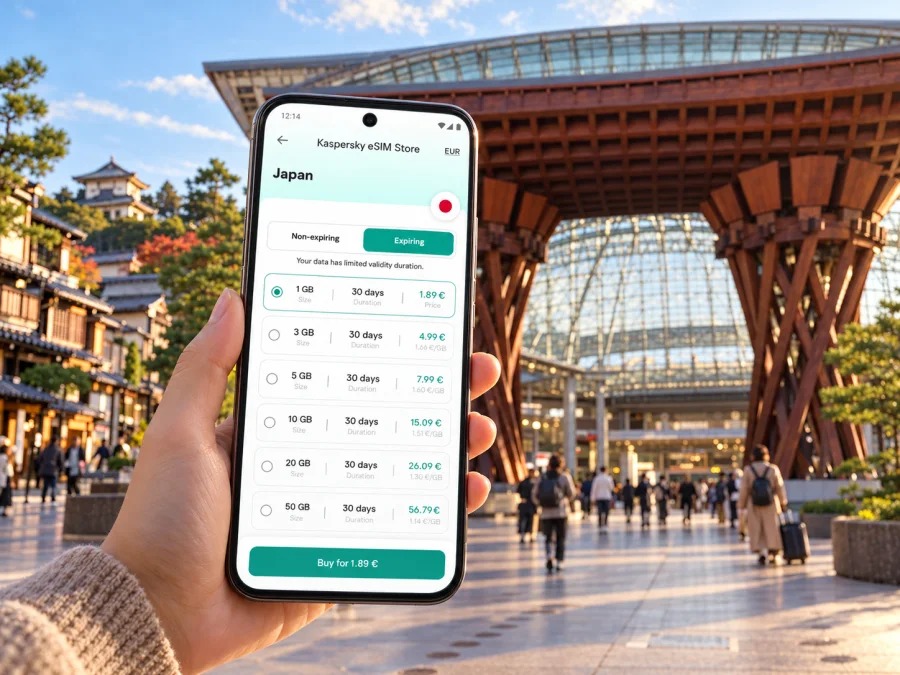
Kanazawa eSIM: Mobile Connection and Internet for Your Trip
Kanazawa rewards an unhurried visit: one day might begin beneath the grand wooden Tsuzumi-mon gate, continue through the lanes around Omicho Market, and end among the teahouses of Higashi Chaya. A dependable way to check maps, bus routes, opening information and messages can make those transitions easier. An eSIM can provide mobile data during your visit without taking out your home SIM, provided your phone supports eSIM and the plan you choose covers Japan.
This guide focuses on how to plan for mobile internet in Kanazawa: arriving by train or through Komatsu Airport, finding your way between districts, choosing accommodation, and deciding how much connectivity your itinerary needs. Local transport schedules, ticket rules and mobile plan terms can change, so check them again close to your travel dates.
What an eSIM can do on a Kanazawa trip
An eSIM is a digital SIM profile installed on a compatible device. A travel data plan can be useful for opening a map after leaving Kanazawa Station, checking a bus stop, translating a menu, confirming a reservation or messaging your accommodation while you are out. You can prepare the profile before departure and follow its provider’s instructions for when to enable it.
An eSIM does not by itself guarantee a signal in every building or on every route. Service depends on the plan’s terms, its underlying network, local conditions, your device and settings. Read the destination, data allowance, validity period, activation rules and any restrictions before completing a purchase. Many travel eSIM plans are designed for data; do not assume they include a Japanese phone number, ordinary voice calls or SMS unless the specific offer says so. Messaging and voice apps can use data, while calls to local services may require another arrangement.
Keep your existing number available if you need it for one-time codes or calls. Check with your home carrier about roaming charges, and decide which SIM should handle mobile data. If you keep two lines active, confirm the device settings carefully so that data does not switch to the more expensive line unexpectedly.
First connection: the station, the airport and your first map
Most visitors arriving by rail begin at Kanazawa Station. Its large Motenashi Dome shelters the bus terminal, while the Tsuzumi-mon gate is a useful landmark at the East (Kenrokuen) Exit. The station’s tourist information center can help with local visitor information, and there are hotels, restaurants and shops around the station. Download or save your accommodation address before you leave home, especially if you expect to arrive late or need to conserve battery.
If your route uses Komatsu Airport, the airport publishes a limousine bus connection to Kanazawa Station. The airport’s current access information gives an approximate journey of 40 minutes; services are tied to flight schedules and timetables can change. Confirm the bus operating on your arrival date and how to pay before boarding. Keep the hotel name and address visible offline as a backup in case you have not yet activated mobile data.
From Tokyo, the Hokuriku Shinkansen runs to Kanazawa Station. The official rail information lists a fastest journey of about two and a half hours, though the train and schedule you choose affect the actual trip. Routes from Osaka and Kyoto can involve a transfer at Tsuruga, so check the itinerary rather than assuming a direct train. For an onward bus or a day trip, save the departure point as well as the destination: a station name alone may not identify the correct terminal.
A low-stress arrival sequence
- Before travel, save your accommodation’s address in Japanese and English, plus an offline map of central Kanazawa.
- Check whether your chosen eSIM can be installed before departure and when its validity begins. Follow the provider’s activation instructions; installation and activation are not always the same event.
- At the station or airport, connect to Wi-Fi if you need to finish setup, check the day’s transport information or contact your accommodation.
- Once you are ready to use the travel line, select it for mobile data and confirm data roaming settings exactly as the eSIM instructions specify.
- Test a map or message before setting off. Keep the route, hotel address and important booking details available offline as a fallback.
For digital setup steps, use the Android eSIM installation guide or the iPhone eSIM installation guide. The exact menu names differ by operating-system version and manufacturer, so follow the instructions for your device rather than relying on a generic sequence.
Getting around Kanazawa without losing your bearings
Kanazawa is more manageable when you think in clusters rather than treating every attraction as a separate cross-city trip. The official visitor guide describes many major sights as being concentrated within roughly two kilometres of Kanazawa Castle Park. Walking is practical between nearby areas, while the Kanazawa Loop Bus, local buses, taxis and shared bicycles can help when the weather turns or your schedule is tight.
The Loop Bus starts at Kanazawa Station and connects central visitor areas including Omicho Market, Higashi Chaya, Kenrokuen and Kanazawa Castle, the 21st Century Museum of Contemporary Art, and Nagamachi. There are clockwise and counterclockwise routes. Check the route code and current timetable at the stop; the bus colour can vary. Walking directions are helpful for estimating short distances, but narrow streets, crossings, rain and crowds can make a route take longer than a map suggests.
| Area or stop | Why it helps to save it | Connectivity task that may come up |
|---|---|---|
| Kanazawa Station | Rail arrivals, bus terminals, tourist information and nearby accommodation | Find the right exit, platform or bus stand |
| Omicho Market | Food stalls, shops and a convenient central meeting point | Check opening details, find a restaurant or share a location |
| Higashi Chaya District | Historic streets and teahouse architecture | Navigate on foot and locate a reservation |
| Kenrokuen and Kanazawa Castle Park | A large garden and castle-area walk | Check entrances, bus stops and current visiting information |
| Hirosaka and the 21st Century Museum | Museum visits and nearby cultural stops | Review admission or exhibition information before arrival |
| Nagamachi | Former samurai district with lanes and historic residences | Find a specific lane or return to a bus stop |
| Korinbo | Shopping, dining and an accommodation option | Coordinate an evening meeting or route back to the hotel |
A live map is particularly useful when you need to choose between walking and a bus, but it should not replace checking the stop name and direction on the actual route. In Kanazawa, buses can have different payment rules. The city visitor guide says the Loop Bus accepts cash, nationwide IC cards and contactless credit cards, while some Hokutetsu local buses do not accept nationwide IC cards. Contactless payment may require tapping both when boarding and when getting off. Check the signage and current operator guidance for the specific service you board.
Keep a little flexibility in your itinerary. If a bus is full, delayed or difficult to board with luggage, a nearby walk or taxi may be simpler. Save your next stop and hotel in the map before leaving Wi-Fi, and keep enough battery for navigation. A small power bank is useful on days when the phone handles maps, camera, tickets and translation.
Pick a base that fits your plans
Kanazawa has several practical accommodation areas, and the right one depends on whether you value station access, evening dining or time in the historic center.
- Near Kanazawa Station: convenient for Shinkansen arrivals, airport buses, luggage storage and early departures. It is a sensible choice for a short stay or a trip with onward rail travel.
- Around Omicho Market: a central base for morning food stops and walks toward the castle area. Check the precise address; “near the market” can mean different walking distances and routes.
- Korinbo: useful for shopping, restaurants and reaching several central districts. It is on the Loop Bus route and within walking distance of many attractions.
- A traditional inn or ryokan: can make the stay itself part of the experience. Confirm check-in hours, meal arrangements and the exact route from the nearest stop, particularly if you will arrive with luggage.
On a booking page, save the property’s full address, Japanese name and phone number. A map pin can be misplaced or labeled differently from the entrance. If the property offers arrival directions, download a screenshot. These small preparations reduce dependence on a data connection during the first few minutes in the city.
Plan your mobile data around the actual itinerary
In Kaspersky eSIM Store, the app and website help you choose, purchase and activate an eSIM with a suitable plan for mobile internet on an international trip. You can review options for a trip to Japan and compare the current plan details with your dates and expected use. The destination page is for Japan as a country; it does not guarantee identical service in every place or building, and the terms shown for each plan should guide your choice.
There is no single data allowance that fits every Kanazawa visit. A traveler who mostly walks, uses offline maps and checks messages occasionally has different needs from someone who uploads video, joins work calls or uses navigation throughout the day. Estimate your use by activity and leave room for unplanned searches.
| Typical use | A practical preparation |
|---|---|
| Maps and walking directions | Download the central area in an offline map app; use live routing when needed |
| Bus planning | Check route and timetable before leaving; save stop names and the hotel address |
| Translation and search | Download language resources where the app allows it; limit automatic media downloads |
| Photos and social sharing | Upload on trusted Wi-Fi when convenient rather than sending every file on mobile data |
| Remote work | Confirm whether the plan permits your expected use and whether your meetings need stable data |
| Messages and bookings | Keep confirmation emails or screenshots available offline |
When you compare offers, look at the amount of high-speed data, the validity period, supported destination, activation conditions, tethering rules if relevant, and what happens when the included data is used. Do not choose by the advertised data quantity alone. A plan that expires before the final day or begins counting down earlier than expected may not match your itinerary. If your trip includes multiple countries, check whether the exact regional plan covers each stop; a Japan-only plan should not be assumed to work elsewhere.
Check the phone before buying
Confirm that your phone supports eSIM and is not restricted by a carrier lock. Compatibility can vary by the exact device model, country or regional variant, and the carrier that sold it. A product family name is not enough to establish support: check the exact model identifier and the manufacturer or carrier documentation for your particular version. If you are unsure, check your device’s eSIM compatibility before selecting a plan.
Also check that you can access the email address or account used to receive setup details, that your phone has its latest supported software, and that you can connect to Wi-Fi during installation if needed. Avoid deleting an installed eSIM profile while troubleshooting unless the provider’s instructions tell you to; some profiles cannot simply be reinstalled without assistance.
A one-day route with useful connectivity pauses
For a first visit, group nearby sights and leave room for a meal or a change in weather. This route is a framework; confirm current opening hours and bus times before setting out.
- Morning: start at Omicho Market, then walk toward Kanazawa Castle Park. Save the route before leaving your hotel.
- Midday: visit Kenrokuen and nearby museums. Check venue information, and use a downloaded map if you prefer to put your phone away in the garden.
- Afternoon: choose Higashi Chaya for historic teahouse streets or Nagamachi for lanes associated with samurai residences. Check your return bus direction before shops close.
- Evening: dine around Korinbo or return to the station area. Keep your accommodation pin and the final transport time handy.
For another day, consider a slower museum or craft visit, or an onward trip toward Shirakawa-go. Regional transport needs separate timetable and ticket checks; a local city pass should not be assumed to cover it.
Short stopover: what to do first
Keep a short visit compact: save your departure time, leave luggage at a station locker or staffed storage point if available, then choose one or two nearby destinations. Check locker space and allow time to retrieve bags. If arriving via Komatsu Airport, include the bus transfer and confirm the schedule. Screenshots and an offline map are useful if data or battery runs low.
Work trip: protect time between meetings
Save each meeting’s full address, building entrance and contact number. Kanazawa Station is a useful transport anchor, but allow time to reach destinations beyond the center. If you need a phone hotspot, check the plan’s tethering rules and battery use first. Test work access before departure and follow your organization’s security requirements; public Wi-Fi availability and login steps vary.
Installation, activation and practical troubleshooting
Install the eSIM when you have time, stable Wi-Fi and access to the setup instructions. Some providers allow installation before the trip while the plan begins only when it connects to a supported network; others use different activation rules. Read the specific terms so that you know whether installation, turning on the line, or first network connection starts the validity period.
After arrival, if data does not work, check the basics in order:
- Make sure the eSIM profile is still present and the line is turned on.
- Confirm that this line is selected for mobile data, rather than your home SIM.
- Check whether the provider requires data roaming to be enabled for that eSIM.
- Turn airplane mode on briefly, then off, or restart the phone if the instructions recommend it.
- Wait a few minutes and check the provider’s setup details for any required network selection or APN setting.
- If there is still no connection, use Wi-Fi to contact the provider’s support and share the plan details they request.
Avoid changing several settings at once: it makes it harder to identify what fixed the issue. Do not remove the eSIM profile unless support confirms that it is safe and explains how to reinstall it. If you need immediate directions, use station or hotel Wi-Fi, ask staff for the next step, or use a saved offline map while you troubleshoot.
What to save offline before leaving
Before the day begins, save your accommodation’s address in Japanese and English, the correct station exit or bus terminal, a map of central Kanazawa, bookings and opening details, onward departure information, and your eSIM provider’s support contact. The city visitor guide lists Kanazawa-Free Wi-Fi around major tourist spots, with registration required. Treat it as an option where available, not as your only plan.
Frequently asked questions
Is an eSIM useful for a short stay in Kanazawa?
It can help with maps, searches, translation and messages while you move around. Compare it with your existing Japan roaming option and check the plan’s destination and terms.
Will the eSIM give me a Japanese phone number?
Do not assume so. Many travel eSIMs are data-focused; check the specific offer for voice, SMS or a local number. Internet-based messaging can work over data.
Do I need mobile data for the Loop Bus?
No. Data can help check routes and stops, but signs and offline maps are alternatives. Payment methods differ between bus services, so confirm the specific route.
What if my phone is a regional variant?
Check its full model identifier, manufacturer information and carrier-lock status. eSIM support can differ between variants with similar names, so do not rely only on the general product family.
Get ready for your Kanazawa visit
Before you leave, confirm your phone’s eSIM support, choose a plan whose Japan coverage and validity fit your dates, save your first route and accommodation details offline, and keep the setup instructions available. In Kanazawa, use mobile data when it makes a walk, bus connection or booking easier, while keeping a saved map and timetable as backup.
Kaspersky eSIM Store is an app and website where you can choose, purchase and activate an eSIM with a suitable plan for mobile internet on an international trip. Compare current eSIM options for Japan and review the plan details before you travel. Install and activate it according to its instructions, then enjoy exploring Kanazawa at your own pace.


