
Travel connectivity guide
Kandahar eSIM for mobile internet
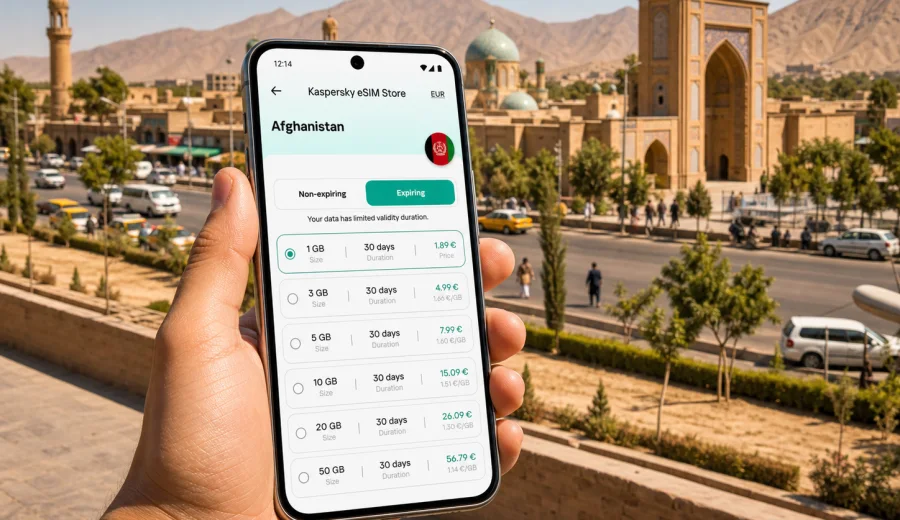
Kandahar eSIM: mobile connection and internet for a trip to the city
Kandahar is a city where small travel details matter. You may need maps for the route from the airport, messaging to coordinate a pickup, mobile internet to confirm a hotel address, and a reliable way to stay in touch while moving between districts. An eSIM can make this part of the trip simpler because you do not need to look for a physical SIM card immediately after arrival.
This guide focuses on Kandahar, not Afghanistan in general. It covers the moments when mobile data is useful in the city: arrival, local transport, navigation, accommodation, business meetings, short stopovers, and onward travel from Kandahar to other parts of the country. It also explains how to prepare an eSIM with Kaspersky eSIM Store, what to check before purchase, and how to use mobile internet without assuming that any single option will be perfect in every place.
Why mobile internet matters in Kandahar
Kandahar travel is often practical rather than spontaneous. Visitors usually coordinate details in advance: airport pickup, hotel check-in, local contacts, meeting times, and the safest or most convenient route for the day. Mobile internet supports those tasks from the first hour in the city.
An eSIM can be useful when you want to:
- message a driver or host after landing;
- load a map before leaving the airport area;
- keep hotel, office, and meeting addresses available;
- use messenger calls when voice calls are not included in your data plan;
- check booking emails and travel documents;
- share your live location with a trusted contact;
- avoid depending only on public Wi-Fi in cafes, offices, or hotels.
Kandahar is also a city where plans can change. Road timing, appointments, and opening hours may shift, so having mobile data helps you confirm details without waiting for the next Wi-Fi connection.
Arrival in Kandahar: the first online tasks
Many city trips begin at Kandahar International Airport, also known as Ahmad Shah Baba International Airport. Whether you are arriving for work, family reasons, a humanitarian or development project, or a short transit, the first few online tasks are usually the same.
| Moment | Why mobile data helps | Practical tip |
|---|---|---|
| Before passport and baggage procedures | You may need to tell someone you have landed | Keep messenger notifications on, but avoid large downloads |
| Meeting a driver or host | Pickup points can be hard to describe without messages | Save the contact name and phone number before departure |
| Leaving the airport area | Maps and route sharing can reduce confusion | Download an offline map as backup before your flight |
| First hotel or guesthouse check-in | You may need booking details, address, or ID documents | Store important files locally as well as in email |
| First local movement | Directions may depend on traffic and security conditions | Confirm routes with your host or hotel before moving |
An eSIM is not a replacement for good local planning. It is one layer of preparation that helps you communicate and access information when Wi-Fi is not available or not convenient.
eSIM basics for Kandahar visitors
An eSIM is a digital SIM profile installed on a compatible smartphone or tablet. For travel, it is usually used for mobile data. It may not include a regular phone number, voice calls, or SMS unless those options are clearly stated in the selected tariff conditions. In many travel scenarios, that is enough because maps, email, ride coordination, and messenger calls all work through internet access.
For a trip to Kandahar, you should choose a tariff that covers Afghanistan, then match the data allowance and validity period to the way you will use the phone. A short stopover may need only light messaging and maps. A work trip with video calls, cloud files, and hotspot use will need a larger allowance.
Kaspersky eSIM Store is an app and website where you can choose, arrange, install, and activate an eSIM with a suitable mobile internet tariff for an international trip. The service helps you prepare mobile data before travel or shortly after arrival, while the actual conditions depend on the selected tariff, device, and local network availability.
Choosing data for a Kandahar itinerary
Think about your Kandahar trip as a set of online situations rather than a single number of gigabytes. Your real data use depends on how often you open maps, upload media, join calls, or share a hotspot with a laptop.
| Trip style | Typical data needs | What to prioritize |
|---|---|---|
| Same-day stopover | Low | Messaging, maps, document access |
| Two or three days in the city | Low to moderate | Navigation, hotel coordination, email |
| Business visit | Moderate to high | Email, messenger calls, file sharing |
| Field work around Kandahar | Variable | Validity period, route coverage, backup options |
| Longer Afghanistan route via Kandahar | Higher | Country coverage, longer validity, top-up options |
If you are unsure, choose a tariff with enough validity for the full trip and leave a reserve for unexpected route changes. Video calls, map layers, app updates, and cloud photo backups can use data quickly. Before departure, switch off automatic app updates on mobile data and download large files over home or hotel Wi-Fi.
Local movement: airport, hotels, offices, and districts
Kandahar movement is often arranged through known drivers, hosts, hotels, organizations, or local contacts. Mobile internet helps you coordinate those movements, but it should not replace local advice. Confirm the route and timing with people who understand the current situation in the city.
Useful mobile data scenarios include:
- sending your exact pickup point after landing;
- receiving a changed meeting address;
- checking whether a hotel or office location is saved correctly;
- sharing your arrival time with colleagues;
- keeping translation tools available for short practical phrases;
- opening scanned travel documents when asked for booking or identity details;
- using maps to understand direction and distance, even when someone else is driving.
Before leaving your accommodation, save the address in English and, if available, in a local-language format shared by your host. A screenshot can be helpful if mobile data becomes temporarily weak.
When to install and activate your eSIM
For Kandahar, the best approach is usually to install the eSIM before travel while you still have stable Wi-Fi, then activate it according to the tariff instructions. Some tariffs start validity at installation, some at first connection to a supported network, and some follow other conditions. Read the details before you proceed.
A simple preparation sequence:
1. Check that your device supports eSIM and is not locked to one carrier.
2. Choose Afghanistan as the destination for the trip.
3. Compare data allowance, validity period, and tariff conditions.
4. Arrange the selected tariff through Kaspersky eSIM Store.
5. Install the eSIM profile using the instructions provided after purchase.
6. On arrival, select the eSIM for mobile data and follow any activation steps.
7. Keep your primary SIM available if you need your regular phone number for banking or account verification.
If you are ready to compare options before your flight, you can prepare an eSIM tariff for your Kandahar trip and review the Afghanistan data choices in advance.
Device compatibility and setup checks
Not every phone can use eSIM. Before you choose a tariff, check the device model, carrier lock status, and software version. A compatible phone must be able to add an eSIM profile and use mobile data through that profile. Dual SIM settings also matter because you may want your regular SIM for calls while the eSIM handles mobile data.
Use this checklist before buying:
- Check your device for eSIM support.
- Confirm that the phone is not locked to a single mobile carrier.
- Update the operating system if an update is already available and stable for your device.
- Make sure you know where to change the mobile data line in settings.
- Keep Wi-Fi available during installation.
- Save the QR code or installation details in a place you can access offline.
- Check whether data roaming needs to be enabled for the eSIM profile.
If your trip involves a work phone, ask the device administrator whether eSIM installation is allowed. Some corporate devices restrict mobile profiles or require approval.
Installing eSIM on Android or iOS
Installation steps vary by device and operating system, but the general idea is consistent: you add the eSIM profile, choose it for mobile data, and follow the activation instructions. For detailed setup, use the Android installation guide or the iOS installation guide.
Before you start, connect to stable Wi-Fi and keep the screen unlocked. Do not delete the eSIM profile unless you are sure you no longer need it; depending on the tariff and profile conditions, reinstalling or moving it to another device may not be possible.
After installation, check these settings:
- the eSIM profile is visible in mobile network settings;
- mobile data is assigned to the eSIM when you want to use travel data;
- data roaming is enabled for the eSIM if the instructions require it;
- your primary SIM is still selected for calls or SMS if you need it;
- low data mode or data saver is configured the way you prefer.
Kandahar scenarios where eSIM is especially useful
| Scenario | How mobile data helps | Data note |
|---|---|---|
| Business meetings | Receive changed meeting points, send documents, open calendars, and join short messenger calls | Check hotspot rules before tethering a laptop |
| Hotels and guesthouses | Open booking details, message reception, and confirm arrival time when Wi-Fi is not yet available | Use Wi-Fi for large downloads when possible |
| Navigation | Understand distance and direction even when a local driver handles the route | Save offline maps and confirm movement with local contacts |
| Short stopovers | Stay reachable, check the next leg, and share pickup details quickly | Install the eSIM before departure to save time |
| Trips from Kandahar | Keep data for onward travel within Afghanistan, not only the city center | Choose country coverage and keep key documents offline |
How to reduce data use in the city
Good data habits make a smaller tariff last longer. They also reduce stress when you are moving between airport, hotel, office, and meetings.
| Setting or habit | Why it helps |
|---|---|
| Download offline maps before travel | Navigation uses less mobile data |
| Disable automatic app updates | Prevents background gigabyte use |
| Turn off cloud photo backup on mobile data | Keeps data for messaging and maps |
| Use Wi-Fi for large files when available | Saves the eSIM allowance for movement |
| Limit video calls | Video can use data quickly |
| Keep documents offline | Reduces dependence on live downloads |
| Monitor usage daily | Helps you decide whether to top up or reduce heavy tasks |
If your phone supports per-app data controls, restrict nonessential apps before the trip. Social feeds, cloud storage, and video apps can use data in the background even when you are not actively using them.
Practical checklist before flying to Kandahar
Use this checklist the day before travel:
- Confirm your arrival details and pickup plan.
- Save hotel, office, and host addresses offline.
- Download offline map areas for Kandahar and any onward route.
- Store passport, booking, insurance, and itinerary files on the device.
- Check eSIM compatibility and carrier lock status.
- Install the eSIM while connected to Wi-Fi.
- Read the activation rule and validity period.
- Turn off large background downloads on mobile data.
- Tell a trusted contact how you will communicate after arrival.
- Keep your phone charged and carry a power bank if your schedule is long.
This preparation is especially useful if your trip has a tight transfer, an early meeting, or limited time to troubleshoot after landing.
FAQ: eSIM and mobile internet in Kandahar
Is an eSIM useful for Kandahar?
Yes, it can be useful if your phone supports eSIM and you want mobile data for maps, messaging, email, and travel coordination without buying a physical SIM immediately after arrival.
Does a travel eSIM include a local phone number?
Often it is data-only. Voice calls and SMS are not included unless the selected tariff explicitly says so. You can usually use internet-based messengers for calls and messages.
Should I keep my regular SIM active?
If you need your regular number for banking codes, work accounts, calls, or SMS, keep it available. You can set the eSIM as the mobile data line and use the primary SIM for other services if your device supports that setup.
Prepare mobile internet for Kandahar before you travel
A Kandahar trip is easier when mobile internet is not an afterthought. Install your eSIM while you have Wi-Fi, check the tariff conditions, save key documents offline, and keep your local contacts ready before arrival. That way, mobile data supports the practical parts of the trip: airport pickup, hotel check-in, route awareness, business messages, and onward plans.
With Kaspersky eSIM Store, you can choose, arrange, and activate an eSIM with a suitable data tariff for your Afghanistan trip. Before you leave, review the available eSIM options for Afghanistan and prepare the setup that fits your Kandahar itinerary.