Travel connectivity guide
Kangerlussuaq eSIM: Mobile Data for Your Trip
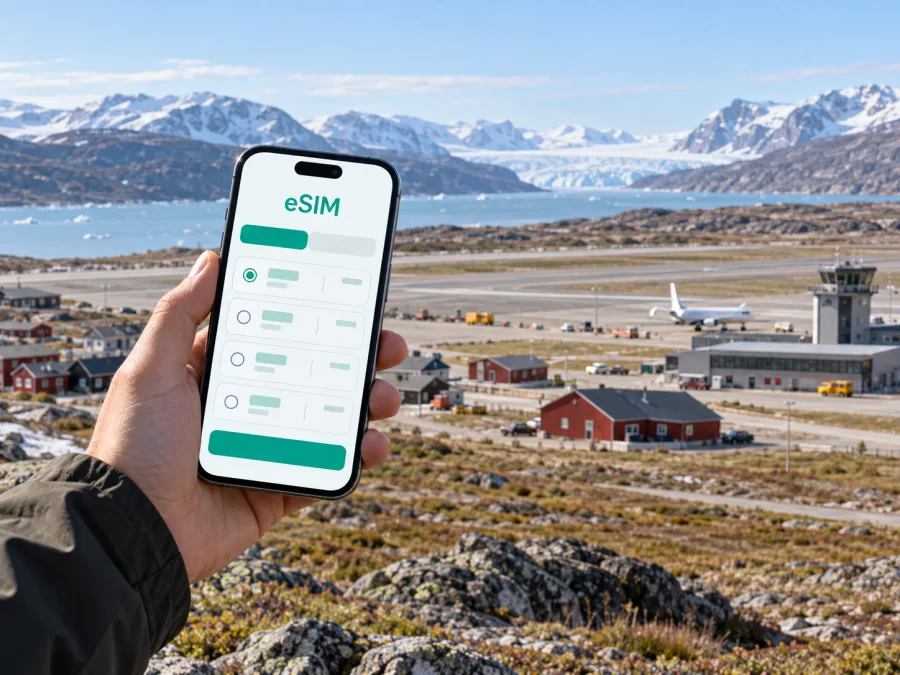
Kangerlussuaq eSIM: mobile connection and internet for your trip
Kangerlussuaq is a small settlement in western Greenland where the airport, accommodation, local services and access to the surrounding landscape shape most visitors’ plans. A mobile connection can help you check an onward flight, coordinate an airport pickup, use downloaded maps and stay in touch while arranging a guided outing. An eSIM is a digital SIM profile for mobile data, so you can prepare it before travelling without handling a physical local SIM card.
The settlement is spread around the airport runway rather than arranged like a compact city centre. That matters when you are choosing where to stay, meeting a driver or deciding whether to walk with luggage. It also means that a working data plan is useful for practical coordination, while it should not replace checking transport and excursion arrangements directly with your accommodation or tour provider.
What to expect on arrival in Kangerlussuaq
Kangerlussuaq Airport is a significant transport point for Greenland, and some itineraries use it as a stop between international and domestic flights. Flight schedules and routes can change, so check your current itinerary with the airline and leave enough time for any connection. If your trip includes a separate booking, confirm how baggage, check-in and transfer timing work before departure.
After landing, your first tasks may be to locate your accommodation transfer, confirm an excursion meeting point or tell someone that you have arrived. Keep key details available offline as well as on your phone: the accommodation name, booking reference, host or driver contact, and any pickup instructions. A data connection gives you another way to retrieve messages and maps, but a saved copy remains useful if mobile service is delayed or unavailable at a particular moment.
The airport lists Wi-Fi and a bus among its facilities and transport options, but hours and payment arrangements can change. Do not assume the bus matches your arrival or reaches your accommodation; ask your host whether pickup is arranged and where to meet.
A first-hour checklist
- Check the airport display and your airline’s latest updates before leaving the terminal.
- Confirm whether your host, hotel or tour operator expects to meet you, and at which point.
- Keep your booking details and essential contacts accessible offline.
- If you plan to use the bus, verify that it is operating at your arrival time and confirm how to pay.
- Open your map while connected, then save the relevant area or address details for later reference.
- Send a short arrival message when you have a connection; agree on a backup meeting plan in advance.
Getting around a settlement built around an airstrip
Walking is possible for short distances, but the layout can make a route longer than it first appears. The airport divides the settlement, and accommodation or services may be on a different side of the runway from where you arrive. With a light day bag and daylight, walking may suit some plans. With checked luggage, children, winter clothing or a tight flight connection, arranging transport is usually more straightforward.
A local bus is one option when it is running. The airport and visitor information describe a bus service, but travellers should check the current timetable and payment details rather than rely on an old schedule. A transfer arranged by a hotel or guesthouse can be more predictable, especially outside normal daytime hours. For excursions beyond the settlement, transport is commonly part of the operator’s plan; ask what is included and where the group departs.
| Situation | A practical way to plan | What mobile data can help with |
|---|---|---|
| Airport to accommodation | Confirm the pickup before travelling; ask about the exact meeting point | Messages, updated instructions and map reference |
| Short walk within the settlement | Check distance, weather and daylight, and carry your essentials | Map orientation and communication if plans change |
| Bus journey | Verify service times, stops and payment locally | Checking messages or schedule information if available |
| Guided excursion | Confirm departure time, clothing, route and return plan with the operator | Reaching the meeting point and notifying your host |
| Flight connection | Recheck airline updates and keep a buffer for transfers | Email, airline notifications and itinerary access |
Use maps for orientation, not as proof that a road is open, a route is safe or a vehicle can travel there. Confirm your plans locally before setting off.
Why an eSIM can help with a Kangerlussuaq itinerary
Mobile internet here is useful for travel coordination: contacting a driver or accommodation, checking a flight update, confirming a meeting time and messaging family. For work, it can support email and cloud documents, subject to service and the plan’s terms.
An eSIM lets you add a digital mobile-data profile to a compatible device. It can be prepared before departure, which reduces the need to search for a physical SIM after landing. Kaspersky eSIM Store is an app and website where travellers can choose, arrange and activate an eSIM with a suitable plan for mobile internet abroad. The specific plan conditions matter: check its destination, data allowance, validity period, activation instructions and any limits before you make a choice.
For Greenland, begin with the country-level destination rather than looking for a separate Kangerlussuaq product page. If you want to compare the available options for your itinerary, review mobile data plans for Greenland. Availability and plan details can change, so use the terms shown at the time you select a plan.
A useful decision is not simply “How many gigabytes should I buy?” Consider the trip shape first:
- Count the days when you may need data. Include arrival and departure days, especially if you will coordinate transport or check flight information.
- List your likely uses. Messaging, maps, email and browsing generally use less data than frequent video calls, large file transfers or streaming.
- Think about connectivity between stops. Kangerlussuaq may be one leg of a wider Greenland route. Make sure the plan’s destination and regional coverage match every place on your itinerary; do not infer coverage from the city name alone.
- Choose a comfortable allowance. Estimate your use with some margin, while avoiding an oversized plan if most of your time will be offline on guided trips.
- Read the plan conditions. Check validity, when the plan starts, whether top-ups are available, and what to do if you need more data.
Match the plan to the way you will travel
A brief stopover may call mainly for arrival messages, flight updates and access to bookings. A few nights with excursions can add pickup coordination and regular check-ins. A work visit may need more data for email or calls, while a multi-stop itinerary requires checking the plan’s destination terms against every stop. These are planning examples, not fixed allowances: estimate your own use and compare it with the available validity and data options.
Accommodation and work plans
Before booking, ask whether airport pickup is included, how to reach the host after hours, and what internet access is available. Check how far the property is from the services you need; the settlement is spread around the runway, so a short-looking map distance may still require a transfer.
For remote work, download documents and meeting details in advance. Ask your accommodation whether its connection suits your tasks, and avoid scheduling an essential video call during an excursion or transfer. An eSIM is useful for messaging and email when service is available, but it cannot guarantee indoor signal or a particular speed.
Trips from Kangerlussuaq: plan the connection around the excursion
Kangerlussuaq is known as a starting point for experiences in the surrounding Arctic landscape. Visit Greenland describes road access from the settlement toward the Greenland Ice Sheet, with viewpoints along the way, and identifies Russell Glacier as an attraction in the area. These are outdoor excursions rather than ordinary trips across an urban neighbourhood. Arrange transport with a qualified local operator, follow their safety guidance and confirm the day’s conditions before setting out.
For a hike or a longer route such as the Arctic Circle Trail, a mobile map is not a substitute for route planning, suitable equipment, local advice or a communication plan. Ask the provider what to carry and whether the route has mobile service. Save the itinerary and contact details, and share your expected return time.
For connectivity, use the settlement as the point to prepare rather than assuming you can solve every issue on the road. Before an excursion:
- Send any necessary messages and download maps, tickets and booking details.
- Confirm the pickup location, departure time, return estimate and contact method.
- Ask whether the provider expects guests to bring a phone, and how it should be carried in cold weather.
- Keep your device warm and protected; cold can affect battery performance.
- Switch off nonessential background data if you want to conserve battery and allowance.
- Agree on what to do if the group is delayed or your phone cannot connect.
Connectivity can be intermittent outside the settlement, and conditions vary by location, device and network. Do not rely on a live map, cloud document or message arriving during a remote outing. Download essentials and follow the operator’s instructions.
Prepare your phone before leaving home
First confirm that your exact phone model supports eSIM and is not carrier-locked. Compatibility can depend on the model version and operator. Check whether your device supports eSIM.
Read the selected plan’s setup and activation instructions before travel. These can be separate steps, so check when validity begins. Adding a profile may require internet access; setting it up somewhere with a stable connection can be easier than waiting until arrival. Keep your regular line active if you need its number, and review which line your phone uses for mobile data.
Use the Android eSIM installation instructions or iOS eSIM installation instructions. Menu names vary by phone and software version, so follow the prompts shown on your device.
A simple setup sequence
- Check compatibility and carrier lock status.
- Select a plan that matches Greenland and your itinerary.
- Follow the plan’s installation and activation instructions.
- Add the profile while connected to reliable internet, if permitted by the instructions.
- Label the profile clearly and select it for mobile data as directed.
- Keep setup details available and do not delete the profile as a first troubleshooting step.
What to check before you travel
- Destination and route: Confirm the plan includes Greenland and matches all stops.
- Data and validity: Review allowance, validity period, and when it begins.
- Phone: Check eSIM support and carrier-lock status for the exact model.
- Setup: Save the instructions and any required QR code or activation details.
- Regular SIM: Review roaming charges and data settings to avoid unintended use.
- Offline access: Save flight details, accommodation contacts, maps and excursion bookings.
- Transport: Confirm pickup arrangements, bus timing, payment and meeting point directly.
- Cold weather: Keep the phone protected and bring a suitable power bank for long outings.
An eSIM data plan does not automatically disable roaming on your usual line. Check the phone’s line and data settings before departure.
Common questions about eSIM in Kangerlussuaq
Will an eSIM work everywhere around Kangerlussuaq?
No plan guarantees universal coverage. Availability depends on the plan, local network, device and location. Prepare for offline use during excursions beyond the settlement.
Can I use the eSIM for ordinary calls and texts?
The travel eSIM is for mobile data unless the selected plan says otherwise. It does not provide an ordinary phone number, calls or SMS by default. Messaging and voice apps may work when data service is available.
Should I install it before arrival?
Preparing the profile while you have reliable internet can be convenient, but follow the plan’s instructions. Installation and the start of validity may be separate events.
What if data does not connect?
Check that the eSIM is enabled, selected for mobile data and configured as the plan instructs. Restarting may help. Do not remove the profile unless support or the instructions tell you to; use saved contacts while troubleshooting.
A practical connection plan for your stay
For Kangerlussuaq, the most useful eSIM setup is the one that matches your actual route and daily routine. A light-data stopover, several days of excursions and a work visit have different needs. Check destination, validity, data allowance and setup conditions; arrange airport transport directly; and save essential information for offline use before travelling beyond the settlement.
Kaspersky eSIM Store helps you choose, arrange and activate an eSIM plan for mobile internet on an international trip. Before departure, compare the available terms for a Greenland trip, confirm that your device is compatible, and follow the setup instructions for your phone. Then keep maps, bookings and contact details available offline as a reliable companion to your mobile connection.


