Travel connectivity guide
Karbala eSIM: Mobile Internet for Your Trip
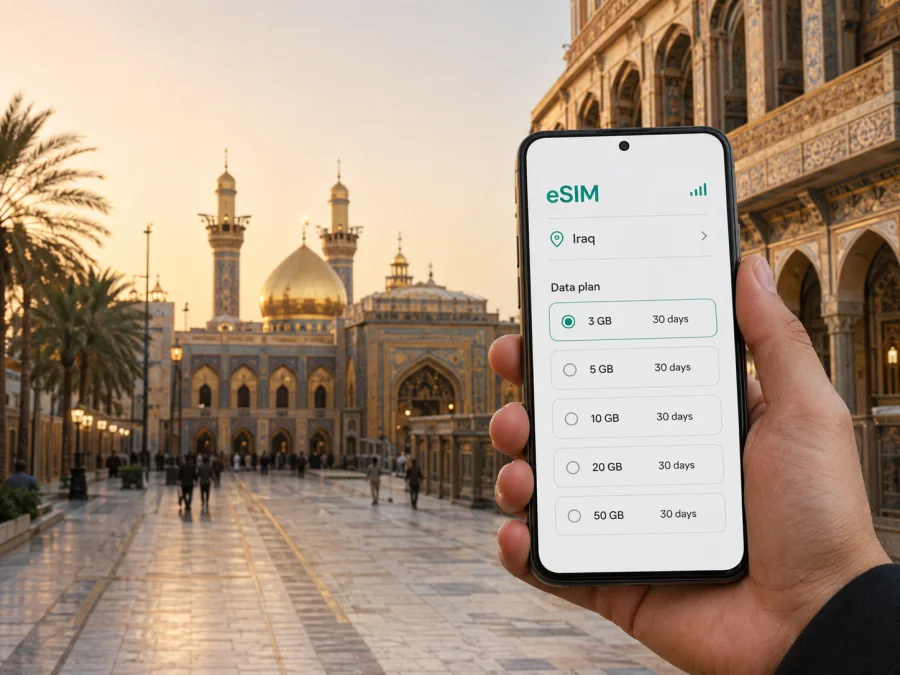
Karbala eSIM: mobile connection and internet for your trip
Karbala is a city where practical planning matters. Pilgrims come for the Imam Hussein Shrine and the nearby shrine of Al-Abbas ibn Ali, while other visitors arrive for family occasions, cultural interest, work, or a short stop on a wider Iraq itinerary. In every case, a dependable way to use maps, messages, translation tools, bookings, and travel details makes the first hours much easier.
An eSIM, or digital SIM, can be a useful option for mobile internet in Karbala. It lets you prepare a data profile for an overseas trip without removing the physical SIM already in your phone. The right plan depends on how long you will stay, how much you use maps and media, and whether your route includes only Karbala or other places in Iraq. Kaspersky eSIM Store is an app and website where you can choose, arrange, and activate an eSIM with a suitable plan for mobile internet during an international trip.
Why mobile internet is useful in Karbala
Karbala is easy to experience on foot in the central shrine area, but a visitor’s day rarely stays within one compact route. You may need to confirm a hotel address, send your meeting point to a driver, check a road route from an airport, translate a sign, or coordinate with family in a busy pedestrian area. A connection on your own phone can reduce the need to search for public Wi-Fi each time you need one short piece of information.
Mobile data is particularly useful for:
- opening an online map when you are moving between the shrine district, a hotel, and a transport pickup point;
- checking messages when a group separates during a pilgrimage visit;
- using a translation app for menus, directions, and simple conversations;
- confirming reservations and contacting accommodation after arrival;
- sharing a live location with a trusted contact when meeting in a crowded part of the city;
- keeping travel documents, booking confirmations, and important phone numbers available online.
Arriving in Karbala: plan the first connection before the road transfer
Karbala is an inland destination, so the final part of many journeys is a road transfer from an airport or another Iraqi city. The exact route and travel time depend on your arrival point, road conditions, traffic, and the dates of your visit. Save the accommodation name and address before departure, and keep them available in your phone even if you expect to meet a driver.
The arrival sequence is simple:
- Keep your primary SIM active if you need to receive important calls or messages.
- Install the eSIM while you have a stable internet connection, preferably before leaving for Iraq or while at your accommodation.
- Label the profiles clearly, for example “Home” and “Iraq data”.
- Choose which line will be used for mobile data.
- Check that the eSIM is selected for data before starting the road journey.
- Keep the transfer address, hotel phone number, and meeting instructions in an offline note as well.
If you are travelling with a group, agree on one meeting point that can be described clearly rather than relying only on a moving pin. In the shrine area, pedestrian flows can change the time it takes to cross a short distance. A mobile connection helps you update the group, but a simple printed or saved plan is still useful if a phone battery runs low.
The central shrine area: navigation when streets are busy
The Imam Hussein Shrine and the Al-Abbas ibn Ali Shrine are the defining landmarks of central Karbala. The distance between important places can look short on a map, yet the practical journey may take longer because of crowds, access arrangements, prayer times, street controls, or temporary pedestrian routing. Treat the map as a planning aid, not as a promise of a fixed walking time.
Before setting out, mark three points:
- your accommodation;
- the place you want to visit;
- a fallback meeting point outside the busiest pedestrian flow.
Use recognizable landmarks and the local name of the destination when arranging a ride. If you are travelling with older relatives or children, avoid making the day depend on one long continuous walk. Plan a return route, a water break, and a way to contact the group if people move at different speeds.
Navigation data is also useful for a pharmacy, cash point, restaurant, supermarket, or work call. Verify the destination before leaving and save the address in text. When a driver is collecting you, send the written address as well as a map location.
Choosing an eSIM plan for a Karbala itinerary
There is no single right data allowance for every visitor. A short visit focused on walking and messaging can require much less data than a longer stay with frequent video calls, cloud work, or hotspot use. The useful comparison is between your actual routine and the plan’s stated traffic amount and validity period.
| Travel pattern in Karbala | Typical data activity | What to consider |
|---|---|---|
| Short stopover | Messages, a few map checks, booking details | A smaller allowance may be enough if maps and documents are prepared offline |
| Shrine visit over several days | Navigation, group coordination, translation, regular messages | Allow room for repeated map use and photo sharing |
| Family or pilgrimage trip | Several people coordinating, frequent calls through apps, shared planning | Estimate use for the whole stay and do not assume one phone will always have service |
| Business visit | Email, authentication, online meetings, document access | Check whether the plan and device settings suit hotspot or work use |
| Extended Iraq route | Karbala plus travel to other cities | Confirm that the chosen direction covers the full route, not just one stop |
When you review the available options, focus on four fields: destination, data volume, validity, and price. A plan with more data is not automatically a better fit if your trip is short. Conversely, an allowance that looks adequate for messaging may be restrictive if you expect to stream video, upload many photographs, or use your phone as a hotspot.
The safest preparation is to choose an eSIM plan for a trip to Iraq after you have written down your dates, destinations, and expected data habits. The Kaspersky eSIM Store interface can help you review the available option for the direction and proceed with the selected plan. Conditions depend on the plan, so read the stated validity and traffic terms before payment.
Districts, hotels, and everyday movement
The shrine district is where orientation and coordination are most valuable. Crowds can change the practical route between entrances, accommodation, and meeting points, so keep the hotel address saved and agree on a fallback point outside the busiest flow. Hotels farther from the landmarks may require more road transport; send a driver the written address as well as a map location.
Getting around Karbala
Combine walking with local road transport according to the weather, luggage, crowd levels, time of day, and distance from your hotel. Divide the day into short, easy-to-check segments: walk with a saved map and a return point, confirm a written destination before a road journey, and check the next route shortly before leaving. For an onward trip, record the departure location, pickup time, and next accommodation. Mobile data helps you adapt, but it does not replace local judgment or a saved offline plan.
How to install and activate an eSIM for Iraq
Complete the basic preparation before installation: confirm that the phone supports eSIM, make sure it is not locked to a mobile operator, and have internet access available while the profile is added. The exact menu names vary by device and operating-system version. For model-specific steps, use the Android installation instructions or the iOS installation instructions.
1. Check the device
Before payment, check whether your device supports eSIM. Some models differ by market or region, and an operator lock can prevent activation even when the model family supports eSIM.
2. Prepare the profile
Open the purchase confirmation or profile that contains the eSIM details. Keep the QR code or activation information available on another screen when possible. Avoid deleting an existing mobile profile while you are preparing the new one.
3. Add the eSIM
Open the mobile-network settings and select the option for adding an eSIM or mobile plan. Scan the QR code or enter the required details according to the instructions for your device.
4. Select the data line
Give the new profile a clear name, such as “Iraq travel data”. Choose it as the line for mobile data when you are ready to use it. Keep calls and SMS on your usual line if that matches your plan.
5. Activate after checking the timing
Some plans start their validity at activation or when they first connect, depending on the stated conditions. Read the plan information before switching it on. Activation may take a few minutes, and some devices may require data roaming to be enabled for the eSIM profile.
An eSIM is normally tied to the device and profile conditions after activation. Do not plan to move it to another phone unless the applicable terms explicitly allow that. Keep the confirmation and support details until the trip is complete.
Business trips and short stopovers
Before a business trip, arrange the eSIM, check the device, download key documents, and store the meeting address offline. On arrival, confirm the road transfer and test the data line with a small task. For a short stopover, keep maps, messaging, translation, bookings, and authentication available in a low-data or offline form.
Trips from Karbala to other parts of Iraq
Karbala is often one stop in a broader journey. You may continue to Najaf, Baghdad, or another destination for family, business, or cultural reasons. Before leaving, verify that the selected plan covers the next part of the route; do not rely on a country-wide assumption instead of the stated direction and validity.
For each onward leg, record:
- the departure location and pickup instructions;
- the next accommodation address;
- the expected travel day;
- a contact person for arrival;
- the amount of data you expect to use while moving;
- a backup offline note in case the phone needs charging or the connection is interrupted.
If you are travelling with several people, agree on what happens if the group separates. Everyone should have the next address and an agreed meeting point.
Common questions about eSIM use in Karbala
Is an eSIM useful for a visit focused on the shrine area?
Yes. Even when most movement is on foot, data can help with accommodation details, group messages, maps, translation, and meeting-point changes. A short visit may need only a modest allowance if you prepare maps and documents offline.
Does an eSIM include a regular phone number?
Usually no. An eSIM plan in this context is intended for mobile internet and does not include a separate number, ordinary calls, or SMS unless the specific plan says otherwise. Internet-based messaging and calling services can be used when appropriate.
Should I install the eSIM before travelling to Karbala?
Often that is convenient because you can complete setup with stable internet. Whether you activate before departure or after arrival depends on the plan’s validity conditions, so check when the plan starts before switching it on.
What if the eSIM does not connect immediately?
Check that the profile is enabled, the correct line is selected for data, and the device has the required roaming setting. Activation may take a few minutes. If the issue remains, consult the installation guidance and support information connected with the purchase.
A calm connection checklist for Karbala
Before you leave for the city, confirm the following:
- your phone supports eSIM and is not operator-locked;
- the selected direction includes Iraq and suits the full itinerary;
- the traffic allowance and validity match the number of days you expect to use it;
- the installation information is accessible;
- the central accommodation address and road-transfer details are saved offline;
- the eSIM is labelled separately from your home line;
- mobile data is assigned to the intended profile;
- the home line’s calls, SMS, and roaming settings are understood;
- maps, translation tools, and important documents are available in a low-data or offline form;
- the phone and a power bank are charged before a long day.
Prepare your Karbala trip with the right eSIM plan
Karbala rewards a practical travel routine: save the addresses, allow extra time in busy areas, separate your data line from your home line, and choose a plan that matches the route rather than an abstract estimate. Kaspersky eSIM Store helps you choose, arrange, and activate an eSIM for mobile internet during an overseas trip. The service is not a mobile operator, and the available terms depend on the selected plan and its local network arrangements.
Before you go, check your device, review the traffic and validity conditions, and decide when activation should begin. Then choose the eSIM plan for Iraq that fits your Karbala itinerary, install it using the relevant device instructions, and keep your essential travel details available offline as a backup.


