Travel connectivity guide
Kasama eSIM: Mobile Internet in Northern Zambia
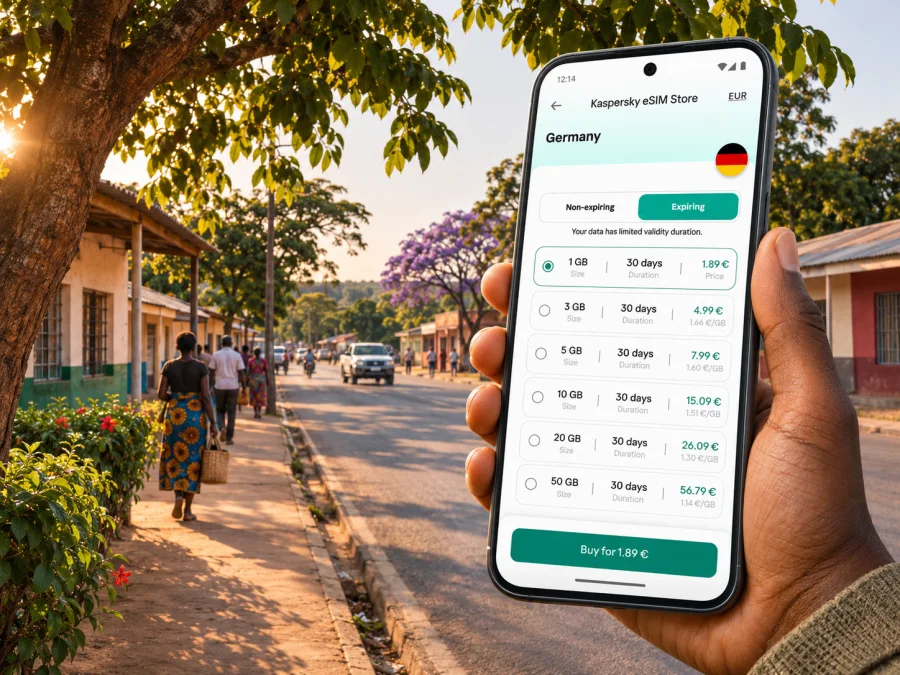
Kasama eSIM: mobile connection and internet for your trip
Kasama is a practical base for exploring Zambia’s Northern Province, visiting Chishimba Falls, or handling business in the region. A working mobile data connection can help with arrival arrangements, maps, hotel messages, and changes to a road journey. An eSIM can make that preparation easier when your phone supports it, but it does not remove the need to plan around distance, transport, or variable network availability.
This guide focuses on using mobile internet in and around Kasama: how to prepare before you arrive, what to check in an eSIM plan, and how to avoid relying on a signal for every part of a regional trip. The best setup depends on your route, your phone, and the exact plan terms.
What to expect from a visit to Kasama
Kasama is the administrative headquarters of Northern Province and a regional town in northern Zambia. A visit may combine a hotel, meetings or errands in town, a prearranged transfer, and a separate drive to places outside the centre.
The Zambia Tourism Agency identifies Chishimba Falls as a waterfall in Kasama District, comprising the main falls, Kaela Rapids, and Mutumuna Falls. It also notes the site’s cultural significance to Bemba people. Plan transport and timing as a separate excursion rather than assuming it is an easy walk from your accommodation.
Kasama also appears on Zambia Airports Corporation Limited’s list of provincial aerodromes. That confirms the aerodrome’s administrative status; it does not confirm a current passenger route, airline, or departure time. Check live transport arrangements with your airline or local host before building a connection around a flight. If your itinerary begins in another Zambian city, compare the actual flight and road options for your dates and leave room for schedule changes.
Connectivity is a practical aid, not a guarantee. Save the destination, accommodation details, driver contact, and directions offline before setting out.
Where mobile data helps during a Kasama trip
In town, mobile internet can help confirm a pickup, message your accommodation, check a route, or coordinate a changed meeting. These tasks use data differently from video calls, cloud backups, or frequent media uploads.
The needs change outside town. A trip to Chishimba Falls or another regional destination may involve longer road travel and fewer places to stop. Do not assume that a signal available in central Kasama will continue along the entire route. Before leaving, download offline maps where available, confirm whether the site is open and how visitors are expected to arrive, and agree on a meeting point and return plan with your driver or host.
| Trip moment | How data can help | A useful backup |
|---|---|---|
| Before arrival | Send your ETA and confirm a pickup | Save the driver’s number and agreed meeting point |
| Finding accommodation | Open a map or message the property | Keep the address and booking details offline |
| Moving around town | Check directions and contact a local service | Save important places in advance |
| Driving to Chishimba Falls | Coordinate timing and route changes | Download a map and confirm arrangements before departure |
| Business visit | Share a meeting update or access cloud documents | Keep key files available offline |
| Late or changed plans | Let a contact know what has changed | Agree on a fallback meeting point before travelling |
The table describes useful tasks, not local coverage. Performance depends on the selected network, route, conditions, and device. Keep a backup for time-critical plans.
Choosing a data setup for Zambia
Start with the route, not the headline allowance. A town-focused visit may use data mostly for maps, messages, email, and browsing; remote work, video calls, and large uploads need a separate estimate.
A travel eSIM is typically a mobile-data option for a destination or region. It may be data-only and may not provide an ordinary local phone number, voice calls, or SMS. Check the plan details rather than assuming that calls or texts are included. You can keep your usual SIM active for calls or verification messages if your phone supports dual SIM use and your home carrier’s roaming settings and charges are acceptable. Messenger calls still need a working data connection.
Zambia’s operator market and a travel eSIM are related but distinct choices. Airtel Zambia and MTN Zambia publish information about their own local eSIM services. Those offers follow each operator’s eligibility, registration, and activation process; for example, MTN Zambia describes in-person steps for some new registrations and swaps. That does not establish that every visitor can obtain a domestic operator eSIM, that the process is identical across operators, or that a travel eSIM uses the same network. Confirm the provider, activation requirements, and intended use for the product you are considering.
For a travel plan, check that Zambia is listed, along with the stated network, data amount, validity, top-up rules, and start trigger. Validity may begin on installation, first connection, or another date in the terms; check this before installing early.
If Kasama is one stop on a multi-country route, verify each country separately. A regional plan can be convenient only if its coverage list actually includes every destination. Do not infer regional coverage from a plan name, or assume that coverage in Zambia means the same provider or performance along every leg.
When you are ready to compare the current destination options and their stated conditions, browse eSIM plans for Zambia. This country page is a starting point for reviewing available plans; it is not a promise of a particular local network or coverage in Kasama.
How much data might you need?
Estimate use from your actual plans. Messaging, short map searches, and email are lighter than video calls, photo uploads, or using your phone as a hotspot. Offline maps reduce the need to load directions repeatedly, but live updates and new searches still use data.
Before choosing an allowance:
- List the tasks you expect to do each day.
- Decide whether hotel Wi-Fi will handle meetings and large files.
- Add a little room for a changed transfer or an extra day.
- Check the plan’s validity, top-up rules, and hotspot terms.
- Disable automatic backups and app updates over mobile data if unnecessary.
Validity matters as much as the data amount. Confirm when the plan starts counting days, whether unused data expires, and whether a top-up changes the validity period. These rules vary by plan.
Prepare your phone before leaving
Check compatibility before paying. Physical-SIM support does not guarantee eSIM support, and phone variants can differ by market. Confirm eSIM support for your exact model and regional variant using the manufacturer’s information or device settings. Check that your phone is not carrier-locked. Check whether your device supports eSIM.
Compare the plan’s destination, data type, validity, start trigger, named network if supplied, tethering rules, and installation method. Confirm whether a QR code or profile can be reused, and save the activation details where you can retrieve them while travelling. A data-only plan may not include a local number, voice calls, or SMS; check its terms rather than assuming these are included.
Install the eSIM while you have stable internet and follow the instructions for your operating system: install an eSIM on Android or install an eSIM on iOS. Label it clearly, such as “Zambia data,” and select it for mobile data when appropriate. If the plan requires data roaming, enable it for the eSIM line only and check that your home SIM is not selected for data. Do not delete a profile during troubleshooting unless the plan instructions confirm that it can be installed again.
Arrival and first connection
Save your accommodation address, map pin, pickup contact, and arrival instructions before departure. Agree on a meeting point with your driver or host and keep the details offline in case a flight or road journey changes.
On arrival, let the eSIM connect according to its instructions. Depending on the plan, you may need to select the correct data line, enable roaming for that line, or wait for registration. If it does not connect, check the plan’s activation status and start date, destination, profile setting, and network instructions before attempting to reinstall it.
First-connection checklist
- The plan includes Zambia and is within its validity period.
- The eSIM profile is enabled and selected for mobile data.
- Data roaming is set as instructed; airplane mode is off.
- The home SIM is not selected for data by mistake.
If service remains unavailable, restart once and check for plan-specific network or APN instructions. Contact the eSIM provider over Wi-Fi if possible. This helps distinguish an activation or settings issue from local network availability.
Moving around town and planning a regional visit
Download an offline map and save your accommodation, meeting place, and transport pickup while online. Keep the exact destination name, a screenshot of the route, and essential contact details in an offline note. For unfamiliar roads, ask your hotel or host to confirm directions and transport arrangements rather than relying only on a map estimate.
For a visit to Chishimba Falls, confirm transport, timing, the driver’s waiting or return plan, and any local guidance before leaving town. The Zambia Tourism Agency notes the site’s cultural significance to Bemba people; follow local guidance and behave respectfully, especially near the caves. Mobile data can help coordinate the trip, but it cannot replace advice from people familiar with the area.
Before a drive beyond town, share your destination and expected return time with someone you trust, charge your phone, and agree what to do if the route or return time changes. Coverage can vary with distance, terrain, network, and current conditions, so send important updates before departure where possible.
Short stop, work trip, or longer stay?
For a brief stop: Prioritize arrival messages, maps, and booking access. Install and test the eSIM before travelling if the terms allow it, download a town map, and keep onward travel details offline.
For a work visit: Confirm whether your accommodation has Wi-Fi for meetings and large files. Save key documents offline, and check the plan’s data allowance and hotspot terms before joining video calls.
For a longer regional itinerary: Match plan validity to the full route, including travel days. Verify every country on a multi-country trip and compare top-up rules. A regional plan is useful only if its stated destinations match your itinerary.
If you need a local number: A data-only travel eSIM may not meet that need. Check whether voice and SMS are included. If considering a local operator service, confirm visitor eligibility, registration, device support, and activation rules directly with that operator.
Common questions
Does a Zambia travel eSIM give me a local phone number?
Not necessarily. Many travel eSIMs provide mobile data only. Check the chosen plan for voice, SMS, and a phone number. You may be able to keep your home SIM active for calls or texts, subject to device capability and roaming charges.
Can I rely on mobile internet at Chishimba Falls?
Do not plan as if a continuous connection is guaranteed. The falls are in Kasama District, but that does not establish signal quality along the route or at the site. Download directions and confirm transport before leaving town.
Can I install the eSIM before travelling?
Often, yes, if the plan terms allow it and you have stable internet during setup. Check when validity starts: it may begin on installation, first connection, or another specified trigger.
What should I do if the eSIM shows no service?
Check the activation status, destination, selected data line, and any required roaming or network settings. Restart once, consult the provider’s instructions, and contact support over Wi-Fi if available. The cause may be a setting, activation timing, device, or local network limitation.
Before you leave your accommodation
- Save the address, route, pickup details, and important bookings offline.
- Confirm transport and return timing with your host or driver.
- Check phone charge, eSIM validity, and remaining data.
- Let someone know your destination if travelling outside town.
Use mobile internet to make navigation and coordination easier, while keeping essential information available offline. That balance is useful in Kasama and more important on journeys beyond it.
Prepare your eSIM for Kasama
Kaspersky eSIM Store is an app and website where you can choose, order, and activate an eSIM with a suitable data plan for an international trip. Confirm that Zambia is included, compare allowance and validity with your itinerary, and check compatibility for your exact phone variant.
Review eSIM options for your Zambia trip, then follow the selected plan’s installation steps over a stable connection. Save Kasama directions and transport contacts offline.


